
Understand vendor invoices and payment applications
Supplier liabilities, advances, withholding and settlement currencies
A vendor invoice records a supplier liability. A vendor payment records money paid or advanced from a company bank account. Applying that payment associates its cash with specific eligible invoice lines. Keep these records separate: entering a supplier reference is not applying a payment, and saving a payment record is not instructing or proving a bank transfer.
This field reference covers ordinary Invoice and Vendor Payment screens for authorised payables and accounting users. Credit/debit notes, refunds, miscellaneous payments, payment batches, specialised asset/cost adjustments and trade-reference dialogs have different purposes; do not use them as shortcuts for an ordinary invoice or payment correction.
Confirm prerequisites and source evidence
Confirm Current Company, permitted Location, supplier identity, active account/sub-account mappings, open accounting dates, item/UOM, tax defaults, rates and supporting evidence. For a payment, review the company's selected bank account and its bank GL and supplier-prepayment accounts. The vendor's own banking references are separate beneficiary information.
Match supplier, external invoice reference, date, amount and earlier records before entering another invoice. A Vendor Invoice Number is useful evidence, not a guarantee that duplicate entry is impossible. After an interruption, inspect the existing record and related processing before retrying.
Distinguish the invoice matching routes
| Effective line policy | Source evidence | Inventory implication |
|---|---|---|
| Two-Way inventory | Approved eligible PO Line | One-step invoice receipt allocation supplies the stock receiving detail |
| Three-Way two-step inventory | Posted eligible GRN Line; its PO source is derived | Goods were already received; do not receive the same stock again on the invoice |
| Non-inventory with PO matching | Eligible PO Line | Purchased service/charge does not create ordinary inventory on hand |
| Invoice Only | No PO/GRN match source required by that policy | Inventory items still need their applicable one-step receipt allocation |
Check the item's enabled override and the effective line policy. The location policy alone may not describe every item. A source line must agree with supplier, item, company/location, currency, eligible balance and applicable tolerance. An arbitrary source number in text is not a selected matching record.
The ordinary line Contra Account derives from the item's purchasing posting group. Purchasing policy can prevent replacement. In a GRN match, the receipt accrual and applicable differences are handled through the matching accounting design; the visible account field is not permission to bypass the GRNI trail with an unrelated expense account.
Read invoice amounts and withholding
Base Amount is quantity times price after discount. Chargeable Tax adds applicable tax to that base. Withholding Tax is separate and follows the tax code's recognition policy. Gross, net cash, transaction currency and functional currency must not be treated as interchangeable amounts.
Some withholding is recognised at invoice entry; some is recognised on settlement. The payment lookup distinguishes Gross Open Amount, Projected WHT and Net Cash Payable, with Functional Net Cash for the company-currency view. Read these together rather than applying the gross amount as cash and deducting withholding again.
Invoice and payment field references
Figures use ordinary blank forms and fictional reference values. The grids continue horizontally; fields to the right may require scrolling. Balances are calculated displays, not amounts for users to overwrite. Conditional specialist controls are identified so they are not mistaken for routine entry fields.
Vendor invoice header field reference
Figure 1 Vendor invoice header
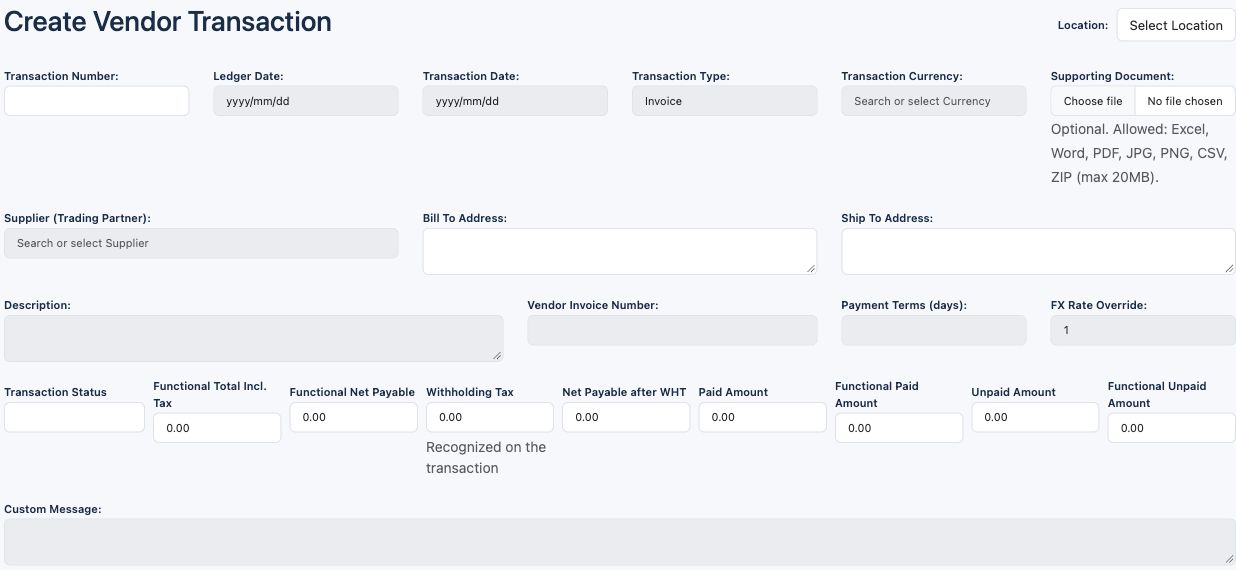
| Field and screenshot | Entry rule and example | Purpose and implication |
|---|---|---|
| Location - Figure 1 | Required permitted company location before dependent choices. Example: Main Office | Sets document ownership and location purchasing policy. Caution: Confirm Current Company and location before selecting supplier and source lines. |
| Transaction Number - Figure 1 | Generated read-only identity. Example: Assigned to the recorded invoice | Identifies the internal vendor transaction, separately from the supplier's reference. Caution: Retain company/location/type with the number; do not type a supplier invoice number here. |
| Ledger Date - Figure 1 | Required accounting date in an eligible period. Example: 2026-10-16 | Sets the invoice accounting context and dated currency conversion. Caution: A correct Transaction Date does not make a closed Ledger Date eligible. |
| Transaction Date - Figure 1 | Required supplier document date. Example: 2026-10-15 | Records the commercial invoice date. Caution: It is separate from receipt date and posting date. |
| Transaction Type - Figure 1 | Choose Invoice for this reference; type is locked on existing transactions. Example: Invoice | Distinguishes invoices from Vendor Charge, Credit Note and Debit Note. Caution: Do not choose a note type or negative quantity as a substitute for a reviewed correction workflow. |
| Transaction Currency - Figure 1 | Required selected currency, or functional currency where foreign currency is disabled. Example: USD | Denominates invoice prices, taxes and supplier balance. Caution: Check the source PO/GRN currency and actual supplier invoice; selecting currency is not selecting an FX rate. |
| Supporting Document - Figure 1 | Optional permitted supplier evidence. Example: Supplier invoice.pdf | Links the transaction to supporting documents. Caution: Inspect the actual file and its access; a document upload does not validate tax treatment or posting. |
| Supplier (Trading Partner) - Figure 1 | Required actual selected vendor-capable partner. Example: Training Supplier | Links the invoice, source matching, tax defaults and payable control. Caution: Confirm legal supplier identity; customer defaults are separate. |
| Bill To Address - Figure 1 | Derived supplier/address display in this form. Example: Fictional supplier address | Provides the address context shown for the selected partner. Caution: Check the displayed wording and legal invoice; do not assume this label defines the company's tax registration. |
| Ship To Address - Figure 1 | Derived address display from selected partner details. Example: Fictional delivery address | Provides the address context displayed on the document. Caution: An address is not the actual inventory warehouse allocation. |
| Description - Figure 1 | Required document narrative within the configured description limit. Example: October supplies | Explains the invoice purpose. Caution: Keep internal credentials and unnecessary personal data out of narratives. |
| Vendor Invoice Number - Figure 1 | Supplier's external reference; optional in the underlying header. Example: SUP-2026-0100 | Supports supplier correspondence and duplicate review. Caution: Check supplier, reference, date, amount and existing records; do not assume the field alone prevents duplicates. |
| Payment Terms (days) - Figure 1 | Required non-negative whole days; review the supplier default. Example: 30 | Sets the commercial due-date basis used by the invoice. Caution: Do not change terms merely to hide an overdue balance. |
| FX Rate Override - Figure 1 | Positive permitted rate; locked when transaction and functional currency match. Example: 1 for same currency | Converts transaction amounts to company functional currency. Caution: Confirm rate direction and accounting date; payment conversion can later differ. |
| Custom Message - Figure 1 | Optional document message. Example: Reference the delivery note | Adds applicable document-output narrative. Caution: Review supplier-facing content before any email or export. |
Vendor invoice balances field reference
| Field and screenshot | Entry rule and example | Purpose and implication |
|---|---|---|
| Transaction Status - Figure 1 | Calculated status display. Example: Unpaid | Summarises the recorded transaction's settlement state. Caution: A settlement label is not proof that every inventory or GL process completed. |
| Functional Total Incl. Tax - Figure 1 | Calculated gross in company currency. Example: 1000.00 in the no-tax same-currency example | Shows gross accounting value before withholding effects. Caution: Do not compare it directly with a foreign-currency supplier statement. |
| Functional Net Payable - Figure 1 | Calculated net payable in company currency. Example: 1000.00 without WHT | Shows the functional net liability measure. Caution: Read it with the withholding recognition context. |
| Withholding Tax - Figure 1 | Calculated invoice withholding display. Example: 0.00 without WHT | Separates WHT from chargeable tax and cash. Caution: The tax code and recognition timing determine whether withholding is recognised now or at settlement. |
| Net Payable after WHT - Figure 1 | Calculated net in transaction currency. Example: 1000.00 without WHT | Shows net supplier amount after applicable WHT presentation. Caution: Do not subtract the same withholding again when applying payment. |
| Paid Amount - Figure 1 | Calculated recorded settlement in transaction currency. Example: 400.00 in a partial-settlement example | Summarises the recorded applied balance. Caution: It is not an independent bank-statement confirmation. |
| Functional Paid Amount - Figure 1 | Calculated applied balance in company currency. Example: 400.00 at rate 1 | Supports functional-currency reconciliation. Caution: Rates and realised differences can make it unlike a simple current-rate conversion. |
| Unpaid Amount - Figure 1 | Calculated remaining transaction-currency balance. Example: 600.00 after a 400.00 application to 1000.00 | Identifies the remaining invoice balance. Caution: Check line-level applications and notes if it differs from expectations. |
| Functional Unpaid Amount - Figure 1 | Calculated remaining functional balance. Example: 600.00 at rate 1 | Supports the supplier-control reconciliation in company currency. Caution: Use the same as-of date and currency basis as the ledger report. |
Vendor invoice line grid field reference
Figure 2 Vendor invoice line grid
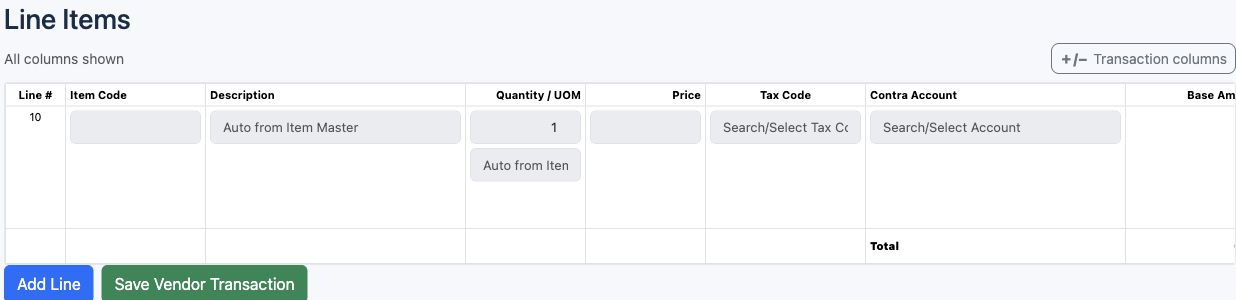


| Field and screenshot | Entry rule and example | Purpose and implication |
|---|---|---|
| Line # - Figure 2 | Assigned line identity. Example: 10 | Identifies the invoice line used by matching and settlement. Caution: Applications are to a specific line, not only a header total. |
| Item Code - Figure 2 | Required selected item for the ordinary purchasing line. Example: Training stocked item | Supplies description, UOM, posting group and effective purchasing policy. Caution: Review stock versus non-stock nature before entering quantities or allocating. |
| Description - Figure 2 | Derived item description in the ordinary item line. Example: Training stocked item | Explains the selected line item. Caution: A text match is not a source-document match. |
| Quantity / UOM - Figure 2 | Required positive invoice quantity in the displayed item unit. Example: 10 Each | Defines the quantity being invoiced and compared to the source. Caution: Review eligible remaining PO/GRN quantities and prior invoices; do not duplicate a receipt. |
| Price - Figure 2 | Required invoice unit price at applicable commercial price precision. Example: 100.00 per Each | Provides the invoice commercial base. Caution: Review source price, discount, effective tolerance and price variance. |
| Tax Code - Figure 2 | Selected applicable purchase tax code; defaults can come from item or supplier. Example: Approved purchase tax code | Calculates chargeable and withholding amounts. Caution: Verify jurisdiction, date and tax recoverability; a familiar code is not legal approval. |
| Contra Account - Figure 2 | Item-derived inventory asset or charge/expense account; editable only under the purchasing override policy. Example: Approved item purchasing account | Determines the line account selection, subject to matching/accounting rules. Caution: Review the full same-company account/sub-account. Do not treat this as the supplier-control or bank account. |
| Base Amount - Figure 2 | Calculated quantity times price after discount. Example: 1000.00 at ten times 100 | Provides the line's pre-tax amount. Caution: Check rounding and source-price differences before relying on totals. |
| Chargeable Tax - Figure 2 | Calculated chargeable tax. Example: 0.00 in the no-tax example | Adds applicable tax to the commercial base. Caution: Tax recovery depends on the applicable rules; this is not WHT. |
| Total Amount including Tax - Figure 2 | Calculated gross line value. Example: 1000.00 without tax | Shows base plus chargeable tax before WHT presentation. Caution: Do not confuse gross invoice value with net cash payable. |
| Withholding Tax - Figure 2 | Calculated under the tax code and recognition policy. Example: 0.00 | Shows the withholding component. Caution: Recognition at invoice and settlement are different designs; do not double-deduct. |
| Net Payable after WHT - Figure 2 | Calculated net supplier amount. Example: 1000.00 without WHT | Shows the line's net payment measure. Caution: Review Gross Open Amount and Net Cash Payable when selecting a payment target. |
| Discount % - Figure 2 | Optional non-negative commercial discount below 100%. Example: 5.00 | Reduces the invoice base before applicable tax calculations. Caution: Do not enter a withholding or chargeable tax rate here. |
| Fixed discount amount (auto) - Figure 2 | Read-only calculated display beneath Discount %. Example: 50.00 on a 1000.00 line at 5% | Shows the money value of the commercial discount. Caution: Do not count it as another deduction in addition to Discount %. |
| Fixed Asset - Figure 2 | Conditional specialised fixed-asset checkbox/context. Example: Unchecked for ordinary supplies | Identifies applicable capital-procurement context. Caution: Do not treat the checkbox as capitalisation or change protected system item defaults. |
| PO Line - Figure 2 | Required source where effective policy specifies PO matching; derived/locked when sourced through a GRN. Example: Approved PO line 10 | Links the commercial quantity and price to the order. Caution: Check supplier, item, currency, location, remaining quantity and tolerances. |
| GRN Line - Figure 2 | Required posted receipt source for three-way two-step inventory matching. Example: Posted GRN line for the accepted goods | Matches the supplier invoice to goods already received. Caution: Do not allocate a second receipt at invoice entry for that same two-step stock. |
| Source functional - Figure 2 | Calculated source receipt value for the matching context. Example: 900.00 in a same-currency nine-unit receipt at 100 | Provides the functional source baseline for variance comparison. Caution: It is not an extra invoice line or a field to overwrite. |
| Vendor functional for source - Figure 2 | Calculated invoice-side functional value associated with the matched source. Example: 900.00 when matched prices and rates agree | Supports comparison of source and vendor values. Caution: Review matched quantities and rates rather than comparing only header totals. |
| PPV - Figure 2 | Calculated purchase price variance for the match. Example: 0.00 where prices agree | Separates commercial price differences from receipt cost. Caution: Do not confuse price variance with withholding or realised payment FX. |
| FX gain/loss - Figure 2 | Calculated match-related functional exchange difference. Example: 0.00 where source and vendor rates agree | Separates matching exchange differences from commercial price differences. Caution: It is not necessarily the later payment-application Gain/Loss. |
| FX rates - Figure 2 | Read-only source and vendor rate comparison. Example: 1 to 1 for same currency | Explains rate context behind source matching metrics. Caution: A displayed zero in a blank reference is not an acceptable transaction conversion rate. |
| Cost Center - Figure 2 | Optional selected company cost center where applicable. Example: Operations | Attributes the purchasing cost. Caution: It does not override the account classification or location policy. |
| Actions - Figure 2 | Contextual line controls, including applicable inventory allocation or related detail. Example: Review allocation for a one-step stock line | Provides the relevant detail for the line nature and state. Caution: Two-step stock uses the earlier GRN allocation; specialised allocation and correction actions require their own approved procedure. |
Vendor payment identity and supplier field reference
Figure 3 Vendor payment identity and supplier
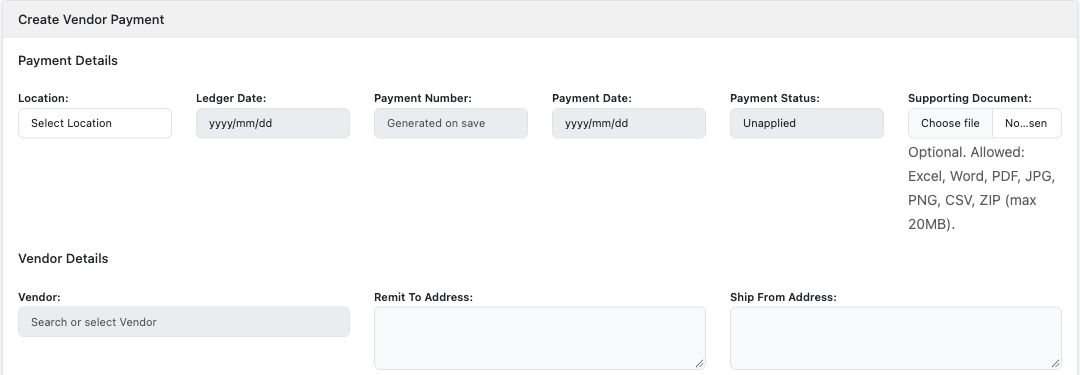
| Field and screenshot | Entry rule and example | Purpose and implication |
|---|---|---|
| Location - Figure 3 | Required permitted company location. Example: Main Office | Identifies the payment's location. Caution: Confirm Current Company and location before selecting vendor or bank. |
| Ledger Date - Figure 3 | Required eligible accounting date. Example: 2026-10-16 | Dates the payment accounting record. Caution: Do not assume the invoice date or Payment Date opens a closed accounting period. |
| Payment Number - Figure 3 | Generated read-only payment identity. Example: Assigned to the recorded payment | Identifies the internal payment voucher. Caution: It is not the external bank transaction reference. |
| Payment Date - Figure 3 | Required payment document date. Example: 2026-10-16 | Records the business payment date. Caution: Recording this date does not instruct a bank transfer. |
| Payment Status - Figure 3 | Calculated status display such as Unapplied, Partially Applied or Fully Applied. Example: Unapplied | Summarises how the payment has been assigned to vendor transactions. Caution: Fully Applied does not by itself prove bank clearance or GL completion. |
| Supporting Document - Figure 3 | Optional permitted file; screen allows Excel, Word, PDF, JPG, PNG, CSV or ZIP up to 20 MB. Example: Payment advice.pdf | Stores supporting payment evidence. Caution: Verify destination company and file contents; uploading advice is not bank execution. |
| Vendor - Figure 3 | Required selected vendor-capable trading partner. Example: Training Supplier | Identifies whose invoices or advance the payment concerns. Caution: Confirm the legal recipient independently before any real bank instruction. |
| Remit To Address - Figure 3 | Derived vendor address display. Example: Fictional supplier remit address | Provides the selected supplier's remittance context. Caution: An address is not independent verification of beneficiary bank details. |
| Ship From Address - Figure 3 | Derived vendor address display. Example: Fictional dispatch address | Shows the supplier shipping context. Caution: It does not select the inventory warehouse or change invoice ownership. |
Company bank and payment amounts field reference
Figure 4 Company bank and payment amounts
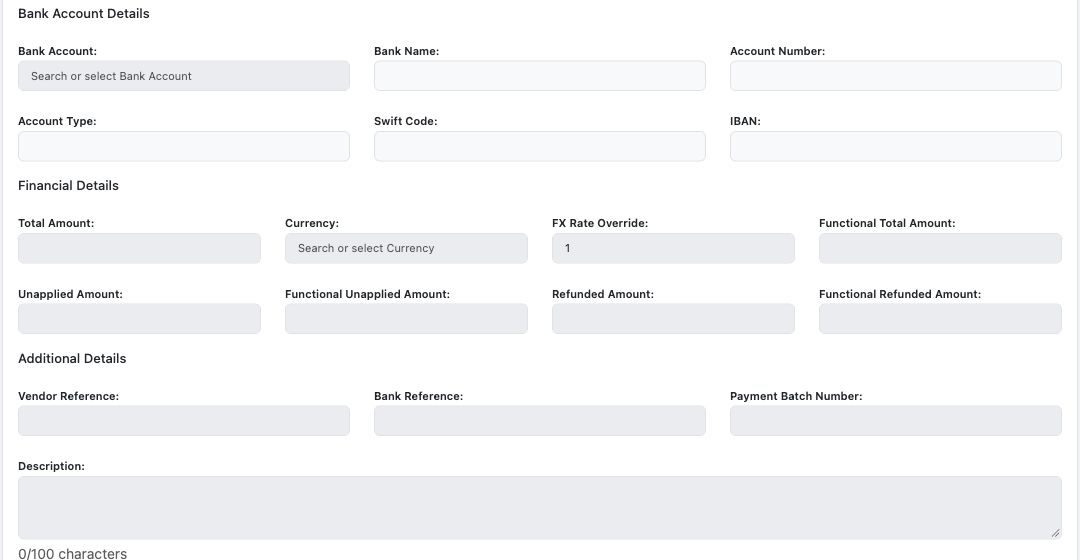
| Field and screenshot | Entry rule and example | Purpose and implication |
|---|---|---|
| Bank Account - Figure 4 | Required selected company bank account. Example: Approved operating bank | Supplies the company's bank GL and supplier-prepayment mappings. Caution: This is the payer's account, not the vendor's beneficiary account. Verify both mappings before use. |
| Bank Name - Figure 4 | Read-only selected bank detail. Example: Training Bank | Helps identify the company's bank account. Caution: Do not infer beneficiary verification from this display. |
| Account Number - Figure 4 | Read-only selected company bank detail. Example: Fictional training number | Helps distinguish company accounts. Caution: Treat actual bank identifiers as sensitive and avoid unnecessary screenshots or exports. |
| Account Type - Figure 4 | Read-only bank-account type. Example: Business account | Describes the selected company account. Caution: It is not the Chart of Account classification. |
| Swift Code - Figure 4 | Read-only bank reference where held. Example: Fictional reference | Shows the selected bank account's stored SWIFT reference. Caution: It is not verification of a supplier's bank change. |
| IBAN - Figure 4 | Read-only bank reference where held. Example: Fictional reference or blank | Shows the selected company account's stored IBAN. Caution: Do not invent an IBAN where the account does not use one. |
| Total Amount - Figure 4 | Required positive amount for an ordinary payment at company amount precision. Example: 400.00 | Records money paid or advanced in the payment currency. Caution: This creates an accounting/payment record, not proof of a bank transfer or bank clearance. |
| Currency - Figure 4 | Required payment currency; permitted choices depend on company foreign-currency settings and dates. Example: USD | Denominates the payment, which may differ from invoice currency. Caution: Check bank account and currency compatibility; do not compare unlike-currency amounts directly. |
| FX Rate Override - Figure 4 | Positive permitted rate; locked for functional-currency payments. Example: 1 for same currency | Converts payment amount into functional currency. Caution: It is not the invoice rate or the application cross-currency rate. |
| Functional Total Amount - Figure 4 | Calculated, read-only. Example: 400.00 at rate 1 | Shows payment value in company currency. Caution: Review the actual rate and rounding; do not overwrite the calculated figure. |
| Vendor Reference - Figure 4 | Optional supplier-facing reference. Example: SUP-2026-0100 | Supports remittance correspondence and matching. Caution: A text reference does not apply payment to that invoice. |
| Bank Reference - Figure 4 | Optional external bank reference. Example: Fictional transfer reference | Supports tracing the separately authorised bank transaction. Caution: A typed reference does not prove bank execution or reconciliation. |
| Payment Batch Number - Figure 4 | Read-only when supplied by a payment batch. Example: Blank for an ordinary standalone entry | Identifies batch origin where applicable. Caution: Do not fabricate a batch identity or assume this field submits a bank file. |
| Description - Figure 4 | Payment narrative; screen limit 100 characters. Example: Partial settlement of October supplies | Explains the payment purpose. Caution: Keep credentials and full unnecessary banking details out of free text. |
Vendor payment balances field reference
| Field and screenshot | Entry rule and example | Purpose and implication |
|---|---|---|
| Unapplied Amount - Figure 4 | Calculated remaining payment-currency balance. Example: 400.00 before applying the payment | Shows money still available for application after applicable refunds and allocations. Caution: Unapplied is not a missing payment; it may be an intentional supplier advance. |
| Functional Unapplied Amount - Figure 4 | Calculated remaining balance in company currency. Example: 400.00 at rate 1 | Supports advance/prepayment reconciliation. Caution: Read alongside payment currency and functional ledger values. |
| Refunded Amount - Figure 4 | Calculated recorded refunds in payment currency. Example: 0.00 for an ordinary unrefunded payment | Shows the amount already refunded against the payment. Caution: Refunds are a separate controlled workflow, not an editable balance field. |
| Functional Refunded Amount - Figure 4 | Calculated recorded refunds in company currency. Example: 0.00 | Supports the functional refund balance review. Caution: Do not infer an actual bank receipt solely from this display. |
Payment application grid field reference
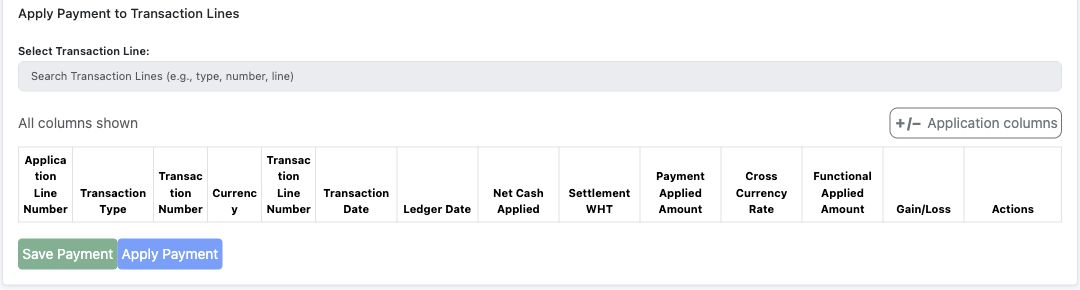
Figure 5 Payment application grid
| Field and screenshot | Entry rule and example | Purpose and implication |
|---|---|---|
| Select Transaction Line - Figure 5 | Search and choose an eligible vendor transaction line; selection does not itself complete application. Example: Invoice line 10 | Adds the intended settlement target to the application context. Caution: Check company, supplier, location, currency, open amount and prior applications. |
| Application Line Number - Figure 5 | Generated application-row identity. Example: 10 | Identifies the allocation within the payment. Caution: It is distinct from the invoice transaction line number. |
| Transaction Type - Figure 5 | Read-only selected target type. Example: Invoice | Identifies the kind of transaction being settled. Caution: Do not assume all note types are interchangeable with invoices. |
| Transaction Number - Figure 5 | Read-only selected invoice identity. Example: The intended supplier invoice | Links the payment allocation to the invoice. Caution: Check the supplier's external reference as well as this internal number. |
| Currency - Figure 5 | Read-only target invoice currency. Example: USD | Denominates Net Cash Applied for this row. Caution: It can differ from the payment header currency. |
| Transaction Line Number - Figure 5 | Read-only target line identity. Example: 10 | Identifies which invoice line is settled. Caution: A header total is not proof every intended line was selected. |
| Transaction Date - Figure 5 | Required application business date. Example: 2026-10-16 | Dates the settlement association. Caution: It is separate from the payment and invoice dates. |
| Ledger Date - Figure 5 | Required eligible application accounting date. Example: 2026-10-16 | Dates the settlement accounting effect. Caution: Review period controls and report cutoff separately from the payment header. |
| Net Cash Applied - Figure 5 | Positive cash application in target invoice currency within the eligible balance. Example: 400.00 for a same-currency partial settlement | Specifies net cash assigned to the invoice line. Caution: It excludes separately recognised Settlement WHT; do not enter gross including WHT blindly. |
| Settlement WHT - Figure 5 | Calculated applicable withholding recognised on settlement. Example: 0.00 in the no-tax example | Separates withholding from cash paid. Caution: Do not deduct invoice-recognised withholding a second time. |
| Payment Applied Amount - Figure 5 | Amount consumed in payment currency; same-currency rows derive/lock it to the relevant cash amount. Example: 400.00 for the same-currency example | Reduces the payment's unapplied balance. Caution: It is not necessarily equal numerically to Net Cash Applied across currencies. |
| Cross Currency Rate - Figure 5 | Calculated payment-to-target conversion rate. Example: 1 when payment and invoice currencies match | Explains conversion between payment and invoice cash amounts. Caution: Do not confuse it with either document's functional FX rate or invert it. |
| Functional Applied Amount - Figure 5 | Calculated settlement value in company currency. Example: 400.00 at rate 1 | Supports functional supplier/prepayment reconciliation. Caution: Use the generated settlement and FX records, not a manually forced total. |
| Gain/Loss - Figure 5 | Calculated functional-currency exchange difference; negative values may appear in parentheses. Example: 0.00 at equal same-currency rates | Shows applicable realised FX impact. Caution: It is not a bank fee, price variance or tax amount. |
| Actions - Figure 5 | Contextual Remove or Update controls for eligible application rows. Example: Review the selected row before acting | Changes the allocation between payment and invoice. Caution: Removal is not refunding money; changes can affect balances and journals and require authority. |
Understand payment allocation and currency
The payment header's Currency denominates Total Amount and Unapplied Amount. The selected invoice line's Currency denominates Net Cash Applied. Payment Applied Amount is the corresponding consumption of payment currency. The cross-currency rate connects payment currency to target invoice currency; each document's functional FX rate has a different purpose.
The transaction-line search displays Location, Transaction Type, Transaction Number, Currency and Line Number to identify the target. Gross Open Amount shows the outstanding gross basis, Projected WHT shows the anticipated withholding component, Net Cash Payable shows cash available for settlement and Functional Net Cash shows its company-currency equivalent. Select the intended invoice line, not merely the first number matching a reference.
An application has its own Transaction Date and Ledger Date. Review both, the target open cash balance, payment availability, Settlement WHT and actual saved application records. A selected row or an entered amount is not proof that an allocation has completed. Remove changes the association; it is not sending money back to the bank or cancelling the supplier invoice.
Follow the accounting relationships
| Record or event | Ordinary relationship | Review separately |
|---|---|---|
| Purchase order | Non-posting commercial commitment | Approval, source lines and remaining quantities |
| Two-step stock receipt | Inventory debit and GRNI credit for accepted goods | Stock allocation, receipt value, posting and later matching |
| Supplier invoice | Approved stock/expense or receipt-clearing accounting, applicable taxes and supplier liability | Match quantities, GRNI clearing, price/FX differences and actual journal |
| Ordinary vendor payment | Supplier-prepayment/advance debit and bank credit under the company's bank mappings | Unapplied balance and the actual bank transaction |
| Payment application | Reduces the supplier open liability against the payment/prepayment allocation, with applicable WHT and realised FX | Both invoice and payment balances, settlement journals and report cutoff |
The payment's bank account needs a supplier prepayment mapping even where the business intends immediate invoice settlement. Do not assume a new payment directly clears a particular invoice without its application. Generated accounting may complete separately from the screen save; investigate missing linked journals rather than entering duplicate payments or balancing plugs.
Work through a partial payment example
Assume an ordinary service invoice of 1000 in the company's functional currency, with no discount, tax, withholding or FX difference. A separate payment of 400 starts with 400 unapplied. A 400 application to the intended invoice line consumes 400 of the payment and leaves 600 on the invoice. The payment's remaining unapplied amount is zero if there are no other applications or refunds.
The illustrative accounting relationship is expense debit 1000 and supplier liability credit 1000 for the invoice; supplier advance debit 400 and bank credit 400 for the payment; then supplier liability debit 400 and advance credit 400 for the application. Actual account names, journal timing and linked records must follow your approved setup. This arithmetic is not a tax or foreign-currency example.
Reconcile the purchase to payment trail
| Reconciliation | Compare on the same company and cutoff | Investigate |
|---|---|---|
| Source matching | PO, accepted GRN quantities, returns and invoiced quantities | Duplicate receipt/invoice, wrong source or quantity/price exception |
| GRNI | Receipt accruals and matched supplier invoice clearing | Received-not-invoiced goods, price/FX differences or missing processing |
| Supplier balance | Invoice lines, credits, applications and vendor open-item/statement detail | Unallocated payments, wrong supplier/line or different as-of dates |
| Advances | Unapplied payment balances and supplier-prepayment GL | A payment saved but not allocated, refunds or missing journals |
| Bank | Payment register, bank GL and actual bank statement/reconciliation | Unexecuted or duplicated bank payment, fees, currency or timing differences |
| Functional accounts | Posted journals and control-account totals in company currency | FX differences, rounding, period cutoff or incomplete downstream processing |
Use report filters consistently for company, location, date and currency. Reconcile transaction-currency open items and functional-currency controls on their own bases. An Unpaid or Fully Applied screen label does not certify that the bank statement, stock and GL all reconcile.
Resolve common payables problems
| What you see | Safe response |
|---|---|
| PO or GRN source is unavailable | Check effective policy, approved/open PO, posted GRN, supplier/location/currency and remaining eligible quantity |
| Contra Account cannot be edited | Review the item posting group and purchasing override control with the authorised accountant |
| Invoice or payment remains locked | Another session or document dependencies may control editing; do not work around locks with duplicate records |
| Payment is Unapplied | Review the intended invoice-line allocation; it may also be an intentional advance |
| Payment target is absent | Review supplier, company, currency, open cash balance and earlier applications; do not force a closed line |
| Cash and gross invoice balance differ | Review chargeable tax, WHT recognition and existing settlements before changing amounts |
| Foreign-currency figures differ | Separate target currency, payment currency and functional amounts; review rates and realised FX |
| Save returns an error or journal is absent | Inspect the recorded document, balances and linked processing with the authorised administrator before retrying |
Bank execution, beneficiary changes and approval of real payments follow your organisation's separate treasury controls. RavenLedger's accounting record and a typed Bank Reference do not replace those controls.