
Set up manufacturing and review production batches
WIP overhead formulas output allocation and completion controls
Prepare the manufacturing configuration before recording production batches. Use this chapter for setup and field meanings; use batch transactions for recording inputs, outputs and the sequence of financial actions. It is for authorised production and cost-accounting users in the selected company.
Prepare manufacturing in dependency order
WIP means work in progress: production cost accumulated before finished output is recognised. UOM means unit of measure. Prepare approved accounts, items, UOMs, warehouses, bins and tracking policies before configuring production.
- Open Production Setup and review the WIP, abnormal-loss and abnormal-gain mappings and default finished warehouse against the approved design. Save only intended setup changes, not a transaction workaround.
- In Overhead Master, establish the approved overhead code, basis, rate and credit destination. A Per Unit rate and a Per Batch rate cannot be compared without their quantities.
- In Formulas, identify the intended output and version. Review material requirements, output roles/loss assumptions, overheads and the selected joint-cost allocation basis in the field references below.
- Confirm the actual material stock, eligible formula, location, warehouses, tracking identities, dates and quality responsibilities before starting a batch. A formula describes requirements; it does not create available stock.
- Continue to the batch preparation and posting checklist. After processing, compare input/output quantities and WIP/finished-cost journals rather than treating a saved batch as completed production.
Keep production WIP separate from asset capital work in progress. If setup or stock is missing, resolve that prerequisite; do not use an adjustment or transfer as a substitute for manufacture.
Separate production from ordinary stock movement
Manufacturing consumes materials and overhead to produce finished outputs. A warehouse transfer only relocates the same item; an inventory adjustment records an approved correction. Do not use either as a substitute for a production batch and its cost trail.
Prepare production accounting
In Production Setup, choose the WIP account, abnormal-loss expense, abnormal-gain income and default finished warehouse. Confirm item posting groups, inventory asset accounts, UOM, locations, bins, tracking, negative-stock policy and open dates. Production WIP and asset capital-work-in-progress are different processes even if their names look similar.
Define overhead masters
Overhead Master identifies code, name, type, basis, rate and credit account. Per Batch and Per Unit rates imply different cost amounts. Attach permitted evidence when appropriate. Changing a master does not reverse an earlier batch; inspect formulas and future consuming processes before changing a used definition.
Field explanations and training references
Each reference describes the field or control, entry rule, example and practical implication. Illustrations use blank or fictional training values. Conditional fields and actions depend on your selected policy, country, record state and permissions; choose actual application lookup records rather than copying text or hidden identities.
Production Overhead Master field reference
Figure 1 Production Overhead Master
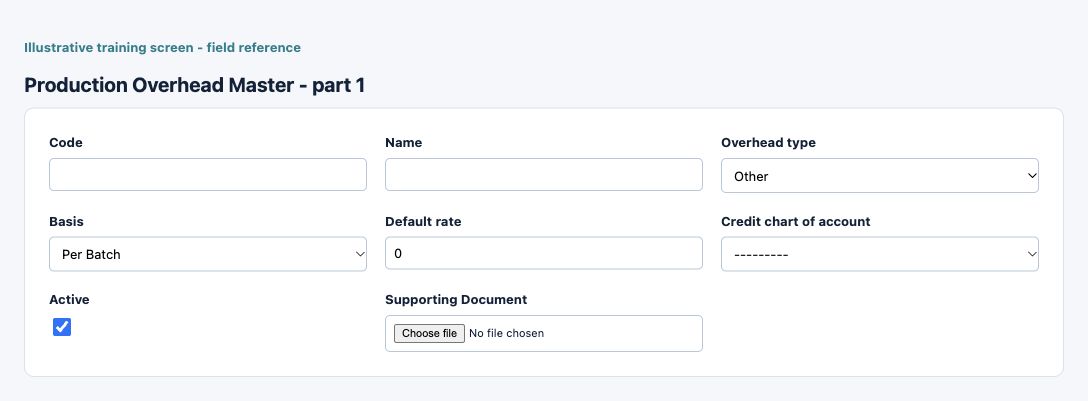
| Field and screenshot | Entry rule and example | Purpose and implication |
|---|---|---|
| Code - Figure 1 | Required entry. Maximum 32 characters. Example: TRAIN-001 | Business code identifying the configuration or master record. Use a stable naming scheme and check existing records before adding another. Caution: Confirm the saved value and affected workflow before relying on the result. |
| Name - Figure 1 | Required entry. Maximum 100 characters. Example: Training configuration | Business description used to recognise this record in lists and selections; it is not a posting account or an approval. Caution: Confirm the saved value and affected workflow before relying on the result. |
| Overhead type - Figure 1 | Required entry. Choices: Labor, Machine, Rent, Depreciation, Other. Example: Labor | Identifies the nature of production overhead. The selected type, basis and rate must represent the approved cost design. Caution: Confirm the saved value and affected workflow before relying on the result. |
| Basis - Figure 1 | Required entry. Choices: Per Batch, Per Unit. Example: Per Batch | Basis used to interpret the overhead rate. A rate per unit and a fixed amount are not interchangeable. Caution: Confirm the saved value and affected workflow before relying on the result. |
| Default rate - Figure 1 | Required entry. Form precision up to 6 decimal places; consuming company policy also applies. Example: 25.00 on the selected basis | Default overhead rate used by consuming formula or batch processes. Review the basis and resulting amount; changing a default is not a historical cost correction. Caution: Confirm the saved value and affected workflow before relying on the result. |
| Credit chart of account - Figure 1 | Required entry. Example: Approved active company posting account | Credit-side offset when the overhead is absorbed into production. It is distinct from WIP and finished-goods inventory accounts. Caution: Form acceptance is not accounting approval; inspect company, active state and purpose. |
| Active - Figure 1 | Checkbox policy setting; review the saved on/off state. Example: The approved on/off policy | Controls whether this configuration remains available for relevant use. Turning it off does not reverse earlier transactions or erase history. Caution: Confirm the saved value and affected workflow before relying on the result. |
| Supporting Document - Figure 1 | Optional or policy-dependent entry. Example: Approved supporting document.pdf | Supporting evidence upload, subject to the displayed type and size limits. It does not approve the record or post any financial transaction. Optional. Allowed: Excel, Word, PDF, JPG, PNG, CSV, ZIP (max 20MB). Caution: Confirm the saved value and affected workflow before relying on the result. |
Production Setup field reference
Figure 2 Production Setup
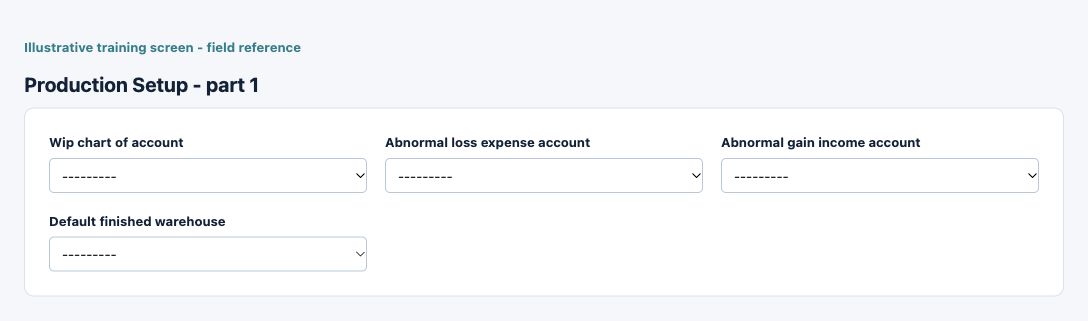
| Field and screenshot | Entry rule and example | Purpose and implication |
|---|---|---|
| Wip chart of account - Figure 2 | Required entry. Example: Approved active company posting account | Work-in-progress destination for production costs before completion. Reconcile open batches and posted WIP before period close. Caution: Form acceptance is not accounting approval; inspect company, active state and purpose. |
| Abnormal loss expense account - Figure 2 | Required entry. Example: Approved active company posting account | Expense destination for production loss classified as abnormal by the production process. Do not hide abnormal loss by increasing normal-loss allowances. Caution: Form acceptance is not accounting approval; inspect company, active state and purpose. |
| Abnormal gain income account - Figure 2 | Required entry. Example: Approved active company posting account | Income destination for abnormal production gains. Investigate quantities and assumptions before accepting a gain as an ordinary output. Caution: Form acceptance is not accounting approval; inspect company, active state and purpose. |
| Default finished warehouse - Figure 2 | Optional or policy-dependent entry. Example: The approved business value or selected record | Warehouse default for the relevant production or terminal process. A default does not move stock or override location, bin and tracking requirements. Caution: Confirm the saved value and affected workflow before relying on the result. |
Read formula headers and versions
Formulas describe the output item, standard batch quantity, version, status and material/overhead requirements. A description is not a material line. Review the applicable formula version before starting a batch; a later revision must not be treated as the historical design used by an earlier batch.
Understand material and output grids
Material rows identify item, UOM, standard quantity and normal-loss assumptions. Output rows identify output item, role, standard quantity, normal-loss mode/value and any allocation inputs required by the joint-cost method. Market value, net realisable value and fixed allocation percentages are different bases; enter only the basis relevant to the chosen method. Overhead rows supply the defined overhead and standard amount.
Review the production batch
A batch selects location and formula, ledger/transaction dates and description. Output rows distinguish planned quantity, actual quantity, actual loss, normal loss, abnormal loss/gain and allocated cost. Material rows distinguish standard requirement, expected loss, actual issue/loss, available stock and issue warehouse/bin/lot/serial identity. Warehouse and tracking identities are physical controls, not merely cost labels.
Distinguish WIP from completion
Save, Post WIP, Reverse WIP, Complete or Post WIP & Complete, and Cancel have different consequences and are subject to the batch state and authority. Posting WIP accumulates eligible material/overhead cost; completion recognises the finished outputs and applicable variance accounting. Inspect the actual linked journals and stock movements rather than assuming Save completes every stage.
Review quality and traceability
QC Status and QC Notes record quality context. Preserve output and input lot/expiry/serial identity and actual quantities. A passed label is not a substitute for the organisation's inspection evidence. Review deliberate rework, loss or output substitution through the approved production correction process.
Reconcile batch cost and stock
Reconcile Material Cost plus Overhead Cost to Total Cost, WIP movement, finished inventory and abnormal variance accounts. For a simple example, materials 800 plus overhead 200 give a cost pool 1000 before applicable allocation/loss treatment. A 100-unit output does not automatically mean all losses should be charged at 10 each; the formula method and actual classification control allocation.
Control reversals and period close
Before reversing or cancelling, inspect later material issues, completed outputs, sales/consumption and the batch's current state. Do not delete the audit trail or enter duplicate outputs after an interruption. At close, reconcile open batches, posted WIP, material/finished quantities, inventory valuation and the relevant functional-currency ledger accounts.
Resolve a production prerequisite or result
| Situation | What to do |
|---|---|
| Item, formula or warehouse is unavailable | Check company/location, active/eligible setup, formula version and stock/tracking prerequisites before creating a batch. |
| Batch saved but output is not ready | Check the batch state, WIP/completion actions, quality release, stock movements and actual journals. Save is not completion. |
| Cost or stock does not reconcile | Trace actual issues, outputs/losses, allocation basis and linked WIP/completion records. Do not add a duplicate batch or unexplained stock adjustment. |
Continue with the related task
Batch transactions and allocation examples, items, warehouses, tracking conditions and inventory reconciliation.
Formula imports, changes and batch imports for Manufacturing
Use the correct bulk action for this module. The following templates are different business operations, not interchangeable create/update files.
| Action and exact template columns | Prepare the file | Check the saved result |
|---|---|---|
| Formulas - Production Formulas, Bulk Upload | New formulas with headers, material and overhead relationships. Prepare eligible output/material items, quantities, overhead masters and formula/version choices. | Reopen the formula and check all lists/status before a batch. Use production setup. |
| Formulas Bulk Change - Production Formulas, Bulk Change | Existing company/code/version updates or missing-combination creation; material/overhead lists are full replacements as described above. | Compare all retained/removed lines, QC, batch quantity and calculated overheads; do not infer historical batch recalculation. |
| Production Batches - Production Batches, Bulk Upload | Prepare formula/version, location, quantity, warehouses and supported tracking/context columns. | Inspect saved batch state, formula/materials and later release/issue/completion results. Import success is not proof of consumption or finished output. Use production transactions. |
Follow this module bulk procedure
- Prepare inventory accounts, WIP/overhead mappings, eligible items/UOM, warehouses, tracking and formula ownership. Choose Formulas > Bulk Upload for new formulas, Formulas > Bulk Change for controlled formula changes, or Production Batches > Bulk Upload.
- For Bulk Change, download the current existing-data workbook using Status, Code From/To, Output Item, Updated Since and Limit as appropriate. Preserve Formulas, Material Lines and Overhead Lines with consistent External Key (Ext Key) relationships.
- Keep the intended Formula Code and Version No. Existing company/code/version combinations are updated; missing combinations can create. Supply the COMPLETE intended material and overhead lists: omitted existing lines are removed.
- Set Status, QC and Joint Cost Method explicitly; blanks can default to INACTIVE, No and PHYSICAL_QTY. Check derived overhead amounts and the full proposed lists, then validate and commit the approved file once.
- Reopen every affected formula/version and compare all retained/removed lines, quantities, overheads and status. For imported batches, inspect the saved state and follow release/issue/completion controls separately; reconcile WIP, material consumption and finished output when those events occur.
Validate, commit and recover safely
For a supported workbook import, use the shared import steps and job recovery. A validated preview is not a saved transaction. Use Show status before retrying; cancelling a job does not reverse committed records. Keep the approved file, job reference and reconciled results securely. Read formula replacement and blank defaults before changing existing versions.