
Record journals, opening balances, revaluation and period close
Prepare balanced entries, understand approval and posting, and control the accounting cutoff.
Use manual journals for authorised general-ledger entries, not as a substitute for invoices, receipts, inventory movements, payroll or asset transactions that need their own subsidiary records. An entry can balance while still using the wrong account, period, tax treatment or source workflow.
Prepare accounts and the open period
Confirm the selected company, functional currency, GL Setup, rounding/FX mappings and account hierarchy. Select the actual Chart of Account lookup result, including its reporting account and posting sub-account. Use a cost centre only where appropriate. Check the last closed date: the ledger date must be strictly later. Keep approved calculation and supporting evidence with the entry.
Enter a manual journal
- Open Journal Entries and choose Create. Review the locked Journal Number and status fields.
- Set Ledger Date for the accounting period and Transaction Date for the underlying event. Select Transaction Currency. Where foreign currency is disabled, the company currency is locked.
- Enter Description and optional Supporting Document. For foreign currency, confirm the FX basis and any authorised FX Rate Override. Check the resulting functional amounts rather than assuming an override is correctly oriented.
- Add each line, select its posting account, enter its description and one debit or credit amount, and choose a cost centre where required. Remove empty lines.
- Compare total transaction debits/credits and functional debits/credits. Save once. Record the generated journal number and inspect its saved lines.
- If approval is enabled, submit the Draft for approval. After the authorised decision, wait for Posting Status POSTED and inspect the transaction/ledger output. A saved record, approval or QUEUED state alone is not a completed posting.
Header and line controls
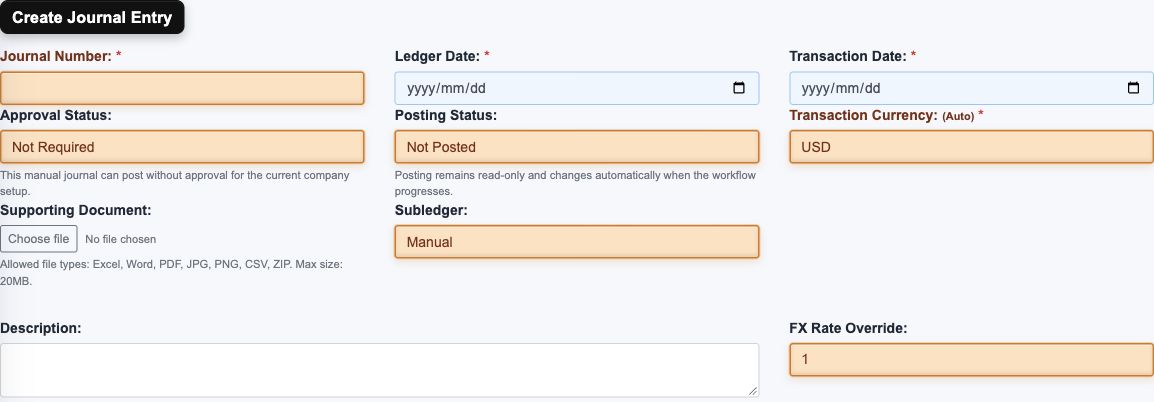
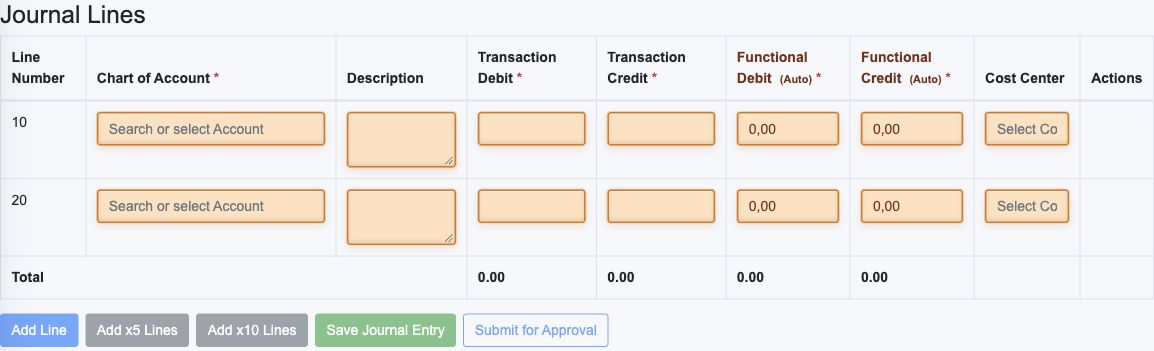
| Field or control | Entry and example | Implication and caution |
|---|---|---|
| Journal Number | System assigned and locked. | Use the saved number to identify retries, approvals and evidence. |
| Ledger Date | Open accounting date, e.g. 2026-10-16. | Controls accounting cutoff; it is not necessarily the invoice/event date. |
| Transaction Date | Date of the underlying event. | Retain truthful source timing even when posting later. |
| Approval Status | Read-only workflow state. | Draft/Pending/Rejected/Approved describe the decision, not final ledger posting. |
| Posting Status | Read-only processing state. | Require POSTED before treating the journal as completed accounting. |
| Transaction Currency | Select the actual currency result; may be locked. | All line transaction amounts use this currency. |
| Supporting Document | Optional approved calculation/evidence, maximum 20 MB in supported types. | An attachment is evidence, not proof that the entry posted. |
| Subledger | Read-only Manual for a manual journal; originating-module information for generated journals. | Do not edit generated GL as a substitute for a source correction. |
| Description | Clear purpose and original reference within the screen limit. | Keep enough context to distinguish accrual, opening and correction entries. |
| FX Rate Override | Optional authorised transaction-to-functional basis. | Review functional amounts and rate direction before saving. |
| Line Number | Line sequence. | Identifies the line, not an account code. |
| Chart of Account | Select the correct reporting-account/sub-account combination. | Typed text alone is not selection; avoid control/system accounts without an approved purpose. |
| Line Description | Explain the line and source reference. | Preserves audit context and is not a reconciliation link by itself. |
| Transaction Debit and Credit | Enter a nonzero amount on the intended side. | Use the transaction currency, balance the entry and avoid unexplained negative/double-sided lines. |
| Functional Debit and Credit | Calculated displayed amounts. | Check both functional totals and rounding, not only transaction totals. |
| Cost Center | Select the applicable lookup record where used. | Adds analysis; it is not a branch or warehouse selector. |
| Add Line / Add x5 Lines / Add x10 Lines / Remove | Add the required number of rows or remove an unwanted row where the action is available. | Recheck the complete account/amount set and totals after changing lines. Blank rows are not additional accounting. |
| Save / Submit / Approve / Reject | Use only the available state-appropriate action. | Save, decision and posting are separate stages; rejected submissions need an explanation and correction. |
| Run Date / Mode / Reversal | For FX, select month, Draft/Final and reversal policy. | The month end is used; first-next-month reversal does not settle the foreign balance. |
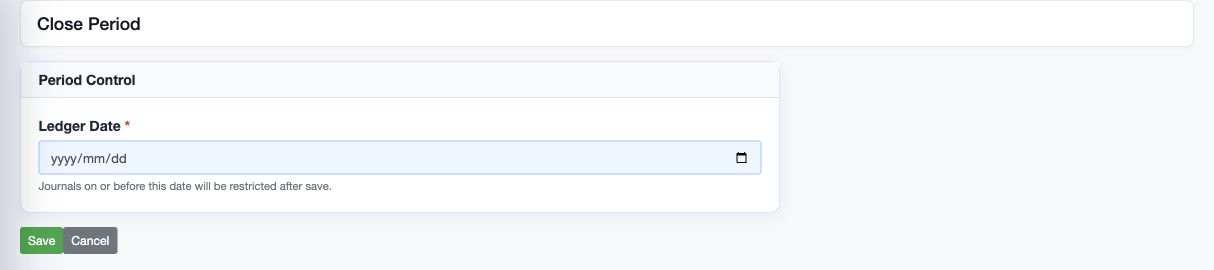
| Ledger Date on Close Period | Inclusive closed-through date. | The next calendar day is the first open day; obtain financial authorisation before changing it. |
Submit, approve, reject and resubmit
When manual-journal approval is enabled, a new saved manual journal is a Draft and is not posted. Submission requires lines, equal functional debits/credits, an open ledger date and a matching active approval rule. The rule uses the functional debit total and currency scope. If no rule matches, have the Tenant Administrator review the configured rule; do not split journals to avoid the threshold.
An authorised approver reviews company, dates, accounts, support, currency and totals before Approve or Reject. Rejection needs a reason. A rejected journal can be corrected and resubmitted where the form permits. Approval changes the posting state to Queued; background completion is still required. Pending or approved entries may no longer be editable. Follow the organisation's independent-review policy even where an administrative role has broader authority.
If posting remains Queued, Processing or Failed, inspect the existing journal and approval history before retrying. Retain the journal number and error details for support. Do not enter a duplicate to obtain a successful notification.
Plan opening balances without double counting
Agree one cutover date and an approved opening trial balance. Map every legacy account to its RavenLedger posting combination. Reconcile customer/vendor open documents, inventory quantities and values, assets and accumulated depreciation, tax liabilities, bank balances and equity to the control totals before entering them.
Decide which openings come from subsidiary workflows and which belong in a manual journal. Do not load a control account manually and also post the same opening through customer, vendor, stock or asset records. A GL journal alone does not create an aged receivable, payable, stock lot or asset register entry. Keep historical foreign units and their functional carrying amounts where relevant; translating all openings at today's rate can create incorrect FX.
For a simple illustrative opening with no subsidiary balances, debit Bank 1,000 and credit the approved opening equity account 1,000. Use the cutover ledger date, correct currency and approval workflow. This is not a recommendation to post unexplained differences to equity. Preserve the approved mapping and reconcile the posted trial balance to the signed legacy totals.
Check an accrual and its correction
An illustrative expense accrual is debit Expense 200 and credit Accrued liabilities 200. After posting, both sides should appear in the ledger for the chosen date; a payable invoice or supplier balance is not created by that journal. When the invoice arrives, the accountant must avoid recognising the expense twice.
Reverse an authorised manual journal
Reverse prepares a separate manual journal with the debit and credit sides exchanged. It does not delete, cancel or edit the original. Copy also prepares a new journal, but does not exchange the debit and credit sides; it is not a correction action.
- Confirm the selected company and locate the original in Journal Entries. Record its number, dates, currency, posting state and purpose. Confirm that an appropriate reversal does not already exist. Obtain the organisation's authority for the correction.
- Choose Reverse for that original. Check the prepared description beginning Reversal and retain an explicit original-journal reference. A new journal number is assigned on Save; the original number is not reused.
- Review Ledger Date and Transaction Date. The form initially copies the original dates; it does not automatically choose today's date or reopen a closed period. Choose the authorised correction date in an open period and retain the true underlying event date under your accounting policy.
- Compare every account, cost centre, description and amount with the original. Original debit amounts should now be credits and original credits should be debits. Check both transaction and functional totals. Confirm the intended currency and FX basis before saving.
- Review supporting evidence and attach the approved correction calculation where needed. Save once. Note the new journal number and inspect the saved header and complete lines. The saved form represents the new journal, not a second reversal of the original.
- If approval is required, submit the new Draft and obtain the authorised decision. Confirm Posting Status POSTED before treating the correction as ledger accounting. If approval is not required, still inspect posting completion rather than assuming the save notification is sufficient.
- Reopen the original and the new journal from the list. Reconcile the accounts for the applicable dates, retaining both numbers and the reason for correction. A reversal in the next period does not remove the original from the earlier period's reports.
For the illustrative posted accrual above, the correction is debit Accrued liabilities 200 and credit Expense 200. With both entries posted, the two-account cumulative effect is zero only when the report includes both ledger dates and the same company, accounts and currency basis. If a replacement entry is needed, treat it as another authorised journal with its own evidence and posting checks.
Check foreign currency before reversing
Do not assume the prepared currency is inherited from the original: a derived Copy or Reverse starts with the company's functional currency. For a foreign-currency original, stop before Save and have the accountant determine the required transaction currency, rate and functional carrying amounts. Merely swapping displayed figures can create an incorrect currency balance or FX effect. If the prepared values do not match the approved correction, leave it unsaved and obtain support rather than forcing a balancing line.
A general-ledger reversal does not reverse a customer invoice, vendor invoice, receipt, payment, stock movement, asset event, payroll record or fiscal document. Use the originating module's authorised correction process for its subsidiary records and country obligations. A zero GL balance alone is not proof that those records are corrected.
Recover from an interrupted save
If the journal was saved but its latest status could not be refreshed, retain the new journal number and reopen that record through Journal Entries. Do not create it again. The saved record can exist even when a subsequent status refresh fails.
If a previous attempt remained on Loading journal entry, first search for the reversal and inspect its number, dates, description and lines. An old loading screen does not prove that Save failed. In application v1.1.537, successful Copy and Reverse saves keep the newly saved journal visible while its status is refreshed; this does not remove any duplicates created by earlier retries.
For a loading or network error before a save is confirmed, check the list before retrying, and give support the original number, any new number, approximate time and displayed message. Do not share credentials or confidential attachments unnecessarily. If more than one reversal exists, have the accountant assess their posted effects and approve the correction; do not delete history or add another reversal by guesswork.
Review foreign currency classification
The monetary property belongs to the reporting account and affects balances under it. Cash and fixed-currency receivables/payables are normally monetary; inventory and historical-cost assets are normally non-monetary. Advances and deposits depend on whether settlement is in fixed currency or goods/services, not their account name alone. Do not reclassify accounts merely to make a revaluation run include or exclude a balance.
IAS 21 generally uses the closing rate for foreign-currency monetary items, the transaction-date rate for non-monetary historical-cost items, and the valuation-date rate for non-monetary fair-value items. Special arrangements, exchangeability and other standards can require additional treatment. Have the accountant approve classification and rate policy. See the IFRS Foundation IAS 21 materials.
Run and review FX revaluation
- Reconcile foreign monetary account balances and resolve unposted or unapproved foreign entries first. Confirm closing conversion rates and unrealised gain/loss mappings.
- Open FX Revaluation Runs. Select Run Date and Mode Draft. The selected date identifies the month; the calculation uses that month's end, not the selected day as an interim cutoff.
- Choose whether to create the first-day-next-month reversal under company policy. Run Draft and open Detail. Review each account/currency, End Rate, Transaction Net Balance, Functional Net Balance, Translated Functional Balance and Adjustment Amount. Do not add different transaction currencies into a meaningful currency total.
- Download Review Excel and compare the Expected Journal with the account deltas and configured offsets. A draft has no final revaluation journal. Resolve rate, mapping or classification errors before Final.
- Run Final for the reviewed period. Review the linked Journal and Reversal Journal, if selected, and their actual posting states. Confirm month-end ledger balances and the reversal's first-next-month date. Do not run another Final merely because posting is still queued.
For a monetary foreign asset of EUR 100 carried at USD 110, a closing rate of USD 1.20 per EUR gives USD 120 and a USD 10 increase: debit the monetary asset 10 and credit unrealised FX gain 10. With auto-reversal, the next month's first-day entry reverses that adjustment. The example assumes USD functional currency, no other activity and an approved rate; it is not a current market rate. A non-monetary goods prepayment under historical-cost accounting is not included merely because it is denominated in EUR.
The first company run establishes a baseline month. For a later month, the immediately preceding month must be Final. An already-finalised month cannot be finalised again. If the run shows no monetary foreign balances or a missing rate, investigate the actual balances and setup rather than creating a fictitious journal.
Close the accounting period
- Complete the organisation's cutoffs, bank reconciliation, AR/AP control reconciliations, inventory costing/valuation, asset and payroll reviews, tax reconciliations, accruals and FX review. Resolve errors and retain the close evidence.
- Confirm that all relevant journals are posted and that asynchronous inventory, payment-batch and other accounting work has finished. Review approvals and unresolved manual journals.
- Open Close Period for the correct company and enter Ledger Date as the inclusive closed-through date. A close through 31 October blocks accounting dated 31 October and earlier; 1 November is the next open day.
- If blocked, download the blocking-records workbook for the intended date. Use its type, document/reference, dates, status, approval/posting state and recommended action to find each source record. Refresh after legitimate completion. Never delete queued work or change dates solely to pass close.
- Save the authorised cutoff only after reconciliation and review. Reopen Close Period and confirm the saved date. Retain the final reports, supporting schedules and approval evidence.
Close Period is a date restriction, not evidence that every account is reconciled and not a substitute for Balance Sheet Review sign-off. Do not move the cutoff backwards as a routine correction method. Any reopening needs explicit financial authority, impact assessment and retained evidence; this guide does not prescribe an unverified reopening action.
Related guides
GL setup, Account hierarchy, Bank reconciliation, Report parameters and Balance Sheet Review.