
Understand purchase orders and goods receipts
Commercial commitments, approvals, accepted quantities and two step receiving
A purchase order records what you intend to buy. A Goods Receipt Note, or GRN, records the separate receipt of goods when the effective inventory policy uses Two-Step GRN. Keep order authorisation, physical acceptance, inventory allocation and accounting posting distinct.
This guide explains ordinary order and receipt controls, field meanings and review points. It is for authorised purchasing and stores users within their company and location access. Use the purchasing prerequisites guide to choose the appropriate one-step or two-step route before entering transaction details.
Locate the documents and confirm context
The Vendors sidebar provides Purchase Orders and Goods Receipt Notes, subject to permissions. Confirm Current Company, then the document Location. Supplier, currency, dates and source line must remain consistent across the order, receipt and invoice.
An order is a non-posting commitment. A saved GRN and a posted GRN are different states. Neither is a supplier payment. Read the actual state and linked records before repeating an action after a timeout or page error.
Review the purchase order
Check supplier identity, description, document dates, payment terms, currency, item/UOM, quantities, price, discount, tax and cost center. The item supplies its description and UOM; do not use a free-text description as a substitute for selecting the item.
Save Draft retains editable commercial details under the order workflow. Save & Submit for Approval and the list's approval actions relate to authorisation; saving does not by itself mean the order is approved. The Approval display is separate from Open/Closed Status. Review all amounts and attachments before a submission or supplier-facing output.
The column menu changes grid visibility, not the underlying commercial rules. Scroll horizontally to review the remaining columns and totals. A hidden tax or amount column still matters to the order.
Understand approval and order changes
An approval-required order needs an eligible approver under its company/location/currency/amount rule. The policy may prevent the submitter from approving and may restrict print/export until approval. A group name alone does not prove that the current user can approve.
Reopening, closing, cancelling and editing have different consequences. Active unposted GRNs can block these transitions. Posted or reversed GRN history blocks cancelling the order; closing is not a reversal of the receipts. Receipt-linked order lines have protected commercial fields, including quantity and price. Do not replace a supplier, remove linked lines or alter dates to make a mismatch disappear.
Review a separate goods receipt
The GRN source must be an open, approved PO. Location is chosen before the PO search. Only eligible lines for the separate receipt route belong in this document; non-stock service lines do not become inventory merely because they are on the order.
The receipt grid separates Ordered Qty, Previously Received, Remaining, tolerance headroom and Max Receivable. Review these together with actual delivered goods. Received Qty must equal Accepted Qty plus Rejected Qty. Applicable warehouse/tracking allocation must cover the accepted quantity, not the rejected quantity.
Save GRN and Post GRN are separate controls. Posting has inventory and accounting implications and requires the correct posting date, accounts, FX and allocations. A posted receipt is not an editable draft. Cancel is for eligible unposted receipts; it is not the way to undo posted stock. Corrections involving posted receipts or matched invoices require review of their linked documents and supported reversal/return process.
Form fields and screenshot references
Figures 1 and 2 show the ordinary blank purchase-order form and both sides of its line grid. Figures 3 and 4 show the blank GRN header and both sides of the receiving grid. Values become populated after selecting the relevant company records and source order.
Purchase order header field reference
Figure 1 Purchase order header
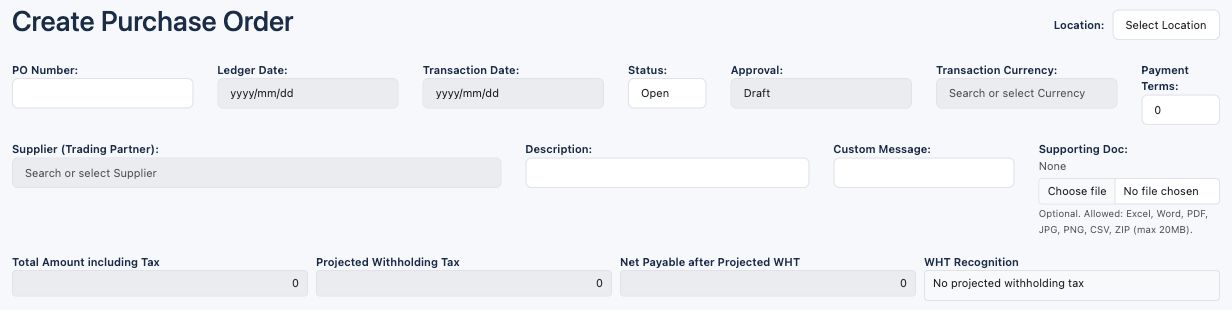
| Field and screenshot | Entry rule and example | Purpose and implication |
|---|---|---|
| Location - Figure 1 | Required permitted location; select before dependent header choices. Example: Main Office | Identifies the purchasing policy and document location. Caution: Confirm Current Company and actual location; a similar location name is not an access grant. |
| PO Number - Figure 1 | Generated, read-only. Example: Assigned after the order is saved | Identifies the purchase order within its document context. Caution: Retain company/location as well as the number when tracing documents. |
| Ledger Date - Figure 1 | Required PO record date; enabled after Location. Example: 2026-10-16 | Dates the non-posting commercial order. Caution: This date does not post a journal or prove downstream accounting periods are open. |
| Transaction Date - Figure 1 | Required document date; enabled after Ledger Date. Example: 2026-10-16 | Records the commercial document date. Caution: Do not confuse the order date with the later physical receipt or supplier invoice date. |
| Status - Figure 1 | Open or Closed on the editable form; cancellation uses a separate controlled action. Example: Open | Describes whether the commercial order remains open. Caution: Closed is not the same as Approved, paid or reversed. |
| Approval - Figure 1 | Read-only workflow display. Example: Draft | Distinguishes Draft, Submitted, Approved, Rejected and Reopened states. Caution: Save Draft does not mean approved; use the recorded workflow state. |
| Transaction Currency - Figure 1 | Required currency; functional currency is used where foreign currency is disabled. Example: USD | Denominates the order quantities and prices in money terms. Caution: Select a real currency result and review rate context for later receipts and invoices. |
| Payment Terms - Figure 1 | Required whole days, 0 to 3650; zero means due on receipt. Example: 30 | Records the agreed supplier payment term. Caution: An order term is not a payment instruction or an extension of an existing invoice's due date. |
| Supplier (Trading Partner) - Figure 1 | Required vendor-capable partner selected from suggestions. Example: Training Supplier | Links the order to the supplier. Caution: Typing a name alone does not select the record; confirm the full result and company. |
| Description - Figure 1 | Required document narrative within the configured description length. Example: Office equipment order | Explains the purpose of the purchase. Caution: Use a useful business reference, not credentials or unnecessary personal information. |
| Custom Message - Figure 1 | Optional text. Example: Deliver during receiving hours | Adds the commercial message used on applicable document output. Caution: Do not put internal approval deliberations in a supplier-facing message. |
| Supporting Doc - Figure 1 | Optional allowed document, maximum 20 MB in the screen: Excel, Word, PDF, JPG, PNG, CSV or ZIP. Example: Approved quotation.pdf | Associates evidence with the order. Caution: Check file contents and access before attaching or emailing; replacing/removing evidence requires authority. |
Purchase order totals field reference
| Field and screenshot | Entry rule and example | Purpose and implication |
|---|---|---|
| Total Amount including Tax - Figure 1 | Calculated from order lines. Example: 1000.00 with no tax | Summarises base amounts plus chargeable tax in order currency. Caution: An order total is a commitment, not a posted supplier balance. |
| Projected Withholding Tax - Figure 1 | Calculated projected withholding under the selected tax rules. Example: 0.00 in the no-tax example | Shows anticipated withholding separately from chargeable tax. Caution: Projected withholding is not proof of statutory recognition or remittance. |
| Net Payable after Projected WHT - Figure 1 | Calculated net after projected withholding. Example: 1000.00 with no withholding | Shows the projected supplier cash requirement. Caution: Recognition timing and actual invoice/payment amounts can differ. |
| WHT Recognition - Figure 1 | Read-only tax-recognition explanation. Example: No projected withholding tax | Explains the applicable withholding presentation. Caution: Read it with the tax code; do not assume every jurisdiction recognises WHT at invoice entry. |
Purchase order lines field reference
Figure 2 Purchase order lines


| Field and screenshot | Entry rule and example | Purpose and implication |
|---|---|---|
| Line # - Figure 2 | Generated line identity. Example: 10 | Identifies the source line for later matching. Caution: A line number alone is not a globally unique document identifier. |
| Item - Figure 2 | Required selected item; search supports item or barcode. Example: Training stocked item | Supplies item nature, description, UOM and applicable purchasing defaults. Caution: Use the correct company item and review its policy override and posting group. |
| Description - Figure 2 | Read-only, defaulted from Item Master. Example: Training stocked item | Describes the selected product or service. Caution: Do not substitute description text for the item identity. |
| UOM - Figure 2 | Read-only item unit display. Example: Each | Defines the quantity unit. Caution: Do not compare a supplier carton price with an Each quantity without an approved conversion. |
| Quantity - Figure 2 | Required positive number remaining greater than zero at company quantity precision. Example: 10 | Defines the quantity ordered. Caution: This does not put ten units on hand or mark them received. |
| Price - Figure 2 | Required unit price at applicable commercial unit-price precision. Example: 100.00 per Each | Sets the commercial line price before discount and tax. Caution: Confirm currency and UOM; amount precision and unit-price precision can differ. |
| Disc % - Figure 2 | Optional non-negative discount percentage below 100%. Example: 5.00 | Reduces the gross quantity-times-price amount. Caution: Check the calculated discount and base; do not enter a tax percentage here. |
| Disc Amt - Figure 2 | Read-only calculated discount amount in the screen. Example: 50.00 on 1000.00 at 5% | Shows the money value of the discount. Caution: Do not add this figure again as another discount. |
| Tax Code - Figure 2 | Optional selected applicable tax code; item/supplier defaults can populate it. Example: Approved purchase tax code, or none for a genuinely tax-free example | Calculates chargeable and projected withholding tax. Caution: Review jurisdiction, effective rules and recoverability; a default is not tax advice. |
| Base Amount - Figure 2 | Calculated quantity times price less discount. Example: 950.00 | Provides the taxable commercial base before chargeable tax. Caution: Check rounding and supplier quotation differences before approval. |
| Chargeable Tax - Figure 2 | Calculated chargeable tax amount. Example: 0.00 in the no-tax example | Adds applicable tax to the commercial base. Caution: It is not the same as withholding or proof of input-tax recovery. |
| Total Amount including Tax - Figure 2 | Calculated base plus chargeable tax. Example: 950.00 with no tax | Shows the gross line commitment. Caution: Do not interpret it as net cash after withholding. |
| Projected Withholding Tax - Figure 2 | Calculated projected WHT, following the tax code's signed convention. Example: 0.00 | Explains the anticipated tax deduction from supplier cash. Caution: Do not manually reverse its sign or assume it is already posted. |
| Net Payable after Projected WHT - Figure 2 | Calculated gross adjusted for projected WHT. Example: 950.00 with no withholding | Shows expected net supplier cash for the line. Caution: Use actual invoice and application amounts for settlement. |
| Cost Center - Figure 2 | Optional selected current-company cost center. Example: Operations | Attributes the commercial line to an internal responsibility centre. Caution: It does not replace an expense account, approval group or location. |
| Del - Figure 2 | Row removal control while editing. Example: X on an unwanted unsaved line | Removes that line from the proposed order content. Caution: Check the selected line and dependencies; removing an order line does not reverse stock or invoices. |
Goods receipt header field reference
Figure 3 Goods receipt header
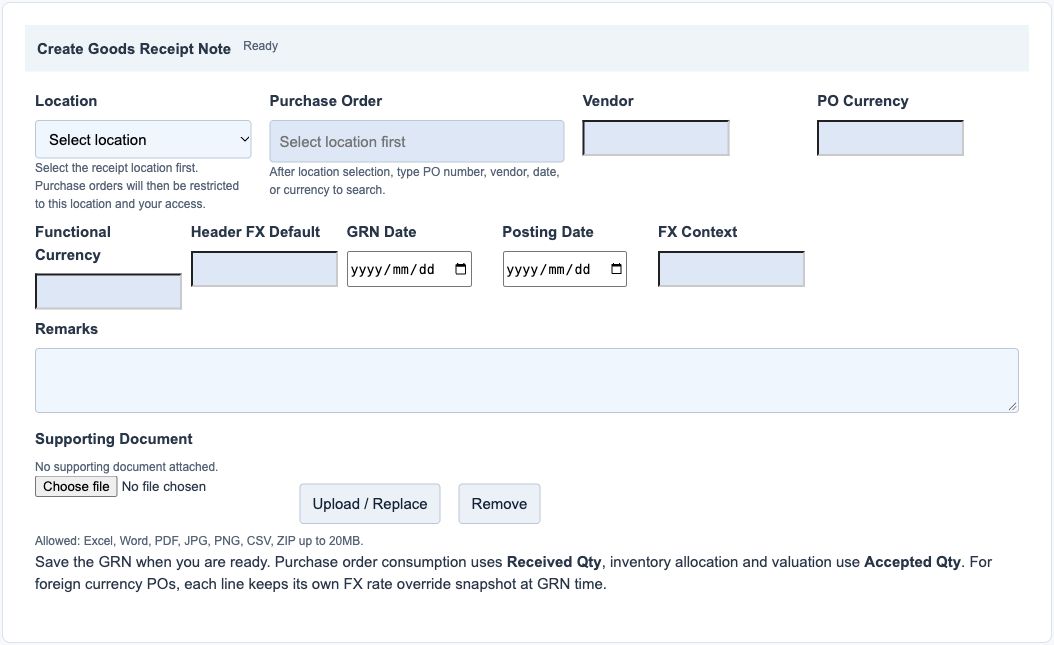
| Field and screenshot | Entry rule and example | Purpose and implication |
|---|---|---|
| Location - Figure 3 | Required before selecting a purchase order. Example: Main Office | Restricts eligible orders to the location and your access. Caution: Confirm the actual receiving location before choosing an order. |
| Purchase Order - Figure 3 | Required selected open, approved purchase order. Example: The authorised supplier order | Supplies the vendor and eligible receipt lines. Caution: Closed or unapproved orders are not receipt sources; draft orders are not approvals. |
| Vendor - Figure 3 | Read-only derived from the selected order. Example: Training Supplier | Identifies whose goods are being received. Caution: A mismatch with the delivery note needs investigation, not manual replacement of a hidden ID. |
| PO Currency - Figure 3 | Read-only order-currency display. Example: USD | Identifies the unit-cost currency. Caution: This is not necessarily the company's functional currency. |
| Functional Currency - Figure 3 | Read-only company currency. Example: USD in a same-currency example | Identifies the inventory ledger valuation currency. Caution: Compare reports in the same currency basis. |
| Header FX Default - Figure 3 | Read-only initial rate context. Example: 1 for same currency | Provides the initial conversion context for receipt lines. Caution: Review the line FX Rate and Posting Date; do not assume the PO date's rate is always the receipt rate. |
| GRN Date - Figure 3 | Required physical receipt/document date. Example: 2026-10-16 | Records when the goods receipt document is dated. Caution: Do not backdate to conceal a late receipt. |
| Posting Date - Figure 3 | Required accounting date in an eligible open period. Example: 2026-10-16 | Dates downstream inventory and receipt-accrual accounting. Caution: It is distinct from the PO Ledger Date and GRN Date. |
| FX Context - Figure 3 | Read-only rate explanation. Example: PO currency matches functional currency | Explains the rate basis or missing-rate context. Caution: Resolve a missing rate before relying on functional cost. |
| Remarks - Figure 3 | Optional receiving narrative. Example: Outer packaging checked | Records operational receiving notes. Caution: Rejected goods and quantities belong in their dedicated fields as well. |
| Supporting Document - Figure 3 | Optional receiving evidence; upload controls apply to the saved document state. Example: Delivery note.pdf | Links the receipt to supporting documentation. Caution: Do not upload confidential supplier information to an unrelated company or assume a draft attachment proves posting. |
Goods receipt line grid field reference
Figure 4 Goods receipt line grid
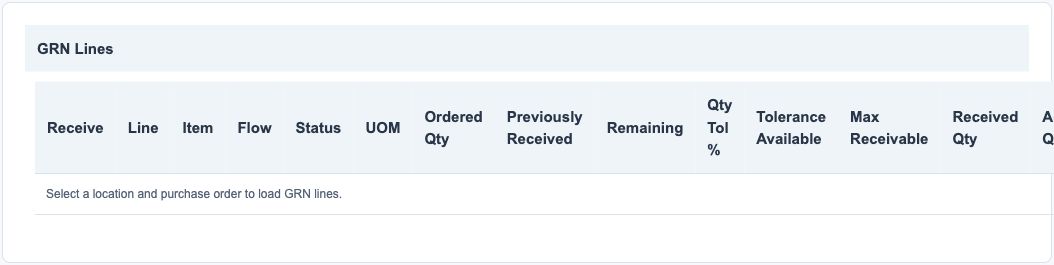

| Field and screenshot | Entry rule and example | Purpose and implication |
|---|---|---|
| Receive - Figure 4 | Selection checkbox for an eligible line. Example: Checked for the delivered line | Identifies the lines included in this receipt. Caution: Do not select lines for goods not delivered. |
| Line - Figure 4 | Read-only source line number. Example: 10 | Links the receipt to the order line. Caution: Check item and order identity as well as the number. |
| Item - Figure 4 | Read-only selected order item. Example: Training stocked item | Identifies the goods received. Caution: A similar description does not mean the same SKU. |
| Flow - Figure 4 | Read-only effective receipt flow. Example: TWO_STEP_GRN | Explains whether separate GRN receiving applies. Caution: Do not force a one-step item into separate GRN receiving. |
| Status - Figure 4 | Read-only eligibility or line-status information. Example: Eligible receiving status | Explains whether the line can be received. Caution: Resolve a blocked status rather than changing policy solely to bypass it. |
| UOM - Figure 4 | Read-only order unit. Example: Each | Defines all quantity columns on the line. Caution: Count and compare in this UOM. |
| Ordered Qty - Figure 4 | Read-only ordered-quantity snapshot. Example: 10 | Provides the commercial quantity baseline. Caution: It is not remaining stock or quantity already received. |
| Previously Received - Figure 4 | Calculated prior receipt quantity used by the receiving calculation. Example: 4 | Shows earlier receiving activity considered for this order line. Caution: Check receipt and return history when the figure differs from physical expectations. |
| Remaining - Figure 4 | Calculated remaining order quantity. Example: 6 before any tolerance addition | Shows the ordinary unreceived quantity. Caution: Do not confuse remaining with Max Receivable when tolerance applies. |
| Qty Tol % - Figure 4 | Read-only effective quantity tolerance. Example: 5.00% | Shows the policy tolerance applied to the line. Caution: An enabled item override may differ from location policy. |
| Tolerance Available - Figure 4 | Calculated additional tolerance quantity available. Example: 0.50 on an otherwise unreceived ten-unit order at 5% | Separates tolerance headroom from normal remaining quantity. Caution: This is cumulative headroom, not a fresh allowance for every receipt. |
| Max Receivable - Figure 4 | Calculated maximum current receipt quantity. Example: 10.50 for that unreceived example | Combines the applicable receiving balance and tolerance. Caution: Recheck after other receipts or returns; do not rely on a stale screen. |
| Received Qty - Figure 4 | Required non-negative actual delivered quantity on a selected line. Example: 10 | Records the physical quantity presented for receipt. Caution: Accepted plus Rejected must equal Received; count goods rather than copying the PO blindly. |
| Accepted Qty - Figure 4 | Required non-negative accepted portion. Example: 9 | Determines accepted receipt quantity and related allocation. Caution: Do not include rejected goods in stock accepted for use. |
| Rejected Qty - Figure 4 | Required non-negative rejected portion, including zero. Example: 1 | Separately identifies goods not accepted. Caution: 9 accepted plus 1 rejected must reconcile to 10 received. |
| Unit Cost - Figure 4 | Read-only PO-derived unit cost in PO currency. Example: 100.00 | Provides the receipt costing basis from the commercial source. Caution: It is not an editable supplier invoice price. |
| FX Rate - Figure 4 | Positive line conversion rate; editable only when permitted by currency/state. Example: 1 for same-currency receipt | Converts the line unit cost into functional currency. Caution: Use the approved rate for the receipt posting context; do not use zero or invert the rate. |
| Functional Unit Cost - Figure 4 | Calculated unit cost in company currency. Example: 100.00 when rate is 1 | Shows the functional receipt cost basis. Caution: It is a unit cost, not the total receipt value. |
| Allocated Qty - Figure 4 | Calculated allocation quantity. Example: 9 accepted units allocated | Shows how much accepted quantity has warehouse/tracking allocation. Caution: For applicable inventory lines it must agree with accepted quantity before posting. |
| Allocation - Figure 4 | Manage Allocation or View Allocation according to state. Example: The approved receiving warehouse and bin | Opens the receiving allocation detail for applicable stock. Caution: Warehouse, bin, lot/serial and expiry requirements still apply; choosing a PO alone does not allocate stock. |
Read the receiving gate pass summary
The GRN's Gate Pass Groups table is an output summary associated with valid allocations and posting, not another PO or invoice. Gate Pass # identifies the record; Type identifies its movement purpose; Location and Warehouse identify receiving ownership and storage; Date dates the movement; Vehicle, Driver and Transporter describe transport; Condition describes the goods condition recorded for that group.
Blank transport details are not proof that the receipt failed. Gate pass evidence does not replace stock allocation, the GRN posting state or the accounting journal. Record only operationally necessary transport information under your privacy policy.
Work through a simple receiving example
Assume a no-tax same-currency order for ten units at 100 each, with no discount and no earlier receipt. The order commitment is 1000. If ten units arrive and one is rejected, Received Qty is 10, Accepted Qty is 9 and Rejected Qty is 1. The applicable allocation covers nine accepted units.
At a functional rate of 1 and receipt unit cost of 100, the nine accepted units have an illustrative receipt value of 900. The ordinary two-step accounting relationship is an inventory asset debit of 900 and a GRNI credit of 900. The supplier invoice and any price or tax differences remain separate. This arithmetic assumes no other costs, tax, currency differences or returns; compare your actual posted records rather than forcing them to these example amounts.
Review receiving and accounting evidence
| Review | Compare | Difference to investigate |
|---|---|---|
| Commercial authorisation | PO supplier, approval and open status | Draft/unapproved source, changed supplier or closed order |
| Physical quantities | Delivery evidence, accepted/rejected quantities and receipt history | Missing goods, duplicate receipt or unexplained tolerance use |
| Allocation | Accepted quantity versus warehouse/bin/tracking detail | Wrong location, unavailable bin, incomplete lot/serial data |
| Posting | GRN state, actual inventory movement and linked journal | Saved draft mistaken for posting or incomplete downstream processing |
| Receipt accrual | Receipt values versus matched supplier invoices and GRNI | Uninvoiced receipts, price/FX differences or incorrect matching |
Use a consistent company, location, as-of date and currency basis. The purchasing reports include receipt and GRNI reconciliation views; report names alone are not proof that a document's stock and journal have completed. Investigate a missing journal or movement before duplicating the transaction.
Resolve common order and receipt problems
| Problem | What to review |
|---|---|
| Supplier or item search is empty | Company/location access, supplier role, active records and an actual selected result |
| PO is absent from GRN search | Location, Open status, Approved state and eligible two-step inventory lines |
| Receipt exceeds the limit | Cumulative receipts/returns, current effective tolerance and Max Receivable |
| Allocation blocks posting | Accepted quantity, receiving warehouse/location, required bins and item tracking |
| FX or functional cost is missing | Receipt Posting Date, company currency, valid dated rate and permitted line override |
| Order changes are blocked | Draft/posted GRN dependencies and protected linked commercial fields |
| Posted receipt needs correction | Preserve the trail and review matched invoices/returns before any authorised correction |
Do not enable negative stock, widen tolerance, change policy or create duplicate documents solely to bypass an unexplained error.