
Reconcile bank statements with a worked example
Map the statement template, match entries and explain the closing difference.
Reconcile each real bank account in its bank currency and selected company. A match links evidence to a book transaction; it neither executes a payment nor posts a missing fee. Keep statement evidence, the reconciliation and supporting accounting records together.
Prepare the bank and statement
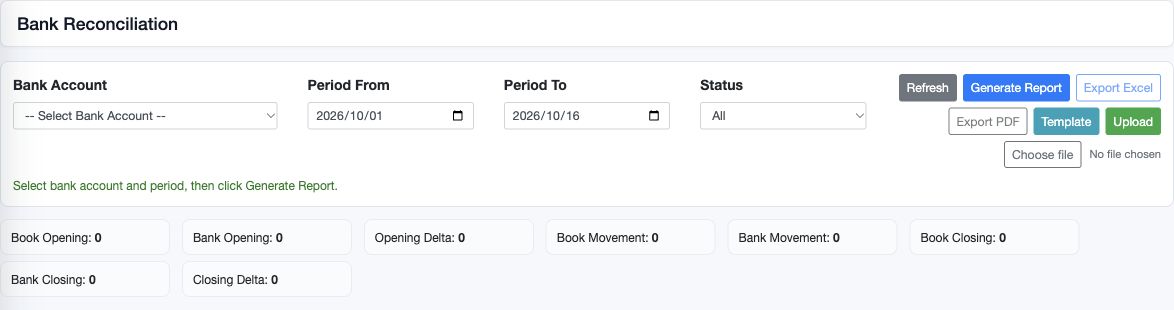
Confirm the bank master, currency, bank GL and permitted locations. Choose the bank in Bank Reconciliation and set Period From and Period To. Obtain the actual statement opening and closing balances for the same range. Review previous uploads before importing another file.
Download the Bank Statement Lines template from that selected account. Fill the BankStatement sheet without renaming its columns. Preserve Context and enter statement_opening_balance and statement_closing_balance there. The account selected by the screen is enforced for the upload; a different bank number in a row is not a safe way to change context.
Statement template columns
| Field or control | Entry and example | Implication and caution |
|---|---|---|
| line_no | Statement line sequence. | Keep source ordering; it is not the book transaction number. |
| statement_date | Bank date YYYY-MM-DD. | Used in the reconciliation period filter. |
| value_date | Value date where supplied. | Retains bank value-date evidence; do not replace statement_date to hide timing. |
| external_line_id | Stable bank/source reference if available. | Useful for investigation; not a blanket duplicate guarantee. |
| bank_reference | Exact bank transaction reference. | Normalisation helps comparison but does not prove an amount match. |
| description | Bank narration. | Retain enough evidence to identify the actual event. |
| debit_amount | Withdrawal, e.g. 200.00. | Reduces statement balance; do not reverse signs by copying ledger debit conventions. |
| credit_amount | Deposit, e.g. 300.00. | Increases statement balance; do not put the same movement on both sides. |
| bank_account | Selected-account context or accepted bank identifier. | A selected bank is enforced by the upload screen. |
| currency | Bank currency code, e.g. USD. | Must match the intended bank; do not aggregate unlike currencies. |
| Context statement_opening_balance | Actual statement opening, e.g. 1000.00. | Provides independent opening evidence rather than a zero fallback. |
| Context statement_closing_balance | Actual statement closing, e.g. 1290.00. | Compare with opening plus statement movement and period bounds. |
Validate and commit the upload
Replace the example row with your real statement lines. Debit means a bank withdrawal and credit means a bank deposit: signed movement is credit less debit. Use dates in YYYY-MM-DD format and numeric amounts without currency symbols. Keep a stable external line reference where supplied by the bank. Avoid summing subtotals into the transaction rows.
Upload, Validate and inspect every reported row error and the preview totals before Commit. A valid preview is not a completed import. Check the final job status and saved lines. After an interruption, inspect the job and existing lines before resubmitting; a reference is useful evidence but is not a universal duplicate-prevention guarantee.
Match and unmatch
Use Manual Match for a statement line and search eligible book transactions. Compare amount, sign, bank currency, date, company, source document and bank reference. Match Selected requires an exact signed amount match and does not allow one book transaction to be matched to another statement line at the same time. A deposit 300 does not match a withdrawal 300.
If one bank line combines several book transactions, or a fee is netted into a receipt, do not assume a many-to-one match is supported. Reconcile the components and use the organisation's authorised accounting process. Never alter the real statement amount to make an exact match pass.
Unmatch removes the association. It does not delete the statement line or reverse the book transaction. Reopen the row and confirm its unmatched state; match it again only after reviewing the source. A view-only user should ask an authorised reconciliation user to perform matching.
Worked October reconciliation
This fictional example uses USD throughout and an October 1 to 31 period. The opening book and statement balances are both 1,000. Posted books contain a deposit 300, a payment 200 and a bank fee 10. The bank statement contains the deposit 300 and fee 10; the payment has not yet cleared.
| Item | Books USD | Statement USD |
|---|---|---|
| Opening | 1,000 | 1,000 |
| Deposit | +300 | +300 |
| Payment not yet cleared | -200 | No bank line yet |
| Fee | -10 | -10 |
| Closing | 1,090 | 1,290 |
Match the deposit 300 and fee 10 to their correct posted records. The unmatched book payment is negative 200 and there is no unmatched bank amount. Closing Delta is statement less books: 1,290 minus 1,090 equals 200. Adjusted statement balance is 1,290 less outstanding payment 200 equals 1,090. Keep the payment as an explained timing item and check its clearance in the next period. A supported timing difference does not justify posting another payment.
If the fee was not yet recorded, books would close at 1,100. The unexplained fee 10 would remain on the statement side. Record the actual fee once through the approved accounting workflow, verify its posted bank credit and expense debit, refresh the reconciliation and then match it. Do not use a balancing journal for an unidentified difference.
Read the report without losing detail
Generate Report shows book/statement opening, movement, closing, opening/closing delta and unmatched totals. The book opening uses the bank GL projection before the period; period movements come from supported cash records and bank-impacting journals. Check the bank GL and source records independently, particularly if posting is incomplete or a mapping changed.
When only one statement balance is supplied, the other can be derived from net movement. If neither is supplied, the report can fall back to zero opening plus movement. A calculated figure is not independent bank evidence. Provide the actual balances and investigate any opening delta before relying on the closing comparison.
Review every unmatched line, not only net unmatched totals: an erroneous deposit 100 and withdrawal 100 can net to zero. Different-currency GL journals can be excluded from the selected bank-currency comparison; inspect any exclusion note. Use consistent dates when exporting Excel/PDF and retain the statement and outstanding-item explanations.
Bank transfer fields
| Field or control | Entry and example | Implication and caution |
|---|---|---|
| Transfer Number | Generated locked identifier. | Find the existing record before retrying. |
| Ledger Date / Transaction Date | Accounting date and underlying transfer date. | Must respect period controls and truthful transfer evidence. |
| Supporting Document / Description | Optional statement/instruction evidence and purpose. | Not an instruction sent to the actual bank. |
| Line # | Generated line sequence. | Each line has a source and destination side. |
| From Bank Account / From Currency | Select the source; currency comes from its master. | Requires access to the bank and its location context. |
| From Amount / From FX Override | Actual source outflow and authorised conversion basis. | Review functional clearing and any FX; do not assume the destination amount equals source units. |
| From Bank Reference | Actual source bank reference. | Preserve the source-leg reconciliation trail. |
| To Bank Account / To Currency | Select the destination; currency is locked to its master. | Check it is the intended receiving bank, not merely a similar label. |
| To Amount / To FX Override | Actual inflow and authorised conversion basis. | Different-currency legs need the correct amounts/rates and gain/loss treatment. |
| To Bank Reference / Description | Destination reference and line explanation. | Reconcile the destination separately and investigate charges/clearing differences. |
| Add/Remove / Save | Review each line before saving once. | Inspect linked accounting and both bank statements after processing. |
The transfer source and destination must be accessible company bank accounts. Currency comes from each bank; FX overrides and clearing mappings affect the accounting. A transfer record does not send an instruction to a bank. Reconcile both bank legs and actual charges, and review any transfer-clearing balance. Do not use a transfer to disguise a supplier payment, customer receipt or foreign-exchange difference.
Related guides
Cash and bank setup, Journal entries, Import columns and Report parameters.