
Choose parameters for individual reports
Find each standard report and its exact parameter requirements and choices.
Select the current company, open Reporting Center and choose the intended report. Set its required parameters, review filters and output format, then run it once. Wait for the report job to complete and inspect the saved output and parameters. Available reports depend on your subscription, permissions and configuration. The reference below groups reports only when their parameter requirements and choices are identical.
Report parameter screen
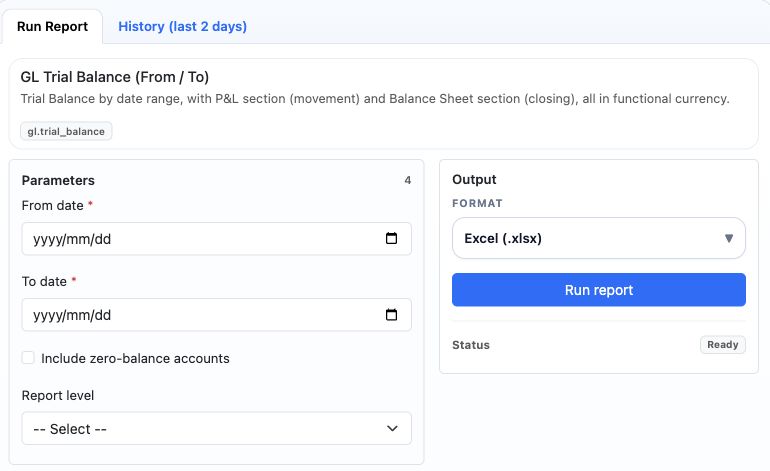
Read dates, filters and outputs
A date range describes activity; an as-of date describes a position. Confirm ledger versus transaction date where offered. Empty optional filters do not grant unrestricted access. Default values apply when a parameter is omitted; clearing a field can be different from explicitly choosing No or zero. Use the actual lookup control for record identifiers. Some reports expose additional filters after selecting a source, template or document type.
For a trial balance, compare opening, debit/credit movement and closing at the same account level. Income and expense openings use the report's period semantics; do not add pre-period profit again to the selected period. For bank, AR/AP, stock, asset and payroll reports, reconcile the detail to the relevant source records and GL using consistent dates, currencies, states and scope. Top-N and include/exclude filters can change the population. A completed job or empty output is not proof of a zero liability or complete posting.
Distinguish reports from actions
AR Auto-Apply Receipts is an operational job, not a read-only balance report. Its dry_run option defaults to False: running it without selecting a preview can apply receipts to customer transactions. Use an authorised preview first, inspect customer/location scope and proposed applications, then obtain approval before an actual application run. Retain the resulting application and accounting references. Do not use a report job retry as a way to repeat financial applications.
Find a standard report
| Report | Parameter reference |
|---|---|
| AP Aging Summary (By Vendor) (ap.ap_aging_summary) | AP Aging Summary (By Vendor) parameters |
| AP Cash Requirements / Payment Forecast (ap.cash_requirements_forecast) | AP Cash Requirements / Payment Forecast parameters |
| AP Closed Purchase Orders (ap.po_closed_summary) | AP Closed Purchase Orders parameters |
| AP Employee Advance / Imprest Detail (ap.employee_imprest_tracking_detail) | AP Employee Advance / Imprest Detail parameters |
| AP Employee Advance / Imprest Summary (ap.employee_imprest_tracking) | AP Employee Advance / Imprest Summary parameters |
| AP GRN Match FX Detail (ap.grn_match_fx_detail) | AP GRN Match FX Detail parameters |
| AP Gate Pass Print Pack (ap.gate_pass_print_pack) | AP Gate Pass Print Pack parameters |
| AP Gate Pass Register (ap.gate_pass_register) | AP Gate Pass Print Pack parameters |
| AP Gate Pass Summary by Warehouse (ap.gate_pass_summary_by_warehouse) | AP Gate Pass Print Pack parameters |
| AP Input Tax Detail Register (tax.ap_input_tax_detail_register) | AP Input Tax Detail Register parameters |
| AP Item Spend Summary (ap.item_spend_summary) | AP Spend by Cost Center parameters |
| AP Miscellaneous Payment Monthly Trend (ap.misc_payment_monthly_trend) | AP Miscellaneous Payment Monthly Trend parameters |
| AP Miscellaneous Payment Register (ap.misc_payment_register) | AP Miscellaneous Payment Monthly Trend parameters |
| AP Miscellaneous Payment Vendor Activity (ap.misc_payment_vendor_activity) | AP Miscellaneous Payment Monthly Trend parameters |
| AP Monthly Spend Trend (ap.monthly_spend_trend) | AP Monthly Spend Trend parameters |
| AP Open Purchase Orders (ap.po_open_summary) | AP Closed Purchase Orders parameters |
| AP Open Transactions (ap.ap_open_transactions) | AP Open Transactions parameters |
| AP Payable Aging Detail (By Invoice) (ap.payable_aging_detail) | AP Payable Aging Detail (By Invoice) parameters |
| AP Payment Application Detail (ap.payment_application_detail) | AP Payment Application Detail parameters |
| AP Payment Batch Register (ap.payment_batch_register) | AP Payment Batch Register parameters |
| AP Payment Register (ap.ap_payment_register) | AP Payment Register parameters |
| AP Purchase Order Balance by Line (ap.po_balance_by_line) | AP Purchase Order Balance by Line parameters |
| AP Purchase Order Utilization Detail (ap.po_utilization_detail) | AP Purchase Order Utilization Detail parameters |
| AP Purchase Price Variance Detail (ap.purchase_price_variance_detail) | AP GRN Match FX Detail parameters |
| AP Sales Tax Invoice Register (ap.sales_tax_invoice_register) | AP Sales Tax Invoice Register parameters |
| AP Sales Tax Invoice Summary by Transaction Type (ap.sales_tax_invoice_summary_by_type) | AP Sales Tax Invoice Register parameters |
| AP Spend by Contra Account (ap.expense_account_spend) | AP Spend by Cost Center parameters |
| AP Spend by Cost Center (ap.cost_center_spend) | AP Spend by Cost Center parameters |
| AP Subledger to GL Reconciliation (ap.subledger_gl_reconciliation) | AP Subledger to GL Reconciliation parameters |
| AP Supplier Purchases by PO (ap.supplier_purchases_by_po) | AP Supplier Purchases by PO parameters |
| AP Supplier Purchases by Vendor (ap.supplier_purchases_by_vendor) | AP Supplier Purchases by Vendor parameters |
| AP Transaction Register (ap.transaction_register) | AP Transaction Register parameters |
| AP Unapplied Payments / Supplier Advances (ap.unapplied_payments) | AP Unapplied Payments / Supplier Advances parameters |
| AP Vendor Balance Summary (ap.vendor_balance_summary) | AP Payment Application Detail parameters |
| AP Vendor FX Exposure (ap.vendor_fx_exposure) | AP Vendor FX Exposure parameters |
| AP Vendor Item Spend Detail (ap.vendor_item_spend_detail) | AP Monthly Spend Trend parameters |
| AP Vendor Ledger Detail (ap.vendor_ledger_detail) | AP Vendor Ledger Detail parameters |
| AP Vendor Match Register (ap.vendor_match_register) | AP GRN Match FX Detail parameters |
| AP Vendor Note Allocation Detail (ap.vendor_note_allocation_detail) | AP Payment Application Detail parameters |
| AP Vendor Open Item Detail (ap.vendor_open_item_detail) | AP Vendor Open Item Detail parameters |
| AP Vendor Statement (ap.ap_vendor_statement) | AP Vendor Statement parameters |
| AP Withholding Tax Detail Register (tax.ap_withholding_tax_detail_register) | AP Input Tax Detail Register parameters |
| AP Withholding Tax Register (ap.withholding_tax_register) | AP Payment Application Detail parameters |
| AR Adjustments / Write-Off Register (ar.adjustment_writeoff_register) | AR Adjustments / Write-Off Register parameters |
| AR Aging Detail (ar.ar_aging_detail) | AR Aging Detail parameters |
| AR Aging Summary (By Customer) (ar.ar_aging_summary) | AR Aging Summary (By Customer) parameters |
| AR Auto-Apply Unapplied Receipts (Functional Currency) (ar.auto_apply_receipts) | AR Auto-Apply Unapplied Receipts (Functional Currency) parameters |
| AR Closed Sales Orders (ar.so_closed_summary) | AR Closed Sales Orders parameters |
| AR Collection / Cash Report (ar.collection_cash_report) | AR Collection / Cash Report parameters |
| AR Collection Forecast (ar.collection_forecast) | AR Aging Summary (By Customer) parameters |
| AR Credit Application Detail (ar.credit_application_detail) | AR Credit Application Detail parameters |
| AR Customer Balance Summary (ar.customer_balance_summary) | AR Credit Application Detail parameters |
| AR Customer Credit Exposure (ar.customer_credit_exposure) | AR Customer Credit Exposure parameters |
| AR Customer Ledger Detail (ar.customer_ledger_detail) | AR Customer Ledger Detail parameters |
| AR Customer Open Item Detail (ar.customer_open_item_detail) | AR Customer Open Item Detail parameters |
| AR Customer Sales by Customer (ar.customer_sales_by_customer) | AR Customer Sales by Customer parameters |
| AR Customer Sales by Invoice (ar.customer_sales_by_invoice) | AR Customer Sales by Invoice parameters |
| AR Customer Sales by Item (ar.customer_sales_by_item) | AR Customer Sales by Item parameters |
| AR Customer Statement (ar.ar_customer_statement) | AR Customer Statement parameters |
| AR Gate Pass Print Pack (ar.gate_pass_print_pack) | AR Gate Pass Print Pack parameters |
| AR Gate Pass Register (ar.gate_pass_register) | AR Gate Pass Print Pack parameters |
| AR Gate Pass Summary by Warehouse (ar.gate_pass_summary_by_warehouse) | AR Gate Pass Print Pack parameters |
| AR Margin by Customer (ar.margin_by_customer) | AR Customer Sales by Customer parameters |
| AR Miscellaneous Receipt Bank and Contra Analysis (ar.misc_receipt_bank_contra_analysis) | AR Miscellaneous Receipt Bank and Contra Analysis parameters |
| AR Miscellaneous Receipt Customer Activity (ar.misc_receipt_customer_activity) | AR Miscellaneous Receipt Customer Activity parameters |
| AR Miscellaneous Receipt Monthly Trend (ar.misc_receipt_monthly_trend) | AR Miscellaneous Receipt Monthly Trend parameters |
| AR Miscellaneous Receipt Register (ar.misc_receipt_register) | AR Miscellaneous Receipt Register parameters |
| AR Miscellaneous Receipt Status Activity (ar.misc_receipt_status_activity) | AR Miscellaneous Receipt Status Activity parameters |
| AR Open Sales Orders (ar.so_open_summary) | AR Closed Sales Orders parameters |
| AR Open Transactions (ar.ar_open_transactions) | AR Open Transactions parameters |
| AR Output Tax Detail Register (tax.ar_output_tax_detail_register) | AP Input Tax Detail Register parameters |
| AR Receipt Application Detail (ar.receipt_application_detail) | AR Credit Application Detail parameters |
| AR Receipt Register (ar.ar_receipt_register) | AP Payment Register parameters |
| AR Sales Order Balance by Line (ar.so_balance_by_line) | AR Sales Order Balance by Line parameters |
| AR Sales Order Fulfillment Detail (ar.so_utilization_detail) | AR Sales Order Fulfillment Detail parameters |
| AR Sales Tax Invoice Register (ar.sales_tax_invoice_register) | AR Sales Tax Invoice Register parameters |
| AR Sales Tax Invoice Summary by Transaction Type (ar.sales_tax_invoice_summary_by_type) | AR Sales Tax Invoice Register parameters |
| AR Subledger to GL Reconciliation (ar.subledger_gl_reconciliation) | AR Subledger to GL Reconciliation parameters |
| AR Transaction Register (ar.transaction_register) | AR Transaction Register parameters |
| AR Unapplied Receipts (ar.unapplied_receipts) | AR Unapplied Receipts parameters |
| AR Withholding Tax Detail Register (tax.ar_withholding_tax_detail_register) | AP Input Tax Detail Register parameters |
| Active Formula by Output Item (prod.active_formula_by_output_item) | FA Setup Listing parameters |
| Approval Controls & Reopened Reviews (bsr.approval_controls) | Approval Controls & Reopened Reviews parameters |
| Attendance Device Fingerprint Register (hr.attendance_device_fingerprint_register) | Attendance Device Fingerprint Register parameters |
| Attendance Face Match / Liveness Exception Report (hr.attendance_face_liveness_exception) | Attendance Device Fingerprint Register parameters |
| Attendance Geofence Exception Summary (hr.attendance_geofence_exception_summary) | Attendance Device Fingerprint Register parameters |
| Attendance Policy Compliance by Position (hr.attendance_policy_compliance_by_position) | Attendance Policy Compliance by Position parameters |
| Balance Sheet Reconciliation Register (bsr.review_register) | Balance Sheet Reconciliation Register parameters |
| Balance Sheet Review Audit History (bsr.review_history) | Balance Sheet Review Audit History parameters |
| Bank Account Balance Summary (cashbank.bank_account_balance_summary) | Bank Account Balance Summary parameters |
| Bank Account Ledger Detail (cashbank.bank_account_ledger_detail) | Bank Account Balance Summary parameters |
| Bank Account Master Listing (cashbank.bank_account_master_listing) | Bank Account Master Listing parameters |
| Bank Activity by Location (cashbank.bank_activity_by_location) | Bank Account Balance Summary parameters |
| Bank Payments and Receipts Report (cashbank.bank_payments_receipts) | Bank Account Balance Summary parameters |
| Bank Transfer FX Gain/Loss Report (cashbank.bank_transfer_fx_gain_loss) | Bank Account Balance Summary parameters |
| Bank Transfer Register (cashbank.bank_transfer_register) | Bank Account Balance Summary parameters |
| Batch Tracking Exceptions (prod.batch_tracking_exceptions) | Production Abnormal Loss / Gain GL Impact Report parameters |
| Batches Missing Inventory Transaction Link (prod.missing_inventory_transaction_link) | Production Abnormal Loss / Gain GL Impact Report parameters |
| Biometric Consent Register (hr.biometric_consent_register) | Attendance Policy Compliance by Position parameters |
| Biometric Enrollment Version Audit Report (hr.biometric_enrollment_version_audit) | Attendance Policy Compliance by Position parameters |
| Co-Product / By-Product Cost Allocation Report (prod.co_by_product_cost_allocation) | Production Abnormal Loss / Gain GL Impact Report parameters |
| Compensation Basic Salary Exception Report (hr.compensation_basic_salary_exception) | Attendance Policy Compliance by Position parameters |
| Compensation Effective-Dated Change Register (hr.compensation_effective_dated_change_register) | Compensation Effective-Dated Change Register parameters |
| Compensation by Department / Grade / Position Summary (hr.compensation_department_grade_position_summary) | Attendance Policy Compliance by Position parameters |
| Completed Batches Missing Completion Journal (prod.completed_missing_completion_journal) | Production Abnormal Loss / Gain GL Impact Report parameters |
| Completion & Account Coverage (bsr.coverage) | Completion & Account Coverage parameters |
| Customer / Supplier Tax Code Assignment Report (tax.customer_supplier_tax_code_assignment) | POS Loyalty Profile Listing parameters |
| Customer Interest Funnel Summary (customer_interest.funnel_summary) | Customer Interest Funnel Summary parameters |
| Customer Interest Lifecycle and Response Analysis (customer_interest.lifecycle_analysis) | Customer Interest Funnel Summary parameters |
| Customer Interest Register (customer_interest.register) | Customer Interest Funnel Summary parameters |
| Customer Interest Source and Owner Performance (customer_interest.source_owner_performance) | Customer Interest Funnel Summary parameters |
| Customer Invoice Detail - One or Range (ar.customer_invoice_detail) | Customer Invoice Detail - One or Range parameters |
| Deferred Withholding Tax Status (tax.deferred_withholding_tax_status) | AP Input Tax Detail Register parameters |
| E-Invoice Document Register (tax.einvoice_document_register) | E-Invoice Document Register parameters |
| E-Invoice Lifecycle Audit Report (tax.einvoice_lifecycle_audit) | E-Invoice Document Register parameters |
| E-Invoice Rejection / Exception Report (tax.einvoice_rejection_exception) | E-Invoice Document Register parameters |
| E-Invoice Submission Status Report (tax.einvoice_submission_status) | E-Invoice Document Register parameters |
| E-Invoice Tax Category / Exemption Report (tax.einvoice_tax_category_exemption) | E-Invoice Document Register parameters |
| Employee Active Without Position Assignment Report (hr.employee_active_without_position_assignment) | Attendance Policy Compliance by Position parameters |
| Employee Advance AP Reconciliation (hr.employee_advance_ap_reconciliation) | Employee Advance AP Reconciliation parameters |
| Employee Bank Details Exception Report (hr.employee_bank_details_exception) | Attendance Policy Compliance by Position parameters |
| Employee Biometric Enrollment Status Report (hr.biometric_enrollment_status) | Attendance Policy Compliance by Position parameters |
| Employee Deduction Assignment Register (hr.employee_deduction_assignment_register) | Attendance Policy Compliance by Position parameters |
| Employee Earning Assignment Register (hr.employee_earning_assignment_register) | Attendance Policy Compliance by Position parameters |
| Employee Next of Kin Listing (hr.employee_next_of_kin_listing) | Attendance Policy Compliance by Position parameters |
| Employee Position Assignment Register (hr.employee_position_assignment_register) | Attendance Policy Compliance by Position parameters |
| Employee Tax / National ID Exception Report (hr.employee_tax_national_id_exception) | Attendance Policy Compliance by Position parameters |
| Employee Trading Partner Link Exception Report (hr.employee_trading_partner_link_exception) | Attendance Policy Compliance by Position parameters |
| Employees Missing Compensation Report (hr.employees_missing_compensation) | Attendance Policy Compliance by Position parameters |
| FA Adjustment Register (fa.adjustment_register) | FA Adjustment Register parameters |
| FA Asset Additions Report (fa.asset_additions) | FA Adjustment Register parameters |
| FA Asset Group Listing (fa.asset_group_listing) | Bank Account Master Listing parameters |
| FA Asset Register (fa.asset_register) | FA Asset Register parameters |
| FA Asset Retirements / Disposals Detail (fa.asset_retirements_disposals_detail) | FA Adjustment Register parameters |
| FA Asset Tag / Physical Verification Listing (fa.asset_tag_physical_verification_listing) | FA Asset Tag / Physical Verification Listing parameters |
| FA Assets Fully Depreciated Report (fa.assets_fully_depreciated) | FA Asset Tag / Physical Verification Listing parameters |
| FA CWIP Aging Report (fa.cwip_aging) | FA CWIP Aging Report parameters |
| FA CWIP Source Register (fa.cwip_source_register) | FA CWIP Aging Report parameters |
| FA Capitalization Register (fa.capitalization_register) | FA Adjustment Register parameters |
| FA Capitalization Source Detail (fa.capitalization_source_detail) | FA Adjustment Register parameters |
| FA Category Listing (fa.category_listing) | Bank Account Master Listing parameters |
| FA Depreciation Forecast / Projection (fa.depreciation_forecast_projection) | FA Depreciation Forecast / Projection parameters |
| FA Depreciation Reversal Register (fa.depreciation_reversal_register) | FA Adjustment Register parameters |
| FA Depreciation Run Register (fa.depreciation_run_register) | FA Depreciation Run Register parameters |
| FA Depreciation Summary (fa.depreciation_summary) | FA Adjustment Register parameters |
| FA Disposal Settlement Register (fa.disposal_settlement_register) | FA Disposal Settlement Register parameters |
| FA Disposal Summary (fa.disposal_summary) | FA Disposal Settlement Register parameters |
| FA GL Account Mapping Report (fa.gl_account_mapping) | FA GL Account Mapping Report parameters |
| FA Ledger Detail (fa.ledger_detail) | FA Ledger Detail parameters |
| FA NBV by Category Summary (fa.nbv_by_category_summary) | FA Asset Tag / Physical Verification Listing parameters |
| FA NBV by Cost Center Summary (fa.nbv_by_cost_center_summary) | FA Asset Tag / Physical Verification Listing parameters |
| FA NBV by Location Summary (fa.nbv_by_location_summary) | FA Asset Tag / Physical Verification Listing parameters |
| FA Rollforward Summary (fa.rollforward_summary) | FA Rollforward Summary parameters |
| FA Setup Listing (fa.setup_listing) | FA Setup Listing parameters |
| Final Settlement AP Reconciliation (hr.final_settlement_ap_reconciliation) | Employee Advance AP Reconciliation parameters |
| Final Settlement Line Detail (hr.final_settlement_line_detail) | Employee Advance AP Reconciliation parameters |
| Finished Goods Lot / Serial Traceability (prod.finished_goods_lot_serial_traceability) | Production Abnormal Loss / Gain GL Impact Report parameters |
| Finished Goods Receipt Detail (prod.finished_goods_receipt_detail) | Production Abnormal Loss / Gain GL Impact Report parameters |
| Formula Cost Rollup / Standard Cost Report (prod.formula_cost_rollup) | Formula Cost Rollup / Standard Cost Report parameters |
| Formula Input / Output Loss by UOM (prod.formula_io_loss_by_uom) | Formula Input / Output Loss by UOM parameters |
| Formula Master Register (prod.formula_master_register) | Formula Cost Rollup / Standard Cost Report parameters |
| Formula Material Detail (prod.formula_material_detail) | Formula Cost Rollup / Standard Cost Report parameters |
| Formula Normal Loss Setup Report (prod.formula_normal_loss_setup) | Formula Cost Rollup / Standard Cost Report parameters |
| Formula Output Detail (prod.formula_output_detail) | Formula Cost Rollup / Standard Cost Report parameters |
| Formula Overhead Detail (prod.formula_overhead_detail) | Formula Cost Rollup / Standard Cost Report parameters |
| Formula Setup Exceptions (prod.formula_setup_exceptions) | Formula Cost Rollup / Standard Cost Report parameters |
| Formula Version Comparison (prod.formula_version_comparison) | Formula Cost Rollup / Standard Cost Report parameters |
| Fund Ledger Source Traceability Report (hr.fund_ledger_source_traceability) | Compensation Effective-Dated Change Register parameters |
| Fund Withdrawal AP Reconciliation (hr.fund_withdrawal_ap_reconciliation) | Employee Advance AP Reconciliation parameters |
| Fund Withdrawal Line Detail (hr.fund_withdrawal_line_detail) | Employee Advance AP Reconciliation parameters |
| Fund Withdrawal Register (hr.fund_withdrawal_register) | Employee Advance AP Reconciliation parameters |
| GL Account Activity (gl.account_activity) | GL Account Activity parameters |
| GL Balance Sheet Comparison (As Of Dates) (gl.trial_balance_comparison) | GL Balance Sheet Comparison (As Of Dates) parameters |
| GL Cost Center Journal Detail (gl.cost_center_journal_detail) | GL Cost Center Journal Detail parameters |
| GL Cost Center Monthly Trend (gl.cost_center_monthly_trend) | GL Cost Center Journal Detail parameters |
| GL Cost Center Spend By Account (gl.cost_center_spend_by_account) | GL Cost Center Spend By Account parameters |
| GL Cost Center Spend Summary (gl.cost_center_spend_summary) | GL Cost Center Journal Detail parameters |
| GL Journal Listing (gl.journal_listing) | GL Journal Listing parameters |
| GL Journal Voucher Report (gl.journal_voucher) | GL Journal Voucher Report parameters |
| GL Profit And Loss (gl.profit_and_loss) | GL Profit And Loss parameters |
| GL Trial Balance (From / To) (gl.trial_balance) | GL Trial Balance (From / To) parameters |
| GRN Pending Posting Register (purchase.grn_pending_posting_register) | GRN Pending Posting Register parameters |
| GRN Rejection / Quality Exception Register (purchase.grn_rejection_quality_exception_register) | GRN Rejection / Quality Exception Register parameters |
| HR Attendance Absence Register (Date Range) (hr.attendance_absence_date_range) | HR Attendance Absence Register (Date Range) parameters |
| HR Attendance Day Summary (hr.attendance_day_summary) | HR Attendance Day Summary parameters |
| HR Attendance Exception Register (hr.attendance_exception_register) | HR Attendance Exception Register parameters |
| HR Attendance Monthly Absence Summary (hr.attendance_absence_monthly) | HR Attendance Monthly Absence Summary parameters |
| HR Attendance Policy Listing (hr.attendance_policy_listing) | Bank Account Master Listing parameters |
| HR Attendance Register (hr.attendance_register) | HR Attendance Register parameters |
| HR Compensation Line Register (hr.compensation_line_register) | HR Compensation Line Register parameters |
| HR Deduction Setup Catalog (hr.deduction_setup_catalog) | Bank Account Master Listing parameters |
| HR Earning Setup Catalog (hr.earning_setup_catalog) | Bank Account Master Listing parameters |
| HR Employee Advance Register (hr.employee_advance_register) | HR Employee Advance Register parameters |
| HR Employee Compensation Register (hr.compensation_register) | HR Employee Compensation Register parameters |
| HR Employee Headcount Summary (hr.employee_headcount_summary) | HR Employee Headcount Summary parameters |
| HR Employee Leave Availability (hr.employee_leave_availability) | HR Employee Leave Availability parameters |
| HR Employee Master (hr.employee_master) | HR Employee Master parameters |
| HR Employee Movement (hr.employee_movement) | HR Employee Movement parameters |
| HR Employee Payslip Register (hr.employee_payslip_register) | HR Employee Payslip Register parameters |
| HR Final Settlement Register (hr.final_settlement_register) | HR Final Settlement Register parameters |
| HR Fund Contribution Register (hr.fund_contribution_register) | HR Fund Contribution Register parameters |
| HR Fund Register (Comprehensive) (hr.fund_register) | HR Fund Register (Comprehensive) parameters |
| HR Holiday Calendar Line Detail (hr.holiday_calendar_line_detail) | HR Holiday Calendar Line Detail parameters |
| HR Holiday Calendar Listing (hr.holiday_calendar_listing) | Bank Account Master Listing parameters |
| HR Monthly Payroll Review (hr.monthly_payroll_review) | HR Monthly Payroll Review parameters |
| HR Payroll Line Detail (hr.payroll_line_detail) | HR Payroll Line Detail parameters |
| HR Payroll Run Summary (hr.payroll_run_summary) | HR Payroll Run Summary parameters |
| HR Payroll Tax Code Register (hr.tax_code_register) | Bank Account Master Listing parameters |
| HR Payroll to AP Reconciliation (hr.payroll_ap_reconciliation) | HR Payroll to AP Reconciliation parameters |
| HR Position Master Listing (hr.position_master_listing) | Bank Account Master Listing parameters |
| HR Position Policy Map Listing (hr.position_policy_map_listing) | Bank Account Master Listing parameters |
| HR Tax Setup Register (hr.tax_setup_register) | Bank Account Master Listing parameters |
| HR Trading Partner / Payroll Defaults Listing (hr.trading_partner_defaults_listing) | FA Setup Listing parameters |
| Import-Export Trade Reference Register (trade.import_export_trade_reference) | Import-Export Trade Reference Register parameters |
| Inactive / Exception Tax Setup Report (tax.inactive_exception_tax_setup) | POS Loyalty Profile Listing parameters |
| Inventory Adjustment Register (inv.adjustment_register) | Inventory Adjustment Register parameters |
| Inventory Classification Listing (inv.classification_listing) | Bank Account Master Listing parameters |
| Inventory Cost by Company (inv.cost_by_company) | Inventory Cost by Company parameters |
| Inventory Cost by Warehouse (inv.cost_by_warehouse) | Inventory Cost by Warehouse parameters |
| Inventory Gate Pass Register (inv.gate_pass_register) | Inventory Gate Pass by Warehouse / Location parameters |
| Inventory Gate Pass Sequence Listing (inv.gate_pass_sequence_listing) | Inventory Gate Pass Sequence Listing parameters |
| Inventory Gate Pass by Warehouse / Location (inv.gate_pass_by_warehouse_location) | Inventory Gate Pass by Warehouse / Location parameters |
| Inventory Item Master List (inv.item_master_list) | Inventory Item Master List parameters |
| Inventory Lot-wise Tracking Register (inv.lot_tracking_register) | Inventory Lot-wise Tracking Register parameters |
| Inventory MRP Action Plan (inv.mrp_action_plan) | Inventory MRP Action Plan parameters |
| Inventory MRP Net Requirements (inv.mrp_net_requirements) | Inventory MRP Net Requirements parameters |
| Inventory Movement Value by Source Module (inv.movement_value_by_source_module) | Inventory Movement Value by Source Module parameters |
| Inventory On-Hand By Warehouse (inv.on_hand_by_warehouse) | Inventory On-Hand By Warehouse parameters |
| Inventory On-Hand by Bin (inv.on_hand_by_bin) | Inventory Cost by Warehouse parameters |
| Inventory On-Hand by Lot and Bin (inv.on_hand_by_lot_bin) | Inventory Cost by Warehouse parameters |
| Inventory Posting Failure / Exception Report (inv.posting_failure_exception) | Inventory Posting Failure / Exception Report parameters |
| Inventory Posting Group and GL Mapping Report (inv.posting_group_gl_mapping) | Bank Account Master Listing parameters |
| Inventory Receipt Allocation Detail (inv.receipt_allocation_detail) | Inventory Movement Value by Source Module parameters |
| Inventory Receipt Register (inv.receipt_register) | Inventory Movement Value by Source Module parameters |
| Inventory Reorder / Below Reorder Point Report (inv.reorder_below_point) | Inventory Reorder / Below Reorder Point Report parameters |
| Inventory Setup Listing (inv.setup_listing) | FA Setup Listing parameters |
| Inventory Source Document Traceability Report (inv.source_document_traceability) | Inventory Movement Value by Source Module parameters |
| Inventory Transaction Register (inv.transaction_register) | Inventory Transaction Register parameters |
| Inventory Transfer Line Detail (inv.transfer_line_detail) | Inventory Movement Value by Source Module parameters |
| Inventory Transfer Register (inv.transfer_register) | Inventory Movement Value by Source Module parameters |
| Inventory Transfer Status / Exception Report (inv.transfer_status_exception) | Inventory Posting Failure / Exception Report parameters |
| Inventory Valuation As Of Date (inv.valuation_as_of) | Inventory Valuation As Of Date parameters |
| Inventory Valuation Summary (inv.valuation_summary) | Inventory Valuation Summary parameters |
| Inventory Value by Posting Group / GL Reconciliation (inv.value_by_posting_group) | FA Setup Listing parameters |
| Inventory Warehouse Stock Summary (inv.warehouse_stock_summary) | Inventory Warehouse Stock Summary parameters |
| Item Barcode Register (inv.item_barcode_register) | Bank Account Master Listing parameters |
| Item Price List / Sales Price Register (inv.item_price_list) | Bank Account Master Listing parameters |
| Item Purchase Price History (purchase.item_purchase_price_history) | GRN Rejection / Quality Exception Register parameters |
| Item Tracking Configuration Exceptions (inv.tracking_configuration_exceptions) | Bank Account Master Listing parameters |
| Late Arrival Register (hr.late_arrival_register) | Attendance Device Fingerprint Register parameters |
| Lot Expiry Aging / Near-Expiry Report (inv.lot_expiry_aging) | Lot Expiry Aging / Near-Expiry Report parameters |
| Manual Bank Journal Register (cashbank.manual_bank_journal_register) | Bank Account Balance Summary parameters |
| Missing Checkout Register (hr.missing_checkout_register) | Attendance Device Fingerprint Register parameters |
| Negative Inventory Control Listing (inv.negative_inventory_control) | Bank Account Master Listing parameters |
| Non-Monthly Compensation Audit (hr.non_monthly_compensation_audit) | Attendance Policy Compliance by Position parameters |
| Open Batches Pending Completion (prod.open_batches_pending_completion) | Open Batches Pending Completion parameters |
| Open POS Session Aging Report (pos.open_session_aging) | POS Allocation Exception Report parameters |
| Open Reconciling Items & Ageing (bsr.open_items) | Open Reconciling Items & Ageing parameters |
| Output Cost per Unit Report (prod.output_cost_per_unit) | Production Abnormal Loss / Gain GL Impact Report parameters |
| POS AR Invoice Reconciliation Report (pos.ar_invoice_reconciliation) | POS Allocation Exception Report parameters |
| POS Allocation Exception Report (pos.allocation_exception) | POS Allocation Exception Report parameters |
| POS Allocation Register (pos.allocation_register) | POS Allocation Exception Report parameters |
| POS Cashier Session Summary (pos.cashier_session_summary) | POS Allocation Exception Report parameters |
| POS Checkout Exception Report (pos.checkout_exception) | POS Allocation Exception Report parameters |
| POS Daily Summary (pos.daily_summary) | POS Daily Summary parameters |
| POS Detail Register (pos.detail_register) | POS Detail Register parameters |
| POS Discount Register (pos.discount_register) | POS Allocation Exception Report parameters |
| POS E-Invoice Exception Report (pos.einvoice_exception) | POS Allocation Exception Report parameters |
| POS E-Invoice Status Report (pos.einvoice_status) | POS Allocation Exception Report parameters |
| POS Lot / Serial Allocation Detail (pos.lot_serial_allocation_detail) | POS Allocation Exception Report parameters |
| POS Loyalty Points Ledger (pos.loyalty_points_ledger) | POS Allocation Exception Report parameters |
| POS Loyalty Profile Listing (pos.loyalty_profile_listing) | POS Loyalty Profile Listing parameters |
| POS Loyalty Sales Summary (pos.loyalty_sales_summary) | POS Allocation Exception Report parameters |
| POS Mixed Payment Register (pos.mixed_payment_register) | POS Allocation Exception Report parameters |
| POS Payment Detail Register (pos.payment_detail_register) | POS Allocation Exception Report parameters |
| POS Payment Tender Summary (pos.payment_tender_summary) | POS Allocation Exception Report parameters |
| POS Receipt Reconciliation Report (pos.receipt_reconciliation) | POS Allocation Exception Report parameters |
| POS Refund Payment Status Report (pos.refund_payment_status) | POS Allocation Exception Report parameters |
| POS Return Against Original Sale Report (pos.return_against_original_sale) | POS Allocation Exception Report parameters |
| POS Return Line Detail (pos.return_line_detail) | POS Allocation Exception Report parameters |
| POS Return Register (pos.return_register) | POS Allocation Exception Report parameters |
| POS Sales Summary by Cashier (pos.sales_summary_by_cashier) | POS Allocation Exception Report parameters |
| POS Sales Summary by Customer Type (pos.sales_summary_by_customer_type) | POS Allocation Exception Report parameters |
| POS Sales Summary by Item (pos.sales_summary_by_item) | POS Allocation Exception Report parameters |
| POS Sales Summary by Location (pos.sales_summary_by_location) | POS Allocation Exception Report parameters |
| POS Sales Summary by Terminal (pos.sales_summary_by_terminal) | POS Allocation Exception Report parameters |
| POS Serial Return Audit Report (pos.serial_return_audit) | POS Allocation Exception Report parameters |
| POS Session Register (pos.session_register) | POS Allocation Exception Report parameters |
| POS Tax Summary (pos.tax_summary) | POS Allocation Exception Report parameters |
| POS Terminal Configuration Exception Report (pos.terminal_configuration_exception) | POS Loyalty Profile Listing parameters |
| POS Terminal Master Listing (pos.terminal_master_listing) | POS Loyalty Profile Listing parameters |
| POS Ticket Line Detail (pos.ticket_line_detail) | POS Allocation Exception Report parameters |
| POS Ticket Register (pos.ticket_register) | POS Allocation Exception Report parameters |
| Party Tax Identifier Listing (tax.party_tax_identifier_listing) | Party Tax Identifier Listing parameters |
| Payroll Deduction Liability Register (hr.payroll_deduction_liability_register) | Payroll Deduction Liability Register parameters |
| Payroll Employer Contribution Register (hr.payroll_employer_contribution_register) | Payroll Deduction Liability Register parameters |
| Payroll Gross-to-Net by Location / Cost Center (hr.payroll_gross_net_location_cost_center) | Payroll Deduction Liability Register parameters |
| Payroll Journal Traceability Report (hr.payroll_journal_traceability) | Payroll Deduction Liability Register parameters |
| Payroll Manual Tax Override Register (hr.payroll_manual_tax_override_register) | Payroll Deduction Liability Register parameters |
| Payroll Period Overlap / Control Exception Report (hr.payroll_period_overlap_control_exception) | Payroll Deduction Liability Register parameters |
| Payroll Reversal Register (hr.payroll_reversal_register) | Payroll Deduction Liability Register parameters |
| Payroll Tax Detail Register (tax.payroll_tax_detail_register) | Tax Authority Invoice Register parameters |
| Payroll Tax Liability Account Reconciliation (tax.payroll_tax_liability_account_reconciliation) | Tax Authority Invoice Register parameters |
| Payroll Tax Liability by Authority / Account (hr.payroll_tax_liability_authority_account) | Payroll Deduction Liability Register parameters |
| Payroll Tax Summary by Authority (tax.payroll_tax_summary_by_authority) | Tax Authority Invoice Register parameters |
| Payroll Tax Summary by Employee (tax.payroll_tax_summary_by_employee) | Tax Authority Invoice Register parameters |
| Payroll Variable Input Register (hr.payroll_variable_input_register) | Payroll Deduction Liability Register parameters |
| Payroll Variable Input Status / Approval Report (hr.payroll_variable_input_status_approval) | Payroll Deduction Liability Register parameters |
| Production Abnormal Loss / Gain GL Impact Report (prod.abnormal_loss_gain_gl_impact) | Production Abnormal Loss / Gain GL Impact Report parameters |
| Production Batch Cancellation Register (prod.batch_cancellation_register) | Production Abnormal Loss / Gain GL Impact Report parameters |
| Production Batch Cost Variance (prod.batch_cost_variance) | Production Batch Cost Variance parameters |
| Production Batch Input / Output Loss by UOM (prod.batch_io_loss_by_uom) | Production Abnormal Loss / Gain GL Impact Report parameters |
| Production Batch Journal Traceability Report (prod.batch_journal_traceability) | Production Abnormal Loss / Gain GL Impact Report parameters |
| Production Batch Lifecycle Report (prod.batch_lifecycle) | Production Abnormal Loss / Gain GL Impact Report parameters |
| Production Batch Line Detail (prod.batch_line_detail) | Production Abnormal Loss / Gain GL Impact Report parameters |
| Production Batch QC Status Report (prod.batch_qc_status) | Production Abnormal Loss / Gain GL Impact Report parameters |
| Production Batch Register (prod.batch_register) | Production Abnormal Loss / Gain GL Impact Report parameters |
| Production Batch Status Summary (prod.batch_status_summary) | Production Abnormal Loss / Gain GL Impact Report parameters |
| Production Daily Batch Report (prod.daily_batch_report) | Production Batch Cost Variance parameters |
| Production Daily Ingredient Consumption (prod.daily_ingredient_consumption) | Production Batch Cost Variance parameters |
| Production Formula Performance Summary (prod.formula_performance_summary) | Production Batch Cost Variance parameters |
| Production Loss & Variance Detail (Output + Materials) (prod.loss_line_variance_detail) | Production Batch Cost Variance parameters |
| Production Loss Analysis (prod.loss_analysis) | Production Batch Cost Variance parameters |
| Production Loss Trend Summary (prod.loss_trend_summary) | Production Loss Trend Summary parameters |
| Production Material Issue Lot / Serial Traceability (prod.material_issue_lot_serial_traceability) | Production Abnormal Loss / Gain GL Impact Report parameters |
| Production Material Issue Register (prod.material_issue_register) | Production Abnormal Loss / Gain GL Impact Report parameters |
| Production Material Issue Warehouse Summary (prod.material_issue_warehouse_summary) | Production Abnormal Loss / Gain GL Impact Report parameters |
| Production Material Over-Issue Report (prod.material_over_issue) | Production Abnormal Loss / Gain GL Impact Report parameters |
| Production Material Shortage / Under-Issue Report (prod.material_shortage_under_issue) | Production Abnormal Loss / Gain GL Impact Report parameters |
| Production Material Variance Detail (prod.material_variance_detail) | Production Batch Cost Variance parameters |
| Production Output Register (prod.output_register) | Production Abnormal Loss / Gain GL Impact Report parameters |
| Production Output Yield (Main/Co/By) (prod.output_yield_main_co_by) | Production Batch Cost Variance parameters |
| Production Overhead Absorption Register (prod.overhead_absorption_register) | Production Abnormal Loss / Gain GL Impact Report parameters |
| Production Overhead Master Listing (prod.overhead_master_listing) | Bank Account Master Listing parameters |
| Production Overhead Variance Detail (prod.overhead_variance_detail) | Production Batch Cost Variance parameters |
| Production Overhead by Type Summary (prod.overhead_by_type_summary) | Production Abnormal Loss / Gain GL Impact Report parameters |
| Production QC Exception Report (prod.qc_exception) | Production Abnormal Loss / Gain GL Impact Report parameters |
| Production Setup Listing (prod.setup_listing) | FA Setup Listing parameters |
| Production Setup Readiness (prod.setup_readiness) | FA Setup Listing parameters |
| Production Throughput Summary (prod.throughput_summary) | Production Batch Cost Variance parameters |
| Production WIP Aging (prod.wip_aging) | Production WIP Aging parameters |
| Production WIP to Finished Goods Reconciliation (prod.wip_fg_reconciliation) | Production Abnormal Loss / Gain GL Impact Report parameters |
| Purchase Approval Rule Listing (purchase.purchase_approval_rule_listing) | Bank Account Master Listing parameters |
| Purchase Commitment by Cost Center (purchase.purchase_commitment_by_cost_center) | GRN Rejection / Quality Exception Register parameters |
| Purchase Commitment by Item (purchase.purchase_commitment_by_item) | GRN Rejection / Quality Exception Register parameters |
| Purchase Commitment by Supplier (purchase.purchase_commitment_by_supplier) | GRN Rejection / Quality Exception Register parameters |
| Purchase Direct PO Match Register (purchase.direct_po_match_register) | Purchase Direct PO Match Register parameters |
| Purchase GRN Match FX Gain/Loss Detail (purchase.grn_match_fx_variance_detail) | Purchase GRN Match FX Gain/Loss Detail parameters |
| Purchase GRN Register (purchase.grn_register) | Purchase GRN Register parameters |
| Purchase GRNI Reconciliation Detail (purchase.grni_open_reconciliation) | Purchase GRNI Reconciliation Detail parameters |
| Purchase GRNI Reconciliation Summary by Account (purchase.grni_open_summary_by_account) | Purchase GRNI Reconciliation Detail parameters |
| Purchase Goods Return Register (purchase.goods_return_register) | Purchase Goods Return Register parameters |
| Purchase Matching Tolerance Exceptions (purchase.tolerance_exception_register) | Purchase Direct PO Match Register parameters |
| Purchase Open PO Reconciliation (purchase.open_po_reconciliation) | Purchase Open PO Reconciliation parameters |
| Purchase Order Approval Pending / Aging Report (purchase.purchase_order_approval_pending_aging) | Purchase Order Approval Pending / Aging Report parameters |
| Purchase Order Line Detail (purchase.purchase_order_line_detail) | GRN Rejection / Quality Exception Register parameters |
| Purchase Order Register (purchase.purchase_order_register) | Purchase Order Register parameters |
| Purchase Order Status Summary (purchase.purchase_order_status_summary) | Purchase Order Register parameters |
| Purchase Order Workflow Audit Report (purchase.purchase_order_workflow_audit) | Purchase Order Register parameters |
| Purchase Receipt Status Report (purchase.purchase_receipt_status) | GRN Rejection / Quality Exception Register parameters |
| Purchasing Setup Listing (purchase.purchasing_setup_listing) | FA Setup Listing parameters |
| Sales Lead Line Register (sales_lead.line_register) | Sales Lead Line Register parameters |
| Sales Quote Line Register (sales_quote.line_register) | Sales Quote Line Register parameters |
| Serial Number On-Hand / Status Register (inv.serial_on_hand_status) | Inventory Cost by Warehouse parameters |
| Slow Moving / Non-Moving Inventory Report (inv.slow_moving_inventory) | Slow Moving / Non-Moving Inventory Report parameters |
| Stock Allocation Register (inv.stock_allocation_register) | Stock Allocation Register parameters |
| Stock Allocation Serial Detail (inv.stock_allocation_serial_detail) | Stock Allocation Register parameters |
| Stock Allocation Split Detail (inv.stock_allocation_split_detail) | Stock Allocation Register parameters |
| Supplier Delivery Performance Report (purchase.supplier_delivery_performance) | GRN Pending Posting Register parameters |
| Supporting Schedule & Evidence Detail (bsr.schedule_evidence) | Balance Sheet Reconciliation Register parameters |
| Tax Account Reconciliation Detail (tax.tax_account_reconciliation_detail) | AP Input Tax Detail Register parameters |
| Tax Authority Invoice Register (tax.authority_invoice_register) | Tax Authority Invoice Register parameters |
| Tax Authority Mapping Report (tax.tax_authority_mapping) | POS Loyalty Profile Listing parameters |
| Tax Authority Master Listing (tax.tax_authority_master_listing) | POS Loyalty Profile Listing parameters |
| Tax Authority Reconciliation (tax.authority_reconciliation) | Tax Authority Invoice Register parameters |
| Tax Code COA Mapping Report (tax.tax_code_coa_mapping) | POS Loyalty Profile Listing parameters |
| Tax Code Dependency / Applied-To Setup Report (tax.tax_code_dependency_setup) | POS Loyalty Profile Listing parameters |
| Tax Code Line / Rate Register (tax.tax_code_line_rate_register) | POS Loyalty Profile Listing parameters |
| Tax Code Master Listing (tax.tax_code_master_listing) | POS Loyalty Profile Listing parameters |
| Tax Liability Line Register (tax.liability_line_register) | Tax Authority Invoice Register parameters |
| Tax Liability Monthly Trend (tax.liability_monthly_trend) | Tax Authority Invoice Register parameters |
| Tax Liability Summary By Authority (tax.liability_summary_by_authority) | Tax Authority Invoice Register parameters |
| Tax Rate Exception Report (tax.tax_rate_exception) | AP Input Tax Detail Register parameters |
| Tax by Code Summary (tax.tax_by_code_summary) | AP Input Tax Detail Register parameters |
| Tax by Counterparty Summary (tax.tax_by_counterparty_summary) | AP Input Tax Detail Register parameters |
| Tax by Location Summary (tax.tax_by_location_summary) | AP Input Tax Detail Register parameters |
| Taxable Base vs Tax Amount Summary (tax.taxable_base_vs_tax_amount_summary) | AP Input Tax Detail Register parameters |
| Trade Reference Reconciliation (trade.reference_reconciliation) | Import-Export Trade Reference Register parameters |
| Trading Partner Tax Registration Exception Report (tax.trading_partner_tax_registration_exception) | POS Loyalty Profile Listing parameters |
| Unmapped Tax Authority Transaction Report (tax.unmapped_tax_authority_transaction) | AP Input Tax Detail Register parameters |
| Warehouse Bin / Locator Master Listing (inv.warehouse_bin_listing) | Warehouse Bin / Locator Master Listing parameters |
| Warehouse Master Listing (inv.warehouse_master_listing) | Bank Account Master Listing parameters |
AP Aging Summary (By Vendor) parameters
Report: ap.ap_aging_summary.
| Parameter | Entry requirements and choices | Effect on interpretation |
|---|---|---|
| As of date (as_of_date) | Required. Date YYYY-MM-DD. | Sets the balance or ageing cutoff. A snapshot is not the sum of monthly snapshots. |
| Vendor (optional) (vendor_id) | Optional. Whole-number selection/value. | Restricts the report to selected vendor records. Select actual lookup results, not a guessed identifier. |
| Locations (location_ids) | Optional. Multiple selections. | Selects the reporting context within permitted access; does not grant access to another company or site. |
| Include zero-balance vendors (include_zero) | Optional. Yes or No. Default: False. | Controls inclusion of zero rows. Review this option before comparing totals. |
AP Open Transactions parameters
Report: ap.ap_open_transactions.
| Parameter | Entry requirements and choices | Effect on interpretation |
|---|---|---|
| As of date (optional) (as_of_date) | Optional. Date YYYY-MM-DD. | Sets the balance or ageing cutoff. A snapshot is not the sum of monthly snapshots. |
| Vendor (optional) (vendor_id) | Optional. Whole-number selection/value. | Restricts the report to selected vendor records. Select actual lookup results, not a guessed identifier. |
| Vendor contains (optional) (vendor_name) | Optional. Text. | Narrows vendors by the entered name criterion. It is not selection of a bank beneficiary or automatic consolidation of similarly named vendors. |
AP Payment Register parameters
These reports use the same parameter requirements: AP Payment Register (ap.ap_payment_register), AR Receipt Register (ar.ar_receipt_register).
| Parameter | Entry requirements and choices | Effect on interpretation |
|---|---|---|
| From date (from_date) | Required. Date YYYY-MM-DD. | Starts the selected range. Keep the same date basis in comparisons. |
| To date (to_date) | Required. Date YYYY-MM-DD. | Ends the selected range. A different cutoff can explain a different total. |
AP Vendor Statement parameters
Report: ap.ap_vendor_statement.
| Parameter | Entry requirements and choices | Effect on interpretation |
|---|---|---|
| From date (from_date) | Required. Date YYYY-MM-DD. | Starts the selected range. Keep the same date basis in comparisons. |
| To date (to_date) | Required. Date YYYY-MM-DD. | Ends the selected range. A different cutoff can explain a different total. |
| Vendor (optional) (vendor_id) | Optional. Whole-number selection/value. | Restricts the report to selected vendor records. Select actual lookup results, not a guessed identifier. |
| Vendor contains (optional) (vendor_name) | Optional. Text. | Narrows vendors by the entered name criterion. It is not selection of a bank beneficiary or automatic consolidation of similarly named vendors. |
AP Cash Requirements / Payment Forecast parameters
Report: ap.cash_requirements_forecast.
| Parameter | Entry requirements and choices | Effect on interpretation |
|---|---|---|
| As of date (as_of_date) | Required. Date YYYY-MM-DD. | Sets the balance or ageing cutoff. A snapshot is not the sum of monthly snapshots. |
| Vendor (optional) (vendor_id) | Optional. Whole-number selection/value. | Restricts the report to selected vendor records. Select actual lookup results, not a guessed identifier. |
| Include zero vendors (include_zero) | Optional. Yes or No. Default: False. | Controls inclusion of zero rows. Review this option before comparing totals. |
AP Spend by Cost Center parameters
These reports use the same parameter requirements: AP Spend by Cost Center (ap.cost_center_spend), AP Spend by Contra Account (ap.expense_account_spend), AP Item Spend Summary (ap.item_spend_summary).
| Parameter | Entry requirements and choices | Effect on interpretation |
|---|---|---|
| From date (from_date) | Required. Date YYYY-MM-DD. | Starts the selected range. Keep the same date basis in comparisons. |
| To date (to_date) | Required. Date YYYY-MM-DD. | Ends the selected range. A different cutoff can explain a different total. |
| Date basis (date_basis) | Optional. Choose one listed value. Default: LEDGER_DATE. Choices: LEDGER_DATE, TRANSACTION_DATE. | Selects the date used to include activity. Ledger and transaction dates can give different populations. |
| Document type (transaction_type) | Optional. Choose one listed value. Default: ALL. Choices: ALL, INVOICE, VENDOR_CHARGE, DEBIT_NOTE, CREDIT_NOTE. | Restricts output to the offered invoice, note or other transaction types. Credits and reversals retain their report-specific sign and should not be treated as ordinary positive sales/purchases. |
| Vendor (optional) (vendor_id) | Optional. Whole-number selection/value. | Restricts the report to selected vendor records. Select actual lookup results, not a guessed identifier. |
| Item (optional) (item_id) | Optional. Whole-number selection/value. | Restricts the report to selected item records. Select actual lookup results, not a guessed identifier. |
| Contra Account (optional) (contra_account_id) | Optional. Whole-number selection/value. | Restricts the report to selected contra account records. Select actual lookup results, not a guessed identifier. |
| Cost Center (optional) (cost_center_id) | Optional. Whole-number selection/value. | Restricts the report to selected cost center records. Select actual lookup results, not a guessed identifier. |
| Locations (location_ids) | Optional. Multiple selections. | Selects the reporting context within permitted access; does not grant access to another company or site. |
| Top N rows (top_n) | Optional. Whole-number selection/value. Default: 200. Minimum: 1. Maximum: 500. | Sets the top n rows limit or period. A limited population may not equal a whole-ledger total. |
AP Employee Advance / Imprest Summary parameters
Report: ap.employee_imprest_tracking.
| Parameter | Entry requirements and choices | Effect on interpretation |
|---|---|---|
| From date (from_date) | Required. Date YYYY-MM-DD. | Starts the selected range. Keep the same date basis in comparisons. |
| To date (to_date) | Required. Date YYYY-MM-DD. | Ends the selected range. A different cutoff can explain a different total. |
| Employee Trading Partner (optional) (employee_tp_id) | Optional. Whole-number selection/value. | Restricts the report to selected employee tp records. Select actual lookup results, not a guessed identifier. |
| Locations (location_ids) | Optional. Multiple selections. | Selects the reporting context within permitted access; does not grant access to another company or site. |
| Include Zero Activity (include_zero_activity) | Optional. Yes or No. Default: False. | Controls inclusion of zero activity rows. Review this option before comparing totals. |
AP Employee Advance / Imprest Detail parameters
Report: ap.employee_imprest_tracking_detail.
| Parameter | Entry requirements and choices | Effect on interpretation |
|---|---|---|
| From date (from_date) | Required. Date YYYY-MM-DD. | Starts the selected range. Keep the same date basis in comparisons. |
| To date (to_date) | Required. Date YYYY-MM-DD. | Ends the selected range. A different cutoff can explain a different total. |
| Employee Trading Partner (employee_tp_id) | Required. Whole-number selection/value. | Restricts the report to selected employee tp records. Select actual lookup results, not a guessed identifier. |
| Locations (location_ids) | Optional. Multiple selections. | Selects the reporting context within permitted access; does not grant access to another company or site. |
AP Gate Pass Print Pack parameters
These reports use the same parameter requirements: AP Gate Pass Print Pack (ap.gate_pass_print_pack), AP Gate Pass Register (ap.gate_pass_register), AP Gate Pass Summary by Warehouse (ap.gate_pass_summary_by_warehouse).
| Parameter | Entry requirements and choices | Effect on interpretation |
|---|---|---|
| Gate pass from date (gate_pass_from_date) | Required. Date YYYY-MM-DD. | Starts the selected range. Keep the same date basis in comparisons. |
| Gate pass to date (gate_pass_to_date) | Required. Date YYYY-MM-DD. | Ends the selected range. A different cutoff can explain a different total. |
| Ledger from date (ledger_from_date) | Optional. Date YYYY-MM-DD. | Starts the selected range. Keep the same date basis in comparisons. |
| Ledger to date (ledger_to_date) | Optional. Date YYYY-MM-DD. | Ends the selected range. A different cutoff can explain a different total. |
| Location (optional) (location_id) | Optional. Whole-number selection/value. | Selects the reporting context within permitted access; does not grant access to another company or site. |
| Warehouse (optional) (warehouse_id) | Optional. Whole-number selection/value. | Restricts the report to selected warehouse records. Select actual lookup results, not a guessed identifier. Select location id first. |
| Vendor (optional) (vendor_id) | Optional. Whole-number selection/value. | Restricts the report to selected vendor records. Select actual lookup results, not a guessed identifier. |
| Gate pass type (gate_pass_type) | Optional. Choose one listed value. Default: ALL. Choices: ALL, INWARD, OUTWARD. | Restricts output to the offered gate-pass type. A gate pass is transport/release evidence, not proof of cash settlement. |
| Transaction type (transaction_type) | Optional. Choose one listed value. Default: ALL. Choices: ALL, INVOICE, VENDOR_CHARGE, DEBIT_NOTE, CREDIT_NOTE. | Restricts output to the offered invoice, note or other transaction types. Credits and reversals retain their report-specific sign and should not be treated as ordinary positive sales/purchases. |
| Gate pass no. from (gate_pass_number_from) | Optional. Whole-number selection/value. Minimum: 1. | First gate-pass number in the selected number range. This is not the start date or the first inventory item. |
| Gate pass no. to (gate_pass_number_to) | Optional. Whole-number selection/value. Minimum: 1. | Last gate-pass number in the selected number range. Keep this separate from the report's date cutoff. |
AP GRN Match FX Detail parameters
These reports use the same parameter requirements: AP GRN Match FX Detail (ap.grn_match_fx_detail), AP Purchase Price Variance Detail (ap.purchase_price_variance_detail), AP Vendor Match Register (ap.vendor_match_register).
| Parameter | Entry requirements and choices | Effect on interpretation |
|---|---|---|
| From AP ledger date (from_date) | Required. Date YYYY-MM-DD. | Starts the selected range. Keep the same date basis in comparisons. |
| To AP ledger date (to_date) | Required. Date YYYY-MM-DD. | Ends the selected range. A different cutoff can explain a different total. |
| Vendor (optional) (vendor_id) | Optional. Whole-number selection/value. | Restricts the report to selected vendor records. Select actual lookup results, not a guessed identifier. |
| Locations (location_ids) | Optional. Multiple selections. | Selects the reporting context within permitted access; does not grant access to another company or site. |
| Transaction type (transaction_type) | Optional. Choose one listed value. Default: ALL. Choices: ALL, INVOICE, VENDOR_CHARGE, DEBIT_NOTE, CREDIT_NOTE. | Restricts output to the offered invoice, note or other transaction types. Credits and reversals retain their report-specific sign and should not be treated as ordinary positive sales/purchases. |
AP Miscellaneous Payment Monthly Trend parameters
These reports use the same parameter requirements: AP Miscellaneous Payment Monthly Trend (ap.misc_payment_monthly_trend), AP Miscellaneous Payment Register (ap.misc_payment_register), AP Miscellaneous Payment Vendor Activity (ap.misc_payment_vendor_activity).
| Parameter | Entry requirements and choices | Effect on interpretation |
|---|---|---|
| From date (from_date) | Required. Date YYYY-MM-DD. | Starts the selected range. Keep the same date basis in comparisons. |
| To date (to_date) | Required. Date YYYY-MM-DD. | Ends the selected range. A different cutoff can explain a different total. |
| Date basis (date_basis) | Optional. Choose one listed value. Default: LEDGER_DATE. Choices: LEDGER_DATE, RECEIPT_DATE. | Selects the date used to include activity. Ledger and transaction dates can give different populations. |
| Status (status) | Optional. Choose one listed value. Default: ALL. Choices: ALL, Incomplete, Complete, Reversed, Refund, Refunded. | Filters a particular lifecycle state. Approved, posted, paid and delivered are not interchangeable. |
| Payment Type (payment_type) | Optional. Text. Default: ALL. | Restricts payments to the offered business category. Payment classification is not evidence of bank execution or full invoice settlement. |
| Vendor (optional) (vendor_id) | Optional. Whole-number selection/value. | Restricts the report to selected vendor records. Select actual lookup results, not a guessed identifier. |
| Cost center (optional) (cost_center_id) | Optional. Whole-number selection/value. | Restricts the report to selected cost center records. Select actual lookup results, not a guessed identifier. |
| Locations (location_ids) | Optional. Multiple selections. | Selects the reporting context within permitted access; does not grant access to another company or site. |
AP Monthly Spend Trend parameters
These reports use the same parameter requirements: AP Monthly Spend Trend (ap.monthly_spend_trend), AP Vendor Item Spend Detail (ap.vendor_item_spend_detail).
| Parameter | Entry requirements and choices | Effect on interpretation |
|---|---|---|
| From date (from_date) | Required. Date YYYY-MM-DD. | Starts the selected range. Keep the same date basis in comparisons. |
| To date (to_date) | Required. Date YYYY-MM-DD. | Ends the selected range. A different cutoff can explain a different total. |
| Date basis (date_basis) | Optional. Choose one listed value. Default: LEDGER_DATE. Choices: LEDGER_DATE, TRANSACTION_DATE. | Selects the date used to include activity. Ledger and transaction dates can give different populations. |
| Document type (transaction_type) | Optional. Choose one listed value. Default: ALL. Choices: ALL, INVOICE, VENDOR_CHARGE, DEBIT_NOTE, CREDIT_NOTE. | Restricts output to the offered invoice, note or other transaction types. Credits and reversals retain their report-specific sign and should not be treated as ordinary positive sales/purchases. |
| Vendor (optional) (vendor_id) | Optional. Whole-number selection/value. | Restricts the report to selected vendor records. Select actual lookup results, not a guessed identifier. |
| Item (optional) (item_id) | Optional. Whole-number selection/value. | Restricts the report to selected item records. Select actual lookup results, not a guessed identifier. |
| Contra Account (optional) (contra_account_id) | Optional. Whole-number selection/value. | Restricts the report to selected contra account records. Select actual lookup results, not a guessed identifier. |
| Cost Center (optional) (cost_center_id) | Optional. Whole-number selection/value. | Restricts the report to selected cost center records. Select actual lookup results, not a guessed identifier. |
| Locations (location_ids) | Optional. Multiple selections. | Selects the reporting context within permitted access; does not grant access to another company or site. |
AP Payable Aging Detail (By Invoice) parameters
Report: ap.payable_aging_detail.
| Parameter | Entry requirements and choices | Effect on interpretation |
|---|---|---|
| As of date (as_of_date) | Required. Date YYYY-MM-DD. | Sets the balance or ageing cutoff. A snapshot is not the sum of monthly snapshots. |
| Vendor (optional) (vendor_id) | Optional. Whole-number selection/value. | Restricts the report to selected vendor records. Select actual lookup results, not a guessed identifier. |
| Locations (location_ids) | Optional. Multiple selections. | Selects the reporting context within permitted access; does not grant access to another company or site. |
| Include zero balances (include_zero) | Optional. Yes or No. Default: False. | Controls inclusion of zero rows. Review this option before comparing totals. |
AP Payment Application Detail parameters
These reports use the same parameter requirements: AP Payment Application Detail (ap.payment_application_detail), AP Vendor Balance Summary (ap.vendor_balance_summary), AP Vendor Note Allocation Detail (ap.vendor_note_allocation_detail), AP Withholding Tax Register (ap.withholding_tax_register).
| Parameter | Entry requirements and choices | Effect on interpretation |
|---|---|---|
| From date (from_date) | Required. Date YYYY-MM-DD. | Starts the selected range. Keep the same date basis in comparisons. |
| To date (to_date) | Required. Date YYYY-MM-DD. | Ends the selected range. A different cutoff can explain a different total. |
| Vendor (optional) (vendor_id) | Optional. Whole-number selection/value. | Restricts the report to selected vendor records. Select actual lookup results, not a guessed identifier. |
AP Payment Batch Register parameters
Report: ap.payment_batch_register.
| Parameter | Entry requirements and choices | Effect on interpretation |
|---|---|---|
| From ledger date (from_date) | Required. Date YYYY-MM-DD. | Starts the selected range. Keep the same date basis in comparisons. |
| To ledger date (to_date) | Required. Date YYYY-MM-DD. | Ends the selected range. A different cutoff can explain a different total. |
| Status (status) | Optional. Choose one listed value. Choices: , DRAFT, PROCESSING, CONFIRMED, CANCELLED, REVERSED. | Filters a particular lifecycle state. Approved, posted, paid and delivered are not interchangeable. |
AP Purchase Order Balance by Line parameters
Report: ap.po_balance_by_line.
| Parameter | Entry requirements and choices | Effect on interpretation |
|---|---|---|
| As of AP ledger date (optional) (as_of_date) | Optional. Date YYYY-MM-DD. | Sets the balance or ageing cutoff. A snapshot is not the sum of monthly snapshots. |
| Vendor (optional) (vendor_id) | Optional. Whole-number selection/value. | Restricts the report to selected vendor records. Select actual lookup results, not a guessed identifier. |
| PO number (optional) (po_number) | Optional. Whole-number selection/value. | Narrows output by purchase-order number. Ordered, received, invoiced and outstanding quantities remain different measures. |
| PO status (optional) (po_status) | Optional. Choose one listed value. Choices: OPEN, CLOSED. | Restricts purchase orders by their saved lifecycle state. Closed or approved does not by itself mean fully received, invoiced and paid. |
| Approval status (optional) (approval_status) | Optional. Choose one listed value. Choices: APPROVED, PENDING. | Filters a particular lifecycle state. Approved, posted, paid and delivered are not interchangeable. |
AP Closed Purchase Orders parameters
These reports use the same parameter requirements: AP Closed Purchase Orders (ap.po_closed_summary), AP Open Purchase Orders (ap.po_open_summary).
| Parameter | Entry requirements and choices | Effect on interpretation |
|---|---|---|
| As of AP ledger date (optional) (as_of_date) | Optional. Date YYYY-MM-DD. | Sets the balance or ageing cutoff. A snapshot is not the sum of monthly snapshots. |
| Vendor (optional) (vendor_id) | Optional. Whole-number selection/value. | Restricts the report to selected vendor records. Select actual lookup results, not a guessed identifier. |
| PO status (optional) (po_status) | Optional. Choose one listed value. Choices: OPEN, CLOSED. | Restricts purchase orders by their saved lifecycle state. Closed or approved does not by itself mean fully received, invoiced and paid. |
| Approval status (optional) (approval_status) | Optional. Choose one listed value. Choices: APPROVED, PENDING. | Filters a particular lifecycle state. Approved, posted, paid and delivered are not interchangeable. |
AP Purchase Order Utilization Detail parameters
Report: ap.po_utilization_detail.
| Parameter | Entry requirements and choices | Effect on interpretation |
|---|---|---|
| From AP ledger date (optional) (from_date) | Optional. Date YYYY-MM-DD. | Starts the selected range. Keep the same date basis in comparisons. |
| To AP ledger date (optional) (to_date) | Optional. Date YYYY-MM-DD. | Ends the selected range. A different cutoff can explain a different total. |
| Vendor (optional) (vendor_id) | Optional. Whole-number selection/value. | Restricts the report to selected vendor records. Select actual lookup results, not a guessed identifier. |
| PO number (optional) (po_number) | Optional. Whole-number selection/value. | Narrows output by purchase-order number. Ordered, received, invoiced and outstanding quantities remain different measures. |
| PO status (optional) (po_status) | Optional. Choose one listed value. Choices: OPEN, CLOSED. | Restricts purchase orders by their saved lifecycle state. Closed or approved does not by itself mean fully received, invoiced and paid. |
| Approval status (optional) (approval_status) | Optional. Choose one listed value. Choices: APPROVED, PENDING. | Filters a particular lifecycle state. Approved, posted, paid and delivered are not interchangeable. |
AP Sales Tax Invoice Register parameters
These reports use the same parameter requirements: AP Sales Tax Invoice Register (ap.sales_tax_invoice_register), AP Sales Tax Invoice Summary by Transaction Type (ap.sales_tax_invoice_summary_by_type).
| Parameter | Entry requirements and choices | Effect on interpretation |
|---|---|---|
| From date (from_date) | Required. Date YYYY-MM-DD. | Starts the selected range. Keep the same date basis in comparisons. |
| To date (to_date) | Required. Date YYYY-MM-DD. | Ends the selected range. A different cutoff can explain a different total. |
| Date basis (date_basis) | Optional. Choose one listed value. Default: LEDGER_DATE. Choices: LEDGER_DATE, TRANSACTION_DATE. | Selects the date used to include activity. Ledger and transaction dates can give different populations. |
| Location (optional) (location_id) | Optional. Whole-number selection/value. | Selects the reporting context within permitted access; does not grant access to another company or site. |
| Vendor (optional) (vendor_id) | Optional. Whole-number selection/value. | Restricts the report to selected vendor records. Select actual lookup results, not a guessed identifier. |
| Transaction type (transaction_type) | Optional. Choose one listed value. Default: ALL. Choices: ALL, INVOICE, VENDOR_CHARGE, DEBIT_NOTE, CREDIT_NOTE. | Restricts output to the offered invoice, note or other transaction types. Credits and reversals retain their report-specific sign and should not be treated as ordinary positive sales/purchases. |
AP Subledger to GL Reconciliation parameters
Report: ap.subledger_gl_reconciliation.
| Parameter | Entry requirements and choices | Effect on interpretation |
|---|---|---|
| As of date (as_of_date) | Required. Date YYYY-MM-DD. | Sets the balance or ageing cutoff. A snapshot is not the sum of monthly snapshots. |
| Vendor (optional) (vendor_id) | Optional. Whole-number selection/value. | Restricts the report to selected vendor records. Select actual lookup results, not a guessed identifier. |
| Include zero accounts (include_zero) | Optional. Yes or No. Default: False. | Controls inclusion of zero rows. Review this option before comparing totals. |
AP Supplier Purchases by PO parameters
Report: ap.supplier_purchases_by_po.
| Parameter | Entry requirements and choices | Effect on interpretation |
|---|---|---|
| From date (from_date) | Required. Date YYYY-MM-DD. | Starts the selected range. Keep the same date basis in comparisons. |
| To date (to_date) | Required. Date YYYY-MM-DD. | Ends the selected range. A different cutoff can explain a different total. |
| Vendor (optional) (vendor_id) | Optional. Whole-number selection/value. | Restricts the report to selected vendor records. Select actual lookup results, not a guessed identifier. |
| PO # (optional) (po_number) | Optional. Whole-number selection/value. | Narrows output by purchase-order number. Ordered, received, invoiced and outstanding quantities remain different measures. |
| PO status (optional) (po_status) | Optional. Choose one listed value. Choices: OPEN, CLOSED. | Restricts purchase orders by their saved lifecycle state. Closed or approved does not by itself mean fully received, invoiced and paid. |
| Approval status (optional) (approval_status) | Optional. Choose one listed value. Choices: APPROVED, PENDING. | Filters a particular lifecycle state. Approved, posted, paid and delivered are not interchangeable. |
| Locations (location_ids) | Optional. Multiple selections. | Selects the reporting context within permitted access; does not grant access to another company or site. |
AP Supplier Purchases by Vendor parameters
Report: ap.supplier_purchases_by_vendor.
| Parameter | Entry requirements and choices | Effect on interpretation |
|---|---|---|
| From date (from_date) | Required. Date YYYY-MM-DD. | Starts the selected range. Keep the same date basis in comparisons. |
| To date (to_date) | Required. Date YYYY-MM-DD. | Ends the selected range. A different cutoff can explain a different total. |
| Vendor (optional) (vendor_id) | Optional. Whole-number selection/value. | Restricts the report to selected vendor records. Select actual lookup results, not a guessed identifier. |
| Locations (location_ids) | Optional. Multiple selections. | Selects the reporting context within permitted access; does not grant access to another company or site. |
AP Transaction Register parameters
Report: ap.transaction_register.
| Parameter | Entry requirements and choices | Effect on interpretation |
|---|---|---|
| From date (from_date) | Required. Date YYYY-MM-DD. | Starts the selected range. Keep the same date basis in comparisons. |
| To date (to_date) | Required. Date YYYY-MM-DD. | Ends the selected range. A different cutoff can explain a different total. |
| Vendor (optional) (vendor_id) | Optional. Whole-number selection/value. | Restricts the report to selected vendor records. Select actual lookup results, not a guessed identifier. |
| Transaction type (transaction_type) | Optional. Choose one listed value. Choices: , INVOICE, VENDOR_CHARGE, DEBIT_NOTE, CREDIT_NOTE, FX_ADJUSTMENT. | Restricts output to the offered invoice, note or other transaction types. Credits and reversals retain their report-specific sign and should not be treated as ordinary positive sales/purchases. |
| Status (status) | Optional. Choose one listed value. Choices: , UNPAID, PARTIALLY_PAID, PAID. | Filters a particular lifecycle state. Approved, posted, paid and delivered are not interchangeable. |
AP Unapplied Payments / Supplier Advances parameters
Report: ap.unapplied_payments.
| Parameter | Entry requirements and choices | Effect on interpretation |
|---|---|---|
| As of date (as_of_date) | Required. Date YYYY-MM-DD. | Sets the balance or ageing cutoff. A snapshot is not the sum of monthly snapshots. |
| Vendor (optional) (vendor_id) | Optional. Whole-number selection/value. | Restricts the report to selected vendor records. Select actual lookup results, not a guessed identifier. |
| Include fully applied payments (include_zero) | Optional. Yes or No. Default: False. | Controls inclusion of zero rows. Review this option before comparing totals. |
AP Vendor FX Exposure parameters
Report: ap.vendor_fx_exposure.
| Parameter | Entry requirements and choices | Effect on interpretation |
|---|---|---|
| As of date (as_of_date) | Required. Date YYYY-MM-DD. | Sets the balance or ageing cutoff. A snapshot is not the sum of monthly snapshots. |
| Vendor (optional) (vendor_id) | Optional. Whole-number selection/value. | Restricts the report to selected vendor records. Select actual lookup results, not a guessed identifier. |
| Include zero exposure (include_zero) | Optional. Yes or No. Default: False. | Controls inclusion of zero rows. Review this option before comparing totals. |
AP Vendor Ledger Detail parameters
Report: ap.vendor_ledger_detail.
| Parameter | Entry requirements and choices | Effect on interpretation |
|---|---|---|
| From date (from_date) | Required. Date YYYY-MM-DD. | Starts the selected range. Keep the same date basis in comparisons. |
| To date (to_date) | Required. Date YYYY-MM-DD. | Ends the selected range. A different cutoff can explain a different total. |
| Vendor (optional) (vendor_id) | Optional. Whole-number selection/value. | Restricts the report to selected vendor records. Select actual lookup results, not a guessed identifier. |
| Location (optional) (location_id) | Optional. Whole-number selection/value. | Selects the reporting context within permitted access; does not grant access to another company or site. |
| Original currency code (optional) (currency) | Optional. Text. Maximum characters: 3. | Selects the relevant currency population. Do not sum unlike currencies as one monetary total. |
AP Vendor Open Item Detail parameters
Report: ap.vendor_open_item_detail.
| Parameter | Entry requirements and choices | Effect on interpretation |
|---|---|---|
| Opening balance from (from_date) | Required. Date YYYY-MM-DD. | Starts the selected range. Keep the same date basis in comparisons. |
| As of date (as_of_date) | Required. Date YYYY-MM-DD. | Sets the balance or ageing cutoff. A snapshot is not the sum of monthly snapshots. |
| Vendor (optional) (vendor_id) | Optional. Whole-number selection/value. | Restricts the report to selected vendor records. Select actual lookup results, not a guessed identifier. |
| Location (optional) (location_id) | Optional. Whole-number selection/value. | Selects the reporting context within permitted access; does not grant access to another company or site. |
| Original currency code (optional) (currency) | Optional. Text. Maximum characters: 3. | Selects the relevant currency population. Do not sum unlike currencies as one monetary total. |
AR Adjustments / Write-Off Register parameters
Report: ar.adjustment_writeoff_register.
| Parameter | Entry requirements and choices | Effect on interpretation |
|---|---|---|
| From date (from_date) | Required. Date YYYY-MM-DD. | Starts the selected range. Keep the same date basis in comparisons. |
| To date (to_date) | Required. Date YYYY-MM-DD. | Ends the selected range. A different cutoff can explain a different total. |
| Customer (optional) (customer_id) | Optional. Whole-number selection/value. | Restricts the report to selected customer records. Select actual lookup results, not a guessed identifier. |
| Adjustment type (adjustment_type) | Optional. Choose one listed value. Choices: , DEBIT_NOTE, CREDIT_NOTE, FX_ADJUSTMENT. | Restricts asset adjustments to the selected increase/decrease or other offered adjustment category; excluded categories no longer contribute to this output. |
AR Aging Detail parameters
Report: ar.ar_aging_detail.
| Parameter | Entry requirements and choices | Effect on interpretation |
|---|---|---|
| As of date (as_of_date) | Required. Date YYYY-MM-DD. | Sets the balance or ageing cutoff. A snapshot is not the sum of monthly snapshots. |
| Customer (optional) (customer_id) | Optional. Whole-number selection/value. | Restricts the report to selected customer records. Select actual lookup results, not a guessed identifier. |
| Include zero transactions (include_zero) | Optional. Yes or No. Default: False. | Controls inclusion of zero rows. Review this option before comparing totals. |
AR Aging Summary (By Customer) parameters
These reports use the same parameter requirements: AR Aging Summary (By Customer) (ar.ar_aging_summary), AR Collection Forecast (ar.collection_forecast).
| Parameter | Entry requirements and choices | Effect on interpretation |
|---|---|---|
| As of date (as_of_date) | Required. Date YYYY-MM-DD. | Sets the balance or ageing cutoff. A snapshot is not the sum of monthly snapshots. |
| Customer (optional) (customer_id) | Optional. Whole-number selection/value. | Restricts the report to selected customer records. Select actual lookup results, not a guessed identifier. |
| Include zero customers (include_zero) | Optional. Yes or No. Default: False. | Controls inclusion of zero rows. Review this option before comparing totals. |
AR Customer Statement parameters
Report: ar.ar_customer_statement.
| Parameter | Entry requirements and choices | Effect on interpretation |
|---|---|---|
| From date (from_date) | Required. Date YYYY-MM-DD. | Starts the selected range. Keep the same date basis in comparisons. |
| To date (to_date) | Required. Date YYYY-MM-DD. | Ends the selected range. A different cutoff can explain a different total. |
| Customer (optional) (customer_id) | Optional. Whole-number selection/value. | Restricts the report to selected customer records. Select actual lookup results, not a guessed identifier. |
| Customer contains (optional) (customer_name) | Optional. Text. | Narrows customers by the entered name criterion. A name filter can include similarly named records; compare customer identities in the detail. |
AR Open Transactions parameters
Report: ar.ar_open_transactions.
| Parameter | Entry requirements and choices | Effect on interpretation |
|---|---|---|
| As of date (optional) (as_of_date) | Optional. Date YYYY-MM-DD. | Sets the balance or ageing cutoff. A snapshot is not the sum of monthly snapshots. |
| Customer (optional) (customer_id) | Optional. Whole-number selection/value. | Restricts the report to selected customer records. Select actual lookup results, not a guessed identifier. |
| Customer contains (optional) (customer_name) | Optional. Text. | Narrows customers by the entered name criterion. A name filter can include similarly named records; compare customer identities in the detail. |
AR Auto-Apply Unapplied Receipts (Functional Currency) parameters
Report: ar.auto_apply_receipts.
| Parameter | Entry requirements and choices | Effect on interpretation |
|---|---|---|
| Company (company_id) | Read-only context. Company context is supplied/locked by the application. Confirm the selected company; do not type a database identifier. | Selects the reporting context within permitted access; does not grant access to another company or site. |
| Location (location_id) | Required. Whole-number selection/value. | Selects the reporting context within permitted access; does not grant access to another company or site. |
| Dry run (simulation only, no posting) (dry_run) | Optional. Yes or No. Default: False. | Chooses preview behaviour where offered. Review the report-specific action and permissions before running a non-preview operation. |
| Customer (optional) (customer_id) | Optional. Whole-number selection/value. Empty/null is allowed where the screen supports it. | Restricts the report to selected customer records. Select actual lookup results, not a guessed identifier. Select location id first. |
AR Collection / Cash Report parameters
Report: ar.collection_cash_report.
| Parameter | Entry requirements and choices | Effect on interpretation |
|---|---|---|
| From date (from_date) | Required. Date YYYY-MM-DD. | Starts the selected range. Keep the same date basis in comparisons. |
| To date (to_date) | Required. Date YYYY-MM-DD. | Ends the selected range. A different cutoff can explain a different total. |
| Customer (optional) (customer_id) | Optional. Whole-number selection/value. | Restricts the report to selected customer records. Select actual lookup results, not a guessed identifier. |
| Receipt status (optional) (receipt_status) | Optional. Text. | Restricts the relevant receipts to their saved status. It does not establish final bank clearance or fiscal acceptance. |
| Locations (location_ids) | Optional. Multiple selections. | Selects the reporting context within permitted access; does not grant access to another company or site. |
AR Credit Application Detail parameters
These reports use the same parameter requirements: AR Credit Application Detail (ar.credit_application_detail), AR Customer Balance Summary (ar.customer_balance_summary), AR Receipt Application Detail (ar.receipt_application_detail).
| Parameter | Entry requirements and choices | Effect on interpretation |
|---|---|---|
| From date (from_date) | Required. Date YYYY-MM-DD. | Starts the selected range. Keep the same date basis in comparisons. |
| To date (to_date) | Required. Date YYYY-MM-DD. | Ends the selected range. A different cutoff can explain a different total. |
| Customer (optional) (customer_id) | Optional. Whole-number selection/value. | Restricts the report to selected customer records. Select actual lookup results, not a guessed identifier. |
AR Customer Credit Exposure parameters
Report: ar.customer_credit_exposure.
| Parameter | Entry requirements and choices | Effect on interpretation |
|---|---|---|
| As of date (as_of_date) | Required. Date YYYY-MM-DD. | Sets the balance or ageing cutoff. A snapshot is not the sum of monthly snapshots. |
| Customer (optional) (customer_id) | Optional. Whole-number selection/value. | Restricts the report to selected customer records. Select actual lookup results, not a guessed identifier. |
| Include future-dated exposure (include_future) | Optional. Yes or No. Default: True. | Controls inclusion of future rows. Review this option before comparing totals. |
| Include zero exposure customers (include_zero) | Optional. Yes or No. Default: False. | Controls inclusion of zero rows. Review this option before comparing totals. |
Customer Invoice Detail - One or Range parameters
Report: ar.customer_invoice_detail.
| Parameter | Entry requirements and choices | Effect on interpretation |
|---|---|---|
| Invoice number (or first number in range) (invoice_from) | Optional. Whole-number selection/value. Minimum: 1. | First invoice number included. This is a document-number filter, not a date or amount. |
| Last invoice number (leave blank for one invoice) (invoice_to) | Optional. Whole-number selection/value. Minimum: 1. | Last invoice number included. Leaving it blank selects the single invoice where supported. |
| From invoice date (optional) (from_date) | Optional. Date YYYY-MM-DD. | Starts the selected range. Keep the same date basis in comparisons. |
| To invoice date (optional) (to_date) | Optional. Date YYYY-MM-DD. | Ends the selected range. A different cutoff can explain a different total. |
| Customer (optional) (customer_id) | Optional. Whole-number selection/value. Minimum: 1. | Restricts the report to selected customer records. Select actual lookup results, not a guessed identifier. |
| Locations (location_ids) | Optional. Multiple selections. | Selects the reporting context within permitted access; does not grant access to another company or site. |
AR Customer Ledger Detail parameters
Report: ar.customer_ledger_detail.
| Parameter | Entry requirements and choices | Effect on interpretation |
|---|---|---|
| From date (from_date) | Required. Date YYYY-MM-DD. | Starts the selected range. Keep the same date basis in comparisons. |
| To date (to_date) | Required. Date YYYY-MM-DD. | Ends the selected range. A different cutoff can explain a different total. |
| Customer (optional) (customer_id) | Optional. Whole-number selection/value. | Restricts the report to selected customer records. Select actual lookup results, not a guessed identifier. |
| Location (optional) (location_id) | Optional. Whole-number selection/value. | Selects the reporting context within permitted access; does not grant access to another company or site. |
| Original currency code (optional) (currency) | Optional. Text. Maximum characters: 3. | Selects the relevant currency population. Do not sum unlike currencies as one monetary total. |
AR Customer Open Item Detail parameters
Report: ar.customer_open_item_detail.
| Parameter | Entry requirements and choices | Effect on interpretation |
|---|---|---|
| Opening balance from (from_date) | Required. Date YYYY-MM-DD. | Starts the selected range. Keep the same date basis in comparisons. |
| As of date (as_of_date) | Required. Date YYYY-MM-DD. | Sets the balance or ageing cutoff. A snapshot is not the sum of monthly snapshots. |
| Customer (optional) (customer_id) | Optional. Whole-number selection/value. | Restricts the report to selected customer records. Select actual lookup results, not a guessed identifier. |
| Location (optional) (location_id) | Optional. Whole-number selection/value. | Selects the reporting context within permitted access; does not grant access to another company or site. |
| Original currency code (optional) (currency) | Optional. Text. Maximum characters: 3. | Selects the relevant currency population. Do not sum unlike currencies as one monetary total. |
AR Customer Sales by Customer parameters
These reports use the same parameter requirements: AR Customer Sales by Customer (ar.customer_sales_by_customer), AR Margin by Customer (ar.margin_by_customer).
| Parameter | Entry requirements and choices | Effect on interpretation |
|---|---|---|
| From date (from_date) | Required. Date YYYY-MM-DD. | Starts the selected range. Keep the same date basis in comparisons. |
| To date (to_date) | Required. Date YYYY-MM-DD. | Ends the selected range. A different cutoff can explain a different total. |
| Customer (optional) (customer_id) | Optional. Whole-number selection/value. | Restricts the report to selected customer records. Select actual lookup results, not a guessed identifier. |
| Locations (location_ids) | Optional. Multiple selections. | Selects the reporting context within permitted access; does not grant access to another company or site. |
AR Customer Sales by Invoice parameters
Report: ar.customer_sales_by_invoice.
| Parameter | Entry requirements and choices | Effect on interpretation |
|---|---|---|
| From date (from_date) | Required. Date YYYY-MM-DD. | Starts the selected range. Keep the same date basis in comparisons. |
| To date (to_date) | Required. Date YYYY-MM-DD. | Ends the selected range. A different cutoff can explain a different total. |
| Customer (optional) (customer_id) | Optional. Whole-number selection/value. | Restricts the report to selected customer records. Select actual lookup results, not a guessed identifier. |
| Invoice/AR # (optional) (invoice_number) | Optional. Whole-number selection/value. | Narrows output to the supplied invoice-number criterion. Confirm company, party and invoice type before interpreting its totals. |
| Locations (location_ids) | Optional. Multiple selections. | Selects the reporting context within permitted access; does not grant access to another company or site. |
AR Customer Sales by Item parameters
Report: ar.customer_sales_by_item.
| Parameter | Entry requirements and choices | Effect on interpretation |
|---|---|---|
| From date (from_date) | Required. Date YYYY-MM-DD. | Starts the selected range. Keep the same date basis in comparisons. |
| To date (to_date) | Required. Date YYYY-MM-DD. | Ends the selected range. A different cutoff can explain a different total. |
| Customer (optional) (customer_id) | Optional. Whole-number selection/value. | Restricts the report to selected customer records. Select actual lookup results, not a guessed identifier. |
| Item code/name contains (optional) (item_keyword) | Optional. Text. | Narrows item records by the entered search text. Similar descriptions can still represent different items and units. |
| Locations (location_ids) | Optional. Multiple selections. | Selects the reporting context within permitted access; does not grant access to another company or site. |
AR Gate Pass Print Pack parameters
These reports use the same parameter requirements: AR Gate Pass Print Pack (ar.gate_pass_print_pack), AR Gate Pass Register (ar.gate_pass_register), AR Gate Pass Summary by Warehouse (ar.gate_pass_summary_by_warehouse).
| Parameter | Entry requirements and choices | Effect on interpretation |
|---|---|---|
| Gate pass from date (gate_pass_from_date) | Required. Date YYYY-MM-DD. | Starts the selected range. Keep the same date basis in comparisons. |
| Gate pass to date (gate_pass_to_date) | Required. Date YYYY-MM-DD. | Ends the selected range. A different cutoff can explain a different total. |
| Ledger from date (ledger_from_date) | Optional. Date YYYY-MM-DD. | Starts the selected range. Keep the same date basis in comparisons. |
| Ledger to date (ledger_to_date) | Optional. Date YYYY-MM-DD. | Ends the selected range. A different cutoff can explain a different total. |
| Location (optional) (location_id) | Optional. Whole-number selection/value. | Selects the reporting context within permitted access; does not grant access to another company or site. |
| Warehouse (optional) (warehouse_id) | Optional. Whole-number selection/value. | Restricts the report to selected warehouse records. Select actual lookup results, not a guessed identifier. Select location id first. |
| Customer (optional) (customer_id) | Optional. Whole-number selection/value. | Restricts the report to selected customer records. Select actual lookup results, not a guessed identifier. |
| Gate pass type (gate_pass_type) | Optional. Choose one listed value. Default: ALL. Choices: ALL, INWARD, OUTWARD. | Restricts output to the offered gate-pass type. A gate pass is transport/release evidence, not proof of cash settlement. |
| Transaction type (transaction_type) | Optional. Choose one listed value. Default: ALL. Choices: ALL, INVOICE, DEBIT_NOTE, CREDIT_NOTE. | Restricts output to the offered invoice, note or other transaction types. Credits and reversals retain their report-specific sign and should not be treated as ordinary positive sales/purchases. |
| Gate pass no. from (gate_pass_number_from) | Optional. Whole-number selection/value. Minimum: 1. | First gate-pass number in the selected number range. This is not the start date or the first inventory item. |
| Gate pass no. to (gate_pass_number_to) | Optional. Whole-number selection/value. Minimum: 1. | Last gate-pass number in the selected number range. Keep this separate from the report's date cutoff. |
AR Miscellaneous Receipt Bank and Contra Analysis parameters
Report: ar.misc_receipt_bank_contra_analysis.
| Parameter | Entry requirements and choices | Effect on interpretation |
|---|---|---|
| From date (from_date) | Required. Date YYYY-MM-DD. | Starts the selected range. Keep the same date basis in comparisons. |
| To date (to_date) | Required. Date YYYY-MM-DD. | Ends the selected range. A different cutoff can explain a different total. |
| Status (status) | Optional. Choose one listed value. Default: ALL. Choices: ALL, Incomplete, Complete, Reversed, Refund, Refunded. | Filters a particular lifecycle state. Approved, posted, paid and delivered are not interchangeable. |
| Receipt type (receipt_type) | Optional. Text. Default: ALL. | Restricts receipts to the offered business category. It does not change a saved receipt or apply unapplied cash. |
| Customer (optional) (customer_id) | Optional. Whole-number selection/value. | Restricts the report to selected customer records. Select actual lookup results, not a guessed identifier. |
| Cost center (optional) (cost_center_id) | Optional. Whole-number selection/value. | Restricts the report to selected cost center records. Select actual lookup results, not a guessed identifier. |
| Locations (location_ids) | Optional. Multiple selections. | Selects the reporting context within permitted access; does not grant access to another company or site. |
| Currency code (optional) (currency_code) | Optional. Text. | Selects the relevant currency population. Do not sum unlike currencies as one monetary total. |
AR Miscellaneous Receipt Customer Activity parameters
Report: ar.misc_receipt_customer_activity.
| Parameter | Entry requirements and choices | Effect on interpretation |
|---|---|---|
| From date (from_date) | Required. Date YYYY-MM-DD. | Starts the selected range. Keep the same date basis in comparisons. |
| To date (to_date) | Required. Date YYYY-MM-DD. | Ends the selected range. A different cutoff can explain a different total. |
| Status (status) | Optional. Choose one listed value. Default: ALL. Choices: ALL, Incomplete, Complete, Reversed, Refund, Refunded. | Filters a particular lifecycle state. Approved, posted, paid and delivered are not interchangeable. |
| Receipt type (receipt_type) | Optional. Text. Default: ALL. | Restricts receipts to the offered business category. It does not change a saved receipt or apply unapplied cash. |
| Customer (optional) (customer_id) | Optional. Whole-number selection/value. | Restricts the report to selected customer records. Select actual lookup results, not a guessed identifier. |
| Cost center (optional) (cost_center_id) | Optional. Whole-number selection/value. | Restricts the report to selected cost center records. Select actual lookup results, not a guessed identifier. |
| Locations (location_ids) | Optional. Multiple selections. | Selects the reporting context within permitted access; does not grant access to another company or site. |
AR Miscellaneous Receipt Monthly Trend parameters
Report: ar.misc_receipt_monthly_trend.
| Parameter | Entry requirements and choices | Effect on interpretation |
|---|---|---|
| From date (from_date) | Required. Date YYYY-MM-DD. | Starts the selected range. Keep the same date basis in comparisons. |
| To date (to_date) | Required. Date YYYY-MM-DD. | Ends the selected range. A different cutoff can explain a different total. |
| Receipt type (receipt_type) | Optional. Text. Default: ALL. | Restricts receipts to the offered business category. It does not change a saved receipt or apply unapplied cash. |
| Customer (optional) (customer_id) | Optional. Whole-number selection/value. | Restricts the report to selected customer records. Select actual lookup results, not a guessed identifier. |
| Cost center (optional) (cost_center_id) | Optional. Whole-number selection/value. | Restricts the report to selected cost center records. Select actual lookup results, not a guessed identifier. |
| Locations (location_ids) | Optional. Multiple selections. | Selects the reporting context within permitted access; does not grant access to another company or site. |
AR Miscellaneous Receipt Register parameters
Report: ar.misc_receipt_register.
| Parameter | Entry requirements and choices | Effect on interpretation |
|---|---|---|
| From date (from_date) | Required. Date YYYY-MM-DD. | Starts the selected range. Keep the same date basis in comparisons. |
| To date (to_date) | Required. Date YYYY-MM-DD. | Ends the selected range. A different cutoff can explain a different total. |
| Status (status) | Optional. Choose one listed value. Default: ALL. Choices: ALL, Incomplete, Complete, Reversed, Refund, Refunded. | Filters a particular lifecycle state. Approved, posted, paid and delivered are not interchangeable. |
| Receipt type (receipt_type) | Optional. Text. Default: ALL. | Restricts receipts to the offered business category. It does not change a saved receipt or apply unapplied cash. |
| Customer (optional) (customer_id) | Optional. Whole-number selection/value. | Restricts the report to selected customer records. Select actual lookup results, not a guessed identifier. |
| Cost center (optional) (cost_center_id) | Optional. Whole-number selection/value. | Restricts the report to selected cost center records. Select actual lookup results, not a guessed identifier. |
| Locations (location_ids) | Optional. Multiple selections. | Selects the reporting context within permitted access; does not grant access to another company or site. |
| Receipt # from (optional) (receipt_number_from) | Optional. Whole-number selection/value. | First receipt number in the selected number range. It is not a date, amount or customer-number range. |
| Receipt # to (optional) (receipt_number_to) | Optional. Whole-number selection/value. | Last receipt number in the selected number range. Check the receipt date/status filters separately. |
AR Miscellaneous Receipt Status Activity parameters
Report: ar.misc_receipt_status_activity.
| Parameter | Entry requirements and choices | Effect on interpretation |
|---|---|---|
| From date (from_date) | Required. Date YYYY-MM-DD. | Starts the selected range. Keep the same date basis in comparisons. |
| To date (to_date) | Required. Date YYYY-MM-DD. | Ends the selected range. A different cutoff can explain a different total. |
| Status (status) | Optional. Choose one listed value. Default: ALL. Choices: ALL, Incomplete, Complete, Reversed, Refund, Refunded. | Filters a particular lifecycle state. Approved, posted, paid and delivered are not interchangeable. |
| Receipt type (receipt_type) | Optional. Text. Default: ALL. | Restricts receipts to the offered business category. It does not change a saved receipt or apply unapplied cash. |
| Customer (optional) (customer_id) | Optional. Whole-number selection/value. | Restricts the report to selected customer records. Select actual lookup results, not a guessed identifier. |
| Cost center (optional) (cost_center_id) | Optional. Whole-number selection/value. | Restricts the report to selected cost center records. Select actual lookup results, not a guessed identifier. |
| Locations (location_ids) | Optional. Multiple selections. | Selects the reporting context within permitted access; does not grant access to another company or site. |
| Include location breakdown (include_location_breakdown) | Optional. Yes or No. Default: True. | Controls inclusion of location breakdown rows. Review this option before comparing totals. |
AR Sales Tax Invoice Register parameters
These reports use the same parameter requirements: AR Sales Tax Invoice Register (ar.sales_tax_invoice_register), AR Sales Tax Invoice Summary by Transaction Type (ar.sales_tax_invoice_summary_by_type).
| Parameter | Entry requirements and choices | Effect on interpretation |
|---|---|---|
| From date (from_date) | Required. Date YYYY-MM-DD. | Starts the selected range. Keep the same date basis in comparisons. |
| To date (to_date) | Required. Date YYYY-MM-DD. | Ends the selected range. A different cutoff can explain a different total. |
| Date basis (date_basis) | Optional. Choose one listed value. Default: LEDGER_DATE. Choices: LEDGER_DATE, TRANSACTION_DATE. | Selects the date used to include activity. Ledger and transaction dates can give different populations. |
| Location (optional) (location_id) | Optional. Whole-number selection/value. | Selects the reporting context within permitted access; does not grant access to another company or site. |
| Customer (optional) (customer_id) | Optional. Whole-number selection/value. | Restricts the report to selected customer records. Select actual lookup results, not a guessed identifier. |
| Transaction type (transaction_type) | Optional. Choose one listed value. Default: ALL. Choices: ALL, INVOICE, DEBIT_NOTE, CREDIT_NOTE. | Restricts output to the offered invoice, note or other transaction types. Credits and reversals retain their report-specific sign and should not be treated as ordinary positive sales/purchases. |
AR Sales Order Balance by Line parameters
Report: ar.so_balance_by_line.
| Parameter | Entry requirements and choices | Effect on interpretation |
|---|---|---|
| As of AR ledger date (optional) (as_of_date) | Optional. Date YYYY-MM-DD. | Sets the balance or ageing cutoff. A snapshot is not the sum of monthly snapshots. |
| Customer (optional) (customer_id) | Optional. Whole-number selection/value. | Restricts the report to selected customer records. Select actual lookup results, not a guessed identifier. |
| SO number (optional) (so_number) | Optional. Whole-number selection/value. | Narrows output by sales-order number. Ordered, fulfilled, invoiced and collected amounts are separate measures. |
| SO status (optional) (so_status) | Optional. Choose one listed value. Choices: OPEN, CLOSED. | Restricts sales orders by their saved lifecycle state. A closed order does not itself prove full collection or fiscal acceptance. |
AR Closed Sales Orders parameters
These reports use the same parameter requirements: AR Closed Sales Orders (ar.so_closed_summary), AR Open Sales Orders (ar.so_open_summary).
| Parameter | Entry requirements and choices | Effect on interpretation |
|---|---|---|
| As of AR ledger date (optional) (as_of_date) | Optional. Date YYYY-MM-DD. | Sets the balance or ageing cutoff. A snapshot is not the sum of monthly snapshots. |
| Customer (optional) (customer_id) | Optional. Whole-number selection/value. | Restricts the report to selected customer records. Select actual lookup results, not a guessed identifier. |
AR Sales Order Fulfillment Detail parameters
Report: ar.so_utilization_detail.
| Parameter | Entry requirements and choices | Effect on interpretation |
|---|---|---|
| From AR ledger date (optional) (from_date) | Optional. Date YYYY-MM-DD. | Starts the selected range. Keep the same date basis in comparisons. |
| To AR ledger date (optional) (to_date) | Optional. Date YYYY-MM-DD. | Ends the selected range. A different cutoff can explain a different total. |
| Customer (optional) (customer_id) | Optional. Whole-number selection/value. | Restricts the report to selected customer records. Select actual lookup results, not a guessed identifier. |
| SO number (optional) (so_number) | Optional. Whole-number selection/value. | Narrows output by sales-order number. Ordered, fulfilled, invoiced and collected amounts are separate measures. |
AR Subledger to GL Reconciliation parameters
Report: ar.subledger_gl_reconciliation.
| Parameter | Entry requirements and choices | Effect on interpretation |
|---|---|---|
| As of date (as_of_date) | Required. Date YYYY-MM-DD. | Sets the balance or ageing cutoff. A snapshot is not the sum of monthly snapshots. |
| Customer (optional) (customer_id) | Optional. Whole-number selection/value. | Restricts the report to selected customer records. Select actual lookup results, not a guessed identifier. |
| Include zero accounts (include_zero) | Optional. Yes or No. Default: False. | Controls inclusion of zero rows. Review this option before comparing totals. |
AR Transaction Register parameters
Report: ar.transaction_register.
| Parameter | Entry requirements and choices | Effect on interpretation |
|---|---|---|
| From date (from_date) | Required. Date YYYY-MM-DD. | Starts the selected range. Keep the same date basis in comparisons. |
| To date (to_date) | Required. Date YYYY-MM-DD. | Ends the selected range. A different cutoff can explain a different total. |
| Customer (optional) (customer_id) | Optional. Whole-number selection/value. | Restricts the report to selected customer records. Select actual lookup results, not a guessed identifier. |
| Transaction type (transaction_type) | Optional. Choose one listed value. Choices: , INVOICE, DEBIT_NOTE, CREDIT_NOTE, FX_ADJUSTMENT. | Restricts output to the offered invoice, note or other transaction types. Credits and reversals retain their report-specific sign and should not be treated as ordinary positive sales/purchases. |
| Status (status) | Optional. Choose one listed value. Choices: , UNPAID, PARTIALLY_PAID, PAID. | Filters a particular lifecycle state. Approved, posted, paid and delivered are not interchangeable. |
AR Unapplied Receipts parameters
Report: ar.unapplied_receipts.
| Parameter | Entry requirements and choices | Effect on interpretation |
|---|---|---|
| As of date (as_of_date) | Required. Date YYYY-MM-DD. | Sets the balance or ageing cutoff. A snapshot is not the sum of monthly snapshots. |
| Customer (optional) (customer_id) | Optional. Whole-number selection/value. | Restricts the report to selected customer records. Select actual lookup results, not a guessed identifier. |
| Include fully applied receipts (include_zero) | Optional. Yes or No. Default: False. | Controls inclusion of zero rows. Review this option before comparing totals. |
Approval Controls & Reopened Reviews parameters
Report: bsr.approval_controls.
| Parameter | Entry requirements and choices | Effect on interpretation |
|---|---|---|
| Event date from (optional) (from_date) | Optional. Date YYYY-MM-DD. | Starts the selected range. Keep the same date basis in comparisons. |
| Event date to (optional) (to_date) | Optional. Date YYYY-MM-DD. | Ends the selected range. A different cutoff can explain a different total. |
| Account code / description (optional) (account) | Optional. Text. Maximum characters: 200. | Narrows the account population using the displayed account criterion. Verify the selected account identity and report level before comparing balances. |
| Event category (event_type) | Optional. Choose one listed value. Default: ALL. Choices: ALL, APPROVAL, OVERRIDE, REOPENED. | Restricts lifecycle/audit events to the offered event type. An event entry does not by itself prove every downstream action completed. |
Completion & Account Coverage parameters
Report: bsr.coverage.
| Parameter | Entry requirements and choices | Effect on interpretation |
|---|---|---|
| Review as-of date from (optional) (from_date) | Optional. Date YYYY-MM-DD. | Starts the selected range. Keep the same date basis in comparisons. |
| Review as-of date to (optional) (to_date) | Optional. Date YYYY-MM-DD. | Ends the selected range. A different cutoff can explain a different total. |
| Account code / description (optional) (account) | Optional. Text. Maximum characters: 200. | Narrows the account population using the displayed account criterion. Verify the selected account identity and report level before comparing balances. |
| Frequency (frequency) | Optional. Choose one listed value. Default: ALL. Choices: ALL, MONTHLY, QUARTERLY, ANNUAL. | Selects the offered period/reporting frequency. Compare the same frequency and date basis; snapshots are not additive flows. |
Open Reconciling Items & Ageing parameters
Report: bsr.open_items.
| Parameter | Entry requirements and choices | Effect on interpretation |
|---|---|---|
| Review as-of date from (optional) (from_date) | Optional. Date YYYY-MM-DD. | Starts the selected range. Keep the same date basis in comparisons. |
| Review as-of date to (optional) (to_date) | Optional. Date YYYY-MM-DD. | Ends the selected range. A different cutoff can explain a different total. |
| Frequency (frequency) | Optional. Choose one listed value. Default: ALL. Choices: ALL, MONTHLY, QUARTERLY, ANNUAL. | Selects the offered period/reporting frequency. Compare the same frequency and date basis; snapshots are not additive flows. |
| Status (status) | Optional. Choose one listed value. Default: ALL. Choices: ALL, DRAFT, SUBMITTED, APPROVED. | Filters a particular lifecycle state. Approved, posted, paid and delivered are not interchangeable. |
| Account code / description (optional) (account) | Optional. Text. Maximum characters: 200. | Narrows the account population using the displayed account criterion. Verify the selected account identity and report level before comparing balances. |
| Risk (risk) | Optional. Choose one listed value. Default: ALL. Choices: ALL, LOW, MEDIUM, HIGH. | Restricts reviews/items to the offered risk category. A risk label is not a completed review or permission to bypass evidence. |
| Template (template) | Optional. Choose one listed value. Default: ALL. Choices: ALL, GENERAL, AR, AP, ACCRUAL, PREPAID, BANK, EQUITY. | Restricts account reviews to the selected schedule template. It does not change a review's saved template or supported balance. |
| Approval method (approval_method) | Optional. Choose one listed value. Default: ALL. Choices: ALL, INDEPENDENT, AUTOMATIC, ADMIN_OVERRIDE, NOT_APPROVED. | Separates offered review/approval methods. Automatic and manual decisions have different evidence; this filter does not make an approval decision. |
| Ageing date (blank = company today) (ageing_date) | Optional. Date YYYY-MM-DD. | Sets the balance or ageing cutoff. A snapshot is not the sum of monthly snapshots. |
Balance Sheet Review Audit History parameters
Report: bsr.review_history.
| Parameter | Entry requirements and choices | Effect on interpretation |
|---|---|---|
| Event date from (optional) (from_date) | Optional. Date YYYY-MM-DD. | Starts the selected range. Keep the same date basis in comparisons. |
| Event date to (optional) (to_date) | Optional. Date YYYY-MM-DD. | Ends the selected range. A different cutoff can explain a different total. |
| Account code / description (optional) (account) | Optional. Text. Maximum characters: 200. | Narrows the account population using the displayed account criterion. Verify the selected account identity and report level before comparing balances. |
Balance Sheet Reconciliation Register parameters
These reports use the same parameter requirements: Balance Sheet Reconciliation Register (bsr.review_register), Supporting Schedule & Evidence Detail (bsr.schedule_evidence).
| Parameter | Entry requirements and choices | Effect on interpretation |
|---|---|---|
| Review as-of date from (optional) (from_date) | Optional. Date YYYY-MM-DD. | Starts the selected range. Keep the same date basis in comparisons. |
| Review as-of date to (optional) (to_date) | Optional. Date YYYY-MM-DD. | Ends the selected range. A different cutoff can explain a different total. |
| Frequency (frequency) | Optional. Choose one listed value. Default: ALL. Choices: ALL, MONTHLY, QUARTERLY, ANNUAL. | Selects the offered period/reporting frequency. Compare the same frequency and date basis; snapshots are not additive flows. |
| Status (status) | Optional. Choose one listed value. Default: ALL. Choices: ALL, DRAFT, SUBMITTED, APPROVED. | Filters a particular lifecycle state. Approved, posted, paid and delivered are not interchangeable. |
| Account code / description (optional) (account) | Optional. Text. Maximum characters: 200. | Narrows the account population using the displayed account criterion. Verify the selected account identity and report level before comparing balances. |
| Risk (risk) | Optional. Choose one listed value. Default: ALL. Choices: ALL, LOW, MEDIUM, HIGH. | Restricts reviews/items to the offered risk category. A risk label is not a completed review or permission to bypass evidence. |
| Template (template) | Optional. Choose one listed value. Default: ALL. Choices: ALL, GENERAL, AR, AP, ACCRUAL, PREPAID, BANK, EQUITY. | Restricts account reviews to the selected schedule template. It does not change a review's saved template or supported balance. |
| Approval method (approval_method) | Optional. Choose one listed value. Default: ALL. Choices: ALL, INDEPENDENT, AUTOMATIC, ADMIN_OVERRIDE, NOT_APPROVED. | Separates offered review/approval methods. Automatic and manual decisions have different evidence; this filter does not make an approval decision. |
Bank Account Balance Summary parameters
These reports use the same parameter requirements: Bank Account Balance Summary (cashbank.bank_account_balance_summary), Bank Account Ledger Detail (cashbank.bank_account_ledger_detail), Bank Activity by Location (cashbank.bank_activity_by_location), Bank Payments and Receipts Report (cashbank.bank_payments_receipts), Bank Transfer FX Gain/Loss Report (cashbank.bank_transfer_fx_gain_loss), Bank Transfer Register (cashbank.bank_transfer_register), Manual Bank Journal Register (cashbank.manual_bank_journal_register).
| Parameter | Entry requirements and choices | Effect on interpretation |
|---|---|---|
| From date (from_date) | Required. Date YYYY-MM-DD. | Starts the selected range. Keep the same date basis in comparisons. |
| To date (to_date) | Required. Date YYYY-MM-DD. | Ends the selected range. A different cutoff can explain a different total. |
| Bank account (optional) (bank_account_id) | Optional. Whole-number selection/value. | Restricts the report to selected bank account records. Select actual lookup results, not a guessed identifier. |
Bank Account Master Listing parameters
These reports use the same parameter requirements: Bank Account Master Listing (cashbank.bank_account_master_listing), FA Asset Group Listing (fa.asset_group_listing), FA Category Listing (fa.category_listing), HR Attendance Policy Listing (hr.attendance_policy_listing), HR Deduction Setup Catalog (hr.deduction_setup_catalog), HR Earning Setup Catalog (hr.earning_setup_catalog), HR Holiday Calendar Listing (hr.holiday_calendar_listing), HR Position Master Listing (hr.position_master_listing), HR Position Policy Map Listing (hr.position_policy_map_listing), HR Payroll Tax Code Register (hr.tax_code_register), HR Tax Setup Register (hr.tax_setup_register), Inventory Classification Listing (inv.classification_listing), Item Barcode Register (inv.item_barcode_register), Item Price List / Sales Price Register (inv.item_price_list), Negative Inventory Control Listing (inv.negative_inventory_control), Inventory Posting Group and GL Mapping Report (inv.posting_group_gl_mapping), Item Tracking Configuration Exceptions (inv.tracking_configuration_exceptions), Warehouse Master Listing (inv.warehouse_master_listing), Production Overhead Master Listing (prod.overhead_master_listing), Purchase Approval Rule Listing (purchase.purchase_approval_rule_listing).
| Parameter | Entry requirements and choices | Effect on interpretation |
|---|---|---|
| Include inactive records (include_inactive) | Optional. Yes or No. Default: False. | Controls inclusion of inactive rows. Review this option before comparing totals. |
Customer Interest Funnel Summary parameters
These reports use the same parameter requirements: Customer Interest Funnel Summary (customer_interest.funnel_summary), Customer Interest Lifecycle and Response Analysis (customer_interest.lifecycle_analysis), Customer Interest Register (customer_interest.register), Customer Interest Source and Owner Performance (customer_interest.source_owner_performance).
| Parameter | Entry requirements and choices | Effect on interpretation |
|---|---|---|
| Created from (from_date) | Required. Date YYYY-MM-DD. | Starts the selected range. Keep the same date basis in comparisons. |
| Created to (to_date) | Required. Date YYYY-MM-DD. | Ends the selected range. A different cutoff can explain a different total. |
| Current status (status) | Optional. Choose one listed value. Default: ALL. Choices: ALL, NEW, ASSIGNED, CONTACTED, QUALIFIED, DISQUALIFIED, DUPLICATE, CONVERTED. | Filters a particular lifecycle state. Approved, posted, paid and delivered are not interchangeable. |
| Source channel (source_channel) | Optional. Choose one listed value. Default: ALL. Choices: ALL, DIGITAL_BUSINESS_CARD, INTERNAL. | Narrows sales leads or relevant records to their recorded acquisition channel. It does not send a communication or change the customer relationship. |
| Interest type (interest_type) | Optional. Choose one listed value. Default: ALL. Choices: ALL, PRODUCT, SERVICE, PARTNERSHIP, SUPPORT, OTHER. | Restricts sales interest/lead records to the selected interest category. It does not calculate financial interest or a borrowing rate. |
| Preferred contact method (preferred_contact_method) | Optional. Choose one listed value. Default: ALL. Choices: ALL, EMAIL, PHONE, WHATSAPP, ANY. | Narrows records by the saved preferred contact channel. Running the report does not send a message or establish consent. |
| Source employee (optional) (source_employee_id) | Optional. Whole-number selection/value. Minimum: 1. | Restricts the report to selected source employee records. Select actual lookup results, not a guessed identifier. |
| Assigned owner name or email contains (optional) (assigned_owner) | Optional. Text. Maximum characters: 255. | Narrows reviews to the responsible assigned owner. This changes the reporting population, not the owner's permissions or the review assignment. |
| Notification status (notification_status) | Optional. Choose one listed value. Default: ALL. Choices: ALL, SENT, FAILED, PENDING. | Filters a particular lifecycle state. Approved, posted, paid and delivered are not interchangeable. |
| Lead / Quote linkage (conversion_status) | Optional. Choose one listed value. Default: ALL. Choices: ALL, UNLINKED, LEAD_LINKED, QUOTE_LINKED. | Filters a particular lifecycle state. Approved, posted, paid and delivered are not interchangeable. |
FA Adjustment Register parameters
These reports use the same parameter requirements: FA Adjustment Register (fa.adjustment_register), FA Asset Additions Report (fa.asset_additions), FA Asset Retirements / Disposals Detail (fa.asset_retirements_disposals_detail), FA Capitalization Register (fa.capitalization_register), FA Capitalization Source Detail (fa.capitalization_source_detail), FA Depreciation Reversal Register (fa.depreciation_reversal_register), FA Depreciation Summary (fa.depreciation_summary).
| Parameter | Entry requirements and choices | Effect on interpretation |
|---|---|---|
| From date (from_date) | Required. Date YYYY-MM-DD. | Starts the selected range. Keep the same date basis in comparisons. |
| To date (to_date) | Required. Date YYYY-MM-DD. | Ends the selected range. A different cutoff can explain a different total. |
| Location (location_id) | Optional. Whole-number selection/value. Empty/null is allowed where the screen supports it. | Selects the reporting context within permitted access; does not grant access to another company or site. |
FA Asset Register parameters
Report: fa.asset_register.
| Parameter | Entry requirements and choices | Effect on interpretation |
|---|---|---|
| As of date (as_of_date) | Required. Date YYYY-MM-DD. | Sets the balance or ageing cutoff. A snapshot is not the sum of monthly snapshots. |
| Location (location_id) | Optional. Whole-number selection/value. Empty/null is allowed where the screen supports it. | Selects the reporting context within permitted access; does not grant access to another company or site. |
| Include disposed assets (include_disposed) | Optional. Yes or No. Default: True. | Controls inclusion of disposed rows. Review this option before comparing totals. |
FA Asset Tag / Physical Verification Listing parameters
These reports use the same parameter requirements: FA Asset Tag / Physical Verification Listing (fa.asset_tag_physical_verification_listing), FA Assets Fully Depreciated Report (fa.assets_fully_depreciated), FA NBV by Category Summary (fa.nbv_by_category_summary), FA NBV by Cost Center Summary (fa.nbv_by_cost_center_summary), FA NBV by Location Summary (fa.nbv_by_location_summary).
| Parameter | Entry requirements and choices | Effect on interpretation |
|---|---|---|
| As of date (as_of_date) | Optional. Date YYYY-MM-DD. | Sets the balance or ageing cutoff. A snapshot is not the sum of monthly snapshots. |
| Location (location_id) | Optional. Whole-number selection/value. Empty/null is allowed where the screen supports it. | Selects the reporting context within permitted access; does not grant access to another company or site. |
| Include disposed assets (include_disposed) | Optional. Yes or No. Default: False. | Controls inclusion of disposed rows. Review this option before comparing totals. |
FA CWIP Aging Report parameters
These reports use the same parameter requirements: FA CWIP Aging Report (fa.cwip_aging), FA CWIP Source Register (fa.cwip_source_register).
| Parameter | Entry requirements and choices | Effect on interpretation |
|---|---|---|
| From ledger date (from_date) | Optional. Date YYYY-MM-DD. | Starts the selected range. Keep the same date basis in comparisons. |
| To ledger date (to_date) | Optional. Date YYYY-MM-DD. | Ends the selected range. A different cutoff can explain a different total. |
| Location (location_id) | Optional. Whole-number selection/value. Empty/null is allowed where the screen supports it. | Selects the reporting context within permitted access; does not grant access to another company or site. |
| Status (status) | Optional. Choose one listed value. Default: ALL. Choices: ALL, OPEN, PARTIAL, FULL. | Filters a particular lifecycle state. Approved, posted, paid and delivered are not interchangeable. |
FA Depreciation Forecast / Projection parameters
Report: fa.depreciation_forecast_projection.
| Parameter | Entry requirements and choices | Effect on interpretation |
|---|---|---|
| As of date (as_of_date) | Optional. Date YYYY-MM-DD. | Sets the balance or ageing cutoff. A snapshot is not the sum of monthly snapshots. |
| Location (location_id) | Optional. Whole-number selection/value. Empty/null is allowed where the screen supports it. | Selects the reporting context within permitted access; does not grant access to another company or site. |
| Projection months (months) | Optional. Whole-number selection/value. Default: 12. Minimum: 1. Maximum: 120. | Sets the projection months limit or period. A limited population may not equal a whole-ledger total. |
FA Depreciation Run Register parameters
Report: fa.depreciation_run_register.
| Parameter | Entry requirements and choices | Effect on interpretation |
|---|---|---|
| From date (from_date) | Required. Date YYYY-MM-DD. | Starts the selected range. Keep the same date basis in comparisons. |
| To date (to_date) | Required. Date YYYY-MM-DD. | Ends the selected range. A different cutoff can explain a different total. |
| Location (location_id) | Optional. Whole-number selection/value. Empty/null is allowed where the screen supports it. | Selects the reporting context within permitted access; does not grant access to another company or site. |
| Run Status (status) | Optional. Choose one listed value. Default: ALL. Choices: ALL, DRAFT, FINAL, REVERSED. | Filters a particular lifecycle state. Approved, posted, paid and delivered are not interchangeable. |
FA Disposal Settlement Register parameters
These reports use the same parameter requirements: FA Disposal Settlement Register (fa.disposal_settlement_register), FA Disposal Summary (fa.disposal_summary).
| Parameter | Entry requirements and choices | Effect on interpretation |
|---|---|---|
| From date (from_date) | Required. Date YYYY-MM-DD. | Starts the selected range. Keep the same date basis in comparisons. |
| To date (to_date) | Required. Date YYYY-MM-DD. | Ends the selected range. A different cutoff can explain a different total. |
| Location (location_id) | Optional. Whole-number selection/value. Empty/null is allowed where the screen supports it. | Selects the reporting context within permitted access; does not grant access to another company or site. |
| Settlement Status (settlement_status) | Optional. Choose one listed value. Default: ALL. Choices: ALL, OPEN, CLOSED. | Filters a particular lifecycle state. Approved, posted, paid and delivered are not interchangeable. |
FA GL Account Mapping Report parameters
Report: fa.gl_account_mapping.
| Parameter | Entry requirements and choices | Effect on interpretation |
|---|---|---|
| Include inactive categories (include_inactive) | Optional. Yes or No. Default: False. | Controls inclusion of inactive rows. Review this option before comparing totals. |
FA Ledger Detail parameters
Report: fa.ledger_detail.
| Parameter | Entry requirements and choices | Effect on interpretation |
|---|---|---|
| From date (from_date) | Required. Date YYYY-MM-DD. | Starts the selected range. Keep the same date basis in comparisons. |
| To date (to_date) | Required. Date YYYY-MM-DD. | Ends the selected range. A different cutoff can explain a different total. |
| Location (location_id) | Optional. Whole-number selection/value. Empty/null is allowed where the screen supports it. | Selects the reporting context within permitted access; does not grant access to another company or site. |
| Event Type (event_type) | Optional. Choose one listed value. Default: ALL. Choices: ALL, CAPITALIZATION, DEPRECIATION, ADJUSTMENT, DISPOSAL, DISPOSAL_SETTLEMENT, REVERSAL. | Restricts lifecycle/audit events to the offered event type. An event entry does not by itself prove every downstream action completed. |
FA Rollforward Summary parameters
Report: fa.rollforward_summary.
| Parameter | Entry requirements and choices | Effect on interpretation |
|---|---|---|
| From date (from_date) | Required. Date YYYY-MM-DD. | Starts the selected range. Keep the same date basis in comparisons. |
| To date (to_date) | Required. Date YYYY-MM-DD. | Ends the selected range. A different cutoff can explain a different total. |
| Location (location_id) | Optional. Whole-number selection/value. Empty/null is allowed where the screen supports it. | Selects the reporting context within permitted access; does not grant access to another company or site. |
| Include zero-balance assets (include_zero) | Optional. Yes or No. Default: False. | Controls inclusion of zero rows. Review this option before comparing totals. |
FA Setup Listing parameters
These reports use the same parameter requirements: FA Setup Listing (fa.setup_listing), HR Trading Partner / Payroll Defaults Listing (hr.trading_partner_defaults_listing), Inventory Setup Listing (inv.setup_listing), Inventory Value by Posting Group / GL Reconciliation (inv.value_by_posting_group), Active Formula by Output Item (prod.active_formula_by_output_item), Production Setup Listing (prod.setup_listing), Production Setup Readiness (prod.setup_readiness), Purchasing Setup Listing (purchase.purchasing_setup_listing).
This report offers no additional report-specific parameter controls. Confirm the selected company and any source context before running it.
GL Account Activity parameters
Report: gl.account_activity.
| Parameter | Entry requirements and choices | Effect on interpretation |
|---|---|---|
| From date (from_date) | Required. Date YYYY-MM-DD. | Starts the selected range. Keep the same date basis in comparisons. |
| To date (to_date) | Required. Date YYYY-MM-DD. | Ends the selected range. A different cutoff can explain a different total. |
| Chart of Account (optional) (chart_of_account_id) | Optional. Whole-number selection/value. | Restricts the report to selected chart of account records. Select actual lookup results, not a guessed identifier. |
| Account code contains (optional) (account_code) | Optional. Text. | Restricts the account population by the supplied posting/account code. It is a filter, not an amount or account-mapping change. |
| Report level (report_level) | Optional. Choose one listed value. Default: sub_account. Choices: sub_account, account. | Changes account/sub-account aggregation, not the underlying postings. Compare like levels. |
GL Cost Center Journal Detail parameters
These reports use the same parameter requirements: GL Cost Center Journal Detail (gl.cost_center_journal_detail), GL Cost Center Monthly Trend (gl.cost_center_monthly_trend), GL Cost Center Spend Summary (gl.cost_center_spend_summary).
| Parameter | Entry requirements and choices | Effect on interpretation |
|---|---|---|
| From date (from_date) | Required. Date YYYY-MM-DD. | Starts the selected range. Keep the same date basis in comparisons. |
| To date (to_date) | Required. Date YYYY-MM-DD. | Ends the selected range. A different cutoff can explain a different total. |
| Cost center (optional) (cost_center_id) | Optional. Whole-number selection/value. | Restricts the report to selected cost center records. Select actual lookup results, not a guessed identifier. |
| Cost center name contains (optional) (cost_center_name) | Optional. Text. | Narrows cost-centre analysis by the entered name text. Check the actual cost-centre identity where names are similar. |
| Include unassigned (include_unassigned) | Optional. Yes or No. Default: False. | Controls inclusion of unassigned rows. Review this option before comparing totals. |
GL Cost Center Spend By Account parameters
Report: gl.cost_center_spend_by_account.
| Parameter | Entry requirements and choices | Effect on interpretation |
|---|---|---|
| From date (from_date) | Required. Date YYYY-MM-DD. | Starts the selected range. Keep the same date basis in comparisons. |
| To date (to_date) | Required. Date YYYY-MM-DD. | Ends the selected range. A different cutoff can explain a different total. |
| Cost center (optional) (cost_center_id) | Optional. Whole-number selection/value. | Restricts the report to selected cost center records. Select actual lookup results, not a guessed identifier. |
| Cost center name contains (optional) (cost_center_name) | Optional. Text. | Narrows cost-centre analysis by the entered name text. Check the actual cost-centre identity where names are similar. |
| Include unassigned (include_unassigned) | Optional. Yes or No. Default: False. | Controls inclusion of unassigned rows. Review this option before comparing totals. |
| Report level (report_level) | Optional. Choose one listed value. Default: sub_account. Choices: sub_account, account. | Changes account/sub-account aggregation, not the underlying postings. Compare like levels. |
GL Journal Listing parameters
Report: gl.journal_listing.
| Parameter | Entry requirements and choices | Effect on interpretation |
|---|---|---|
| From date (from_date) | Required. Date YYYY-MM-DD. | Starts the selected range. Keep the same date basis in comparisons. |
| To date (to_date) | Required. Date YYYY-MM-DD. | Ends the selected range. A different cutoff can explain a different total. |
| Subledger (optional) (subledger) | Optional. Text. | Selects the offered subsidiary ledger or work category. AR and AP populations must be reconciled separately, not added as one unsigned balance. |
GL Journal Voucher Report parameters
Report: gl.journal_voucher.
| Parameter | Entry requirements and choices | Effect on interpretation |
|---|---|---|
| Date basis (date_basis) | Optional. Choose one listed value. Default: ledger. Choices: ledger, transaction. | Selects the date used to include activity. Ledger and transaction dates can give different populations. |
| From date (from_date) | Required. Date YYYY-MM-DD. | Starts the selected range. Keep the same date basis in comparisons. |
| To date (to_date) | Required. Date YYYY-MM-DD. | Ends the selected range. A different cutoff can explain a different total. |
| Journal number from (optional) (journal_number_from) | Optional. Whole-number selection/value. Minimum: 1. | First journal number in the selected number range. Journal-number order is separate from ledger/transaction-date order. |
| Journal number to (optional) (journal_number_to) | Optional. Whole-number selection/value. Minimum: 1. | Last journal number in the selected number range. Review date and posting-status filters independently. |
| Journal source (journal_source) | Optional. Choose one listed value. Choices: MANUAL, SUBLEDGER. | Restricts journals to the offered source process. Manual entries and module-generated entries should not be assumed to have the same correction path. |
| Subledger (optional) (subledger) | Optional. Text. | Selects the offered subsidiary ledger or work category. AR and AP populations must be reconciled separately, not added as one unsigned balance. |
| Source document reference contains (optional) (source_reference) | Optional. Text. | Narrows records by the originating document/reference criterion. Open the actual source to verify its identity, status and amounts. |
| Approval status (approval_status) | Optional. Choose one listed value. Choices: NOT_REQUIRED, DRAFT, PENDING_APPROVAL, APPROVED, REJECTED. | Filters a particular lifecycle state. Approved, posted, paid and delivered are not interchangeable. |
| Posting status (posting_status) | Optional. Choose one listed value. Choices: NOT_POSTED, QUEUED, POSTED, POST_FAILED. | Filters a particular lifecycle state. Approved, posted, paid and delivered are not interchangeable. |
| Transaction currency code (optional) (currency_code) | Optional. Text. | Selects the relevant currency population. Do not sum unlike currencies as one monetary total. |
| Contains chart of account (optional) (chart_of_account_id) | Optional. Whole-number selection/value. | Restricts the report to selected chart of account records. Select actual lookup results, not a guessed identifier. |
| Contains cost center (optional) (cost_center_id) | Optional. Whole-number selection/value. | Restricts the report to selected cost center records. Select actual lookup results, not a guessed identifier. |
| Voucher description contains (optional) (header_description) | Optional. Text. | Filters the document header's description text. It is different from a line-description filter and does not change a saved description. |
| Line description contains (optional) (line_description) | Optional. Text. | Filters text on individual document lines rather than header descriptions. Matching lines may be only part of the full document. |
| Created by name or email contains (optional) (created_by) | Optional. Text. | Narrows records by their creator. Creator, approver and poster can be different people; this is not a filter for all three roles. |
| Sort order (sort_order) | Optional. Choose one listed value. Default: ledger_journal. Choices: ledger_journal, transaction_journal, journal_number. | Changes the offered row ordering. It does not change saved records; review any separate row-limit or Top-N control before comparing the population. |
| Include approval and audit details (include_approval_audit) | Optional. Yes or No. Default: True. | Controls inclusion of approval audit rows. Review this option before comparing totals. |
GL Profit And Loss parameters
Report: gl.profit_and_loss.
| Parameter | Entry requirements and choices | Effect on interpretation |
|---|---|---|
| From date (from_date) | Required. Date YYYY-MM-DD. | Starts the selected range. Keep the same date basis in comparisons. |
| To date (to_date) | Required. Date YYYY-MM-DD. | Ends the selected range. A different cutoff can explain a different total. |
| Include zero lines (include_zero) | Optional. Yes or No. Default: False. | Controls inclusion of zero rows. Review this option before comparing totals. |
| Report level (report_level) | Optional. Choose one listed value. Default: sub_account. Choices: sub_account, account. | Changes account/sub-account aggregation, not the underlying postings. Compare like levels. |
GL Trial Balance (From / To) parameters
Report: gl.trial_balance.
| Parameter | Entry requirements and choices | Effect on interpretation |
|---|---|---|
| From date (from_date) | Required. Date YYYY-MM-DD. | Starts the selected range. Keep the same date basis in comparisons. |
| To date (to_date) | Required. Date YYYY-MM-DD. | Ends the selected range. A different cutoff can explain a different total. |
| Include zero-balance accounts (include_zero) | Optional. Yes or No. Default: False. | Controls inclusion of zero rows. Review this option before comparing totals. |
| Report level (report_level) | Optional. Choose one listed value. Default: sub_account. Choices: sub_account, account. | Changes account/sub-account aggregation, not the underlying postings. Compare like levels. |
GL Balance Sheet Comparison (As Of Dates) parameters
Report: gl.trial_balance_comparison.
| Parameter | Entry requirements and choices | Effect on interpretation |
|---|---|---|
| As-of date 1 (as_of_date_1) | Required. Date YYYY-MM-DD. | Sets the balance or ageing cutoff. A snapshot is not the sum of monthly snapshots. |
| As-of date 2 (as_of_date_2) | Optional. Date YYYY-MM-DD. Empty/null is allowed where the screen supports it. | Sets the balance or ageing cutoff. A snapshot is not the sum of monthly snapshots. |
| As-of date 3 (as_of_date_3) | Optional. Date YYYY-MM-DD. Empty/null is allowed where the screen supports it. | Sets the balance or ageing cutoff. A snapshot is not the sum of monthly snapshots. |
| As-of date 4 (as_of_date_4) | Optional. Date YYYY-MM-DD. Empty/null is allowed where the screen supports it. | Sets the balance or ageing cutoff. A snapshot is not the sum of monthly snapshots. |
| As-of date 5 (as_of_date_5) | Optional. Date YYYY-MM-DD. Empty/null is allowed where the screen supports it. | Sets the balance or ageing cutoff. A snapshot is not the sum of monthly snapshots. |
| Include zero-balance accounts (include_zero) | Optional. Yes or No. Default: False. | Controls inclusion of zero rows. Review this option before comparing totals. |
| Report level (report_level) | Optional. Choose one listed value. Default: sub_account. Choices: sub_account, account. | Changes account/sub-account aggregation, not the underlying postings. Compare like levels. |
HR Attendance Absence Register (Date Range) parameters
Report: hr.attendance_absence_date_range.
| Parameter | Entry requirements and choices | Effect on interpretation |
|---|---|---|
| From date (optional) (from_date) | Optional. Date YYYY-MM-DD. | Starts the selected range. Keep the same date basis in comparisons. |
| To date (optional) (to_date) | Optional. Date YYYY-MM-DD. | Ends the selected range. A different cutoff can explain a different total. |
| Location (optional) (location_id) | Optional. Whole-number selection/value. | Selects the reporting context within permitted access; does not grant access to another company or site. |
| Employee (optional) (employee_id) | Optional. Whole-number selection/value. | Restricts the report to selected employee records. Select actual lookup results, not a guessed identifier. |
HR Attendance Monthly Absence Summary parameters
Report: hr.attendance_absence_monthly.
| Parameter | Entry requirements and choices | Effect on interpretation |
|---|---|---|
| Year (optional) (year) | Optional. Whole-number selection/value. | Sets the year (optional) limit or period. A limited population may not equal a whole-ledger total. |
| Month (optional) (month) | Optional. Whole-number selection/value. Minimum: 1. Maximum: 12. | Sets the month (optional) limit or period. A limited population may not equal a whole-ledger total. |
| Location (optional) (location_id) | Optional. Whole-number selection/value. | Selects the reporting context within permitted access; does not grant access to another company or site. |
| Employee (optional) (employee_id) | Optional. Whole-number selection/value. | Restricts the report to selected employee records. Select actual lookup results, not a guessed identifier. |
HR Attendance Day Summary parameters
Report: hr.attendance_day_summary.
| Parameter | Entry requirements and choices | Effect on interpretation |
|---|---|---|
| From date (optional) (from_date) | Optional. Date YYYY-MM-DD. | Starts the selected range. Keep the same date basis in comparisons. |
| To date (optional) (to_date) | Optional. Date YYYY-MM-DD. | Ends the selected range. A different cutoff can explain a different total. |
| Location (optional) (location_id) | Optional. Whole-number selection/value. | Selects the reporting context within permitted access; does not grant access to another company or site. |
| Employee (optional) (employee_id) | Optional. Whole-number selection/value. | Restricts the report to selected employee records. Select actual lookup results, not a guessed identifier. |
| Status (optional) (status) | Optional. Text. | Filters a particular lifecycle state. Approved, posted, paid and delivered are not interchangeable. |
Attendance Device Fingerprint Register parameters
These reports use the same parameter requirements: Attendance Device Fingerprint Register (hr.attendance_device_fingerprint_register), Attendance Face Match / Liveness Exception Report (hr.attendance_face_liveness_exception), Attendance Geofence Exception Summary (hr.attendance_geofence_exception_summary), Late Arrival Register (hr.late_arrival_register), Missing Checkout Register (hr.missing_checkout_register).
| Parameter | Entry requirements and choices | Effect on interpretation |
|---|---|---|
| From date (from_date) | Optional. Date YYYY-MM-DD. | Starts the selected range. Keep the same date basis in comparisons. |
| To date (to_date) | Optional. Date YYYY-MM-DD. | Ends the selected range. A different cutoff can explain a different total. |
| Location (optional) (location_id) | Optional. Whole-number selection/value. Empty/null is allowed where the screen supports it. | Selects the reporting context within permitted access; does not grant access to another company or site. |
| Employee (optional) (employee_id) | Optional. Whole-number selection/value. Empty/null is allowed where the screen supports it. | Restricts the report to selected employee records. Select actual lookup results, not a guessed identifier. |
HR Attendance Exception Register parameters
Report: hr.attendance_exception_register.
| Parameter | Entry requirements and choices | Effect on interpretation |
|---|---|---|
| From raised date (optional) (from_date) | Optional. Date YYYY-MM-DD. | Starts the selected range. Keep the same date basis in comparisons. |
| To raised date (optional) (to_date) | Optional. Date YYYY-MM-DD. | Ends the selected range. A different cutoff can explain a different total. |
| Employee (optional) (employee_id) | Optional. Whole-number selection/value. | Restricts the report to selected employee records. Select actual lookup results, not a guessed identifier. |
| Status (optional) (status) | Optional. Text. | Filters a particular lifecycle state. Approved, posted, paid and delivered are not interchangeable. |
Attendance Policy Compliance by Position parameters
These reports use the same parameter requirements: Attendance Policy Compliance by Position (hr.attendance_policy_compliance_by_position), Biometric Consent Register (hr.biometric_consent_register), Employee Biometric Enrollment Status Report (hr.biometric_enrollment_status), Biometric Enrollment Version Audit Report (hr.biometric_enrollment_version_audit), Compensation Basic Salary Exception Report (hr.compensation_basic_salary_exception), Compensation by Department / Grade / Position Summary (hr.compensation_department_grade_position_summary), Employee Active Without Position Assignment Report (hr.employee_active_without_position_assignment), Employee Bank Details Exception Report (hr.employee_bank_details_exception), Employee Deduction Assignment Register (hr.employee_deduction_assignment_register), Employee Earning Assignment Register (hr.employee_earning_assignment_register), Employee Next of Kin Listing (hr.employee_next_of_kin_listing), Employee Position Assignment Register (hr.employee_position_assignment_register), Employee Tax / National ID Exception Report (hr.employee_tax_national_id_exception), Employee Trading Partner Link Exception Report (hr.employee_trading_partner_link_exception), Employees Missing Compensation Report (hr.employees_missing_compensation), Non-Monthly Compensation Audit (hr.non_monthly_compensation_audit).
| Parameter | Entry requirements and choices | Effect on interpretation |
|---|---|---|
| As of date (as_of_date) | Optional. Date YYYY-MM-DD. | Sets the balance or ageing cutoff. A snapshot is not the sum of monthly snapshots. |
| Location (optional) (location_id) | Optional. Whole-number selection/value. Empty/null is allowed where the screen supports it. | Selects the reporting context within permitted access; does not grant access to another company or site. |
| Include inactive records (include_inactive) | Optional. Yes or No. Default: False. | Controls inclusion of inactive rows. Review this option before comparing totals. |
HR Attendance Register parameters
Report: hr.attendance_register.
| Parameter | Entry requirements and choices | Effect on interpretation |
|---|---|---|
| From event date (optional) (from_date) | Optional. Date YYYY-MM-DD. | Starts the selected range. Keep the same date basis in comparisons. |
| To event date (optional) (to_date) | Optional. Date YYYY-MM-DD. | Ends the selected range. A different cutoff can explain a different total. |
| Location (optional) (location_id) | Optional. Whole-number selection/value. | Selects the reporting context within permitted access; does not grant access to another company or site. |
| Employee (optional) (employee_id) | Optional. Whole-number selection/value. | Restricts the report to selected employee records. Select actual lookup results, not a guessed identifier. |
| Status (optional) (status) | Optional. Text. | Filters a particular lifecycle state. Approved, posted, paid and delivered are not interchangeable. |
Compensation Effective-Dated Change Register parameters
These reports use the same parameter requirements: Compensation Effective-Dated Change Register (hr.compensation_effective_dated_change_register), Fund Ledger Source Traceability Report (hr.fund_ledger_source_traceability).
| Parameter | Entry requirements and choices | Effect on interpretation |
|---|---|---|
| From date (from_date) | Required. Date YYYY-MM-DD. | Starts the selected range. Keep the same date basis in comparisons. |
| To date (to_date) | Required. Date YYYY-MM-DD. | Ends the selected range. A different cutoff can explain a different total. |
| Location (optional) (location_id) | Optional. Whole-number selection/value. Empty/null is allowed where the screen supports it. | Selects the reporting context within permitted access; does not grant access to another company or site. |
| Employee (optional) (employee_id) | Optional. Whole-number selection/value. Empty/null is allowed where the screen supports it. | Restricts the report to selected employee records. Select actual lookup results, not a guessed identifier. |
HR Compensation Line Register parameters
Report: hr.compensation_line_register.
| Parameter | Entry requirements and choices | Effect on interpretation |
|---|---|---|
| As of date (optional) (as_of_date) | Optional. Date YYYY-MM-DD. | Sets the balance or ageing cutoff. A snapshot is not the sum of monthly snapshots. |
| Location (optional) (location_id) | Optional. Whole-number selection/value. | Selects the reporting context within permitted access; does not grant access to another company or site. |
| Line type (optional) (line_type) | Optional. Choose one listed value. Choices: BASIC, EARNING, DEDUCTION. | Restricts line categories such as item, charge or other offered types. Excluded line categories can explain a difference from the full document total. |
| Include inactive records (include_inactive) | Optional. Yes or No. Default: False. | Controls inclusion of inactive rows. Review this option before comparing totals. |
HR Employee Compensation Register parameters
Report: hr.compensation_register.
| Parameter | Entry requirements and choices | Effect on interpretation |
|---|---|---|
| As of date (optional) (as_of_date) | Optional. Date YYYY-MM-DD. | Sets the balance or ageing cutoff. A snapshot is not the sum of monthly snapshots. |
| Location (optional) (location_id) | Optional. Whole-number selection/value. | Selects the reporting context within permitted access; does not grant access to another company or site. |
| Employee (optional) (employee_id) | Optional. Whole-number selection/value. | Restricts the report to selected employee records. Select actual lookup results, not a guessed identifier. |
| Include inactive records (include_inactive) | Optional. Yes or No. Default: False. | Controls inclusion of inactive rows. Review this option before comparing totals. |
Employee Advance AP Reconciliation parameters
These reports use the same parameter requirements: Employee Advance AP Reconciliation (hr.employee_advance_ap_reconciliation), Final Settlement AP Reconciliation (hr.final_settlement_ap_reconciliation), Final Settlement Line Detail (hr.final_settlement_line_detail), Fund Withdrawal AP Reconciliation (hr.fund_withdrawal_ap_reconciliation), Fund Withdrawal Line Detail (hr.fund_withdrawal_line_detail), Fund Withdrawal Register (hr.fund_withdrawal_register).
| Parameter | Entry requirements and choices | Effect on interpretation |
|---|---|---|
| From date (from_date) | Required. Date YYYY-MM-DD. | Starts the selected range. Keep the same date basis in comparisons. |
| To date (to_date) | Required. Date YYYY-MM-DD. | Ends the selected range. A different cutoff can explain a different total. |
| Location (optional) (location_id) | Optional. Whole-number selection/value. Empty/null is allowed where the screen supports it. | Selects the reporting context within permitted access; does not grant access to another company or site. |
| Status (optional) (status) | Optional. Text. | Filters a particular lifecycle state. Approved, posted, paid and delivered are not interchangeable. |
HR Employee Advance Register parameters
Report: hr.employee_advance_register.
| Parameter | Entry requirements and choices | Effect on interpretation |
|---|---|---|
| From advance date (optional) (from_date) | Optional. Date YYYY-MM-DD. | Starts the selected range. Keep the same date basis in comparisons. |
| To advance date (optional) (to_date) | Optional. Date YYYY-MM-DD. | Ends the selected range. A different cutoff can explain a different total. |
| Location (optional) (location_id) | Optional. Whole-number selection/value. | Selects the reporting context within permitted access; does not grant access to another company or site. |
| Employee (optional) (employee_id) | Optional. Whole-number selection/value. | Restricts the report to selected employee records. Select actual lookup results, not a guessed identifier. |
| Status (optional) (status) | Optional. Choose one listed value. Choices: DRAFT, POSTED, PAID, REVERSED. | Filters a particular lifecycle state. Approved, posted, paid and delivered are not interchangeable. |
HR Employee Headcount Summary parameters
Report: hr.employee_headcount_summary.
| Parameter | Entry requirements and choices | Effect on interpretation |
|---|---|---|
| As of date (as_of_date) | Required. Date YYYY-MM-DD. | Sets the balance or ageing cutoff. A snapshot is not the sum of monthly snapshots. |
HR Employee Leave Availability parameters
Report: hr.employee_leave_availability.
| Parameter | Entry requirements and choices | Effect on interpretation |
|---|---|---|
| As of date (optional) (as_of_date) | Optional. Date YYYY-MM-DD. | Sets the balance or ageing cutoff. A snapshot is not the sum of monthly snapshots. |
| Location (optional) (location_id) | Optional. Whole-number selection/value. | Selects the reporting context within permitted access; does not grant access to another company or site. |
| Employee (optional) (employee_id) | Optional. Whole-number selection/value. | Restricts the report to selected employee records. Select actual lookup results, not a guessed identifier. |
| Employee status (optional) (status) | Optional. Text. | Filters a particular lifecycle state. Approved, posted, paid and delivered are not interchangeable. |
HR Employee Master parameters
Report: hr.employee_master.
| Parameter | Entry requirements and choices | Effect on interpretation |
|---|---|---|
| As of date (optional) (as_of_date) | Optional. Date YYYY-MM-DD. | Sets the balance or ageing cutoff. A snapshot is not the sum of monthly snapshots. |
| Location (optional) (location_id) | Optional. Whole-number selection/value. | Selects the reporting context within permitted access; does not grant access to another company or site. |
| Status (optional) (status) | Optional. Choose one listed value. Choices: ACTIVE, ON_HOLD, TERMINATED. | Filters a particular lifecycle state. Approved, posted, paid and delivered are not interchangeable. |
| Include inactive records (include_inactive) | Optional. Yes or No. Default: False. | Controls inclusion of inactive rows. Review this option before comparing totals. |
HR Employee Movement parameters
Report: hr.employee_movement.
| Parameter | Entry requirements and choices | Effect on interpretation |
|---|---|---|
| From date (from_date) | Required. Date YYYY-MM-DD. | Starts the selected range. Keep the same date basis in comparisons. |
| To date (to_date) | Required. Date YYYY-MM-DD. | Ends the selected range. A different cutoff can explain a different total. |
| Location (optional) (location_id) | Optional. Whole-number selection/value. | Selects the reporting context within permitted access; does not grant access to another company or site. |
HR Employee Payslip Register parameters
Report: hr.employee_payslip_register.
| Parameter | Entry requirements and choices | Effect on interpretation |
|---|---|---|
| From pay date (from_date) | Required. Date YYYY-MM-DD. | Starts the selected range. Keep the same date basis in comparisons. |
| To pay date (to_date) | Required. Date YYYY-MM-DD. | Ends the selected range. A different cutoff can explain a different total. |
| Employee (optional) (employee_id) | Optional. Whole-number selection/value. | Restricts the report to selected employee records. Select actual lookup results, not a guessed identifier. |
| Location (optional) (location_id) | Optional. Whole-number selection/value. | Selects the reporting context within permitted access; does not grant access to another company or site. |
HR Final Settlement Register parameters
Report: hr.final_settlement_register.
| Parameter | Entry requirements and choices | Effect on interpretation |
|---|---|---|
| From settlement date (optional) (from_date) | Optional. Date YYYY-MM-DD. | Starts the selected range. Keep the same date basis in comparisons. |
| To settlement date (optional) (to_date) | Optional. Date YYYY-MM-DD. | Ends the selected range. A different cutoff can explain a different total. |
| Location (optional) (location_id) | Optional. Whole-number selection/value. | Selects the reporting context within permitted access; does not grant access to another company or site. |
| Employee (optional) (employee_id) | Optional. Whole-number selection/value. | Restricts the report to selected employee records. Select actual lookup results, not a guessed identifier. |
| Status (optional) (status) | Optional. Text. | Filters a particular lifecycle state. Approved, posted, paid and delivered are not interchangeable. |
HR Fund Contribution Register parameters
Report: hr.fund_contribution_register.
| Parameter | Entry requirements and choices | Effect on interpretation |
|---|---|---|
| From pay date (optional) (from_date) | Optional. Date YYYY-MM-DD. | Starts the selected range. Keep the same date basis in comparisons. |
| To pay date (optional) (to_date) | Optional. Date YYYY-MM-DD. | Ends the selected range. A different cutoff can explain a different total. |
| Employee (optional) (employee_id) | Optional. Whole-number selection/value. | Restricts the report to selected employee records. Select actual lookup results, not a guessed identifier. |
| Fund (optional) (fund_id) | Optional. Whole-number selection/value. | Restricts the report to selected fund records. Select actual lookup results, not a guessed identifier. |
HR Fund Register (Comprehensive) parameters
Report: hr.fund_register.
| Parameter | Entry requirements and choices | Effect on interpretation |
|---|---|---|
| From entry date (optional) (from_date) | Optional. Date YYYY-MM-DD. | Starts the selected range. Keep the same date basis in comparisons. |
| To entry date (optional) (to_date) | Optional. Date YYYY-MM-DD. | Ends the selected range. A different cutoff can explain a different total. |
| Location (optional) (location_id) | Optional. Whole-number selection/value. | Selects the reporting context within permitted access; does not grant access to another company or site. |
| Employee (optional) (employee_id) | Optional. Whole-number selection/value. | Restricts the report to selected employee records. Select actual lookup results, not a guessed identifier. |
| Fund (optional) (fund_id) | Optional. Whole-number selection/value. | Restricts the report to selected fund records. Select actual lookup results, not a guessed identifier. |
HR Holiday Calendar Line Detail parameters
Report: hr.holiday_calendar_line_detail.
| Parameter | Entry requirements and choices | Effect on interpretation |
|---|---|---|
| Include inactive calendars (include_inactive) | Optional. Yes or No. Default: False. | Controls inclusion of inactive rows. Review this option before comparing totals. |
HR Monthly Payroll Review parameters
Report: hr.monthly_payroll_review.
| Parameter | Entry requirements and choices | Effect on interpretation |
|---|---|---|
| Year (year) | Required. Whole-number selection/value. Minimum: 2000. Maximum: 9999. | Sets the year limit or period. A limited population may not equal a whole-ledger total. |
| Month (1-12) (month) | Required. Whole-number selection/value. Minimum: 1. Maximum: 12. | Sets the month (1-12) limit or period. A limited population may not equal a whole-ledger total. |
| Location (optional) (location_id) | Optional. Whole-number selection/value. | Selects the reporting context within permitted access; does not grant access to another company or site. |
| Status (optional) (status) | Optional. Choose one listed value. Choices: DRAFT, POSTED, PAID. | Filters a particular lifecycle state. Approved, posted, paid and delivered are not interchangeable. |
HR Payroll to AP Reconciliation parameters
Report: hr.payroll_ap_reconciliation.
| Parameter | Entry requirements and choices | Effect on interpretation |
|---|---|---|
| From pay date (from_date) | Required. Date YYYY-MM-DD. | Starts the selected range. Keep the same date basis in comparisons. |
| To pay date (to_date) | Required. Date YYYY-MM-DD. | Ends the selected range. A different cutoff can explain a different total. |
Payroll Deduction Liability Register parameters
These reports use the same parameter requirements: Payroll Deduction Liability Register (hr.payroll_deduction_liability_register), Payroll Employer Contribution Register (hr.payroll_employer_contribution_register), Payroll Gross-to-Net by Location / Cost Center (hr.payroll_gross_net_location_cost_center), Payroll Journal Traceability Report (hr.payroll_journal_traceability), Payroll Manual Tax Override Register (hr.payroll_manual_tax_override_register), Payroll Period Overlap / Control Exception Report (hr.payroll_period_overlap_control_exception), Payroll Reversal Register (hr.payroll_reversal_register), Payroll Tax Liability by Authority / Account (hr.payroll_tax_liability_authority_account), Payroll Variable Input Register (hr.payroll_variable_input_register), Payroll Variable Input Status / Approval Report (hr.payroll_variable_input_status_approval).
| Parameter | Entry requirements and choices | Effect on interpretation |
|---|---|---|
| From pay date (from_date) | Optional. Date YYYY-MM-DD. | Starts the selected range. Keep the same date basis in comparisons. |
| To pay date (to_date) | Optional. Date YYYY-MM-DD. | Ends the selected range. A different cutoff can explain a different total. |
| Location (optional) (location_id) | Optional. Whole-number selection/value. Empty/null is allowed where the screen supports it. | Selects the reporting context within permitted access; does not grant access to another company or site. |
| Status (optional) (status) | Optional. Text. | Filters a particular lifecycle state. Approved, posted, paid and delivered are not interchangeable. |
| Payroll run (optional) (payroll_run_id) | Optional. Whole-number selection/value. Empty/null is allowed where the screen supports it. | Restricts the report to selected payroll run records. Select actual lookup results, not a guessed identifier. |
| Employee (optional) (employee_id) | Optional. Whole-number selection/value. Empty/null is allowed where the screen supports it. | Restricts the report to selected employee records. Select actual lookup results, not a guessed identifier. |
HR Payroll Line Detail parameters
Report: hr.payroll_line_detail.
| Parameter | Entry requirements and choices | Effect on interpretation |
|---|---|---|
| From pay date (optional) (from_date) | Optional. Date YYYY-MM-DD. | Starts the selected range. Keep the same date basis in comparisons. |
| To pay date (optional) (to_date) | Optional. Date YYYY-MM-DD. | Ends the selected range. A different cutoff can explain a different total. |
| Payroll run # (optional) (run_number) | Optional. Whole-number selection/value. | Narrows output to the specified payroll/run identity. Check location, period and processing status rather than interpreting the number as a pay date. |
| Detail type (optional) (detail_type) | Optional. Choose one listed value. Choices: EARNING, DEDUCTION, TAX, EMPLOYER_CONTRIB. | Chooses the offered detail category. Read the selected category's row meaning before adding quantities or monetary totals. |
HR Payroll Run Summary parameters
Report: hr.payroll_run_summary.
| Parameter | Entry requirements and choices | Effect on interpretation |
|---|---|---|
| From date (from_date) | Required. Date YYYY-MM-DD. | Starts the selected range. Keep the same date basis in comparisons. |
| To date (to_date) | Required. Date YYYY-MM-DD. | Ends the selected range. A different cutoff can explain a different total. |
| Location (optional) (location_id) | Optional. Whole-number selection/value. | Selects the reporting context within permitted access; does not grant access to another company or site. |
| Status (optional) (status) | Optional. Choose one listed value. Choices: DRAFT, POSTED, PAID. | Filters a particular lifecycle state. Approved, posted, paid and delivered are not interchangeable. |
Inventory Adjustment Register parameters
Report: inv.adjustment_register.
| Parameter | Entry requirements and choices | Effect on interpretation |
|---|---|---|
| From date (from_date) | Required. Date YYYY-MM-DD. | Starts the selected range. Keep the same date basis in comparisons. |
| To date (to_date) | Required. Date YYYY-MM-DD. | Ends the selected range. A different cutoff can explain a different total. |
| Status (optional) (status) | Optional. Choose one listed value. Choices: , UNPOSTED, PROCESSING, POSTED, FAILED. | Filters a particular lifecycle state. Approved, posted, paid and delivered are not interchangeable. |
Inventory Cost by Company parameters
Report: inv.cost_by_company.
| Parameter | Entry requirements and choices | Effect on interpretation |
|---|---|---|
| Item (item_id) | Optional. Whole-number selection/value. Empty/null is allowed where the screen supports it. | Restricts the report to selected item records. Select actual lookup results, not a guessed identifier. |
| Include zero values (include_zero) | Optional. Yes or No. Default: False. | Controls inclusion of zero rows. Review this option before comparing totals. |
Inventory Cost by Warehouse parameters
These reports use the same parameter requirements: Inventory Cost by Warehouse (inv.cost_by_warehouse), Inventory On-Hand by Bin (inv.on_hand_by_bin), Inventory On-Hand by Lot and Bin (inv.on_hand_by_lot_bin), Serial Number On-Hand / Status Register (inv.serial_on_hand_status).
| Parameter | Entry requirements and choices | Effect on interpretation |
|---|---|---|
| Location (location_id) | Optional. Whole-number selection/value. Empty/null is allowed where the screen supports it. | Selects the reporting context within permitted access; does not grant access to another company or site. |
| Warehouse (warehouse_id) | Optional. Whole-number selection/value. Empty/null is allowed where the screen supports it. | Restricts the report to selected warehouse records. Select actual lookup results, not a guessed identifier. Select location id first. |
| Item (item_id) | Optional. Whole-number selection/value. Empty/null is allowed where the screen supports it. | Restricts the report to selected item records. Select actual lookup results, not a guessed identifier. |
| Include zero quantities (include_zero) | Optional. Yes or No. Default: False. | Controls inclusion of zero rows. Review this option before comparing totals. |
Inventory Gate Pass by Warehouse / Location parameters
These reports use the same parameter requirements: Inventory Gate Pass by Warehouse / Location (inv.gate_pass_by_warehouse_location), Inventory Gate Pass Register (inv.gate_pass_register).
| Parameter | Entry requirements and choices | Effect on interpretation |
|---|---|---|
| From date (from_date) | Required. Date YYYY-MM-DD. | Starts the selected range. Keep the same date basis in comparisons. |
| To date (to_date) | Required. Date YYYY-MM-DD. | Ends the selected range. A different cutoff can explain a different total. |
| Location (location_id) | Optional. Whole-number selection/value. Empty/null is allowed where the screen supports it. | Selects the reporting context within permitted access; does not grant access to another company or site. |
| Warehouse (warehouse_id) | Optional. Whole-number selection/value. Empty/null is allowed where the screen supports it. | Restricts the report to selected warehouse records. Select actual lookup results, not a guessed identifier. Select location id first. |
| Gate pass type (gate_pass_type) | Optional. Text. | Restricts output to the offered gate-pass type. A gate pass is transport/release evidence, not proof of cash settlement. |
| Source module (source_module) | Optional. Text. | Restricts movements/records to their originating module. It helps trace the source but can exclude valid movements from other modules. |
Inventory Gate Pass Sequence Listing parameters
Report: inv.gate_pass_sequence_listing.
| Parameter | Entry requirements and choices | Effect on interpretation |
|---|---|---|
| Location (location_id) | Optional. Whole-number selection/value. Empty/null is allowed where the screen supports it. | Selects the reporting context within permitted access; does not grant access to another company or site. |
| Warehouse (warehouse_id) | Optional. Whole-number selection/value. Empty/null is allowed where the screen supports it. | Restricts the report to selected warehouse records. Select actual lookup results, not a guessed identifier. Select location id first. |
Inventory Item Master List parameters
Report: inv.item_master_list.
| Parameter | Entry requirements and choices | Effect on interpretation |
|---|---|---|
| Include inactive items (include_inactive) | Optional. Yes or No. Default: False. | Controls inclusion of inactive rows. Review this option before comparing totals. |
| Item Nature (item_nature) | Optional. Choose one listed value. Choices: , INVENTORY, NON_INVENTORY. | Selects inventory or non-inventory records where offered. Non-inventory commercial amounts are not stock-on-hand quantities. |
Lot Expiry Aging / Near-Expiry Report parameters
Report: inv.lot_expiry_aging.
| Parameter | Entry requirements and choices | Effect on interpretation |
|---|---|---|
| As of date (as_of_date) | Optional. Date YYYY-MM-DD. | Sets the balance or ageing cutoff. A snapshot is not the sum of monthly snapshots. |
| Days ahead (days_ahead) | Optional. Whole-number selection/value. Default: 90. Minimum: 0. Maximum: 3650. | Sets the days ahead limit or period. A limited population may not equal a whole-ledger total. |
| Location (location_id) | Optional. Whole-number selection/value. Empty/null is allowed where the screen supports it. | Selects the reporting context within permitted access; does not grant access to another company or site. |
| Warehouse (warehouse_id) | Optional. Whole-number selection/value. Empty/null is allowed where the screen supports it. | Restricts the report to selected warehouse records. Select actual lookup results, not a guessed identifier. Select location id first. |
| Include expired lots (include_expired) | Optional. Yes or No. Default: True. | Controls inclusion of expired rows. Review this option before comparing totals. |
Inventory Lot-wise Tracking Register parameters
Report: inv.lot_tracking_register.
| Parameter | Entry requirements and choices | Effect on interpretation |
|---|---|---|
| From date (from_date) | Required. Date YYYY-MM-DD. | Starts the selected range. Keep the same date basis in comparisons. |
| To date (to_date) | Required. Date YYYY-MM-DD. | Ends the selected range. A different cutoff can explain a different total. |
| Item (optional) (item_id) | Optional. Whole-number selection/value. | Restricts the report to selected item records. Select actual lookup results, not a guessed identifier. |
| Warehouse (optional) (warehouse_id) | Optional. Whole-number selection/value. | Restricts the report to selected warehouse records. Select actual lookup results, not a guessed identifier. |
| Lot no contains (optional) (lot_no) | Optional. Text. | Narrows inventory tracking to the selected lot reference. Confirm item, warehouse and expiry context; a lot number alone need not identify one physical balance. |
| Source module (optional) (source_module) | Optional. Text. | Restricts movements/records to their originating module. It helps trace the source but can exclude valid movements from other modules. |
Inventory Movement Value by Source Module parameters
These reports use the same parameter requirements: Inventory Movement Value by Source Module (inv.movement_value_by_source_module), Inventory Receipt Allocation Detail (inv.receipt_allocation_detail), Inventory Receipt Register (inv.receipt_register), Inventory Source Document Traceability Report (inv.source_document_traceability), Inventory Transfer Line Detail (inv.transfer_line_detail), Inventory Transfer Register (inv.transfer_register).
| Parameter | Entry requirements and choices | Effect on interpretation |
|---|---|---|
| From date (from_date) | Required. Date YYYY-MM-DD. | Starts the selected range. Keep the same date basis in comparisons. |
| To date (to_date) | Required. Date YYYY-MM-DD. | Ends the selected range. A different cutoff can explain a different total. |
| Location (location_id) | Optional. Whole-number selection/value. Empty/null is allowed where the screen supports it. | Selects the reporting context within permitted access; does not grant access to another company or site. |
| Warehouse (warehouse_id) | Optional. Whole-number selection/value. Empty/null is allowed where the screen supports it. | Restricts the report to selected warehouse records. Select actual lookup results, not a guessed identifier. Select location id first. |
| Item (item_id) | Optional. Whole-number selection/value. Empty/null is allowed where the screen supports it. | Restricts the report to selected item records. Select actual lookup results, not a guessed identifier. |
Inventory MRP Action Plan parameters
Report: inv.mrp_action_plan.
| Parameter | Entry requirements and choices | Effect on interpretation |
|---|---|---|
| As of date (optional) (as_of_date) | Optional. Date YYYY-MM-DD. | Sets the balance or ageing cutoff. A snapshot is not the sum of monthly snapshots. |
| Location (optional) (location_id) | Optional. Whole-number selection/value. | Selects the reporting context within permitted access; does not grant access to another company or site. |
| Item (optional) (item_id) | Optional. Whole-number selection/value. | Restricts the report to selected item records. Select actual lookup results, not a guessed identifier. |
| Only MRP-enabled items (only_mrp_enabled) | Optional. Yes or No. Default: True. | When enabled, includes only items with MRP planning enabled. It excludes other stock and therefore is not a whole-inventory total. |
| Include formula explosion demand (include_formula_explosion) | Optional. Yes or No. Default: True. | Controls inclusion of formula explosion rows. Review this option before comparing totals. |
| Include in-process production (include_in_process) | Optional. Yes or No. Default: True. | Controls inclusion of in process rows. Review this option before comparing totals. |
| Shortage only (shortage_only) | Optional. Yes or No. Default: True. | When enabled, retains planning rows with a shortage. The result excludes non-shortage items and is not a complete stock balance. |
Inventory MRP Net Requirements parameters
Report: inv.mrp_net_requirements.
| Parameter | Entry requirements and choices | Effect on interpretation |
|---|---|---|
| As of date (optional) (as_of_date) | Optional. Date YYYY-MM-DD. | Sets the balance or ageing cutoff. A snapshot is not the sum of monthly snapshots. |
| Location (optional) (location_id) | Optional. Whole-number selection/value. | Selects the reporting context within permitted access; does not grant access to another company or site. |
| Item (optional) (item_id) | Optional. Whole-number selection/value. | Restricts the report to selected item records. Select actual lookup results, not a guessed identifier. |
| Only MRP-enabled items (only_mrp_enabled) | Optional. Yes or No. Default: True. | When enabled, includes only items with MRP planning enabled. It excludes other stock and therefore is not a whole-inventory total. |
| Include formula explosion demand (include_formula_explosion) | Optional. Yes or No. Default: True. | Controls inclusion of formula explosion rows. Review this option before comparing totals. |
| Include in-process production (include_in_process) | Optional. Yes or No. Default: True. | Controls inclusion of in process rows. Review this option before comparing totals. |
| Include non-shortage items (include_non_shortage) | Optional. Yes or No. Default: True. | Controls inclusion of non shortage rows. Review this option before comparing totals. |
Inventory On-Hand By Warehouse parameters
Report: inv.on_hand_by_warehouse.
| Parameter | Entry requirements and choices | Effect on interpretation |
|---|---|---|
| Location (optional) (location_id) | Optional. Whole-number selection/value. | Selects the reporting context within permitted access; does not grant access to another company or site. |
| Warehouse (optional) (warehouse_id) | Optional. Whole-number selection/value. | Restricts the report to selected warehouse records. Select actual lookup results, not a guessed identifier. Select location id first. |
| Include zero quantities (include_zero) | Optional. Yes or No. Default: False. | Controls inclusion of zero rows. Review this option before comparing totals. |
Inventory Posting Failure / Exception Report parameters
These reports use the same parameter requirements: Inventory Posting Failure / Exception Report (inv.posting_failure_exception), Inventory Transfer Status / Exception Report (inv.transfer_status_exception).
| Parameter | Entry requirements and choices | Effect on interpretation |
|---|---|---|
| From date (from_date) | Optional. Date YYYY-MM-DD. | Starts the selected range. Keep the same date basis in comparisons. |
| To date (to_date) | Optional. Date YYYY-MM-DD. | Ends the selected range. A different cutoff can explain a different total. |
| Status (status) | Optional. Choose one listed value. Default: ALL. Choices: ALL, UNPOSTED, PROCESSING, FAILED. | Filters a particular lifecycle state. Approved, posted, paid and delivered are not interchangeable. |
Inventory Reorder / Below Reorder Point Report parameters
Report: inv.reorder_below_point.
| Parameter | Entry requirements and choices | Effect on interpretation |
|---|---|---|
| Location (location_id) | Optional. Whole-number selection/value. Empty/null is allowed where the screen supports it. | Selects the reporting context within permitted access; does not grant access to another company or site. |
| Warehouse (warehouse_id) | Optional. Whole-number selection/value. Empty/null is allowed where the screen supports it. | Restricts the report to selected warehouse records. Select actual lookup results, not a guessed identifier. Select location id first. |
| Only below reorder point (shortage_only) | Optional. Yes or No. Default: True. | When enabled, retains planning rows with a shortage. The result excludes non-shortage items and is not a complete stock balance. |
Slow Moving / Non-Moving Inventory Report parameters
Report: inv.slow_moving_inventory.
| Parameter | Entry requirements and choices | Effect on interpretation |
|---|---|---|
| As of date (as_of_date) | Optional. Date YYYY-MM-DD. | Sets the balance or ageing cutoff. A snapshot is not the sum of monthly snapshots. |
| Inactive days (inactive_days) | Optional. Whole-number selection/value. Default: 90. Minimum: 1. Maximum: 3650. | Sets the inactive days limit or period. A limited population may not equal a whole-ledger total. |
| Location (location_id) | Optional. Whole-number selection/value. Empty/null is allowed where the screen supports it. | Selects the reporting context within permitted access; does not grant access to another company or site. |
| Warehouse (warehouse_id) | Optional. Whole-number selection/value. Empty/null is allowed where the screen supports it. | Restricts the report to selected warehouse records. Select actual lookup results, not a guessed identifier. Select location id first. |
| Include zero quantities (include_zero) | Optional. Yes or No. Default: False. | Controls inclusion of zero rows. Review this option before comparing totals. |
Stock Allocation Register parameters
These reports use the same parameter requirements: Stock Allocation Register (inv.stock_allocation_register), Stock Allocation Serial Detail (inv.stock_allocation_serial_detail), Stock Allocation Split Detail (inv.stock_allocation_split_detail).
| Parameter | Entry requirements and choices | Effect on interpretation |
|---|---|---|
| Created from (from_date) | Optional. Date YYYY-MM-DD. | Starts the selected range. Keep the same date basis in comparisons. |
| Created to (to_date) | Optional. Date YYYY-MM-DD. | Ends the selected range. A different cutoff can explain a different total. |
| Source module (source_module) | Optional. Text. | Restricts movements/records to their originating module. It helps trace the source but can exclude valid movements from other modules. |
| Item (item_id) | Optional. Whole-number selection/value. Empty/null is allowed where the screen supports it. | Restricts the report to selected item records. Select actual lookup results, not a guessed identifier. |
Inventory Transaction Register parameters
Report: inv.transaction_register.
| Parameter | Entry requirements and choices | Effect on interpretation |
|---|---|---|
| From date (from_date) | Required. Date YYYY-MM-DD. | Starts the selected range. Keep the same date basis in comparisons. |
| To date (to_date) | Required. Date YYYY-MM-DD. | Ends the selected range. A different cutoff can explain a different total. |
| Item (optional) (item_id) | Optional. Whole-number selection/value. | Restricts the report to selected item records. Select actual lookup results, not a guessed identifier. |
| Warehouse (optional) (warehouse_id) | Optional. Whole-number selection/value. | Restricts the report to selected warehouse records. Select actual lookup results, not a guessed identifier. |
| Source module (optional) (source_module) | Optional. Text. | Restricts movements/records to their originating module. It helps trace the source but can exclude valid movements from other modules. |
Inventory Valuation As Of Date parameters
Report: inv.valuation_as_of.
| Parameter | Entry requirements and choices | Effect on interpretation |
|---|---|---|
| As of date (as_of_date) | Required. Date YYYY-MM-DD. | Sets the balance or ageing cutoff. A snapshot is not the sum of monthly snapshots. |
| Location (optional) (location_id) | Optional. Whole-number selection/value. | Selects the reporting context within permitted access; does not grant access to another company or site. |
| Warehouse (optional) (warehouse_id) | Optional. Whole-number selection/value. | Restricts the report to selected warehouse records. Select actual lookup results, not a guessed identifier. Select location id first. |
| Item number / barcode / description (optional) (item_id) | Optional. Whole-number selection/value. | Restricts the report to selected item records. Select actual lookup results, not a guessed identifier. |
| Include zero balances (include_zero) | Optional. Yes or No. Default: False. | Controls inclusion of zero rows. Review this option before comparing totals. |
Inventory Valuation Summary parameters
Report: inv.valuation_summary.
| Parameter | Entry requirements and choices | Effect on interpretation |
|---|---|---|
| Include zero-value items (include_zero) | Optional. Yes or No. Default: False. | Controls inclusion of zero rows. Review this option before comparing totals. |
Warehouse Bin / Locator Master Listing parameters
Report: inv.warehouse_bin_listing.
| Parameter | Entry requirements and choices | Effect on interpretation |
|---|---|---|
| Location (location_id) | Optional. Whole-number selection/value. Empty/null is allowed where the screen supports it. | Selects the reporting context within permitted access; does not grant access to another company or site. |
| Warehouse (warehouse_id) | Optional. Whole-number selection/value. Empty/null is allowed where the screen supports it. | Restricts the report to selected warehouse records. Select actual lookup results, not a guessed identifier. |
| Include inactive records (include_inactive) | Optional. Yes or No. Default: False. | Controls inclusion of inactive rows. Review this option before comparing totals. |
Inventory Warehouse Stock Summary parameters
Report: inv.warehouse_stock_summary.
| Parameter | Entry requirements and choices | Effect on interpretation |
|---|---|---|
| Location (optional) (location_id) | Optional. Whole-number selection/value. | Selects the reporting context within permitted access; does not grant access to another company or site. |
| Include zero-stock warehouses (include_zero) | Optional. Yes or No. Default: False. | Controls inclusion of zero rows. Review this option before comparing totals. |
POS Allocation Exception Report parameters
These reports use the same parameter requirements: POS Allocation Exception Report (pos.allocation_exception), POS Allocation Register (pos.allocation_register), POS AR Invoice Reconciliation Report (pos.ar_invoice_reconciliation), POS Cashier Session Summary (pos.cashier_session_summary), POS Checkout Exception Report (pos.checkout_exception), POS Discount Register (pos.discount_register), POS E-Invoice Exception Report (pos.einvoice_exception), POS E-Invoice Status Report (pos.einvoice_status), POS Lot / Serial Allocation Detail (pos.lot_serial_allocation_detail), POS Loyalty Points Ledger (pos.loyalty_points_ledger), POS Loyalty Sales Summary (pos.loyalty_sales_summary), POS Mixed Payment Register (pos.mixed_payment_register), Open POS Session Aging Report (pos.open_session_aging), POS Payment Detail Register (pos.payment_detail_register), POS Payment Tender Summary (pos.payment_tender_summary), POS Receipt Reconciliation Report (pos.receipt_reconciliation), POS Refund Payment Status Report (pos.refund_payment_status), POS Return Against Original Sale Report (pos.return_against_original_sale), POS Return Line Detail (pos.return_line_detail), POS Return Register (pos.return_register), POS Sales Summary by Cashier (pos.sales_summary_by_cashier), POS Sales Summary by Customer Type (pos.sales_summary_by_customer_type), POS Sales Summary by Item (pos.sales_summary_by_item), POS Sales Summary by Location (pos.sales_summary_by_location), POS Sales Summary by Terminal (pos.sales_summary_by_terminal), POS Serial Return Audit Report (pos.serial_return_audit), POS Session Register (pos.session_register), POS Tax Summary (pos.tax_summary), POS Ticket Line Detail (pos.ticket_line_detail), POS Ticket Register (pos.ticket_register).
| Parameter | Entry requirements and choices | Effect on interpretation |
|---|---|---|
| From date (date_from) | Optional. Date YYYY-MM-DD. | Starts the selected range. Keep the same date basis in comparisons. |
| To date (date_to) | Optional. Date YYYY-MM-DD. | Ends the selected range. A different cutoff can explain a different total. |
| Status (optional) (status) | Optional. Text. | Filters a particular lifecycle state. Approved, posted, paid and delivered are not interchangeable. |
| Terminal (optional) (terminal_code) | Optional. Text. | Narrows POS activity to the terminal code. Compare the intended location, session and dates; it is not a card-acquirer identifier. |
| Ticket # (ticket_no) | Optional. Whole-number selection/value. | Narrows output to the POS ticket reference. A receipt number identifies the event, not proof of card settlement or fiscal acceptance. |
POS Daily Summary parameters
Report: pos.daily_summary.
| Parameter | Entry requirements and choices | Effect on interpretation |
|---|---|---|
| From date (date_from) | Optional. Date YYYY-MM-DD. | Starts the selected range. Keep the same date basis in comparisons. |
| To date (date_to) | Optional. Date YYYY-MM-DD. | Ends the selected range. A different cutoff can explain a different total. |
| Ticket status (status) | Optional. Choose one listed value. Default: CHECKED_OUT. Choices: ALL, CHECKED_OUT, CHECKOUT_REQUESTED, FAILED, DRAFT, VOID. | Filters a particular lifecycle state. Approved, posted, paid and delivered are not interchangeable. |
POS Detail Register parameters
Report: pos.detail_register.
| Parameter | Entry requirements and choices | Effect on interpretation |
|---|---|---|
| From date (date_from) | Optional. Date YYYY-MM-DD. | Starts the selected range. Keep the same date basis in comparisons. |
| To date (date_to) | Optional. Date YYYY-MM-DD. | Ends the selected range. A different cutoff can explain a different total. |
| Ticket status (status) | Optional. Choose one listed value. Default: ALL. Choices: ALL, CHECKED_OUT, CHECKOUT_REQUESTED, FAILED, DRAFT, VOID. | Filters a particular lifecycle state. Approved, posted, paid and delivered are not interchangeable. |
| Terminal (optional) (terminal_code) | Optional. Text. | Narrows POS activity to the terminal code. Compare the intended location, session and dates; it is not a card-acquirer identifier. |
| Ticket # (ticket_no) | Optional. Whole-number selection/value. | Narrows output to the POS ticket reference. A receipt number identifies the event, not proof of card settlement or fiscal acceptance. |
POS Loyalty Profile Listing parameters
These reports use the same parameter requirements: POS Loyalty Profile Listing (pos.loyalty_profile_listing), POS Terminal Configuration Exception Report (pos.terminal_configuration_exception), POS Terminal Master Listing (pos.terminal_master_listing), Customer / Supplier Tax Code Assignment Report (tax.customer_supplier_tax_code_assignment), Inactive / Exception Tax Setup Report (tax.inactive_exception_tax_setup), Tax Authority Mapping Report (tax.tax_authority_mapping), Tax Authority Master Listing (tax.tax_authority_master_listing), Tax Code COA Mapping Report (tax.tax_code_coa_mapping), Tax Code Dependency / Applied-To Setup Report (tax.tax_code_dependency_setup), Tax Code Line / Rate Register (tax.tax_code_line_rate_register), Tax Code Master Listing (tax.tax_code_master_listing), Trading Partner Tax Registration Exception Report (tax.trading_partner_tax_registration_exception).
| Parameter | Entry requirements and choices | Effect on interpretation |
|---|---|---|
| Include inactive (include_inactive) | Optional. Yes or No. Default: False. | Controls inclusion of inactive rows. Review this option before comparing totals. |
Production Abnormal Loss / Gain GL Impact Report parameters
These reports use the same parameter requirements: Production Abnormal Loss / Gain GL Impact Report (prod.abnormal_loss_gain_gl_impact), Production Batch Cancellation Register (prod.batch_cancellation_register), Production Batch Input / Output Loss by UOM (prod.batch_io_loss_by_uom), Production Batch Journal Traceability Report (prod.batch_journal_traceability), Production Batch Lifecycle Report (prod.batch_lifecycle), Production Batch Line Detail (prod.batch_line_detail), Production Batch QC Status Report (prod.batch_qc_status), Production Batch Register (prod.batch_register), Production Batch Status Summary (prod.batch_status_summary), Batch Tracking Exceptions (prod.batch_tracking_exceptions), Co-Product / By-Product Cost Allocation Report (prod.co_by_product_cost_allocation), Completed Batches Missing Completion Journal (prod.completed_missing_completion_journal), Finished Goods Lot / Serial Traceability (prod.finished_goods_lot_serial_traceability), Finished Goods Receipt Detail (prod.finished_goods_receipt_detail), Production Material Issue Lot / Serial Traceability (prod.material_issue_lot_serial_traceability), Production Material Issue Register (prod.material_issue_register), Production Material Issue Warehouse Summary (prod.material_issue_warehouse_summary), Production Material Over-Issue Report (prod.material_over_issue), Production Material Shortage / Under-Issue Report (prod.material_shortage_under_issue), Batches Missing Inventory Transaction Link (prod.missing_inventory_transaction_link), Output Cost per Unit Report (prod.output_cost_per_unit), Production Output Register (prod.output_register), Production Overhead Absorption Register (prod.overhead_absorption_register), Production Overhead by Type Summary (prod.overhead_by_type_summary), Production QC Exception Report (prod.qc_exception), Production WIP to Finished Goods Reconciliation (prod.wip_fg_reconciliation).
| Parameter | Entry requirements and choices | Effect on interpretation |
|---|---|---|
| From date (from_date) | Required. Date YYYY-MM-DD. | Starts the selected range. Keep the same date basis in comparisons. |
| To date (to_date) | Required. Date YYYY-MM-DD. | Ends the selected range. A different cutoff can explain a different total. |
| Location (location_id) | Optional. Whole-number selection/value. Empty/null is allowed where the screen supports it. | Selects the reporting context within permitted access; does not grant access to another company or site. |
| Batch status (status) | Optional. Choose one listed value. Choices: IN_PROCESS, COMPLETED, CANCELLED. | Filters a particular lifecycle state. Approved, posted, paid and delivered are not interchangeable. |
| Formula (formula_id) | Optional. Whole-number selection/value. Empty/null is allowed where the screen supports it. | Restricts the report to selected formula records. Select actual lookup results, not a guessed identifier. |
| Output item (output_item_id) | Optional. Whole-number selection/value. Empty/null is allowed where the screen supports it. | Restricts the report to selected output item records. Select actual lookup results, not a guessed identifier. |
Production Batch Cost Variance parameters
These reports use the same parameter requirements: Production Batch Cost Variance (prod.batch_cost_variance), Production Daily Batch Report (prod.daily_batch_report), Production Daily Ingredient Consumption (prod.daily_ingredient_consumption), Production Formula Performance Summary (prod.formula_performance_summary), Production Loss Analysis (prod.loss_analysis), Production Loss & Variance Detail (Output + Materials) (prod.loss_line_variance_detail), Production Material Variance Detail (prod.material_variance_detail), Production Output Yield (Main/Co/By) (prod.output_yield_main_co_by), Production Overhead Variance Detail (prod.overhead_variance_detail), Production Throughput Summary (prod.throughput_summary).
| Parameter | Entry requirements and choices | Effect on interpretation |
|---|---|---|
| From date (from_date) | Required. Date YYYY-MM-DD. | Starts the selected range. Keep the same date basis in comparisons. |
| To date (to_date) | Required. Date YYYY-MM-DD. | Ends the selected range. A different cutoff can explain a different total. |
| Location (optional) (location_id) | Optional. Whole-number selection/value. | Selects the reporting context within permitted access; does not grant access to another company or site. |
| Batch status (optional) (status) | Optional. Choose one listed value. Choices: IN_PROCESS, COMPLETED, CANCELLED. | Filters a particular lifecycle state. Approved, posted, paid and delivered are not interchangeable. |
| Formula (optional) (formula_id) | Optional. Whole-number selection/value. | Restricts the report to selected formula records. Select actual lookup results, not a guessed identifier. |
| Output item (optional) (output_item_id) | Optional. Whole-number selection/value. | Restricts the report to selected output item records. Select actual lookup results, not a guessed identifier. |
Formula Cost Rollup / Standard Cost Report parameters
These reports use the same parameter requirements: Formula Cost Rollup / Standard Cost Report (prod.formula_cost_rollup), Formula Master Register (prod.formula_master_register), Formula Material Detail (prod.formula_material_detail), Formula Normal Loss Setup Report (prod.formula_normal_loss_setup), Formula Output Detail (prod.formula_output_detail), Formula Overhead Detail (prod.formula_overhead_detail), Formula Setup Exceptions (prod.formula_setup_exceptions), Formula Version Comparison (prod.formula_version_comparison).
| Parameter | Entry requirements and choices | Effect on interpretation |
|---|---|---|
| Include inactive records (include_inactive) | Optional. Yes or No. Default: False. | Controls inclusion of inactive rows. Review this option before comparing totals. |
| Output item (output_item_id) | Optional. Whole-number selection/value. Empty/null is allowed where the screen supports it. | Restricts the report to selected output item records. Select actual lookup results, not a guessed identifier. |
Formula Input / Output Loss by UOM parameters
Report: prod.formula_io_loss_by_uom.
| Parameter | Entry requirements and choices | Effect on interpretation |
|---|---|---|
| Include inactive formulas (include_inactive) | Optional. Yes or No. Default: False. | Controls inclusion of inactive rows. Review this option before comparing totals. |
| Output item (output_item_id) | Optional. Whole-number selection/value. Empty/null is allowed where the screen supports it. | Restricts the report to selected output item records. Select actual lookup results, not a guessed identifier. |
Production Loss Trend Summary parameters
Report: prod.loss_trend_summary.
| Parameter | Entry requirements and choices | Effect on interpretation |
|---|---|---|
| From date (from_date) | Required. Date YYYY-MM-DD. | Starts the selected range. Keep the same date basis in comparisons. |
| To date (to_date) | Required. Date YYYY-MM-DD. | Ends the selected range. A different cutoff can explain a different total. |
| Location (optional) (location_id) | Optional. Whole-number selection/value. | Selects the reporting context within permitted access; does not grant access to another company or site. |
| Batch status (optional) (status) | Optional. Choose one listed value. Choices: IN_PROCESS, COMPLETED, CANCELLED. | Filters a particular lifecycle state. Approved, posted, paid and delivered are not interchangeable. |
| Formula (optional) (formula_id) | Optional. Whole-number selection/value. | Restricts the report to selected formula records. Select actual lookup results, not a guessed identifier. |
| Output item (optional) (output_item_id) | Optional. Whole-number selection/value. | Restricts the report to selected output item records. Select actual lookup results, not a guessed identifier. |
| Trend level (granularity) | Optional. Choose one listed value. Default: MONTH. Choices: DAY, WEEK, MONTH, PERIOD. | Chooses the offered time/detail grouping. Changing grouping changes row interpretation; do not add repeated snapshots into a period movement. |
Open Batches Pending Completion parameters
Report: prod.open_batches_pending_completion.
| Parameter | Entry requirements and choices | Effect on interpretation |
|---|---|---|
| As of date (as_of_date) | Optional. Date YYYY-MM-DD. | Sets the balance or ageing cutoff. A snapshot is not the sum of monthly snapshots. |
| Location (location_id) | Optional. Whole-number selection/value. Empty/null is allowed where the screen supports it. | Selects the reporting context within permitted access; does not grant access to another company or site. |
Production WIP Aging parameters
Report: prod.wip_aging.
| Parameter | Entry requirements and choices | Effect on interpretation |
|---|---|---|
| As of date (optional) (as_of_date) | Optional. Date YYYY-MM-DD. | Sets the balance or ageing cutoff. A snapshot is not the sum of monthly snapshots. |
| Minimum open days (min_open_days) | Optional. Whole-number selection/value. Default: 0. Minimum: 0. | Sets the minimum open days limit or period. A limited population may not equal a whole-ledger total. |
| Include cancelled (include_cancelled) | Optional. Yes or No. Default: False. | Controls inclusion of cancelled rows. Review this option before comparing totals. |
Purchase Direct PO Match Register parameters
These reports use the same parameter requirements: Purchase Direct PO Match Register (purchase.direct_po_match_register), Purchase Matching Tolerance Exceptions (purchase.tolerance_exception_register).
| Parameter | Entry requirements and choices | Effect on interpretation |
|---|---|---|
| From AP ledger date (from_date) | Required. Date YYYY-MM-DD. | Starts the selected range. Keep the same date basis in comparisons. |
| To AP ledger date (to_date) | Required. Date YYYY-MM-DD. | Ends the selected range. A different cutoff can explain a different total. |
| Vendor (optional) (vendor_id) | Optional. Whole-number selection/value. | Restricts the report to selected vendor records. Select actual lookup results, not a guessed identifier. |
| Locations (location_ids) | Optional. Multiple selections. | Selects the reporting context within permitted access; does not grant access to another company or site. |
| Match source (source_type) | Optional. Choose one listed value. Default: ALL. Choices: ALL, PO_LINE, GRN_LINE, GOODS_RETURN_LINE. | Restricts records to the offered source category. Opening/manual/module sources have different meanings; this does not convert existing records between them. |
Purchase Goods Return Register parameters
Report: purchase.goods_return_register.
| Parameter | Entry requirements and choices | Effect on interpretation |
|---|---|---|
| From goods return posting date (from_date) | Required. Date YYYY-MM-DD. | Starts the selected range. Keep the same date basis in comparisons. |
| To goods return posting date (to_date) | Required. Date YYYY-MM-DD. | Ends the selected range. A different cutoff can explain a different total. |
| Vendor (optional) (vendor_id) | Optional. Whole-number selection/value. | Restricts the report to selected vendor records. Select actual lookup results, not a guessed identifier. |
| Locations (location_ids) | Optional. Multiple selections. | Selects the reporting context within permitted access; does not grant access to another company or site. |
Purchase GRN Match FX Gain/Loss Detail parameters
Report: purchase.grn_match_fx_variance_detail.
| Parameter | Entry requirements and choices | Effect on interpretation |
|---|---|---|
| From AP ledger date (from_date) | Required. Date YYYY-MM-DD. | Starts the selected range. Keep the same date basis in comparisons. |
| To AP ledger date (to_date) | Required. Date YYYY-MM-DD. | Ends the selected range. A different cutoff can explain a different total. |
| Vendor (optional) (vendor_id) | Optional. Whole-number selection/value. | Restricts the report to selected vendor records. Select actual lookup results, not a guessed identifier. |
| Locations (location_ids) | Optional. Multiple selections. | Selects the reporting context within permitted access; does not grant access to another company or site. |
| Source type (source_type) | Optional. Choose one listed value. Default: ALL. Choices: ALL, GRN_LINE, GOODS_RETURN_LINE. | Restricts records to the offered source category. Opening/manual/module sources have different meanings; this does not convert existing records between them. |
| AP transaction type (transaction_type) | Optional. Choose one listed value. Default: ALL. Choices: ALL, INVOICE, VENDOR_CHARGE, DEBIT_NOTE, CREDIT_NOTE. | Restricts output to the offered invoice, note or other transaction types. Credits and reversals retain their report-specific sign and should not be treated as ordinary positive sales/purchases. |
| FX result (fx_result) | Optional. Choose one listed value. Default: ALL. Choices: ALL, GAIN, LOSS. | Restricts rows by the offered foreign-exchange result category. Compare amounts on the report's functional-currency basis, not unlike foreign units. |
GRN Pending Posting Register parameters
These reports use the same parameter requirements: GRN Pending Posting Register (purchase.grn_pending_posting_register), Supplier Delivery Performance Report (purchase.supplier_delivery_performance).
| Parameter | Entry requirements and choices | Effect on interpretation |
|---|---|---|
| From date (optional) (from_date) | Optional. Date YYYY-MM-DD. | Starts the selected range. Keep the same date basis in comparisons. |
| To date (optional) (to_date) | Optional. Date YYYY-MM-DD. | Ends the selected range. A different cutoff can explain a different total. |
| Location (optional) (location_id) | Optional. Whole-number selection/value. | Selects the reporting context within permitted access; does not grant access to another company or site. |
| Supplier (optional) (supplier_id) | Optional. Whole-number selection/value. | Restricts the report to selected supplier records. Select actual lookup results, not a guessed identifier. |
Purchase GRN Register parameters
Report: purchase.grn_register.
| Parameter | Entry requirements and choices | Effect on interpretation |
|---|---|---|
| From GRN posting date (from_date) | Required. Date YYYY-MM-DD. | Starts the selected range. Keep the same date basis in comparisons. |
| To GRN posting date (to_date) | Required. Date YYYY-MM-DD. | Ends the selected range. A different cutoff can explain a different total. |
| Vendor (optional) (vendor_id) | Optional. Whole-number selection/value. | Restricts the report to selected vendor records. Select actual lookup results, not a guessed identifier. |
| Locations (location_ids) | Optional. Multiple selections. | Selects the reporting context within permitted access; does not grant access to another company or site. |
GRN Rejection / Quality Exception Register parameters
These reports use the same parameter requirements: GRN Rejection / Quality Exception Register (purchase.grn_rejection_quality_exception_register), Item Purchase Price History (purchase.item_purchase_price_history), Purchase Commitment by Cost Center (purchase.purchase_commitment_by_cost_center), Purchase Commitment by Item (purchase.purchase_commitment_by_item), Purchase Commitment by Supplier (purchase.purchase_commitment_by_supplier), Purchase Order Line Detail (purchase.purchase_order_line_detail), Purchase Receipt Status Report (purchase.purchase_receipt_status).
| Parameter | Entry requirements and choices | Effect on interpretation |
|---|---|---|
| From date (optional) (from_date) | Optional. Date YYYY-MM-DD. | Starts the selected range. Keep the same date basis in comparisons. |
| To date (optional) (to_date) | Optional. Date YYYY-MM-DD. | Ends the selected range. A different cutoff can explain a different total. |
| Location (optional) (location_id) | Optional. Whole-number selection/value. | Selects the reporting context within permitted access; does not grant access to another company or site. |
| Supplier (optional) (supplier_id) | Optional. Whole-number selection/value. | Restricts the report to selected supplier records. Select actual lookup results, not a guessed identifier. |
| PO number (optional) (po_number) | Optional. Whole-number selection/value. | Narrows output by purchase-order number. Ordered, received, invoiced and outstanding quantities remain different measures. |
| PO status (optional) (po_status) | Optional. Choose one listed value. Choices: OPEN, CLOSED, CANCELLED. | Restricts purchase orders by their saved lifecycle state. Closed or approved does not by itself mean fully received, invoiced and paid. |
| Approval status (optional) (approval_status) | Optional. Choose one listed value. Choices: DRAFT, SUBMITTED, APPROVED, REJECTED, REOPENED. | Filters a particular lifecycle state. Approved, posted, paid and delivered are not interchangeable. |
| Item (optional) (item_id) | Optional. Whole-number selection/value. | Restricts the report to selected item records. Select actual lookup results, not a guessed identifier. |
| Cost center (optional) (cost_center_id) | Optional. Whole-number selection/value. | Restricts the report to selected cost center records. Select actual lookup results, not a guessed identifier. |
Purchase GRNI Reconciliation Detail parameters
These reports use the same parameter requirements: Purchase GRNI Reconciliation Detail (purchase.grni_open_reconciliation), Purchase GRNI Reconciliation Summary by Account (purchase.grni_open_summary_by_account).
| Parameter | Entry requirements and choices | Effect on interpretation |
|---|---|---|
| As of date (as_of_date) | Required. Date YYYY-MM-DD. | Sets the balance or ageing cutoff. A snapshot is not the sum of monthly snapshots. |
| Vendor (optional) (vendor_id) | Optional. Whole-number selection/value. | Restricts the report to selected vendor records. Select actual lookup results, not a guessed identifier. |
| Locations (location_ids) | Optional. Multiple selections. | Selects the reporting context within permitted access; does not grant access to another company or site. |
| Scope (open_scope) | Optional. Choose one listed value. Default: OPEN_ONLY. Choices: OPEN_ONLY, ALL, CLOSED_ONLY. | Selects the offered definition of open items. Check whether the population is current or cutoff-based before treating it as historical outstanding. |
Purchase Open PO Reconciliation parameters
Report: purchase.open_po_reconciliation.
| Parameter | Entry requirements and choices | Effect on interpretation |
|---|---|---|
| From PO ledger date (optional) (from_date) | Optional. Date YYYY-MM-DD. | Starts the selected range. Keep the same date basis in comparisons. |
| To PO ledger date (optional) (to_date) | Optional. Date YYYY-MM-DD. | Ends the selected range. A different cutoff can explain a different total. |
| As of activity date (optional) (as_of_date) | Optional. Date YYYY-MM-DD. | Sets the balance or ageing cutoff. A snapshot is not the sum of monthly snapshots. |
| Vendor (optional) (vendor_id) | Optional. Whole-number selection/value. | Restricts the report to selected vendor records. Select actual lookup results, not a guessed identifier. |
| Locations (location_ids) | Optional. Multiple selections. | Selects the reporting context within permitted access; does not grant access to another company or site. |
| PO number (optional) (po_number) | Optional. Whole-number selection/value. | Narrows output by purchase-order number. Ordered, received, invoiced and outstanding quantities remain different measures. |
| PO status (po_status) | Optional. Choose one listed value. Default: OPEN. Choices: ALL, OPEN, CLOSED, CANCELLED. | Restricts purchase orders by their saved lifecycle state. Closed or approved does not by itself mean fully received, invoiced and paid. |
| Approval status (approval_status) | Optional. Choose one listed value. Default: ALL. Choices: ALL, APPROVED, PENDING. | Filters a particular lifecycle state. Approved, posted, paid and delivered are not interchangeable. |
| Line scope (line_scope) | Optional. Choose one listed value. Default: OPEN_ONLY. Choices: OPEN_ONLY, ALL, CLOSED_ONLY. | Chooses which eligible lines contribute under the offered scope. Read whether matching lines or all authorised document lines are included before comparing totals. |
| Matching policy (matching_policy) | Optional. Choose one listed value. Default: ALL. Choices: ALL, INVOICE_ONLY, TWO_WAY, THREE_WAY. | Separates the offered purchasing matching policies. It reports the applicable population without changing order/receipt/invoice matching rules. |
| Receipt flow mode (receipt_flow_mode) | Optional. Choose one listed value. Default: ALL. Choices: ALL, ONE_STEP_AP_RECEIPT, TWO_STEP_GRN. | Separates the offered one-step/two-step receipt flows. It is a report filter, not a change to location/item purchasing policy. |
Purchase Order Approval Pending / Aging Report parameters
Report: purchase.purchase_order_approval_pending_aging.
| Parameter | Entry requirements and choices | Effect on interpretation |
|---|---|---|
| As of date (optional) (as_of_date) | Optional. Date YYYY-MM-DD. | Sets the balance or ageing cutoff. A snapshot is not the sum of monthly snapshots. |
| Location (optional) (location_id) | Optional. Whole-number selection/value. | Selects the reporting context within permitted access; does not grant access to another company or site. |
| Supplier (optional) (supplier_id) | Optional. Whole-number selection/value. | Restricts the report to selected supplier records. Select actual lookup results, not a guessed identifier. |
Purchase Order Register parameters
These reports use the same parameter requirements: Purchase Order Register (purchase.purchase_order_register), Purchase Order Status Summary (purchase.purchase_order_status_summary), Purchase Order Workflow Audit Report (purchase.purchase_order_workflow_audit).
| Parameter | Entry requirements and choices | Effect on interpretation |
|---|---|---|
| From date (optional) (from_date) | Optional. Date YYYY-MM-DD. | Starts the selected range. Keep the same date basis in comparisons. |
| To date (optional) (to_date) | Optional. Date YYYY-MM-DD. | Ends the selected range. A different cutoff can explain a different total. |
| Location (optional) (location_id) | Optional. Whole-number selection/value. | Selects the reporting context within permitted access; does not grant access to another company or site. |
| Supplier (optional) (supplier_id) | Optional. Whole-number selection/value. | Restricts the report to selected supplier records. Select actual lookup results, not a guessed identifier. |
| PO number (optional) (po_number) | Optional. Whole-number selection/value. | Narrows output by purchase-order number. Ordered, received, invoiced and outstanding quantities remain different measures. |
| PO status (optional) (po_status) | Optional. Choose one listed value. Choices: OPEN, CLOSED, CANCELLED. | Restricts purchase orders by their saved lifecycle state. Closed or approved does not by itself mean fully received, invoiced and paid. |
| Approval status (optional) (approval_status) | Optional. Choose one listed value. Choices: DRAFT, SUBMITTED, APPROVED, REJECTED, REOPENED. | Filters a particular lifecycle state. Approved, posted, paid and delivered are not interchangeable. |
Sales Lead Line Register parameters
Report: sales_lead.line_register.
| Parameter | Entry requirements and choices | Effect on interpretation |
|---|---|---|
| From document date (from_date) | Required. Date YYYY-MM-DD. | Starts the selected range. Keep the same date basis in comparisons. |
| To document date (to_date) | Required. Date YYYY-MM-DD. | Ends the selected range. A different cutoff can explain a different total. |
| Status (status) | Optional. Choose one listed value. Default: ALL. Choices: ALL, OPEN, CLOSED. | Filters a particular lifecycle state. Approved, posted, paid and delivered are not interchangeable. |
| Trading Partner Customer (optional) (customer_id) | Optional. Whole-number selection/value. | Restricts the report to selected customer records. Select actual lookup results, not a guessed identifier. |
| Locations (location_ids) | Optional. Multiple selections. | Selects the reporting context within permitted access; does not grant access to another company or site. |
| Lead number (optional) (document_number) | Optional. Whole-number selection/value. Minimum: 1. | Narrows records by the document-number criterion. Confirm source/type as well as the number; document numbers are not monetary values. |
Sales Quote Line Register parameters
Report: sales_quote.line_register.
| Parameter | Entry requirements and choices | Effect on interpretation |
|---|---|---|
| From document date (from_date) | Required. Date YYYY-MM-DD. | Starts the selected range. Keep the same date basis in comparisons. |
| To document date (to_date) | Required. Date YYYY-MM-DD. | Ends the selected range. A different cutoff can explain a different total. |
| Status (status) | Optional. Choose one listed value. Default: ALL. Choices: ALL, DRAFT, SENT, ACCEPTED, REJECTED, EXPIRED, CONVERTED, CANCELLED. | Filters a particular lifecycle state. Approved, posted, paid and delivered are not interchangeable. |
| Trading Partner Customer (optional) (customer_id) | Optional. Whole-number selection/value. | Restricts the report to selected customer records. Select actual lookup results, not a guessed identifier. |
| Locations (location_ids) | Optional. Multiple selections. | Selects the reporting context within permitted access; does not grant access to another company or site. |
| Quote number (optional) (document_number) | Optional. Whole-number selection/value. Minimum: 1. | Narrows records by the document-number criterion. Confirm source/type as well as the number; document numbers are not monetary values. |
AP Input Tax Detail Register parameters
These reports use the same parameter requirements: AP Input Tax Detail Register (tax.ap_input_tax_detail_register), AP Withholding Tax Detail Register (tax.ap_withholding_tax_detail_register), AR Output Tax Detail Register (tax.ar_output_tax_detail_register), AR Withholding Tax Detail Register (tax.ar_withholding_tax_detail_register), Deferred Withholding Tax Status (tax.deferred_withholding_tax_status), Tax Account Reconciliation Detail (tax.tax_account_reconciliation_detail), Tax by Code Summary (tax.tax_by_code_summary), Tax by Counterparty Summary (tax.tax_by_counterparty_summary), Tax by Location Summary (tax.tax_by_location_summary), Tax Rate Exception Report (tax.tax_rate_exception), Taxable Base vs Tax Amount Summary (tax.taxable_base_vs_tax_amount_summary), Unmapped Tax Authority Transaction Report (tax.unmapped_tax_authority_transaction).
| Parameter | Entry requirements and choices | Effect on interpretation |
|---|---|---|
| From date (from_date) | Required. Date YYYY-MM-DD. | Starts the selected range. Keep the same date basis in comparisons. |
| To date (to_date) | Required. Date YYYY-MM-DD. | Ends the selected range. A different cutoff can explain a different total. |
| Tax scope (scope) | Optional. Choose one listed value. Default: ALL. Choices: ALL, BUSINESS, PAYROLL. | Chooses the offered reporting scope. Review its stated population and compare only like scope; it does not widen company/location permissions. |
| Source module (source_module) | Optional. Choose one listed value. Default: ALL. Choices: ALL, AP, AR, HR. | Restricts movements/records to their originating module. It helps trace the source but can exclude valid movements from other modules. |
| Tax authority (optional) (tax_authority_id) | Optional. Whole-number selection/value. | Restricts the report to selected tax authority records. Select actual lookup results, not a guessed identifier. |
| Location (optional) (location_id) | Optional. Whole-number selection/value. | Selects the reporting context within permitted access; does not grant access to another company or site. |
| Trading partner (optional) (trading_partner_id) | Optional. Whole-number selection/value. Empty/null is allowed where the screen supports it. | Restricts the report to selected trading partner records. Select actual lookup results, not a guessed identifier. |
Tax Authority Invoice Register parameters
These reports use the same parameter requirements: Tax Authority Invoice Register (tax.authority_invoice_register), Tax Authority Reconciliation (tax.authority_reconciliation), Tax Liability Line Register (tax.liability_line_register), Tax Liability Monthly Trend (tax.liability_monthly_trend), Tax Liability Summary By Authority (tax.liability_summary_by_authority), Payroll Tax Detail Register (tax.payroll_tax_detail_register), Payroll Tax Liability Account Reconciliation (tax.payroll_tax_liability_account_reconciliation), Payroll Tax Summary by Authority (tax.payroll_tax_summary_by_authority), Payroll Tax Summary by Employee (tax.payroll_tax_summary_by_employee).
| Parameter | Entry requirements and choices | Effect on interpretation |
|---|---|---|
| From date (from_date) | Required. Date YYYY-MM-DD. | Starts the selected range. Keep the same date basis in comparisons. |
| To date (to_date) | Required. Date YYYY-MM-DD. | Ends the selected range. A different cutoff can explain a different total. |
| Tax scope (scope) | Optional. Choose one listed value. Default: ALL. Choices: ALL, BUSINESS, PAYROLL. | Chooses the offered reporting scope. Review its stated population and compare only like scope; it does not widen company/location permissions. |
| Source module (source_module) | Optional. Choose one listed value. Default: ALL. Choices: ALL, AP, AR, HR. | Restricts movements/records to their originating module. It helps trace the source but can exclude valid movements from other modules. |
| Tax authority (optional) (tax_authority_id) | Optional. Whole-number selection/value. | Restricts the report to selected tax authority records. Select actual lookup results, not a guessed identifier. |
| Location (optional) (location_id) | Optional. Whole-number selection/value. | Selects the reporting context within permitted access; does not grant access to another company or site. |
E-Invoice Document Register parameters
These reports use the same parameter requirements: E-Invoice Document Register (tax.einvoice_document_register), E-Invoice Lifecycle Audit Report (tax.einvoice_lifecycle_audit), E-Invoice Rejection / Exception Report (tax.einvoice_rejection_exception), E-Invoice Submission Status Report (tax.einvoice_submission_status), E-Invoice Tax Category / Exemption Report (tax.einvoice_tax_category_exemption).
| Parameter | Entry requirements and choices | Effect on interpretation |
|---|---|---|
| From date (from_date) | Optional. Date YYYY-MM-DD. | Starts the selected range. Keep the same date basis in comparisons. |
| To date (to_date) | Optional. Date YYYY-MM-DD. | Ends the selected range. A different cutoff can explain a different total. |
| Country (optional) (country) | Optional. Text. | Restricts the applicable records to the selected country. It does not activate an electronic-invoice route or change transaction currency. |
| Status (optional) (status) | Optional. Text. | Filters a particular lifecycle state. Approved, posted, paid and delivered are not interchangeable. |
| Direction (optional) (direction) | Optional. Text. | Selects the offered movement direction. Keep receipts and issues/returns distinct and retain the report's signed-amount convention. |
Party Tax Identifier Listing parameters
Report: tax.party_tax_identifier_listing.
| Parameter | Entry requirements and choices | Effect on interpretation |
|---|---|---|
| Include inactive (include_inactive) | Optional. Yes or No. Default: False. | Controls inclusion of inactive rows. Review this option before comparing totals. |
| Party scope (optional) (party_scope) | Optional. Text. | Selects the offered party relationship/scope. Customer and vendor sides can have different balances; this is not an instruction to net them. |
Import-Export Trade Reference Register parameters
These reports use the same parameter requirements: Import-Export Trade Reference Register (trade.import_export_trade_reference), Trade Reference Reconciliation (trade.reference_reconciliation).
| Parameter | Entry requirements and choices | Effect on interpretation |
|---|---|---|
| From date (from_date) | Optional. Date YYYY-MM-DD. | Starts the selected range. Keep the same date basis in comparisons. |
| To date (to_date) | Optional. Date YYYY-MM-DD. | Ends the selected range. A different cutoff can explain a different total. |
| Date basis (date_basis) | Optional. Choose one listed value. Default: ANY. Choices: ANY, ISSUE, TARGET_REALIZATION, LINE_LEDGER, CASH_REALIZATION. | Selects the date used to include activity. Ledger and transaction dates can give different populations. |
| Internal number (internal_reference_no) | Optional. Text. | Narrows trade records by the generated internal reference. Do not substitute the external registration/reference number. |
| External reference (external_reference) | Optional. Text. | Narrows trade records by their external authority/bank reference. It is distinct from RavenLedger's generated internal trade reference. |
| Flow (flow) | Optional. Choose one listed value. Choices: , EXPORT, IMPORT. | Selects import or export trade flow. It does not mean inventory receipt versus issue or automatically create a customs submission. |
| Country / jurisdiction (country_code) | Optional. Text. | Restricts the applicable records by country code. Match the report's offered code format; it does not alter saved country profiles. |
| Party (party_id) | Optional. Whole-number selection/value. | Restricts the report to selected party records. Select actual lookup results, not a guessed identifier. |
| Register status (manual_status) | Optional. Choose one listed value. Choices: , OPEN, CLOSED. | Filters a particular lifecycle state. Approved, posted, paid and delivered are not interchangeable. |
Keep reproducible evidence
Retain the output, job/reference, company, reporting dates, currency basis, selected states and filter values. Download only evidence you are authorised to retain. If a job fails, review the existing job and its error before retrying. Do not change the date range simply to remove an exception. User-defined report layouts and their dataset-specific fields are maintained separately in the Reporting Center guide.
Related guides
Reporting Center, GL and close, Bank reconciliation and Balance Sheet Review.