
Understand inventory movements and reconciliation
Adjustment and transfer fields with quantity value and ledger checks
Use an inventory adjustment to record an approved quantity or value correction. Use an inventory transfer to relocate stock within the current company. Neither replaces a supplier receipt, supplier invoice, customer sale or physical count. This reference explains their fields and the balances to review after processing.
It is for authorised stores, inventory and accounting users within their own subscription workspace. Agree quantities and physical identities with the stock custodian and valuation and contra accounts with the responsible accountant. Confirm Current Company before entering a document.
Choose the right stock document
| Business event | Appropriate record | Accounting distinction |
|---|---|---|
| Receive an approved purchase through two-step receiving | Goods Receipt Note and its accepted allocation | Receipt creates inventory and receipt accrual; a matched invoice clears that accrual |
| Invoice-based receiving under an eligible one-step policy | Vendor invoice and its receiving allocation | Do not add another adjustment for the same stock |
| An approved count discrepancy or value correction | Inventory Adjustment | Changes quantity and/or inventory value against its contra account |
| Move existing goods between warehouses or bins | Inventory Transfer | Source decreases and destination increases; company quantity is unchanged |
| Record a supplier liability or pay it | Vendor invoice, payment and application | These are not interchangeable with stock adjustments or transfers |
Opening inventory is an accounting cutover, not a reason to create a second receipt. Agree the cutover date, physical counts, valuation and offset with your accountant; check earlier purchases and opening journals before recording any opening quantity or value.
Confirm prerequisites and dates
Check active stocked items, base UOM, matching Inventory posting group, inventory asset mapping, permitted locations, active warehouses and required bins. A non-inventory service or charge is not eligible for these stock forms. Use the item's existing tracking policy; changing the master is not a correction of an already posted movement.
Ledger Date controls the accounting and inventory timeline. Transaction Date describes the business event and cannot be later than Ledger Date on these forms. Use an open period and the true approved dates. Backdating can affect later stock availability and moving-average valuation; do not change a date merely to bypass a rejection.
Find the movement screens
In Inventory, use Inventory Adjustments or Inventory Transfers, subject to access. The lists provide the relevant create and record actions. View a saved record before choosing another action, especially after an interrupted save. A menu being visible is not permission to every company, location or record.
Read the adjustment form
An adjustment has a signed quantity and an Extended Cost per line. Extended Cost is the total functional-currency value change, not a unit price. A quantity increase is positive; a quantity decrease is negative. A zero-quantity value adjustment changes valuation without adding goods and needs an existing positive quantity basis.
Where quantity is non-zero and Extended Cost is zero, posting derives the value from the company's current moving-average basis. Zero does not promise free stock or no accounting impact. A full depletion removes the remaining company value rather than leaving a rounding residue. Review the resulting transaction and journal, not just a displayed average multiplied back by quantity.
A supplied non-zero Extended Cost is an explicit value change. Its sign and relationship to quantity must reflect the approved correction. Do not experiment with signs, override cost to hide a difference, or select the inventory asset itself as an offset to make a journal appear balanced.
Inventory adjustment header field reference
Figure 1 Inventory adjustment header
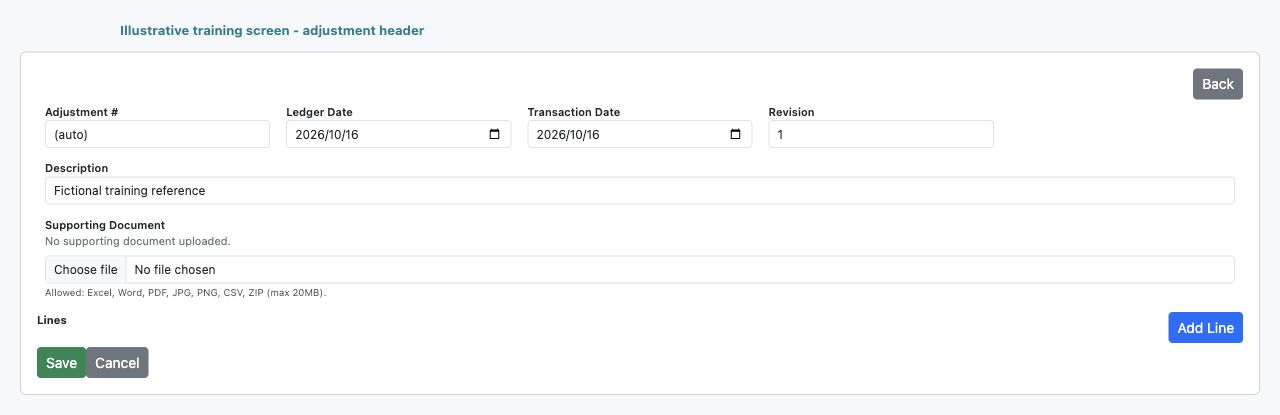
| Field and screenshot | Entry rule and example | Purpose and implication |
|---|---|---|
| Adjustment # - Figure 1 | System assigned; read only. Example: (auto) before save | Identifies the saved adjustment for subsequent review. Caution: Do not use an invented number as proof a record exists. |
| Ledger Date - Figure 1 | Required open accounting date. Example: 16 October 2026 | Places the correction on the accounting and inventory timeline. Caution: Backdating can affect later availability and costing. |
| Transaction Date - Figure 1 | Required; no later than Ledger Date. Example: 16 October 2026 | Records the business event date separately from posting cutoff. Caution: Do not move dates merely to avoid a period restriction. |
| Revision - Figure 1 | System maintained; read only. Example: 1 | Identifies the document revision used by processing. Caution: It is not the application or guide version. |
| Description - Figure 1 | Required meaningful business explanation. Example: Approved count loss in receiving bin | Explains the reason for the stock or value correction. Caution: A description is not evidence of approval by itself. |
| Supporting Document - Figure 1 | Optional permitted file; maximum 20 MB. Example: Approved fictional count sheet.pdf | Attaches evidence to the adjustment; Excel Word PDF JPG JPEG PNG CSV and ZIP are permitted types subject to validation. Caution: Renaming a prohibited file does not make its contents acceptable. |
| Existing document link - Figure 1 | Shown when a file already exists. Example: Count sheet.pdf | Opens the saved supporting evidence for review. Caution: This conditional link is absent from the no-file illustration. |
| Delete current supporting document - Figure 1 | Conditional checkbox when a file exists. Example: Leave unchecked to retain the file | Requests removal of the existing evidence when saved. Caution: Removing evidence is not reversal of the stock transaction; follow retention policy. |
| Add Line - Figure 1 | Adds an unsaved line. Example: Add a different approved stocked item | Extends the adjustment detail before save. Caution: Non-serial items cannot repeat within one adjustment. |
| Save - Figure 1 | Submits the complete adjustment. Example: Save once after review | Records the document and queues processing. Caution: A successful save does not certify stock and journal completion. |
| Back and Cancel - Figure 1 | Return to the list. Example: Cancel an unsaved entry | Leave the form without being a stock correction. Caution: Neither action reverses a previously saved transaction. |
Inventory adjustment line grid field reference
Figure 2 Inventory adjustment line grid
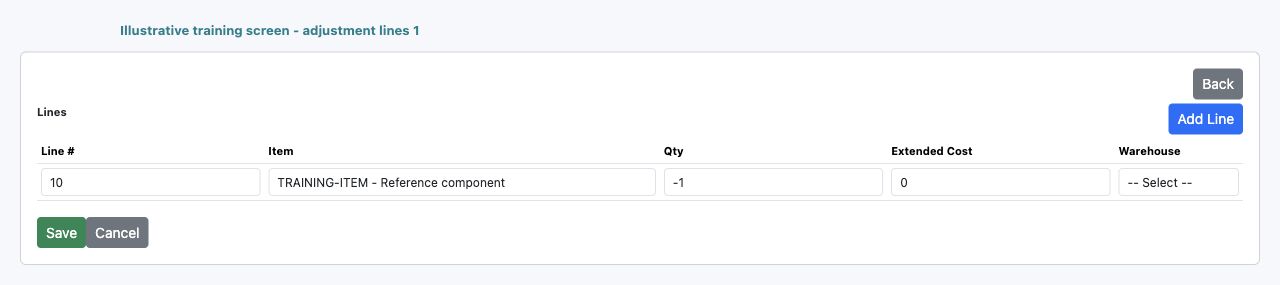
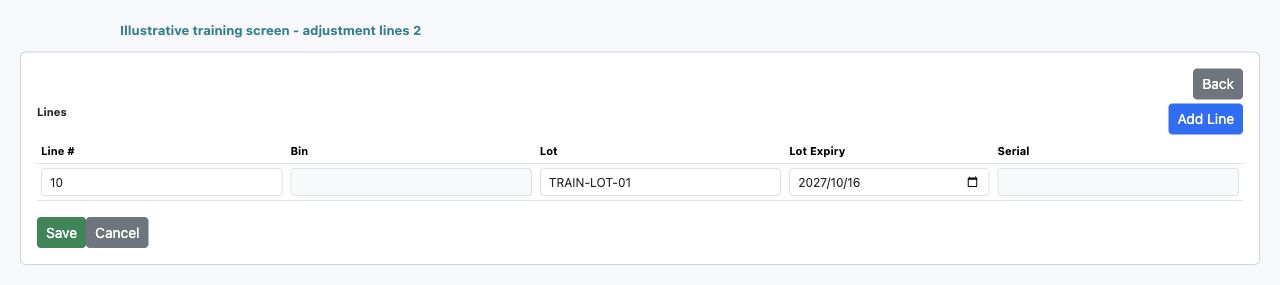
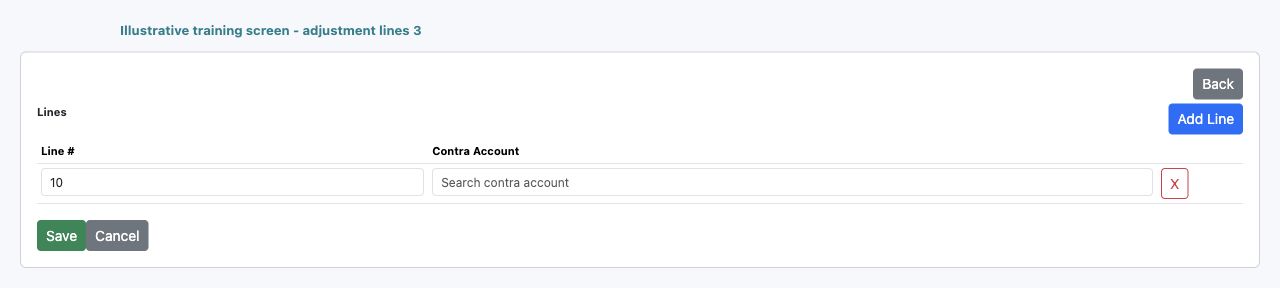
| Field and screenshot | Entry rule and example | Purpose and implication |
|---|---|---|
| Line # - Figure 2 | System seeded sequence; read only. Example: 10 | Identifies the detail line within the document. Caution: It is not an inventory item or ledger account number. |
| Item - Figure 2 | Required active Inventory item selected from search. Example: TRAINING-ITEM | Supplies tracking UOM and the inventory posting group. Caution: Typing a description alone may not select an item identity. |
| Qty - Figure 2 | Signed quantity in base UOM; zero only for an eligible value-only correction. Example: -1 | Changes physical stock when non-zero. Caution: Serial items require one unit or minus one unit per serial line. |
| Extended Cost - Figure 2 | Total functional value change, not unit cost. Example: 0 to derive the moving-average value for a quantity movement | Supplies explicit value or allows posting to derive it when quantity is non-zero and value is zero. Caution: Zero entered cost does not promise zero posted cost. |
| Warehouse - Figure 2 | Required active warehouse of the current company. Example: Warehouse A | Determines the physical location and quantity balance affected. Caution: A default is not permission to adjust another warehouse. |
| Bin - Figure 2 | Required when the selected warehouse uses bins. Example: R01 | Identifies the storage place inside the warehouse. Caution: Confirm the actual bin identity before entering a code. |
| Lot - Figure 2 | Conditional on Lot or Lot + Expiry tracking. Example: TRAIN-LOT-01 | Identifies the batch being added or removed. Caution: A lot is not the same as a warehouse bin. |
| Lot Expiry - Figure 2 | Required for Lot + Expiry and any item requiring expiry. Example: 16 October 2027 | Preserves the expiry identity of the affected batch. Caution: Do not invent or extend an expiry to bypass availability controls. |
| Serial - Figure 2 | Required for Serial tracking; inapplicable otherwise. Example: TRAIN-SERIAL-001 | Identifies an individual unit. Caution: Do not reuse the same serial on duplicate lines. |
| Contra Account - Figure 2 | Required active current-company account selected from search. Example: Approved inventory loss expense | Offsets the inventory asset movement in the journal. Caution: Select the accountant-approved purpose; form acceptance does not approve classification. |
| X - Figure 2 | Removes an unsaved detail line when more than one exists. Example: Remove a duplicate before Save | Changes the form payload before submission. Caution: It does not delete or reverse a posted movement. |
Inventory transfer header field reference
Figure 3 Inventory transfer header
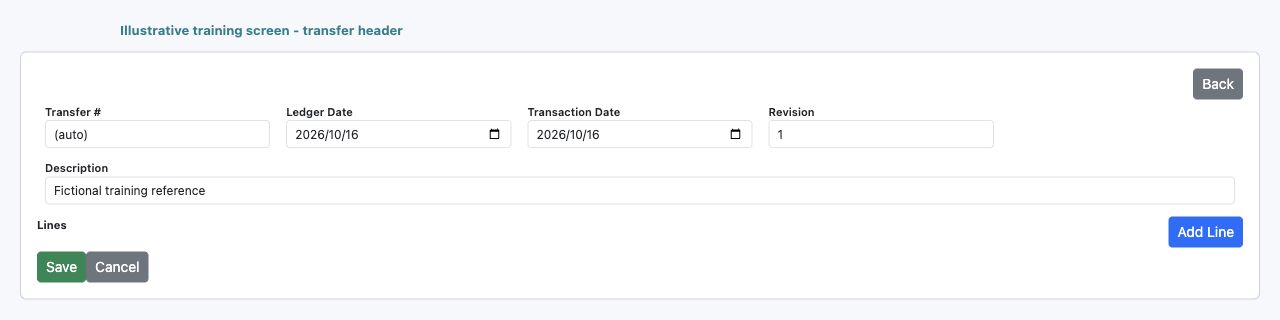
| Field and screenshot | Entry rule and example | Purpose and implication |
|---|---|---|
| Transfer # - Figure 3 | System assigned; read only. Example: (auto) before save | Identifies the saved transfer for follow-up. Caution: A copied record receives a separate transaction identity. |
| Ledger Date - Figure 3 | Required date in an open period. Example: 16 October 2026 | Controls the inventory and accounting cutoff for both sides. Caution: A transfer is not a way to bypass closed periods. |
| Transaction Date - Figure 3 | Required; not later than Ledger Date. Example: 16 October 2026 | Describes when the physical movement occurred. Caution: Do not confuse it with processing completion time. |
| Revision - Figure 3 | System maintained; read only. Example: 1 | Identifies the version of the transfer being processed. Caution: Do not treat it as an approval level. |
| Description - Figure 3 | Required explanation of the movement. Example: Move three components to Warehouse B | Explains why goods move between physical identities. Caution: It does not change company ownership of the stock. |
| Add Line - Figure 3 | Adds another unsaved transfer detail. Example: Another eligible item | Allows separate item and physical allocation detail. Caution: Review each source and destination independently. |
| Save - Figure 3 | Submits the complete transfer. Example: Save the reviewed transfer once | Records the document and initiates posting. Caution: Inspect status and both stock sides before considering the move complete. |
| Back and Cancel - Figure 3 | Return to the transfer list. Example: Cancel before saving | Leave the unsaved form. Caution: They do not undo an existing transfer. |
Inventory transfer line grid field reference
Figure 4 Inventory transfer line grid
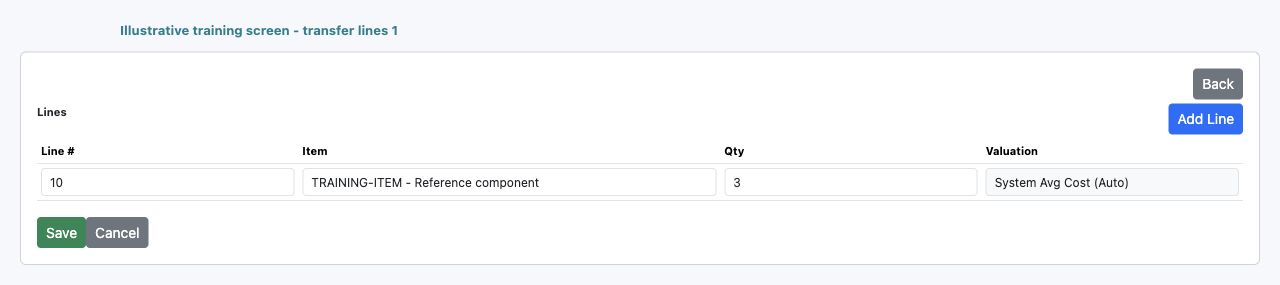
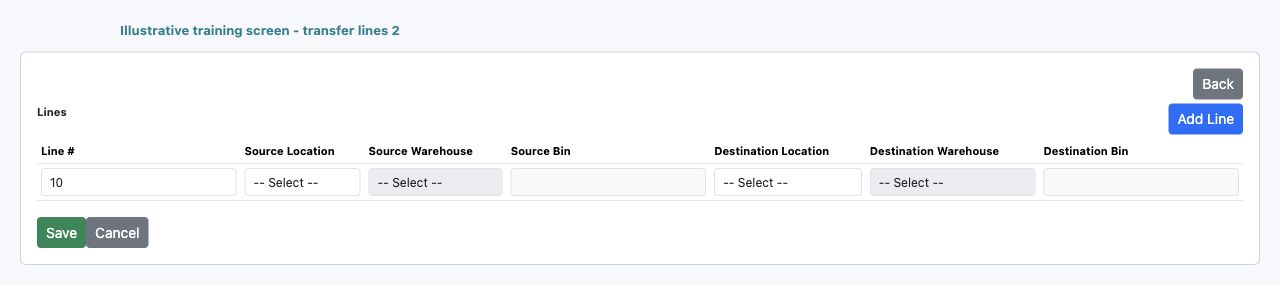
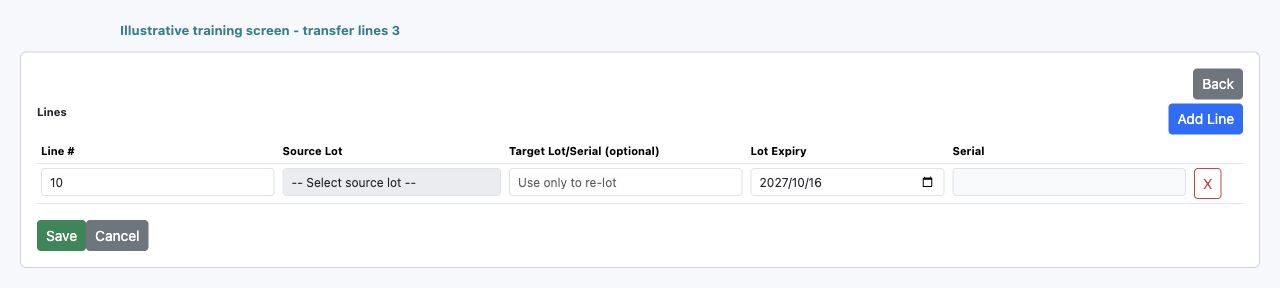
| Field and screenshot | Entry rule and example | Purpose and implication |
|---|---|---|
| Line # - Figure 4 | System seeded sequence; read only. Example: 10 | Identifies the transfer detail. Caution: It is not the source document number. |
| Item - Figure 4 | Required active stocked item selected from search. Example: TRAINING-ITEM | Identifies stock to relocate and its tracking policy. Caution: A non-inventory charge cannot be moved as physical stock. |
| Qty - Figure 4 | Required positive quantity in base UOM. Example: 3 | Decreases source stock and increases destination stock by the same quantity. Caution: Do not enter a negative number to reverse direction; review the proper correction process. |
| Valuation - Figure 4 | System-driven moving-average value; not a price entry. Example: 300 for three units at an example basis of 100 | Carries the source value to destination at posting. Caution: The saved value can differ from multiplying a rounded displayed average. |
| Source Location - Figure 4 | Required current-company source identity. Example: Main Office | Controls which source warehouses are eligible. Caution: Choose the location that actually owns the source warehouse. |
| Source Warehouse - Figure 4 | Required active warehouse belonging to Source Location. Example: Warehouse A | Identifies stock leaving the source. Caution: A same-named warehouse elsewhere is not the same balance. |
| Source Bin - Figure 4 | Required when Source Warehouse uses bins. Example: R01 | Identifies the storage place from which goods leave. Caution: Available company quantity does not establish availability in this bin. |
| Destination Location - Figure 4 | Required current-company destination identity. Example: Main Office | Defines the destination warehouse scope. Caution: This is not an intercompany ownership transfer. |
| Destination Warehouse - Figure 4 | Required active warehouse of Destination Location. Example: Warehouse B | Identifies stock receiving the movement. Caution: Review the actual receiving warehouse rather than relying on a default. |
| Destination Bin - Figure 4 | Required when Destination Warehouse uses bins. Example: D01 | Identifies the receiving storage place. Caution: Do not substitute an unapproved code for an unavailable bin. |
| Source Lot - Figure 4 | Conditional required lot identity for tracked goods. Example: TRAIN-LOT-01 | Identifies the batch leaving the source. Caution: A destination lot label does not prove the source batch is available. |
| Target Lot/Serial (optional) - Figure 4 | Leave blank for a routine identity-preserving transfer. Example: Blank | Can specify a changed destination tracking identity in specialised transfers. Caution: This is not merely a supplier reference; deliberate re-lot or re-serial needs traceability review. |
| Lot Expiry - Figure 4 | Conditional on the item's tracking requirements. Example: 16 October 2027 | Supplies expiry detail for eligible tracked movement. Caution: Preserve the genuine batch expiry and review destination identity. |
| Serial - Figure 4 | Required for serial-tracked stock. Example: TRAIN-SERIAL-001 | Identifies the source unit being moved. Caution: Serial transfers require a positive one-unit line. |
| X - Figure 4 | Removes an unsaved detail when more than one exists. Example: Remove a mistaken extra line | Changes the pending transfer detail only. Caution: It is not a reversal of a previously posted transfer. |
Understand tracking and bin identity
| Item tracking | Required identity | Practical implication |
|---|---|---|
| None | Item and physical warehouse/bin as applicable | Lot and serial controls are disabled or inapplicable |
| Lot | Source or adjustment Lot; expiry if the item requires it | The same text in another warehouse does not establish the same physical stock |
| Lot + Expiry | Lot and Lot Expiry | Preserve the correct batch and expiry, not only the total quantity |
| Serial | Serial, with one unit per serial line | Adjustments use quantity 1 or -1; transfers use a positive one-unit line |
Bins identify storage places, not batches or individual units. These movement forms require a Bin when the selected warehouse uses bins. Confirm the existing warehouse/bin identity even if a field permits typed text; do not assume typing an unfamiliar code is harmless or that a bin lookup proves a physical count.
On the transfer grid, Source Lot identifies the batch leaving the source. Target Lot/Serial (optional) can change destination tracking identity; it is not an ordinary supplier reference. For a routine move, preserve identity and leave the optional target blank. Any deliberate re-lot or re-serial requires the organisation's traceability approval and a review of the resulting tracking records.
Understand saving processing and journals
Save records the document and starts downstream posting. PROCESSING means it is not yet confirmed complete; FAILED and its message require investigation. POSTED on a stock document does not, by itself, establish that its linked journal is posted or that every report and bank balance reconciles.
On a saved record, inspect status, quantities, value and any available View Journal link. Confirm the linked journal's own posting status and accounts. After an error or delay, inspect the recorded document and processing with the authorised administrator before creating a replacement. Repeated entry is not a safe retry mechanism.
Reconcile a purchase receipt and settlement
The following fictional example uses company currency, no tax and a unit cost of 100. Nine units are accepted from ten received; one rejected unit is not added to stock. It shows expected balances, not values to enter into your company.
| Completed event | Stock qty / value | Inventory GL | GRNI GL |
|---|---|---|---|
| Approve order for 10 units | 0 / 0 | 0 | 0 |
| Post receipt of 9 accepted units | 9 / 900 | 900 debit | 900 credit |
| Post matched invoice for 9 units | 9 / 900 | 900 debit | 0 |
| Post and apply both payments | 9 / 900 | 900 debit | 0 |
Supplier and bank balances progress separately:
| Completed event | Payable GL | Advance GL | Bank GL movement |
|---|---|---|---|
| Post matched invoice for 900 | 900 credit | 0 | 0 |
| Post payment of 400 before application | 900 credit | 400 debit | 400 credit |
| Apply the 400 payment | 500 credit | 0 | 400 credit |
| Post and apply the remaining 500 | 0 | 0 | 900 credit |
The payment is initially an advance until application clears that amount against payables. A bank GL credit records the accounting movement; it does not establish bank execution or statement reconciliation. Taxes, withholding and foreign currencies introduce additional amounts and accounts and must be reconciled on their own bases.
Reconcile a transfer and quantity loss
Continuing the example, move 3 of the 9 units from Warehouse A to Warehouse B. A holds 6, B holds 3 and company stock remains 9 units valued at 900. A transfer posts equal source and destination values; with one item posting-group asset account, its net company inventory GL movement is zero.
An approved loss adjustment of -1 in A, with Extended Cost 0, then consumes 100 from the moving-average basis. A holds 5 and B holds 3: company quantity is 8, inventory value and inventory GL are 800, and the approved loss expense is debited 100. Check warehouse/bin detail as well as the company total.
A value-only increase of 80 on 8 units would leave quantity at 8 and increase company value to 880, with an average of 110. The offset depends on the approved correction. This is not an increase in physical stock, a purchase invoice or an instruction to recognise income.
Choose consistent reconciliation reports
| Question | Report or record | Basis and interpretation |
|---|---|---|
| What is currently on hand at each warehouse? | Inventory On-Hand By Warehouse | Current quantities; use Location and Warehouse filters consistently |
| Does current quantity agree with company cost? | Inventory Valuation Summary | Current On Hand Qty, Cost Qty, Avg Cost and Inventory Value; not a historical cutoff |
| What was quantity and value at a cutoff? | Inventory Valuation As Of Date | Dated movement totals by location/warehouse/item; choose the matching ledger cutoff |
| Which movements explain a change? | Inventory Transaction Register | Signed Quantity and Ext Cost in the selected date range, with source, warehouse, lot and bin |
| What receipts remain uninvoiced? | Purchase GRNI Reconciliation Detail | Source and matched quantities/functional values; Open Only excludes fully matched lines |
| What does the supplier still owe or remain owed? | AP open transactions and AP Vendor Statement | Confirm currency, dates and settlement timing; these reports are not a substitute for historical payment reconstruction |
| Does the accounting control agree? | Posted journal and relevant inventory, GRNI, AP, advance and bank accounts | Functional currency, consistent cutoff and completed processing |
For Inventory Valuation As Of Date, As of date is required. Location is optional; choose Location before Warehouse, which must belong to it. Item number / barcode / description narrows the selected item. Include zero balances can reveal cleared rows and residual values. Leaving a filter blank widens scope; it does not restrict results to a document currently open elsewhere.
For Inventory Transaction Register, From date and To date are required, with From no later than To. Optional Item, Warehouse and Source module narrow the movements. Source module is a module code filter, not an individual document number. Quantity and Ext Cost are additive movements; Unit Cost is a rate and must not be summed. A same-company transfer has both outbound and inbound rows.
Run the same company and cutoff across the reports and ledger. Compare quantities in the same base UOM and values in functional currency. A current summary includes movements after a historical cutoff; do not compare it directly to an earlier ledger balance. Keep the exported evidence and explanation of each genuine reconciling item under your normal close controls.
Handle differences without duplicating stock
| What differs | Check first | Safe response |
|---|---|---|
| Document saved but stock absent | Document status, failure message, allocations and downstream processing | Investigate the existing record; do not enter a duplicate receipt or adjustment |
| Quantity agrees but inventory GL differs | Journal existence/status, item mapping, dates and value-only movements | Trace the source and journal; do not post an unexplained plug to the asset account |
| Warehouse totals do not match the company | Locations, filters, transfers, bins and incomplete movements | Reconcile all relevant warehouses on a consistent basis |
| GRNI remains after invoicing | Actual matched receipt line, accepted quantity, tolerance and journal | A typed supplier reference alone does not match or clear GRNI |
| Payment saved but supplier remains open | Payment application and its journal | Check application separately from cash payment and bank statement |
| Negative stock is rejected | Available warehouse/bin/tracking quantity and historical dates | Resolve the shortage; do not enable negative inventory merely to force a save |
| A non-serial item appears twice on an adjustment | Duplicate line and physical scope | Use one line per non-serial item in that adjustment; do not hide distinct events in duplicates |
Review corrections and supporting evidence
Posted adjustments and transfers are not ordinary editable drafts. Copy creates a new transaction; it is not an amendment or undo. Reverse is a separate consequential operation, not deletion of history. Review original and later movements, current stock, periods, tracking and linked accounting with the authorised accountant before using a correction action.
Attach approved count sheets or other permitted evidence to an adjustment when appropriate. A file upload supports the audit trail but does not approve the transaction or change quantities by itself. Keep sensitive personal information out of filenames and attachments unless it is necessary and authorised.
Complete the inventory review
Confirm the saved document number, correct physical identity, status, signed quantities, functional value and linked journal. Compare warehouse totals, company quantity and cost, dated movements and the relevant ledger balances. For purchases, include GRNI and supplier balances; for payments, include advances and the actual bank reconciliation. Resolve differences through their originating process rather than another unexplained stock entry.