
Understand country electronic invoicing and evidence
Company party profiles document status exports and authority acceptance
Use this guide to read electronic-invoice profiles and document evidence without confusing accounting completion with authority acceptance. It is for authorised fiscal users; profile and connection maintenance belongs to the organisation's authorised administrators. Country, document type and environment determine the applicable route.
Review one electronic document safely
Have the original accounting document number, intended country/environment and permission to view its fiscal evidence. An adapter is the configured country/provider route; a payload is the electronic data prepared for that route. Neither word means that an authority has accepted the document.
- Open E-Invoice Documents in the selected company and identify the source document by its exact accounting reference, business type and party. Do not substitute another invoice merely because the amount matches.
- Compare country, environment, currency, totals and party identifiers with the source. A sandbox result belongs to testing, not the production authority record.
- Read the document status, validation messages and available submission/lifecycle evidence. Identify the actual authority reference where acceptance exists; a downloaded file or successful transport response alone is not that evidence.
- If work is queued or a response is uncertain, inspect the existing document and logs before asking the authorised fiscal owner to act. Do not create a second accounting invoice or send another request solely to get a clearer response.
- Retain the accounting source and its matching fiscal evidence. Use the supported country/document correction path under the tax owner's authority when correction is needed; do not overwrite the original accepted reference.
Use conditional controls for country/tracking-dependent fields and POS checkout for provisional versus accepted receipts. This review sequence does not instruct you to transmit, resubmit or replay a historical document.
Separate accounting and fiscal documents
An accounting invoice, prepared electronic document, validated payload, transmitted request and authority-accepted invoice are different records/stages. A successful accounting save or printable PDF does not by itself prove fiscal acceptance.
Confirm country route and permitted duties
Use the country route approved for your company and environment. Pakistan and Kenya have different document, buyer, reference and submission requirements. Not every format, adapter or capability listed in setup is available for every document type. Ordinary users should review document evidence; profile/connection changes belong to authorised administrators.
Review company profiles
Company E-Invoice Profiles identify adapter, country, authority, format, submission model, environment, active dates, default business process and approved connection references. Legal-name or registration overrides require verified evidence. Profile attributes are supported configuration options, not a way to enable an unsupported route by entering arbitrary values.
Field explanations and training references
Each reference describes the field or control, entry rule, example and practical implication. Illustrations use blank or fictional training values. Conditional fields and actions depend on your selected policy, country, record state and permissions; choose actual application lookup records rather than copying text or hidden identities.
Company E-Invoice Profile field reference
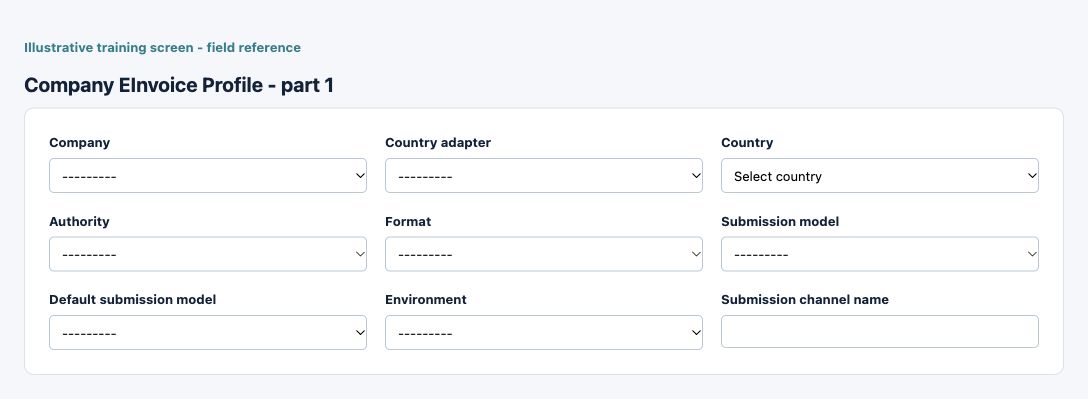
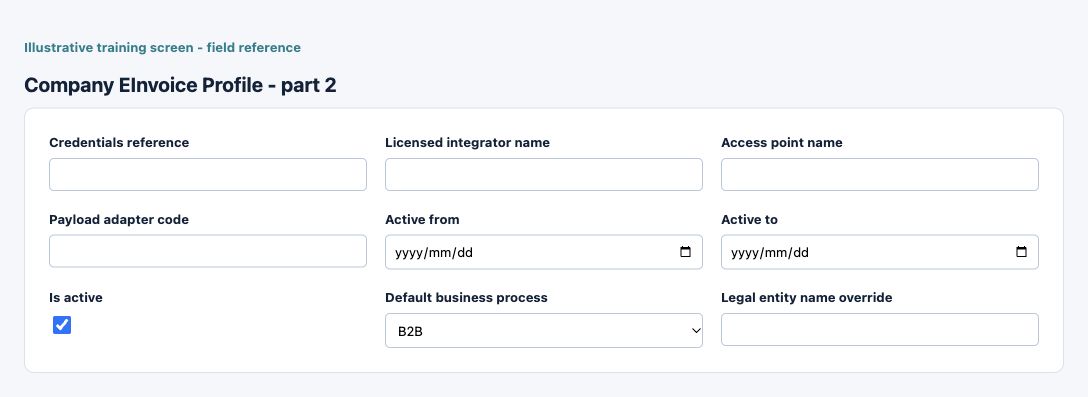
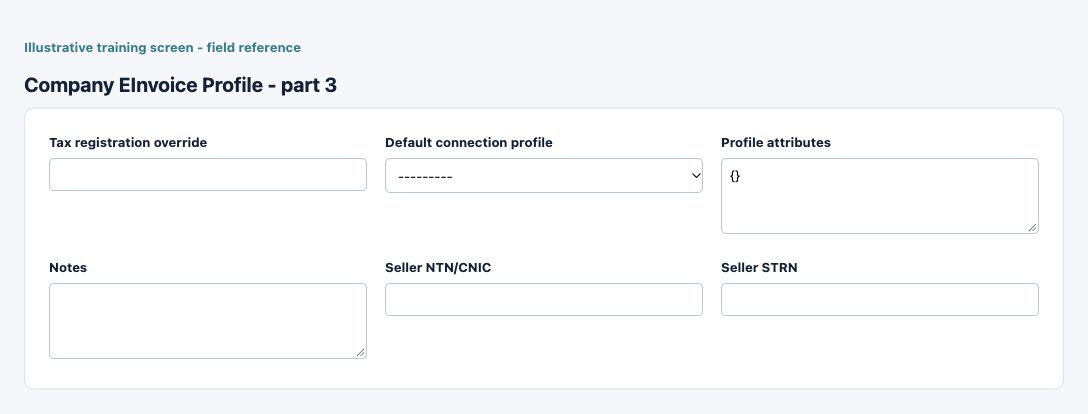
Figure 1 Company E-Invoice Profile
| Field and screenshot | Entry rule and example | Purpose and implication |
|---|---|---|
| Company - Figure 1 | Required entry. Example: Raven Demo Services | Current accounting company context; not a choice of subscription workspace or permission to another company. Caution: Configuration or local preparation is not proof of authority acceptance. |
| Country adapter - Figure 1 | Optional or policy-dependent entry. Example: The approved business value or selected record | Select the approved country adapter, authority or document format for the route. A configured choice does not prove connectivity, certification or authority acceptance. Caution: Configuration or local preparation is not proof of authority acceptance. |
| Country - Figure 1 | Required entry. Maximum 2 characters. Example: The approved Pakistan or Kenya route | Country relevant to this record. It is distinct from transaction currency and does not by itself activate a tax or e-invoicing route. Caution: Configuration or local preparation is not proof of authority acceptance. |
| Authority - Figure 1 | Required entry. Example: The approved business value or selected record | Select the approved country adapter, authority or document format for the route. A configured choice does not prove connectivity, certification or authority acceptance. Caution: Configuration or local preparation is not proof of authority acceptance. |
| Format - Figure 1 | Required entry. Example: The approved business value or selected record | Select the approved country adapter, authority or document format for the route. A configured choice does not prove connectivity, certification or authority acceptance. Caution: Configuration or local preparation is not proof of authority acceptance. |
| Submission model - Figure 1 | Required entry. Choices: Manual Export, Direct API, Peppol Access Point, Licensed Integrator, PRAL, Accredited Service Provider, GSP, Government Platform, Client Agent, Relay Server, Provider Managed. Example: Manual Export | Configured delivery model or named channel for fiscal processing. Preparation, export, transmission and acceptance are different stages. Caution: Configuration or local preparation is not proof of authority acceptance. |
| Default submission model - Figure 1 | Optional or policy-dependent entry. Choices: Manual Export, Direct API, Peppol Access Point, Licensed Integrator, PRAL, Accredited Service Provider, GSP, Government Platform, Client Agent, Relay Server, Provider Managed. Example: Manual Export | Configured delivery model or named channel for fiscal processing. Preparation, export, transmission and acceptance are different stages. Caution: Configuration or local preparation is not proof of authority acceptance. |
| Environment - Figure 1 | Required entry. Choices: Sandbox, Production. Example: Sandbox | Sandbox versus production context for the e-invoice route. Credentials, connection and evidence must match; sandbox acceptance is not production approval. Caution: Configuration or local preparation is not proof of authority acceptance. |
| Submission channel name - Figure 1 | Optional or policy-dependent entry. Maximum 150 characters. Example: The approved business value or selected record | Configured delivery model or named channel for fiscal processing. Preparation, export, transmission and acceptance are different stages. Caution: Configuration or local preparation is not proof of authority acceptance. |
| Credentials reference - Figure 1 | Optional or policy-dependent entry. Maximum 255 characters. Example: Approved credential reference, not its secret | Reference to an approved credential record, not a place to paste passwords, tokens or signing keys. Credential custody remains with the authorised administrator. Caution: Configuration or local preparation is not proof of authority acceptance. |
| Licensed integrator name - Figure 1 | Optional or policy-dependent entry. Maximum 150 characters. Example: Approved integrator | Approved integrator or access-point reference for the configured route. Typing a provider name does not establish a connection or licence. Caution: Configuration or local preparation is not proof of authority acceptance. |
| Access point name - Figure 1 | Optional or policy-dependent entry. Maximum 150 characters. Example: Approved receiving access point | Approved integrator or access-point reference for the configured route. Typing a provider name does not establish a connection or licence. Caution: Configuration or local preparation is not proof of authority acceptance. |
| Payload adapter code - Figure 1 | Optional or policy-dependent entry. Maximum 80 characters. Example: The approved business value or selected record | Supported payload adapter selection for the route. Use the approved value; do not guess an adapter to bypass country validation. Caution: Configuration or local preparation is not proof of authority acceptance. |
| Active from - Figure 1 | Required entry. Example: 16 October 2026, on the approved effective basis | Start of this configuration or review-item period. Use the applicable business basis and check other effective records for overlap. Caution: Configuration or local preparation is not proof of authority acceptance. |
| Active to - Figure 1 | Optional or policy-dependent entry. Example: 31 October 2026, when an end is applicable | End of the applicable date range when present. A blank end can represent continuing applicability; it is not automatic deletion of older records. Caution: Configuration or local preparation is not proof of authority acceptance. |
| Is active - Figure 1 | Checkbox policy setting; review the saved on/off state. Example: The approved on/off policy | Controls whether this configuration remains available for relevant use. Turning it off does not reverse earlier transactions or erase history. Caution: Configuration or local preparation is not proof of authority acceptance. |
| Default business process - Figure 1 | Required entry. Choices: B2B, B2G, B2C, Export, Import. Example: The approved process for this route | Default business-process reference for the e-invoice profile. Check compatibility with document type and buyer requirements. Caution: Configuration or local preparation is not proof of authority acceptance. |
| Legal entity name override - Figure 1 | Optional or policy-dependent entry. Maximum 255 characters. Example: Verified legal name | Profile-specific legal-name or registration override. Use only verified authorised values, not a convenient replacement for company legal identity. Caution: Configuration or local preparation is not proof of authority acceptance. |
| Tax registration override - Figure 1 | Optional or policy-dependent entry. Maximum 100 characters. Example: Verified registration (masked) | Profile-specific legal-name or registration override. Use only verified authorised values, not a convenient replacement for company legal identity. Caution: Configuration or local preparation is not proof of authority acceptance. |
| Default connection profile - Figure 1 | Optional or policy-dependent entry. Example: The approved business value or selected record | Approved connection selected for this company/profile. Check company, environment and route without sharing credential values. Caution: Configuration or local preparation is not proof of authority acceptance. |
| Profile attributes - Figure 1 | Optional or policy-dependent entry. Example: The approved business value or selected record | Additional supported country/profile options. Change only reviewed options for the applicable route; arbitrary values do not enable unsupported fiscal capabilities. Optional country- or authority-specific company attributes stored as JSON. Current regime guidance: Country / Authority Specific E-Invoicing. You can also store dynamic execution policy here, for example execution.source_modes, pos.enabled, pos.allow_offline_queue, and pos.block_completion_until_accepted. Caution: Configuration or local preparation is not proof of authority acceptance. |
| Notes - Figure 1 | Optional or policy-dependent entry. Example: Relevant supporting explanation | Business explanation supporting the record and its review. Text does not replace source documents, approval or calculated accounting values. Caution: Configuration or local preparation is not proof of authority acceptance. |
| Seller NTN/CNIC - Figure 1 | Optional or policy-dependent entry. Example: Verified seller NTN/CNIC (masked) | Pakistan seller or buyer registration reference where applicable. Preserve the verified identifier and distinguish NTN/CNIC from a separately maintained STRN. Use a clean Pakistan FBR seller NTN or CNIC without internal prefixes. Caution: Configuration or local preparation is not proof of authority acceptance. |
| Seller STRN - Figure 1 | Optional or policy-dependent entry. Example: Verified separate STRN (masked) | Pakistan seller or buyer registration reference where applicable. Preserve the verified identifier and distinguish NTN/CNIC from a separately maintained STRN. Enter the seller STRN only if it is maintained separately from NTN/CNIC. Caution: Configuration or local preparation is not proof of authority acceptance. |
Party E-Invoice Profile field reference
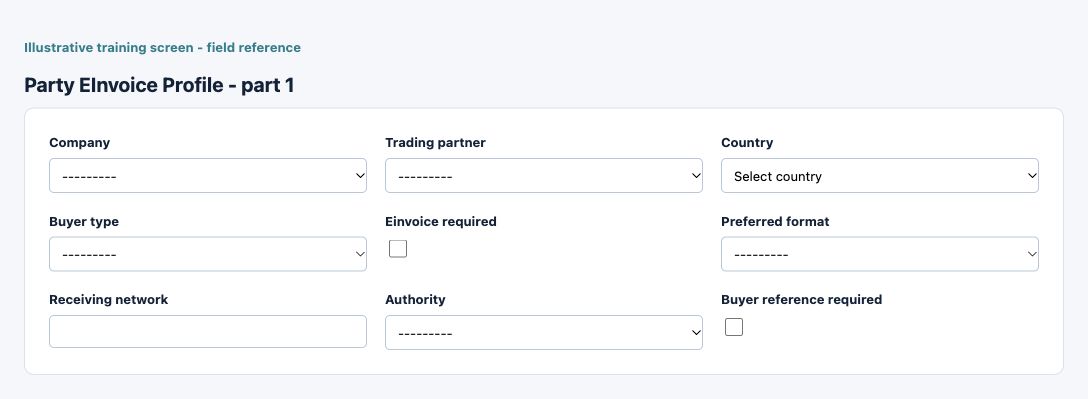
Figure 2 Party E-Invoice Profile
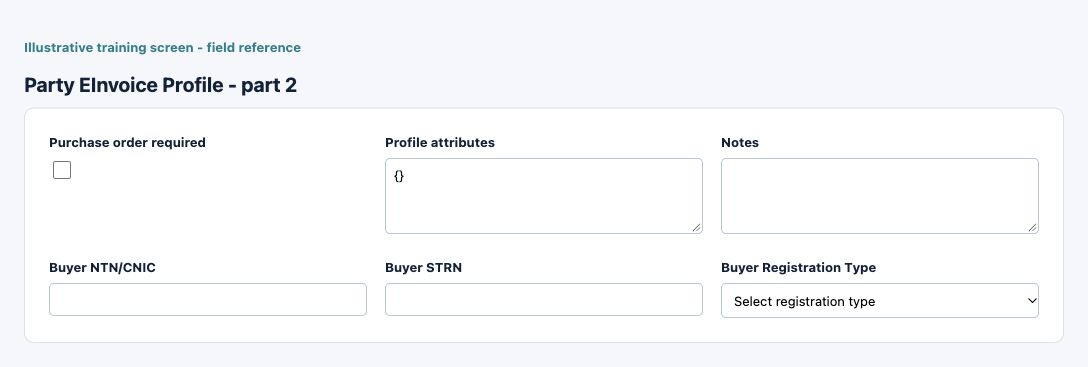
| Field and screenshot | Entry rule and example | Purpose and implication |
|---|---|---|
| Company - Figure 2 | Required entry. Example: Raven Demo Services | Current accounting company context; not a choice of subscription workspace or permission to another company. Caution: Configuration or local preparation is not proof of authority acceptance. |
| Trading partner - Figure 2 | Required entry. Example: The approved business value or selected record | Current-company customer or supplier identity linked to this profile. Check the specific party rather than using an unrelated same-name contact. Caution: Configuration or local preparation is not proof of authority acceptance. |
| Country - Figure 2 | Required entry. Maximum 2 characters. Example: The approved Pakistan or Kenya route | Country relevant to this record. It is distinct from transaction currency and does not by itself activate a tax or e-invoicing route. Caution: Configuration or local preparation is not proof of authority acceptance. |
| Buyer type - Figure 2 | Required entry. Choices: Business, Government, Consumer, Export, Import. Example: Business | Buyer classification for the configured country process. Select the actual registration/business status supported by the evidence. Caution: Configuration or local preparation is not proof of authority acceptance. |
| Einvoice required - Figure 2 | Checkbox policy setting; review the saved on/off state. Example: The approved on/off policy | Records the party requirement for electronic invoicing. It does not itself submit a document or override the supported country route. Caution: Configuration or local preparation is not proof of authority acceptance. |
| Preferred format - Figure 2 | Optional or policy-dependent entry. Example: The approved business value or selected record | Select the approved country adapter, authority or document format for the route. A configured choice does not prove connectivity, certification or authority acceptance. Caution: Configuration or local preparation is not proof of authority acceptance. |
| Receiving network - Figure 2 | Optional or policy-dependent entry. Maximum 100 characters. Example: The approved business value or selected record | Optional buyer receiving network/routing reference. It is not a credential or evidence that the receiver accepted a document. Optional network or routing reference such as Peppol or another buyer receiving channel. Caution: Configuration or local preparation is not proof of authority acceptance. |
| Authority - Figure 2 | Optional or policy-dependent entry. Example: The approved business value or selected record | Select the approved country adapter, authority or document format for the route. A configured choice does not prove connectivity, certification or authority acceptance. Caution: Configuration or local preparation is not proof of authority acceptance. |
| Buyer reference required - Figure 2 | Checkbox policy setting; review the saved on/off state. Example: The approved on/off policy | Requires the corresponding buyer reference or PO information for relevant invoices. It is distinct from procurement receipt matching in your own AP ledger. Caution: Configuration or local preparation is not proof of authority acceptance. |
| Purchase order required - Figure 2 | Checkbox policy setting; review the saved on/off state. Example: The approved on/off policy | Requires the corresponding buyer reference or PO information for relevant invoices. It is distinct from procurement receipt matching in your own AP ledger. Caution: Configuration or local preparation is not proof of authority acceptance. |
| Profile attributes - Figure 2 | Optional or policy-dependent entry. Example: The approved business value or selected record | Additional supported country/profile options. Change only reviewed options for the applicable route; arbitrary values do not enable unsupported fiscal capabilities. Optional country- or authority-specific buyer attributes stored as JSON. Current regime guidance: Country / Authority Specific E-Invoicing. Caution: Configuration or local preparation is not proof of authority acceptance. |
| Notes - Figure 2 | Optional or policy-dependent entry. Example: Relevant supporting explanation | Business explanation supporting the record and its review. Text does not replace source documents, approval or calculated accounting values. Caution: Configuration or local preparation is not proof of authority acceptance. |
| Buyer NTN/CNIC - Figure 2 | Optional or policy-dependent entry. Example: Verified buyer NTN/CNIC (masked) | Pakistan seller or buyer registration reference where applicable. Preserve the verified identifier and distinguish NTN/CNIC from a separately maintained STRN. Use a clean Pakistan FBR buyer NTN or CNIC without internal prefixes. Caution: Configuration or local preparation is not proof of authority acceptance. |
| Buyer STRN - Figure 2 | Optional or policy-dependent entry. Example: Verified separate STRN (masked) | Pakistan seller or buyer registration reference where applicable. Preserve the verified identifier and distinguish NTN/CNIC from a separately maintained STRN. Enter the buyer STRN only if it is maintained separately from NTN/CNIC. Caution: Configuration or local preparation is not proof of authority acceptance. |
| Buyer Registration Type - Figure 2 | Optional or policy-dependent entry. Choices: Registered, Unregistered. Example: Registered | Buyer classification for the configured country process. Select the actual registration/business status supported by the evidence. Choose whether the buyer is registered or unregistered for Pakistan FBR. Caution: Configuration or local preparation is not proof of authority acceptance. |
Review party profiles and identifiers
Party E-Invoice Profiles link the correct trading partner to buyer classification, requirement, preferred format/network and buyer/PO reference requirements. Pakistan NTN/CNIC, a separately maintained STRN and registered/unregistered buyer status are distinct. Country-specific identifiers must be verified and must not contain internal prefixes merely because a company uses them elsewhere.
Protect connections and credentials
Credentials Reference is a reference, not a field for sharing a token or password. Keep sandbox and production settings/evidence separate. Country Adapter Registry, provider capability and transport/credential maintenance are not ordinary invoice-entry tasks; ask the authorised administrator to resolve an unavailable approved route without bypassing protection.
Read document and submission history
E-Invoice Documents, Submission Logs and Lifecycle Events provide different evidence. Inspect the source accounting document, business type, country/environment, document status, validation messages, authority identifiers and lifecycle events together. An HTTP response or exported file is not necessarily an accepted tax invoice.
Distinguish export from online submission
A manual JSON/ZIP export prepares a file for the approved external process; downloading it does not transmit it. Direct online submission requires the supported configured/certified route and authorised credentials. After timeout, inspect the existing status/log/evidence before requesting another submission; do not create a duplicate accounting invoice as a retry.
Understand POS country boundaries
Pakistan and Kenya POS workflows can use profile-specific review/background policies for eligible new sales. An opt-in for new sales is not permission to replay historical invoices. Returns and adjustment notes follow their own reviewed country path. A provisional POS receipt remains different from an authority-accepted fiscal output.
Handle corrections through the supported document type
Credit/debit notes, returns and vendor documents have country/type-specific restrictions. Preserve the original accepted reference and the true correction purpose. Do not classify an unsupported note as an ordinary invoice just to make a submit action available.
Retain evidence and reconcile
Keep the accounting source, prepared payload/export, validation result, submission/lifecycle history and accepted authority references under the organisation's retention rules. Compare amounts, currency, tax and party identity. Reconcile accounting and fiscal states without overwriting original accepted evidence. Escalate uncertain authority status before resubmission; current legal filing requirements must be confirmed through the approved tax owner.
Resolve a fiscal evidence question
| Situation | What to do |
|---|---|
| Route or action is unavailable | Confirm company, country, document type, environment and permission with the authorised fiscal owner; a listed capability is not permission to force an unsupported request. |
| Status is uncertain after a timeout | Inspect the existing document, submission/lifecycle evidence and authority reference before any authorised retry. Do not duplicate the accounting invoice. |
| Accounting and fiscal totals differ | Compare the same source/version, party identifiers, currency, line tax and correction references. Preserve accepted evidence and escalate the mismatch. |
Continue with the related task
Conditional country controls, tax codes, customer invoices, vendor documents and POS receipts.
Data-loading prerequisites and limits for Country specific e invoicing
Item, partner and customer-transaction templates include supported country/fiscal fields where applicable. Import success is not fiscal submission or authority acceptance. Maintain credentials through authorised profile controls; never put signing secrets or OTPs in ordinary workbooks.
Continue with the Imports documents and common controls bulk guidance.