
Understand sales leads, quotes and customer acceptance
Commercial estimates offer terms acceptance evidence and partial order conversion
Commercial estimates offer terms acceptance evidence and partial order conversion. This guide is for authorised sales, stores and receivables users and Tenant Administrators working within their own subscription workspace. A tenant is that workspace, not an administrator person.
Start with the commercial purpose
A Sales Lead records an opportunity or estimate. A Sales Quote records an offer with a validity date and customer/prospect snapshot. Neither creates an invoice, a financial journal or an inventory commitment. Use the Customers area within the correct company and permitted location.
Prepare the recipient and terms
Choose a location first. A lead may refer to an existing customer or a prospect with a name and email or phone. A quote needs a source lead or a Trading Partner customer. Review currency, FX, dates, payment terms, recipient snapshots, items, quantities, discounts and tax before saving the commercial record.
Understand the source chain
Customer Interest can identify an inquiry on a lead row. A quote can retain a Lead Line link. An accepted quote can supply order rows with Quote Line links. These references preserve commercial provenance; they are not proof of stock allocation, customer payment or revenue recognition.
Field explanations and training references
The references pair each listed field or action with its entry rule, example, implication and caution. Illustrations use fictional examples. Fields and available actions depend on document state, permissions, country and item/warehouse policy; choose actual records from the application rather than copying example text.
Lead and quote header field reference
Figure 1 Lead and quote header
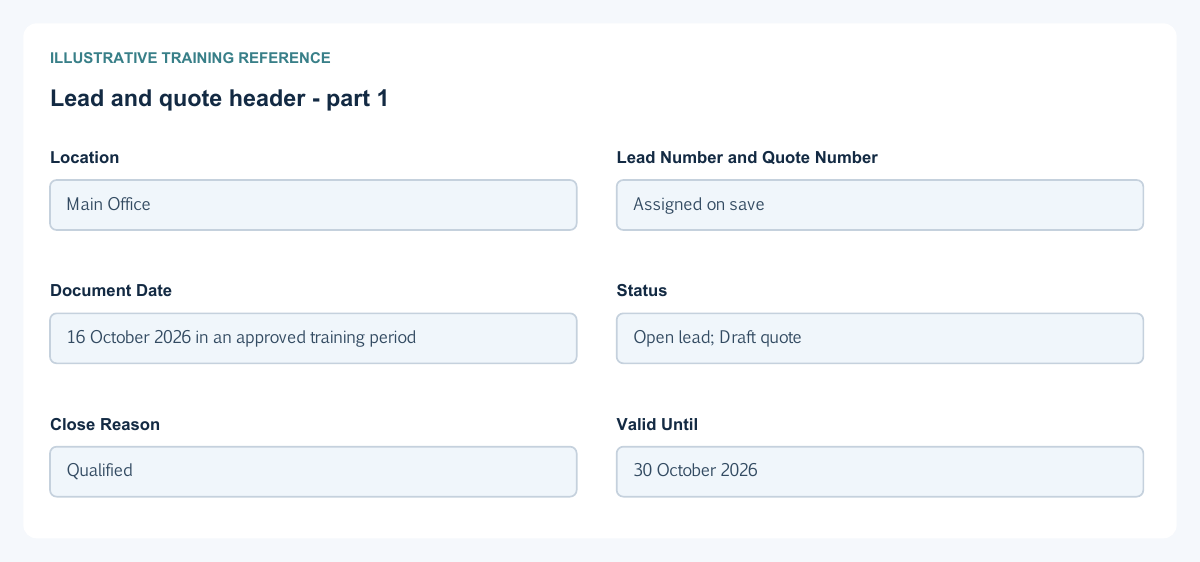
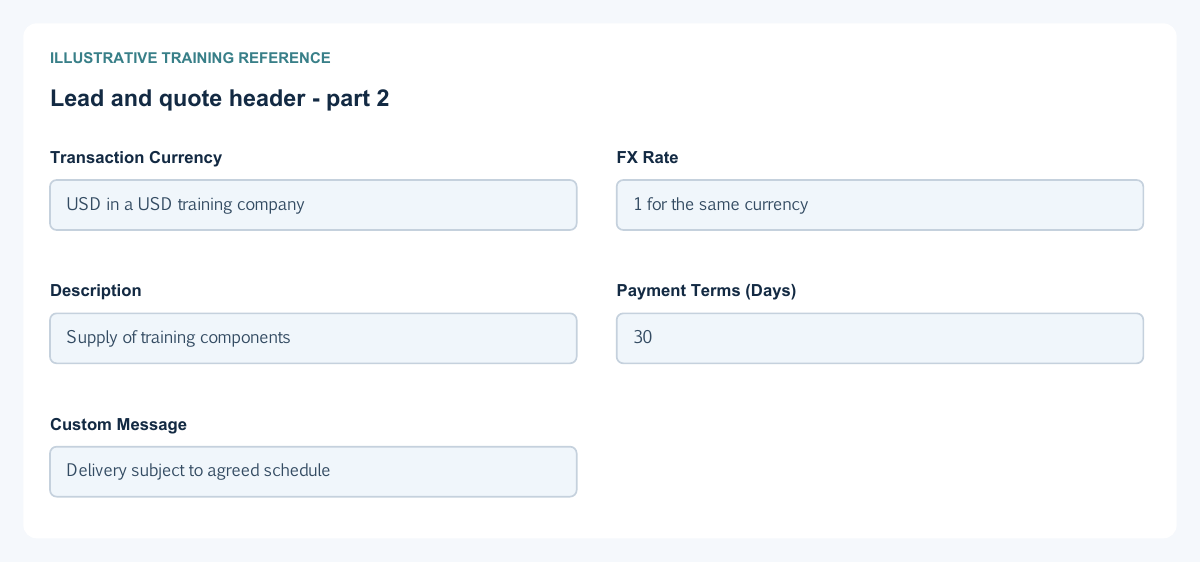
| Field and figure | Entry rule and example | Purpose and implication |
|---|---|---|
| Location - Figure 1 | Required permitted company location. Example: Main Office | Sets the document location and available operational scope; selecting it unlocks the form. Caution: A similar location name does not grant access. |
| Lead Number and Quote Number - Figure 1 | Generated read-only number for the corresponding document. Example: Assigned on save | Identifies the lead or quote within its company/location numbering; these are different document series. Caution: Do not invent a number or use it as the customer order reference. |
| Document Date - Figure 1 | Required document date. Example: 16 October 2026 in an approved training period | Dates the commercial document, not an invoice journal or receipt. Caution: Review the downstream order dates separately. |
| Status - Figure 1 | Lead: Open or Closed. Quote: read-only lifecycle status. Example: Open lead; Draft quote | A lead can be closed with a reason. A quote progresses through its separate lifecycle and is commercially locked after Draft. Caution: Accepted is not paid, invoiced or posted. |
| Close Reason - Figure 1 | Required when a lead is Closed; inactive when Open. Example: Qualified | Explains closure: Qualified, Disqualified, Duplicate or Cancelled. Conversion records its own Converted reason. Caution: Do not close a converted lead to conceal its source history. |
| Valid Until - Figure 1 | Required on a quote. Example: 30 October 2026 | Records the offer validity date; the quote model checks it against the document date and lifecycle rules. Caution: Check current validity before recording acceptance or conversion. |
| Transaction Currency - Figure 1 | Required actual currency selection; foreign-currency editing depends on setup. Example: USD in a USD training company | Denominates the commercial prices and totals; functional reporting uses the company currency. Caution: Typed currency text alone is not a selected record. |
| FX Rate - Figure 1 | Required effective positive rate; locked where functional-currency policy applies. Example: 1 for the same currency | Supplies the transaction-to-functional conversion basis, not a second unit selling price. Caution: Use the approved date/rate convention, not an adjustment to force a desired total. |
| Description - Figure 1 | Required document narrative. Example: Supply of training components | Describes the commercial purpose and helps staff find the correct document. Caution: It does not replace the selected items or supporting evidence. |
| Payment Terms (Days) - Figure 1 | Required whole days from 0 to 3650. Example: 30 | Records commercial credit terms; zero means due on receipt in the supported order terms design. Caution: A terms value does not create a payment or prove the invoice due date. |
| Custom Message - Figure 1 | Optional customer-facing text. Example: Delivery subject to agreed schedule | Carries a document message that can appear on commercial output. Caution: Do not put internal margin notes, secrets or unsupported promises here. |
Customer and prospect snapshot field reference
Figure 2 Customer and prospect snapshot
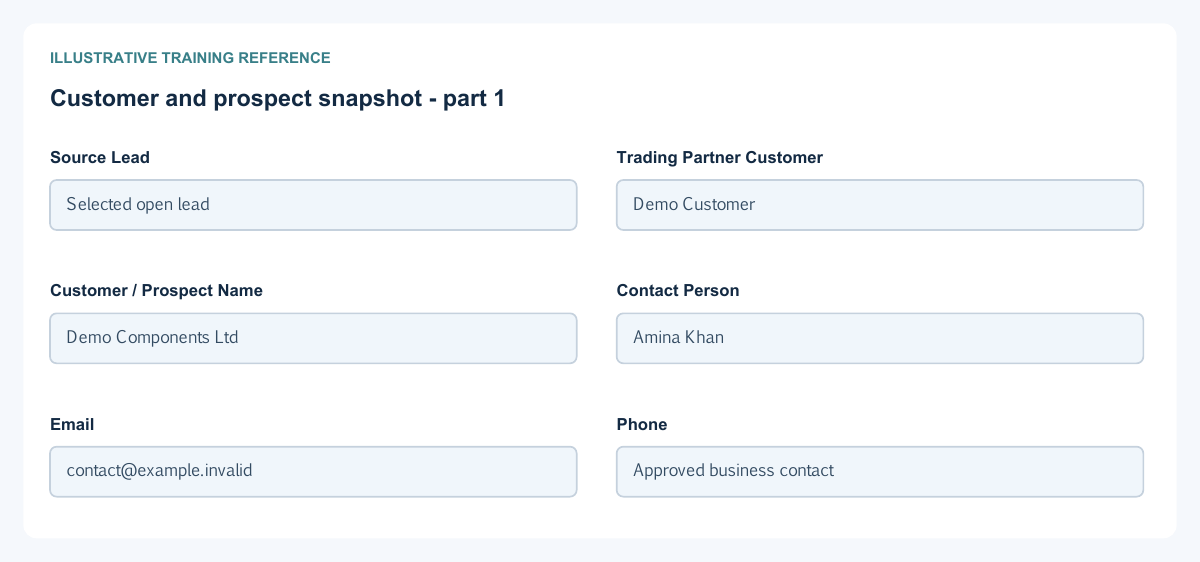
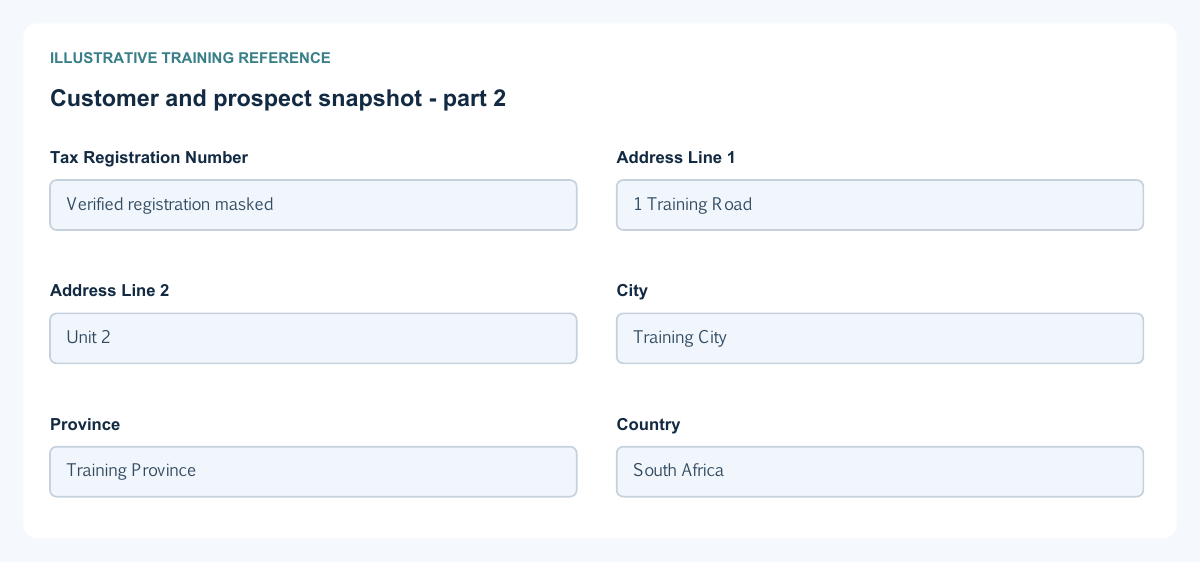
| Field and figure | Entry rule and example | Purpose and implication |
|---|---|---|
| Source Lead - Figure 2 | Quote only; choose an actual lead, or use a Trading Partner customer. Example: Selected open lead | Links a quote to its originating lead and enables Lead Line selection. Caution: A quote needs a source lead or a customer; a free-text name alone is insufficient. |
| Trading Partner Customer - Figure 2 | Optional for a lead; required on a quote without a source lead. Example: Demo Customer | Connects the commercial document to the customer master. A customer is mandatory before conversion to an order. Caution: A prospect snapshot is not automatically a new customer master. |
| Customer / Prospect Name - Figure 2 | Required document snapshot. Example: Demo Components Ltd | Identifies the recipient recorded on this lead or quote, including a prospect without a master. Caution: Review it after changing the selected customer or source lead. |
| Contact Person - Figure 2 | Optional recipient contact. Example: Amina Khan | Records the commercial contact for this document. Caution: A named contact is not an application user or approval authority. |
| Email - Figure 2 | Valid email when supplied; a lead without a customer needs email or phone. Example: contact@example.invalid | Records the document recipient contact, separate from portal or application access. Caution: Verify recipients before a separate email action; saving does not prove delivery. |
| Phone - Figure 2 | Optional unless it is the only contact for a lead without a customer. Example: Approved business contact | Provides the commercial contact number. Caution: Do not publish private personal contact details unnecessarily. |
| Tax Registration Number - Figure 2 | Optional verified recipient reference. Example: Verified registration masked | Carries the recipient tax reference on the document snapshot. Caution: It does not establish tax eligibility or authority validation. |
| Address Line 1 - Figure 2 | Optional snapshot component. Example: 1 Training Road | Records the first billing address line for this commercial recipient. Caution: Review the intended recipient address rather than copying an unrelated party. |
| Address Line 2 - Figure 2 | Optional snapshot component. Example: Unit 2 | Records additional billing address detail. Caution: Leave blank when not applicable. |
| City - Figure 2 | Optional snapshot component. Example: Training City | Records the billing city on this lead or quote. Caution: Changing a snapshot does not update every historic customer document. |
| Province - Figure 2 | Optional snapshot component. Example: Training Province | Records the region or province for the recipient. Caution: Use the customer's approved address convention. |
| Country - Figure 2 | Optional actual country option. Example: South Africa | Identifies the recipient billing country; the model validates supported country codes. Caution: A country selection does not enable a fiscal integration. |
Lead estimate and quote lines field reference
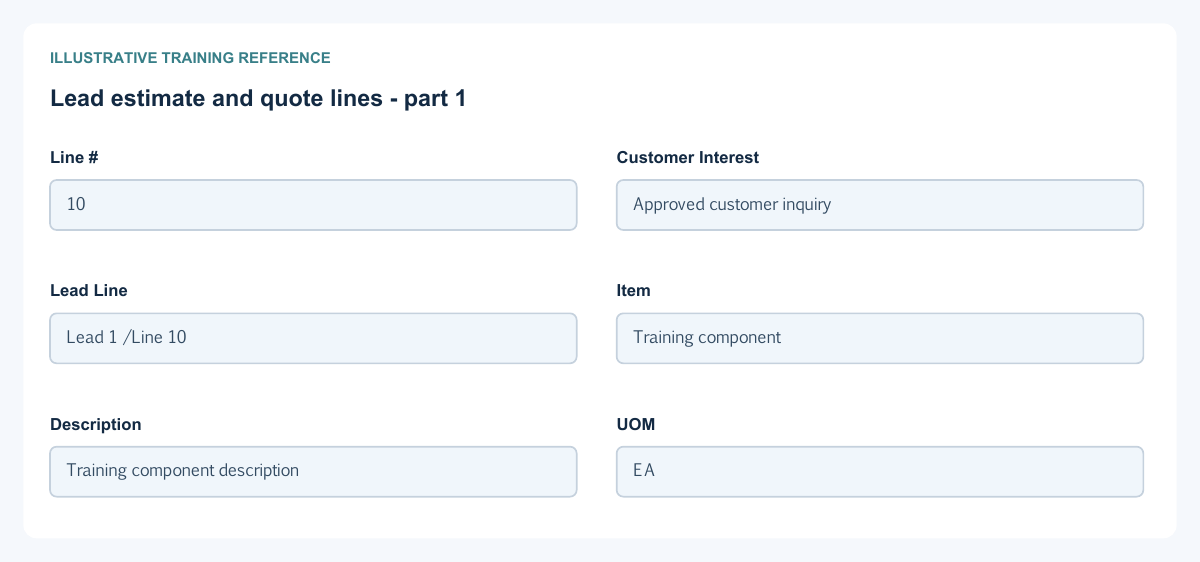
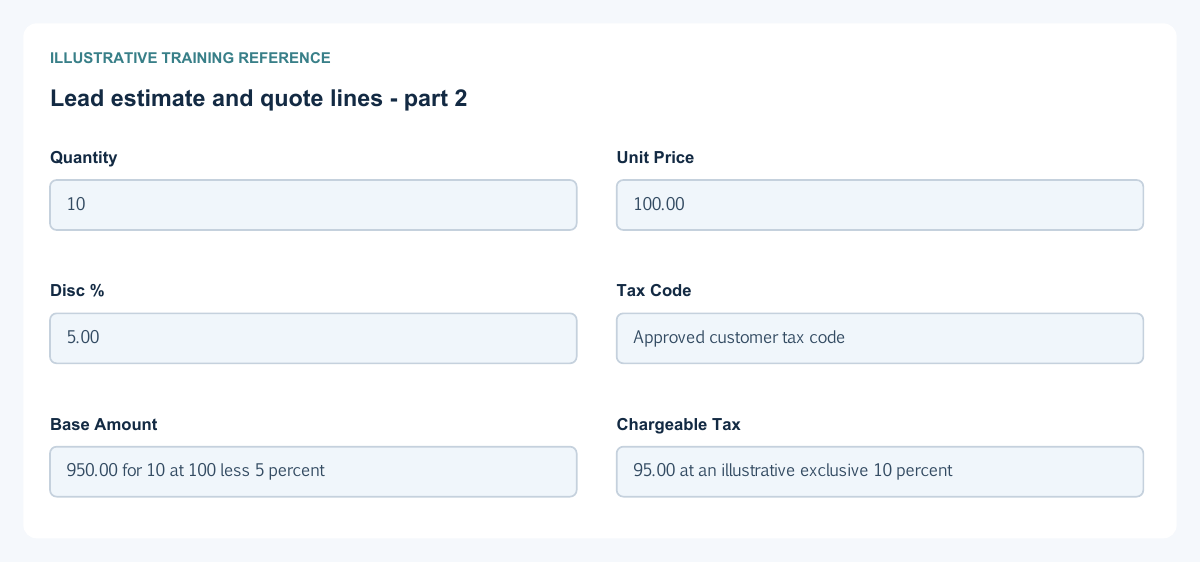
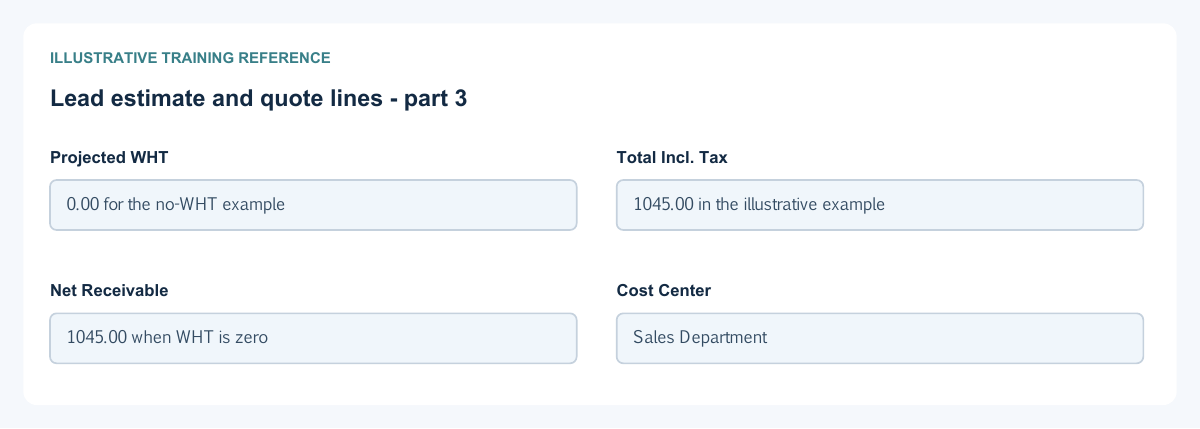
Figure 3 Lead estimate and quote lines
| Field and figure | Entry rule and example | Purpose and implication |
|---|---|---|
| Line # - Figure 3 | System line identity. Example: 10 | Distinguishes commercial rows and their source links. Caution: It is not the document number. |
| Customer Interest - Figure 3 | Lead line only; optional actual available interest selection. Example: Approved customer inquiry | Preserves the inquiry reference associated with the lead line. Caution: Disqualified or duplicate interests are excluded from eligible choices. |
| Lead Line - Figure 3 | Quote line only; choose under the selected Source Lead. Example: Lead 1 / Line 10 | Preserves line provenance and can populate item, quantity, price and tax information. Caution: Review the resulting values; a link is not customer acceptance. |
| Item - Figure 3 | Required actual permitted item result. Example: Training component | Identifies what is offered, with description and UOM information. Caution: Do not use system clearing items or typed-but-unselected text. |
| Description - Figure 3 | Item/source-derived display. Example: Training component description | Explains the selected product or service on the commercial line. Caution: Check the selected item if the description is wrong. |
| UOM - Figure 3 | Item/source-derived display. Example: EA | States the unit measured by Quantity. Caution: A package reference is not automatically a base-unit conversion. |
| Quantity - Figure 3 | Required positive quantity at the supported precision. Example: 10 | Defines the offered units and the maximum basis for partial quote conversion. Caution: A quote quantity does not reserve or issue stock. |
| Unit Price - Figure 3 | Required nonnegative commercial price at the permitted price precision. Example: 100.00 | Values one offered unit before discount and tax. Caution: Price precision and amount rounding can differ. |
| Disc % - Figure 3 | Percentage within the permitted range below 100. Example: 5.00 | Reduces the gross quantity-times-price base under the commercial calculation. Caution: Do not type 0.05 when the intended percentage is 5. |
| Tax Code - Figure 3 | Actual selected tax treatment or deliberate approved clearing. Example: Approved customer tax code | Determines chargeable tax and projected withholding on the commercial line. Caution: A projected amount is not a tax journal or fiscal acceptance. |
| Base Amount - Figure 3 | Calculated amount after discount. Example: 950.00 for 10 at 100 less 5 percent | Provides the line's tax calculation base in transaction currency. Caution: Review inputs rather than overwriting a calculated total. |
| Chargeable Tax - Figure 3 | Calculated; details appear when a breakdown exists. Example: 95.00 at an illustrative exclusive 10 percent | Shows chargeable tax under the selected code and dependencies. Caution: The example rate is not legal tax advice; inspect the actual code. |
| Projected WHT - Figure 3 | Calculated withholding projection. Example: 0.00 for the no-WHT example | Shows the commercial withholding measure separately from chargeable tax. Caution: It is not proof that tax was withheld, paid or recognised. |
| Total Incl. Tax - Figure 3 | Calculated gross line total. Example: 1045.00 in the illustrative example | Combines the discounted base and chargeable tax. Caution: Do not subtract projected withholding twice. |
| Net Receivable - Figure 3 | Calculated projection. Example: 1045.00 when WHT is zero | Shows the commercial net after projected withholding treatment. Caution: It is not a posted receivable or an unpaid invoice balance. |
| Cost Center - Figure 3 | Optional permitted analytical record. Example: Sales Department | Attributes the commercial line to an analysis centre where supported. Caution: It does not choose a stock warehouse or replace the GL account. |
Quote acceptance evidence field reference
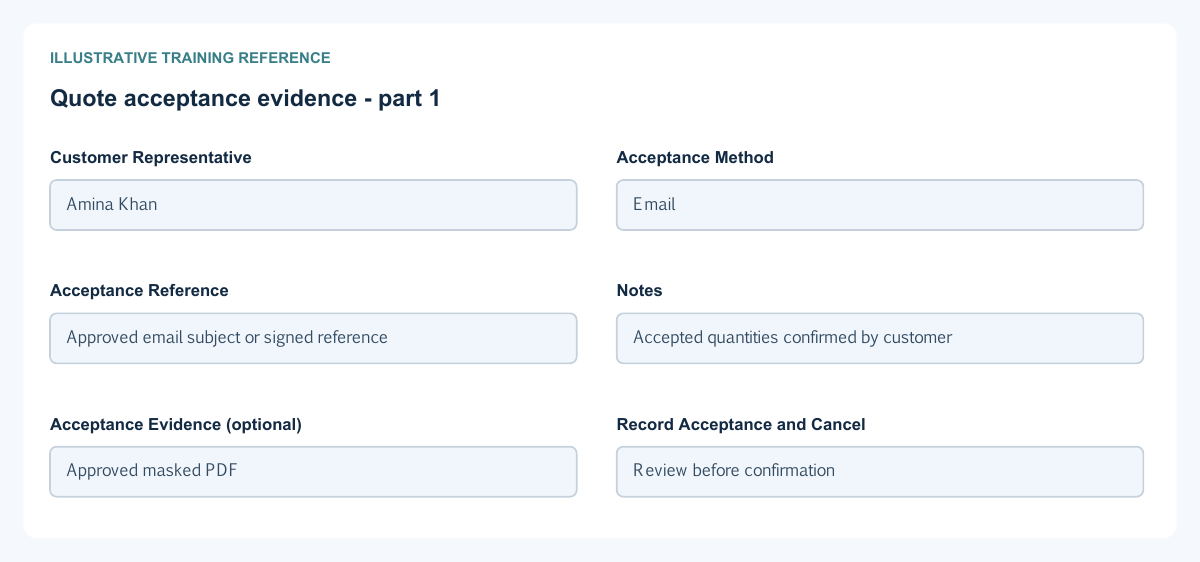
Figure 4 Quote acceptance evidence
| Field and figure | Entry rule and example | Purpose and implication |
|---|---|---|
| Customer Representative - Figure 4 | Required when recording customer acceptance. Example: Amina Khan | Identifies the customer representative whose acceptance the authorised internal user records. Caution: Do not record acceptance without approved customer evidence. |
| Acceptance Method - Figure 4 | Required supported method. Example: Email | Distinguishes Email, Signed document, Telephone, In person or Other. Caution: The method records evidence received; it does not prove the software sent an email. |
| Acceptance Reference - Figure 4 | Optional meaningful reference. Example: Approved email subject or signed reference | Helps locate the original customer acceptance evidence. Caution: Do not insert an access token or password. |
| Notes - Figure 4 | Optional factual explanation. Example: Accepted quantities confirmed by customer | Adds context retained in the quote audit trail. Caution: Separate customer facts from internal speculation. |
| Acceptance Evidence (optional) - Figure 4 | Permitted evidence file; maximum 20 MB. Example: Approved masked PDF | Attaches evidence to the acceptance record through its separate supported action. Caution: File acceptance is not proof of authenticity or customer signing authority. |
| Record Acceptance and Cancel - Figure 4 | Consequential decision or close-without-confirmation action. Example: Review before confirmation | Record Acceptance changes the eligible quote status and records actor/time/evidence; Cancel closes the dialog without confirming that decision. Caution: Check the saved quote and audit after an interruption before retrying. |
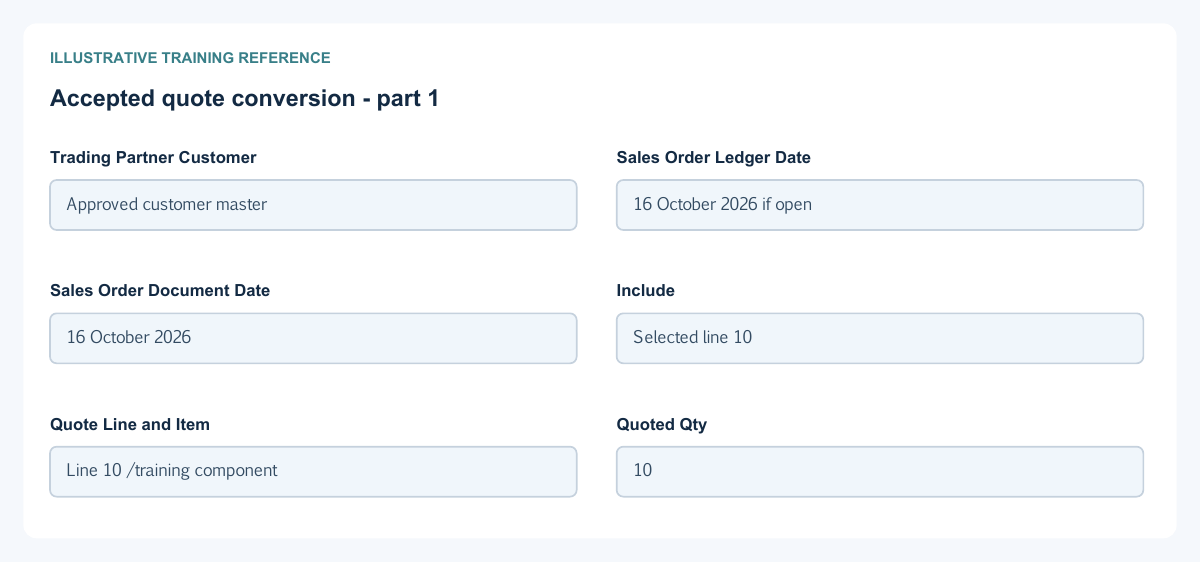
Accepted quote conversion field reference
Figure 5 Accepted quote conversion
| Field and figure | Entry rule and example | Purpose and implication |
|---|---|---|
| Trading Partner Customer - Figure 5 | Shown when the accepted quote has no customer; actual selection required. Example: Approved customer master | Assigns the order owner for a prospect quote. Conversion may fill a missing customer but cannot replace one already recorded on the accepted quote. Caution: Confirm legal entity and account defaults before conversion. |
| Sales Order Ledger Date - Figure 5 | Required eligible open-period date. Example: 16 October 2026 if open | Sets the new order's ledger-period context, not an invoice posting date. Caution: Do not bypass a period restriction by using an unrelated date. |
| Sales Order Document Date - Figure 5 | Required order document date. Example: 16 October 2026 | Dates the generated sales order independently of the quote. Caution: Review both dates rather than assuming the source date is retained. |
| Include - Figure 5 | Select eligible rows with remaining quantity. Example: Selected line 10 | Chooses which quote rows form the new order. Caution: Unchecking does not cancel the underlying quote line. |
| Quote Line and Item - Figure 5 | Read-only source identity. Example: Line 10 / training component | Identifies the exact accepted row being converted. Caution: Similar descriptions can belong to different source lines. |
| Quoted Qty - Figure 5 | Read-only offered quantity. Example: 10 | Shows the accepted row quantity used as the conversion ceiling. Caution: This is not delivered, invoiced or available stock quantity. |
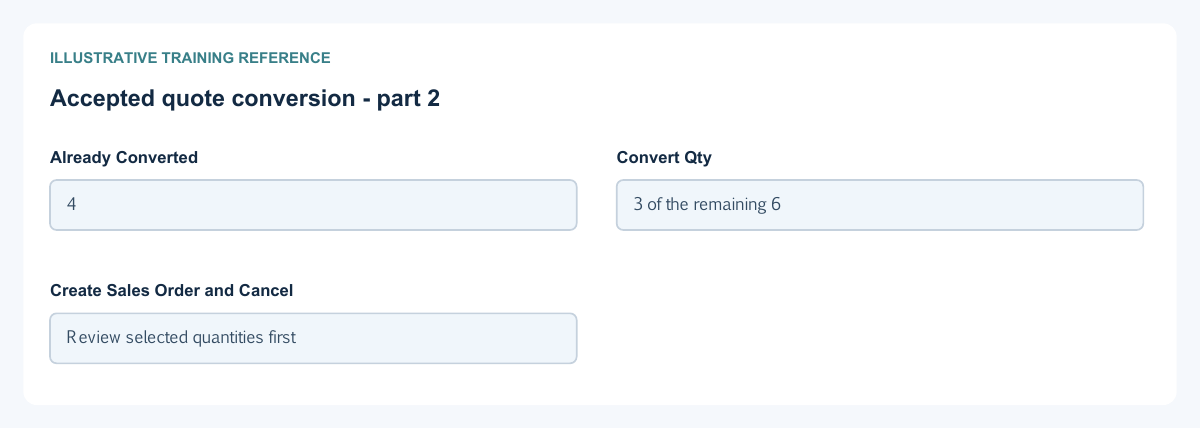
| Already Converted - Figure 5 | Read-only quantity linked to existing orders. Example: 4 | Shows prior order conversion against this quote row. Caution: It is not the quantity already invoiced. |
| Convert Qty - Figure 5 | Positive selected quantity no greater than the remaining quantity. Example: 3 of the remaining 6 | Supports partial conversion. The quote stays Accepted until all its rows are fully converted. Caution: Review existing orders before retrying after an interrupted confirmation. |
| Create Sales Order and Cancel - Figure 5 | Confirm creation or dismiss without confirmation. Example: Review selected quantities first | Creation makes a separate order with source links, subject to scope, dates and credit controls. Caution: It does not create an invoice, reserve stock, collect cash or complete a fiscal submission. |
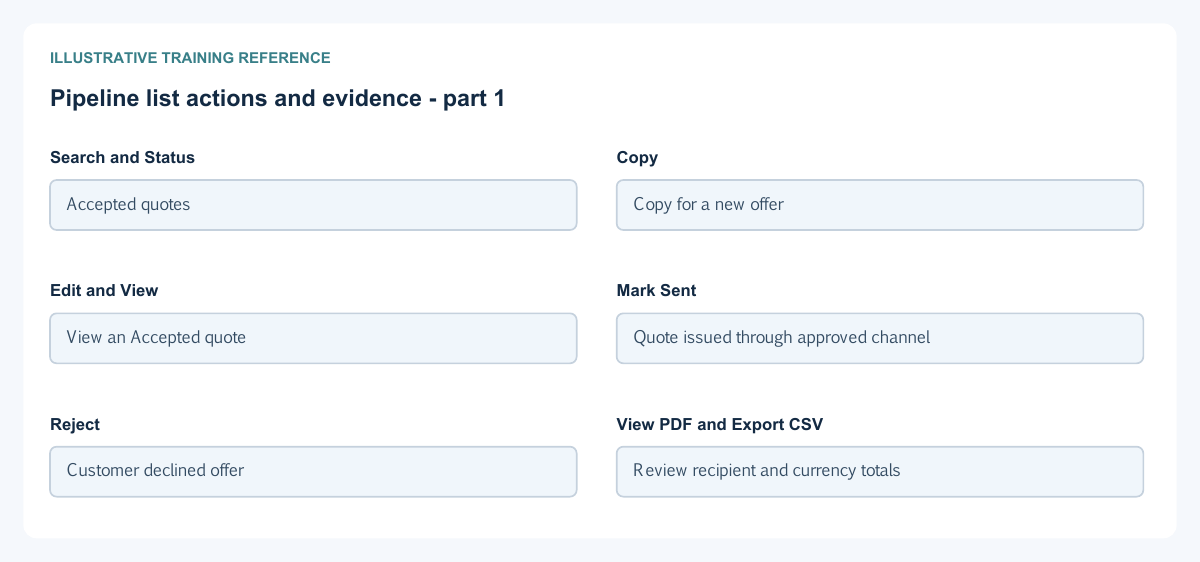
Pipeline list actions and evidence field reference
Figure 6 Pipeline list actions and evidence
| Field and figure | Entry rule and example | Purpose and implication |
|---|---|---|
| Search and Status - Figure 6 | Search number, customer or description; optionally filter lifecycle. Example: Accepted quotes | Finds commercial documents within your permitted scope. Caution: An absent result is not authority to change company access. |
| Copy - Figure 6 | Requires appropriate view and create access. Example: Copy for a new offer | Creates a separate Open lead or Draft quote rather than changing historic commercial terms. Caution: Review dates, recipient and tax treatment on the new document. |
| Edit and View - Figure 6 | Edit depends on permission, locks and lifecycle. Example: View an Accepted quote | View inspects the retained terms; commercial quote editing is restricted after Draft. Caution: Do not bypass a lock or treat copied terms as revised acceptance. |
| Mark Sent - Figure 6 | Eligible Draft quote action. Example: Quote issued through approved channel | Changes the commercial status to Sent. Caution: Mark Sent is not evidence of actual email delivery. |
| Reject - Figure 6 | Eligible Draft or Sent quote decision. Example: Customer declined offer | Records the rejected commercial state and its history. Caution: It is not a financial reversal. |
| View PDF and Export CSV - Figure 6 | Read or export permitted commercial records. Example: Review recipient and currency totals | Produces a snapshot for review or sharing. Caution: A downloaded PDF is not a tax-authority submission; protect private data. |
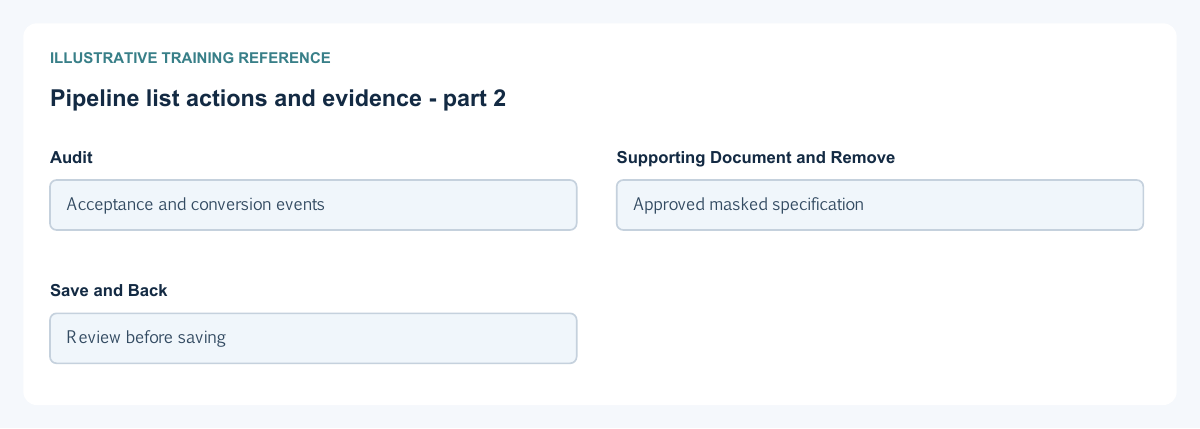
| Audit - Figure 6 | Inspect lifecycle history and actor/time. Example: Acceptance and conversion events | Helps trace the source, decision and generated order. Caution: An audit event is not proof of a financial posting. |
| Supporting Document and Remove - Figure 6 | Optional permitted attachment up to 20 MB; removal appears for an existing file. Example: Approved masked specification | Links or removes supporting evidence, not commercial lines or ledger entries. Caution: Keep required evidence; deleting a file does not cancel the document. |
| Save and Back - Figure 6 | Save only when authorised and required values are complete; Back returns to the list. Example: Review before saving | Stores the commercial form separately from acceptance/conversion actions. Caution: Check whether changes were saved before leaving or retrying. |
Read the quote lifecycle
A quote begins Draft. Its commercial fields are locked after Draft. Supported lifecycle states include Sent, Accepted, Rejected, Expired, Converted and Cancelled; available actions depend on the current state and permissions. Mark Sent records a status, not successful email delivery. View the retained terms and audit evidence before acting.
Record genuine customer acceptance
The acceptance dialog records an authorised internal user's account of acceptance received from the customer, with representative, method, reference, notes and optional evidence. It is distinct from secure online customer acceptance and from internal financial approval. Do not record a customer decision without the organisation's approved supporting basis.
Convert only the intended remaining quantity
Quote-to-order conversion requires an Accepted quote and a customer master. If a prospect quote lacks one, conversion requests an actual customer selection; it cannot replace a customer already recorded. Choose eligible order dates and selected remaining line quantities. For a quote of 10 units with 4 already converted, at most 6 remain; converting 3 leaves 3 for a later order. The quote stays Accepted until all lines are fully converted.
Review the generated order separately
The new order carries source links and its own dates and number. Review customer, location, prices, tax, credit controls and quantities. Order creation does not create a customer invoice, reserve or issue stock, or collect cash. Use the sales-order guide for the next document and the service invoice/receipt guide for common receivables fields.
Handle copying and interrupted actions safely
Copy creates a separate Open lead or Draft quote for review; it is not an amendment to accepted terms. After an interrupted save, acceptance or conversion, inspect the existing record, audit and generated order before retrying. Keep original acceptance evidence and source links rather than deleting history to reopen commercial fields.
Protect customer documents
Review recipients and the exact output before sharing. Keep customer contact and tax references private. Supporting documents and acceptance evidence are separate attachments; removing either is not a commercial cancellation. Ask the Tenant Administrator about missing duties within the subscription workspace, not platform or other-tenant access.
Related user guides
Customer and vendor setup, items, warehouses, service invoice and receipt fields, inventory reconciliation and electronic invoicing explain related prerequisites and controls.