
Register import and export trade references
Reference identity currency document utilisation and realization evidence
Trade References links an import/export reference to commercial documents and receipt/payment realization evidence. Use it to trace the external reference, its registered currency and associated amounts. It does not submit a customs declaration, activate a bank instrument, post an invoice or execute a payment.
Prepare authority and supporting evidence
Work in the intended company with authority to maintain its trade records. Gather the genuine reference, flow, jurisdiction, currency, party and relevant dates. Confirm whether this is an export/customer or import/vendor event. A primary trading partner is a business association, not permission to see every document belonging to that partner.
For country-specific classifications or regulatory obligations, use the responsible trade/tax specialist's approved interpretation. An available reference type does not establish that the application completes that jurisdiction's statutory process.
Open the reference register
Use Import-Export Trade, then Trade References. Search by the internal/external number, type, country, authority/bank or party name. Flow and Status filters narrow the register. Review existing records before choosing Add Trade Reference; a similar external number can have a different company, jurisdiction, type or flow.
Use View to inspect a saved reference, Edit only when authorised, and Cancel to leave unsaved preparation. If the function is unavailable, ask your Tenant Administrator or support to review availability rather than creating a substitute reference in another company.
Create and check a reference
- Choose Add Trade Reference and review the auto-generated Internal Trade Ref No. display. The actual number is assigned on Save.
- Choose Flow and Country / Jurisdiction. Select the applicable Reference Type and enter the genuine External Reference No.; avoid extra surrounding spaces.
- Search and select Registered Currency. Optionally select the actual Primary Party. Typed lookup text alone is not selection.
- Enter Expected Amount where known, in the registered currency, then Authority / Bank, Issue Date and Target Realization Date as applicable. The target is a planning date, not evidence that funds were realized.
- Review Status and Allow multi-party utilization. Keep the reference Open while legitimate use is still expected. Enable multi-party only under an approved business arrangement, not as a substitute for choosing the correct party.
- Add meaningful Remarks and Save once. Reopen the detail and check the new internal number, external reference, flow, country, currency, expected amount and status against the evidence.
Save creates the reference record, not its invoice utilisation or actual cash settlement. Confirm those later on their originating documents and reports. A duplicate reference save can return a page error rather than a friendly duplicate message. Search the register and check the original before retrying; do not assume the reference is missing because the page failed.
Identity and classification fields
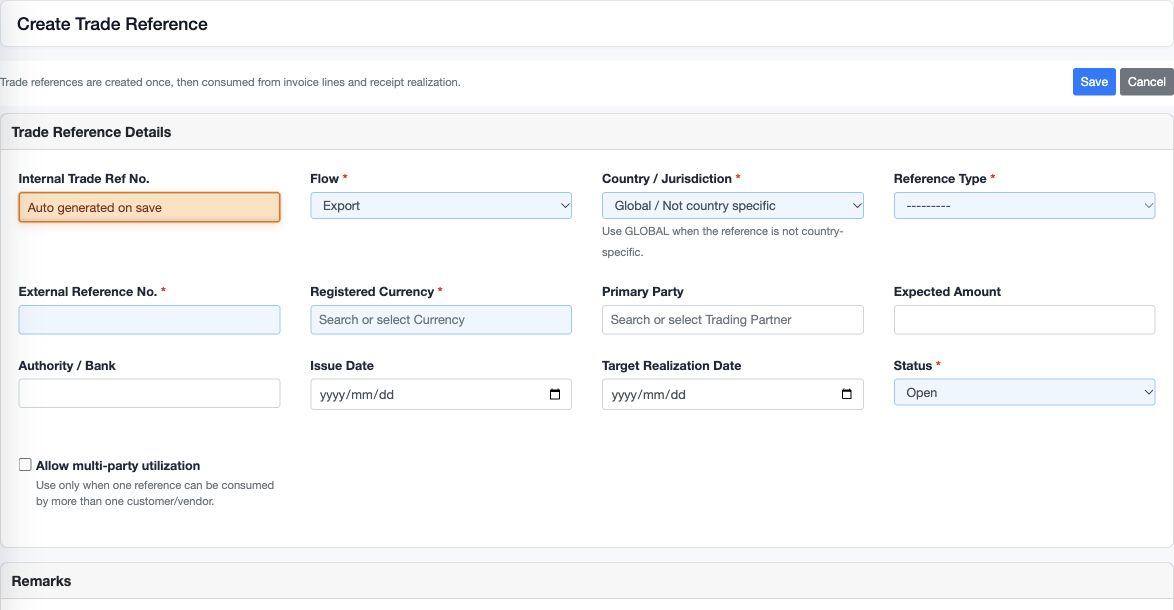
| Field or control | Entry and example | Meaning and implication |
|---|---|---|
| Internal Trade Ref No. | Locked; auto-generated on Save, for example 17 | Internal identifier used to find the record; not the external customs/bank reference |
| Flow | Required Export or Import | Distinguishes the commercial direction; use Import for the supported vendor links |
| Country / Jurisdiction | Required country or Global / Not country specific | Classification of the reference; not the document currency or automatic authority registration |
| Reference Type | Required listed type | Describes the genuine underlying evidence, not an instruction to create a legal instrument |
| External Reference No. | Required, up to 80 characters | Preserve the official identifier; duplicate identity includes company, flow, country and type |
| Registered Currency | Required searchable selection, for example USD | Basis of expected/reportable/realized amounts; do not add figures from different currencies as one monetary total |
| Primary Party | Optional current-company trading partner | Association with the main customer/vendor; changing it does not rewrite linked documents |
The available types are Goods Declaration, Financial Instrument, eBRC, IRM, Shipping Bill, ITN, DUCR, MUCR, MRN, EDN, Transaction Number, Letter of Credit, Contract, Internal Group and Other. Choose the type supported by the actual source evidence. Do not infer country eligibility or statutory acceptance from the name alone.
Amount, date and maintenance fields
| Field or control | Entry and example | Meaning and implication |
|---|---|---|
| Expected Amount | Optional, in registered currency, for example USD 10,000 | Planning/reference amount, not automatically an invoice cap, receivable or bank balance |
| Authority / Bank | Optional text, up to 120 characters | Describes the relevant institution; not a bank-account selection, credential or payment mandate |
| Issue Date | Optional actual issue date | Identifies the evidence date; not a GL posting date |
| Target Realization Date | Optional planned date | Helps follow up expected realization; it is not the actual receipt/payment realization date |
| Status | Open or Closed | Closed references are rejected for new links by the consuming services; closure does not settle existing invoices or erase history |
| Allow multi-party utilization | Checkbox for an approved shared-reference arrangement | Records the intended multi-party use; do not rely on this checkbox alone as a complete currency/party/limit enforcement control |
| Remarks | Optional business explanation | Retain the reason and source reference without bank credentials or unnecessary personal data |
| Save / Cancel | Save retains changes; Cancel leaves preparation | Neither action submits a declaration, pays a supplier or realizes an export receipt |
Understand utilisation and realization
Invoice utilisation records the portion of a commercial line reported against the trade reference. A source line snapshot can include quantity, UOM and line amount; Reportable Amount is a distinct entered figure in the reference basis. It is not a second sale or purchase line.
Receipt realization records Gross Realized, actual realization date and remarks against the saved customer receipt. The supported customer receipt link accepts one trade reference. Vendor transaction lines and vendor payments likewise accept one supported Import reference per line/payment in their respective controls. The vendor payment's Gross Paid amount is trade evidence, not an instruction sent to a bank.
Before saving a link, confirm company, flow, party, registered currency and amount with the underlying document. Do not assume selecting a reference performs currency conversion, enforces an expected-amount ceiling or proves bank settlement. Use the permitted source form to maintain links; do not alter hidden identifiers.
Read the saved detail
| Display or column | Meaning | What to check |
|---|---|---|
| Expected Amount | Registered planning amount | Correct currency and business basis; blank is not proof of a zero obligation |
| Invoice Utilized | Customer invoice-line reportable amounts shown in the current detail | Source documents and any multiple links; not necessarily all import/vendor utilisation |
| Receipt Realized | Customer receipt realization amounts shown in the current detail | Actual receipt reference/date; not necessarily cash applied to a particular invoice |
| Status | Manually maintained Open/Closed | A Closed label does not establish full realization or settlement |
| Transaction, Line and Description | Link to the originating customer line | Correct document and line, not merely the same partner name |
| Qty and UOM | Snapshot of the linked line's quantity and unit | Distinguish the physical quantity from a currency amount |
| Line Amount Snapshot | Amount captured from the originating line | It need not equal the assigned Reportable Amount |
| Reportable Amount and Remarks | The reference assignment and its explanation | Registered-currency basis and no duplicate attribution |
| Receipt, Date and Gross Realized | Linked customer receipt realization evidence | Correct actual receipt and date, plus separate bank/application evidence |
The detail's Invoice Line Utilization and Receipt Realization panels are customer-side panels. Use the Import-Export Trade Reference Register and underlying vendor documents when reviewing import-side utilisation; absence from a customer-side panel does not establish that no vendor links exist. Reconcile the source rows rather than treating displayed aggregate totals alone as certified.
Work through a reference example
Assume a fictional Export reference registered in USD with Expected Amount 10,000. Two invoice lines are assigned reportable amounts of USD 4,000 and USD 3,000, giving customer-side utilisation of USD 7,000. A receipt realization of USD 5,000 leaves a USD 2,000 difference between those two assigned measures, not automatically an overdue invoice or a bank shortage.
Compare the linked invoices, receipt realization and actual receipt applications before concluding what remains collectible. The unused USD 3,000 against Expected Amount is not automatically a sales order or an available bank instrument. This example illustrates the relationship; it is not an automatically saved transaction or a statutory calculation.
Change a reference without losing the trail
Review linked documents before editing flow, jurisdiction, currency, party or the external identity. A change to the reference master is not a supported correction of already posted documents or authority records. Retain the approved reason and reconcile the links again.
Set Closed only when the responsible owner has reviewed remaining use and evidence. If a new legitimate link is rejected as closed, inspect the saved status and obtain authority before reopening; do not create a duplicate external reference simply to bypass the restriction.
Resolve common problems
| Situation | Check | Safe response |
|---|---|---|
| Currency or party appears typed but Save rejects it | Whether an actual lookup result was selected | Re-select the intended current-company record |
| Duplicate identity error | Company, Flow, Country, Type and External Reference No. | Open the existing reference and verify it before creating another |
| Link rejected as closed or wrong flow | Current reference status and Export/Import basis | Use the correct Open reference under authority; do not change another record to force acceptance |
| Expected, utilized and realized amounts differ | Currency, source assignments, applications, dates and multiple links | Reconcile the underlying records; do not enter an invented realization to make totals agree |
| Saved response is uncertain | Register, generated internal number and approximate time | Inspect the existing record before retrying Save |
Related guides
Customers and vendors, sales invoices and stock, customer receipts, vendor payments, report parameters and workflow handbook.