
Prepare and review balance sheet reconciliations
Account schedules supporting items evidence independent review and close
Use this guide to understand account schedules supporting items evidence independent review and close. It is for authorised users and Tenant Administrators working within their own subscription workspace. A tenant is the subscription workspace; the Tenant Administrator manages its permitted users and settings, not the platform or other customers' data.
Separate reconciliation from journal posting
Balance Sheet Review organises support for an account balance and its reconciling items. It does not create a new chart of accounts, accounting period or correcting journal merely because a review is prepared or approved.
Configure account review schedules
Account Review Setup starts accounts as Not required/Monthly. Select the intended accounts on the current page before a bulk change. Blank update controls preserve existing values. Enabling or rescheduling requires the correct frequency and first year/month/quarter. Only completed periods are available; September becomes available on 1 October.
Use templates deliberately
Setup template changes affect newly created reviews. An existing Draft has its own Reconciliation template panel. Choose a template matching the support required for the account; do not change it merely to avoid required evidence or validation.
Field explanations and training references
Each reference describes the field or control, entry rule, example and practical implication. Illustrations use blank or fictional training values. Conditional fields and actions depend on your selected policy, country, record state and permissions; choose actual application lookup records rather than copying text or hidden identities.
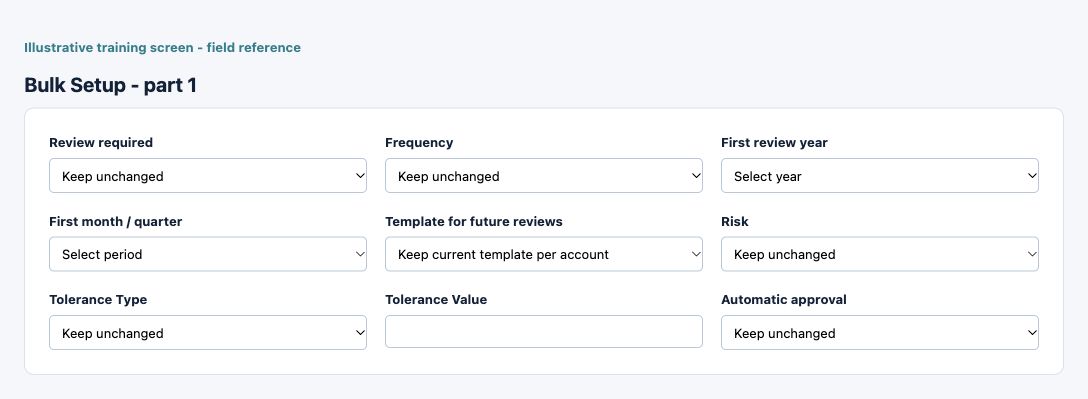
Account review bulk setup field reference
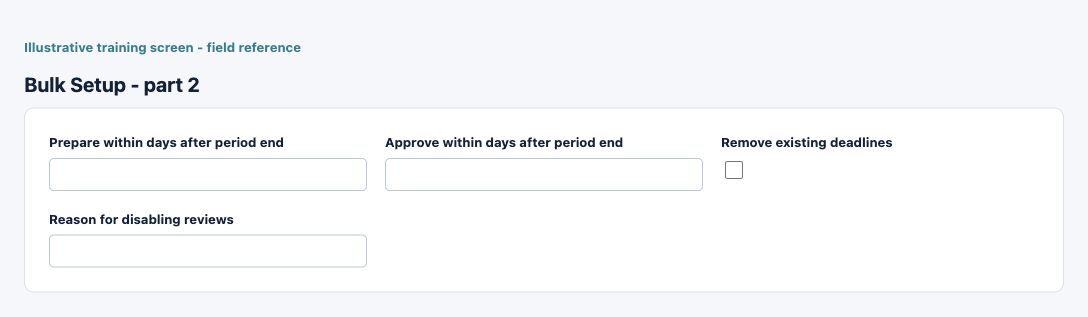
Figure 1 Account review bulk setup
| Field and screenshot | Entry rule and example | Purpose and implication |
|---|---|---|
| Review required - Figure 1 | Optional or policy-dependent entry. Choices: Yes, No. Example: Yes | Whether the selected balance-sheet accounts require reconciliation reviews. Disabling reviews is a governed change, not deletion of existing evidence. Caution: A review setting or support item does not amend or post the general ledger. |
| Frequency - Figure 1 | Optional or policy-dependent entry. Choices: Monthly, Quarterly, Annual. Example: Monthly | Review frequency or first month/quarter for the selected schedule. Only completed periods are available; annual schedules use a year without a month/quarter. Caution: A review setting or support item does not amend or post the general ledger. |
| First review year - Figure 1 | Optional or policy-dependent entry. Example: 2026 | Calendar or first-review year for this record. In review setup it must be combined with the selected frequency and month/quarter when applicable. Caution: A review setting or support item does not amend or post the general ledger. |
| First month / quarter - Figure 1 | Optional or policy-dependent entry. Choices: January, February, March, April, May, June, July, August, September, October, November, December. Example: January | Review frequency or first month/quarter for the selected schedule. Only completed periods are available; annual schedules use a year without a month/quarter. Caution: A review setting or support item does not amend or post the general ledger. |
| Template for future reviews - Figure 1 | Optional or policy-dependent entry. Choices: General Account Support, Receivables, Payables, Accruals, Prepayments, Bank, Retained Earnings / Equity. Example: General Account Support | Template used for future reviews. Changing setup does not silently change an existing Draft review template. Caution: A review setting or support item does not amend or post the general ledger. |
| Risk - Figure 1 | Optional or policy-dependent entry. Choices: Low, Medium, High. Example: Low | Risk classification used to organise account review. It does not alter ledger balances or independently prove a reconciliation is reliable. Caution: A review setting or support item does not amend or post the general ledger. |
| Tolerance Type - Figure 1 | Optional or policy-dependent entry. Choices: Amount, Percentage. Example: Amount | Amount or percentage basis and value for acceptable review differences. A tolerance is not authority to post an unexplained accounting adjustment. Caution: A review setting or support item does not amend or post the general ledger. |
| Tolerance Value - Figure 1 | Optional or policy-dependent entry. Form precision up to 6 decimal places; consuming company policy also applies. Example: 10.00 on the selected basis | Amount or percentage basis and value for acceptable review differences. A tolerance is not authority to post an unexplained accounting adjustment. Caution: A review setting or support item does not amend or post the general ledger. |
| Automatic approval - Figure 1 | Optional or policy-dependent entry. Choices: On, Off. Example: On | Enables the eligible automatic-review policy, not unconditional approval. Carry-forward, activity, template and prior-review controls still apply. Caution: A review setting or support item does not amend or post the general ledger. |
| Prepare within days after period end - Figure 1 | Optional or policy-dependent entry. Example: 5 | Target days after period end for preparation or approval. They are review deadlines, not accounting posting periods. Caution: A review setting or support item does not amend or post the general ledger. |
| Approve within days after period end - Figure 1 | Optional or policy-dependent entry. Example: 10 | Target days after period end for preparation or approval. They are review deadlines, not accounting posting periods. Caution: A review setting or support item does not amend or post the general ledger. |
| Remove existing deadlines - Figure 1 | Checkbox policy setting; review the saved on/off state. Example: The approved on/off policy | Explicitly removes existing review deadlines in a bulk change. Blank deadline fields otherwise preserve existing settings. Caution: A review setting or support item does not amend or post the general ledger. |
| Reason for disabling reviews - Figure 1 | Optional or policy-dependent entry. Maximum 500 characters. Example: Approved account-review exception | Reason for disabling required reviews on selected accounts. Preserve a meaningful governed rationale rather than a generic note. Caution: A review setting or support item does not amend or post the general ledger. |
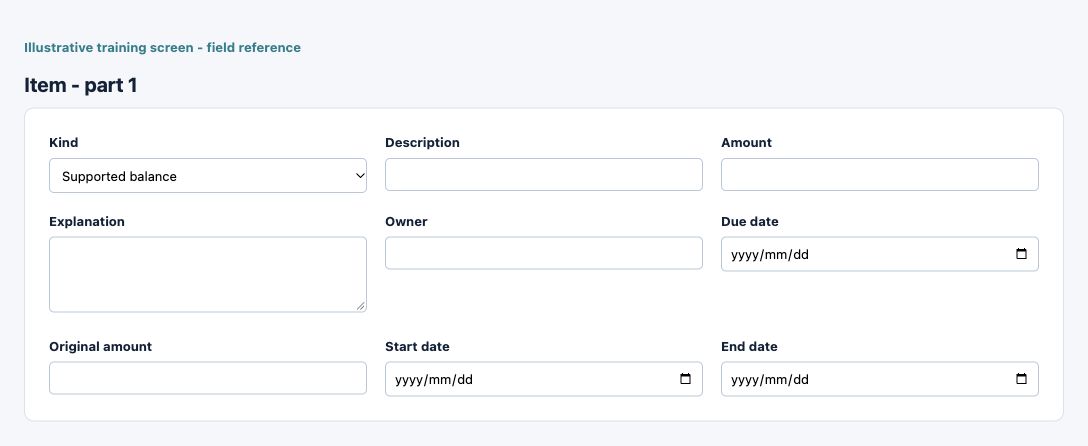
Reconciliation item field reference
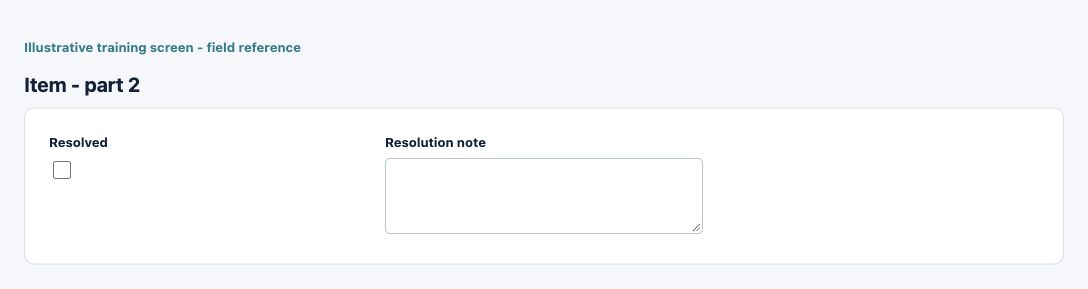
Figure 2 Reconciliation item
| Field and screenshot | Entry rule and example | Purpose and implication |
|---|---|---|
| Kind - Figure 2 | Required entry. Choices: Supported balance, Timing adjustment, Unresolved exception. Example: Supported balance | Classifies a reconciliation item, such as supporting, timing or exception. The type determines applicable explanation and clearance requirements. Caution: A review setting or support item does not amend or post the general ledger. |
| Description - Figure 2 | Required entry. Maximum 500 characters. Example: Approved business purpose | Business explanation supporting the record and its review. Text does not replace source documents, approval or calculated accounting values. Caution: A review setting or support item does not amend or post the general ledger. |
| Amount - Figure 2 | Required entry. Form precision up to 6 decimal places; consuming company policy also applies. Example: 100.00 with the correct sign | Amount supporting or explaining the review item, or its original scheduled value. Review currency, sign and period; it is not a posted correcting journal. Caution: A review setting or support item does not amend or post the general ledger. |
| Explanation - Figure 2 | Optional or policy-dependent entry. Example: Documented reason for the difference | Reason and evidence for the reconciling item. Timing items require an explanation and clearance date. Caution: A review setting or support item does not amend or post the general ledger. |
| Owner - Figure 2 | Optional or policy-dependent entry. Maximum 200 characters. Example: Designated responsible person | Responsible owner or expected clearance date for the reconciling item. Assignment is not proof that the item has cleared. Caution: A review setting or support item does not amend or post the general ledger. |
| Due date - Figure 2 | Optional or policy-dependent entry. Example: 16 October 2026, on the approved effective basis | Responsible owner or expected clearance date for the reconciling item. Assignment is not proof that the item has cleared. Caution: A review setting or support item does not amend or post the general ledger. |
| Original amount - Figure 2 | Optional or policy-dependent entry. Form precision up to 6 decimal places; consuming company policy also applies. Example: 1200.00 | Amount supporting or explaining the review item, or its original scheduled value. Review currency, sign and period; it is not a posted correcting journal. Caution: A review setting or support item does not amend or post the general ledger. |
| Start date - Figure 2 | Optional or policy-dependent entry. Example: 16 October 2026, on the approved effective basis | Start of this configuration or review-item period. Use the applicable business basis and check other effective records for overlap. Caution: A review setting or support item does not amend or post the general ledger. |
| End date - Figure 2 | Optional or policy-dependent entry. Example: 31 October 2026, when an end is applicable | End of the applicable date range when present. A blank end can represent continuing applicability; it is not automatic deletion of older records. Caution: A review setting or support item does not amend or post the general ledger. |
| Resolved - Figure 2 | Checkbox policy setting; review the saved on/off state. Example: The approved on/off policy | Resolution status or explanation for a reconciling item. A checked status does not remove the audit trail or amend the GL. Caution: A review setting or support item does not amend or post the general ledger. |
| Resolution note - Figure 2 | Optional or policy-dependent entry. Example: Cleared against the identified source record | Resolution status or explanation for a reconciling item. A checked status does not remove the audit trail or amend the GL. Caution: A review setting or support item does not amend or post the general ledger. |
Prepare the reconciliation
Open the intended company/account/period review. Confirm the GL balance and source refresh state, then add the appropriate support, timing or exception items. Enter a meaningful description, amount/sign, explanation, owner and due date where applicable. A support amount is not a correcting ledger entry.
Explain timing and unresolved items
Timing items require an explanation and expected clearance date. A resolved timing/exception item needs a resolution note. For example, a known deposit-in-transit can explain a difference only with its amount, source evidence and expected clearance; a tolerance alone is not that explanation.
Control schedules and evidence
Schedule templates can have extra template-specific fields such as original value and start/end dates. Review the resulting period calculation and attached evidence. Changes to source records can make a review stale; refresh and inspect affected support before relying on a prior approval.
Submit for independent review
Submission requires the applicable template and support requirements. A preparer/editor cannot approve the same review version through the ordinary independent-review path, including a Tenant Administrator. Reviewers should inspect support and exceptions, not just the final difference. Governed exceptional overrides are not ordinary user instructions.
Understand automatic approval and tolerance
Automatic approval is a conditional carry-forward control, not unconditional approval of any small difference. Prior approval, unchanged balances/activity, template/frequency and other eligibility checks matter. Amount and percentage tolerances have different bases; neither authorises an unexplained correcting journal.
Review history and changes after approval
Use history, evidence and status to understand who changed or reviewed a version. A later source change or reopened reconciliation needs renewed attention. Preserve the original evidence trail; copying a support value forward does not prove the new period is reconciled.
Coordinate with period close
Reconcile the review population, overdue preparation/approval, open exceptions and account ledger balances for the same completed period. Balance-sheet review approval and accounting period close are separate controls. Retain exported/pack evidence and explain exclusions under the organisation's close policy.
Reconcile each module to the same cutoff
Use one selected company and agreed inclusive ledger cutoff. Record report parameters, currency basis, location scope, generation time and posting state with the evidence. A report run for one branch, current stock or a different date cannot establish agreement with a whole-company period-end ledger.
| Area | Compare | Investigate before signing off |
|---|---|---|
| Cash and bank | Each reconciled book balance to its bank GL account; statement balance adjusted for supported timing items | Unmatched or duplicate statement lines, sign errors, unposted bank entries, transfers represented on only one bank, and timing items that no longer clear |
| Customers | Open customer documents and applications to the receivables control account on the same date and currency basis | Unapplied cash or credits, future-dated applications, manual control-account journals, wrong customer/location and incomplete corrections |
| Vendors | Vendor open documents, payments and applications to the payables control account | Unapplied advances, receipt/invoice cutoff, withholding timing, duplicate invoices and failed or unposted payments |
| Inventory | Dated quantities and valuation by the required item/warehouse/tracking scope to inventory GL; reconcile quantity separately from value | Transfers in progress, backdating, non-costed or failed movements, value-only adjustments and a current-stock report used for a historical cutoff |
| Purchasing and GRNI | Received but uninvoiced receipt quantities and accrual values to the GRNI control account | Partial receipts/invoices, rejected quantities, matching differences, returns and one-sided posting |
| Manufacturing | Batch material, overhead, WIP, completion and variance records to their corresponding inventory and WIP/variance accounts | Uncompleted batches, incomplete material/output posting, loss or joint-cost allocation, and a batch status without its completed journals |
| Point of sale | Session sales, returns and tenders to receipt/payment evidence, cash/card clearing, stock movements and GL | Unconfirmed tenders, settlement fees/timing, partial returns, session cash differences and missing stock or fiscal processing |
| Fixed assets | Register gross cost, accumulated depreciation and net book value to the corresponding GL accounts | CWIP transfers, opening/catch-up entries, missing or reversed depreciation, adjustments and disposals that have not completed |
| HR and payroll | Authorised run totals, liabilities and linked AP/payment balances to payroll expense and liability accounts | Partial AP payments, advances/deductions, tax/fund settlement, and a Paid label used as proof of complete settlement |
| Tax and electronic invoices | Tax bases and amounts to the tax accounts and required document/authority evidence | Save versus queued/exported/accepted states, withholding timing, credit-note references and unresolved country exceptions |
| General ledger | Posted trial balance and account movements to the supporting schedules; debits to credits | Unposted/rejected journals, manual entries to control accounts, rounding/FX mapping and a correction excluded by the report dates |
For example, if the receivables control is 1,200 and the same-date open-customer report is 1,000, the difference is 200; it is not automatically a bad debt, discount or rounding adjustment. Check report scope, posting, applications and direct GL entries first. Record the cause, supporting record and approved resolution rather than posting an unexplained balancing journal. This arithmetic illustrates the review method, not a saved transaction.
Resolve a difference without duplicating transactions
- Re-run the relevant outputs with the same company, cutoff, currency and location scope. Keep the parameter evidence so another reviewer can repeat the comparison.
- Identify the source record and distinguish Save, approval, posting, stock/cost processing, application, authority acceptance and bank settlement. Complete only the stage legitimately required by that record's workflow.
- After a timeout, find the existing transaction and linked journals before resubmitting. A queued event or success message does not establish that all downstream stages completed.
- Use the source module's permitted correction process. A manual GL journal may correct an authorised ledger entry but does not amend subsidiary quantities, open documents, assets, payroll or fiscal records.
- Reconcile again after correction. Retain the original, correction/replacement references, reports, reason and approval. Update the review support and obtain the required independent decision.
Check related records and context
Before changing a saved record, confirm company, location, date/currency basis, current version and linked documents. After an interruption, inspect the existing record and relevant status/history before retrying. Preserve supporting evidence and use the supported correction process; changing a description or deleting an attachment is not a reversal.
Resolve access and data questions
| Situation | Check | Safe response |
|---|---|---|
| A record or action is unavailable | Current company, location, role and record state | Ask the authorised Tenant Administrator to verify the specific duty; do not bypass scope |
| A saved value or balance differs | Source evidence, dates, currency and linked processing | Trace the originating record before adding another transaction |
| A document or export contains private data | Recipient, access and business need | Use the approved protected channel and retain only necessary copies |
Related user guides
Guide library, company setup, user administration, accounting foundation and inventory reconciliation explain the shared context and controls.
Bulk review updates and support imports for Balance Sheet Review and close
Follow this module bulk procedure
- Open the company's Balance Sheet Review setup. Select the intended accounts on the CURRENT results page and choose Bulk update selected accounts. Apply changes before changing page or search.
- Choose only settings to change. Here blank controls can preserve existing settings; do not transfer that assumption to Excel import fields. Agree frequency and first review year/month/quarter when enabling or rescheduling reviews.
- Check review requirement, tolerance, automatic approval, due-date rules and any requested reason for disabling review. Apply the selected-account changes once, then reopen the affected settings and resulting schedules.
- For schedule support, save current manual edits and use the selected schedule's own template/import action. Confirm account, period, currency and its displayed file/line limits.
- Schedule support imports APPEND. Compare added rows and support totals to source evidence; native support remains. Re-importing can add support again rather than replace it. Correct within the schedule process; neither route creates a chart account or posts a journal.
Save and recover safely
Selected-account updates and schedule-support imports use their own screen controls, not the shared workbook job procedure. Save manual edits before importing support. Reopen the affected account settings or schedule and verify the result before retrying; appending the same support again can duplicate it. Keep approved source evidence and reconciled totals securely.