
Prepare and approve account review schedules
Seven schedule templates signed support documents revisions and independent review
Use the Balance Sheet Review schedule to substantiate one account at one completed period end. Saved support, evidence and the preparation conclusion belong together. A review does not post a journal, settle an invoice or replace the accounting period-close action.
Prepare the right account and period
Open Balance Sheet Review for the correct company, account and period. Confirm the template, currency, As of date and Revision. Amounts use company functional currency with debits positive and credits negative. A foreign bank statement must be supported on that functional-currency basis using the approved conversion evidence.
You need the assigned prepare/edit duty for Draft work and the appropriate approve duty for the independent decision. The preparer or editor cannot use normal approval on the same review version, including a Tenant Administrator. Assign a different authorised reviewer rather than sharing credentials.
Follow the preparation sequence
- Review Summary and any What needs attention links. If balances are unavailable or require refresh, refresh and inspect the resulting source information before relying on totals.
- Open Schedule. Check whether native open items already contribute. Add only the support or reconciling items needed; do not re-enter a customer/vendor balance already included natively.
- Complete the common fields and applicable template breakdown below. Save schedule, then confirm the saved supported balance and remaining difference. Totals reflect the last successful save, not unsaved edits.
- Open Documents, upload the relevant evidence, check each result, then select the appropriate uploaded documents on the schedule lines. Uploading a file alone does not add its amount to support.
- In Summary, enter and save the Preparation conclusion explaining the account balance and any difference. Resolve the readiness messages before Submit.
- Submit the saved revision. The independent reviewer checks the source, schedule, documents and conclusion before Approve or Return. Source changes can send the review back to Draft and require another review.
- Retain the saved approved revision and, when needed, Prepare Review Pack. Wait for READY before Download ZIP and verify that its revision is the one intended.
Common schedule fields
| Field or control | Entry rule and example | Implication |
|---|---|---|
| Type | Supported balance, Timing adjustment or Unresolved exception | Support and open timing items can contribute; exceptions do not create support |
| Description / reference | Required meaningful identity, for example Insurance policy INS-17 | Identifies the actual support item; not a ledger correction |
| Signed amount | Functional-currency amount; debit positive, credit negative | Enter for manual items; calculated support uses its calculation fields instead |
| Explanation | State the reason, calculation and source | Required for timing items; do not use a generic plug description |
| Owner | Responsible person or duty | Follow-up responsibility, not a grant of system access |
| Expected clearance date / Document due / clearance date | Date appropriate to the template and item | Required for timing items; AR/AP label also identifies the document due-date context |
| Supporting documents | Tick relevant uploaded evidence belonging to this review | Upload first in Documents; a selection does not change the amount |
| Search supporting documents | Narrow document labels | Selected files remain selected; search is not evidence deletion |
| Resolved | Mark a genuine completed resolution | A resolved timing item contributes zero; review the resulting remaining difference |
| Resolution note | Explain the actual resolution/reference | Required for resolved timing/exception items |
| Carried item checked for this period | Confirm the item is still valid in this period | Appears for carried items; prior approval does not automatically substantiate the new period |
| Add line / Duplicate | Add preparation rows; Duplicate copies eligible fields | Recheck amount, dates and documents to prevent duplicate support |
| Remove | Tick the saved row to remove on Save schedule | Changes support and retains history; does not reverse GL |
| Save schedule | Persist the intended complete edit | Inspect saved totals and errors before leaving or starting another action |
Description and the applicable calculation/evidence conditions must be complete. Do not fill unused fields simply because another template's example uses them.
Understand the supported balance
Supported balance equals native support plus manual support plus open timing adjustments. Remaining difference compares GL balance with that support. Resolved timing items and all exceptions contribute zero. Unresolved exceptions still block submission even if the numerical difference is within tolerance.
For example, a functional-currency bank GL debit balance of 18,000 can be supported by a statement closing balance of 20,000 and an outstanding payment of -2,000. The sum is 18,000. This does not authorise creating a new payment of 2,000: the timing item needs the actual outstanding payment evidence.
General Account Support
Use Counterparty, Document / agreement reference and Document date to identify the independent support. Enter the signed supported amount in the common field. The document date must not be after the review date. For a deposit, attach the agreement and evidence that the amount remains recoverable; a GL movement alone is not independent substantiation.
Receivables and Payables
| Template field | Entry and condition | Meaning |
|---|---|---|
| Customer / Supplier | Identify the supported party | Required for manual open-document fallback; distinguish similar names |
| Invoice / credit reference | Genuine document identifier | Connect the support to the actual invoice or credit |
| Document date | Date no later than review date | Keeps future documents out of historical support |
| Support basis | Additional supported reconciling item or Manual open document (fallback only) | Fallback is not available when native open items already contribute |
| Signed original document amount | Original amount in functional-currency support basis | Required for fallback; retain invoice/credit sign |
| Signed settlements through review date | Same-sign settlements through the cutoff, enter 0 if none | Required for fallback; magnitude cannot exceed original |
| Supplier statement reference | Payables-specific optional reference | Identifies the statement evidence, not a payment instruction |
Manual fallback calculates original less settlements. Receivable 1,000 less 300 gives 700. Payable -1,000 less -300 gives -700; entering +300 as the settlement against that liability is inconsistent. These illustrative amounts are functional currency, not a conversion of a foreign invoice at an assumed rate.
When native historical support is available, inspect its Customer / supplier, Invoice / credit reference, Ledger date, Document type, Due date, Original amount, Settlements through review date, Ageing and Outstanding at review date. Settlements can include applicable dated applications/adjustments, not cash alone. Do not add the same native open document again as manual support.
Accruals
Use Supplier / service provider and Document / agreement reference to identify services received. Service period start and Service period end must be ordered and end by the review date. Enter a manual supported amount or choose Calculation method Quantity x signed rate.
For the calculated method, complete Quantity, Signed rate (negative for liability) and Basis of estimate / calculation, plus both service dates. Quantity cannot be negative; use the rate's sign. For example, 3 service units at -10.125 produce -30.38 at two-decimal display precision under the supported calculation. Review the estimate and evidence; saving this schedule does not accrue an expense in GL.
Use a timing item's due date for the expected invoice/clearance date. Do not use future service periods to support an obligation as of an earlier review date.
Prepayments
Complete Supplier, Invoice / policy reference and Document date, then Original prepaid amount, Coverage start (first day of month) and Coverage end (last day of month). The supported method uses complete calendar months: coverage starts on a month's first day and ends on a month's final day. Other recognition methods belong in an appropriately supported General Account Support schedule.
Leave the manual signed amount blank for calculated prepaid support. For an illustrative original debit of 12,000 covering 1 January to 31 December, equal monthly recognition is 1,000; a 30 September review has three remaining months and support of 3,000. The entered original amount is not added again. A future or fully elapsed policy has different remaining support under the dates; check the saved calculation.
This schedule supports the remaining balance. It does not post the nine months' expense or correct missing amortisation journals. Reconcile the actual GL independently.
Bank
Complete Statement / transaction reference, Statement / transaction date and Bank reconciliation item. Categories are Statement closing balance, Outstanding deposit, Outstanding payment, Unrecorded charge and Other supported difference.
Enter exactly one Statement closing balance as a Supported balance line dated at the review date, in company functional currency. Attach the actual current dated statement in Documents. Imported statement lines are contextual evidence and do not supply independently verified closing-balance support.
Outstanding deposits are positive; outstanding payments and charges are negative. Explain timing items and their expected clearance dates. Investigate an unrecorded charge through the authorised bank/accounting process; a supporting schedule line does not book the charge. See worked bank reconciliation.
Retained Earnings and Equity
Use Document / agreement reference, Document date and Equity movement. Classify each line as Opening supported balance, Profit / loss movement, Distribution / dividend, Equity transfer or Other supported adjustment.
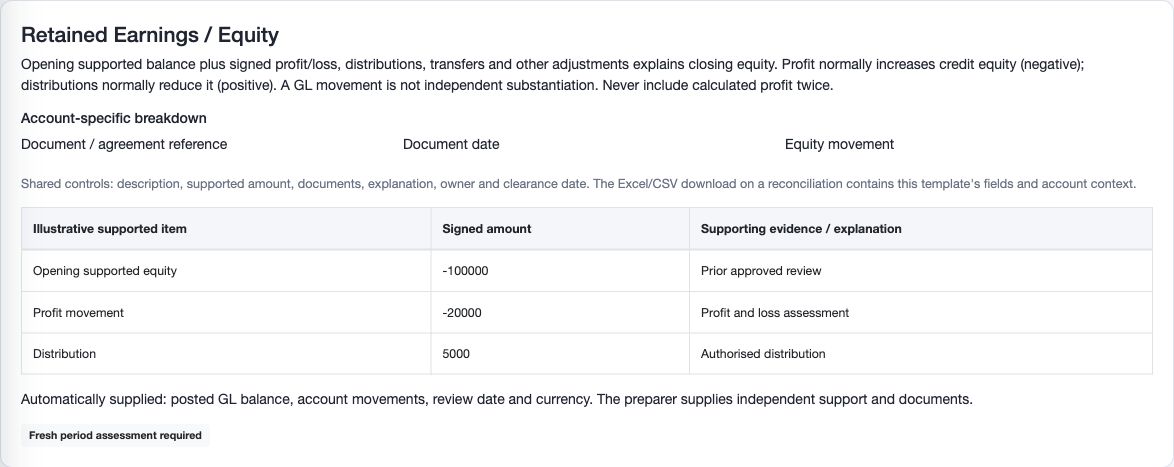
Enter exactly one Opening supported balance line, including zero if appropriate, then substantiate the movements separately. For illustrative credit equity, opening -100,000 plus profit -20,000 plus distribution +5,000 gives -115,000. Do not add calculated retained profit a second time merely because it appears in the ledger comparison.
Retain prior approved support, the profit assessment and authorised distribution/transfer evidence. Choosing a category does not create a journal, declare a dividend or replace corporate approval.
Upload and maintain evidence
In Documents, Choose a supporting document accepts the displayed PDF, Excel, Word, CSV, JPG, PNG or ZIP types. Select up to 10 files, maximum 20 MB each and 50 MB combined. Optional Description is up to 255 characters. Inspect each upload result: some files can succeed while another is rejected, so do not blindly upload all again.
Uploads are available for permitted Draft work. To replace evidence, use Reason for superseding and Supersede document under authority. Superseded evidence remains in history; it is not erased. System-generated account snapshots are separately retained source evidence, not replacements for external statements or calculations.
Import additional schedule lines
Save edited lines first. Use Download Excel template or CSV template for this review, then Bulk Import, validate, inspect the preview and commit through the supported flow. The schedule supports at most 500 total lines and a 2 MB import file. Imports append; they do not replace existing lines.
Check Type, Description, Amount, Contribution, resulting Supported balance and Remaining difference before confirming additional support. Do not duplicate native or existing support. Keep the job/reference and inspect the saved schedule after processing; a validated file is not a completed import. Reconcile uploaded amounts and retained evidence separately.
Refresh, return, reopen and carry forward
Save current edits before Refresh account data. A changed source can invalidate the earlier conclusion or approval. Read the resulting figures, readiness links and source status; an unavailable balance is not zero. Do not submit against stale or unavailable source evidence.
An authorised reviewer can Return a submitted review or Reopen an approved review with a meaningful reason. The review returns to Draft and the earlier decision remains in Activity & Approvals. Complete the changed schedule/evidence/conclusion and submit the new version for an independent decision.
Carried items/evidence are a starting point for the next period, not automatic approval. Inspect the original support, current balance, dates, unresolved/overdue items and confirmation requirement. Automatic approval has specific prior-approval, no-activity, unchanged-support and eligibility conditions; a small difference alone is not sufficient.
Understand the current and future template controls
The Reconciliation template panel identifies the template and version for this account and period. Change template for this Draft and Apply template to this Draft affect that existing Draft only and require both setup-management and Draft-edit authority. Save current schedule edits first.
A different calculation template generally requires an empty schedule. The supported General to Equity conversion cannot retain template-specific details that would be reinterpreted. Existing evidence and history remain. Do not remove legitimate support simply to evade the safeguard. To change future reviews instead, use Template in Account Review Setup; that does not silently replace existing reviews. Submitted/approved templates remain locked until the authorised return/reopen process.
Check the result and recover safely
| Situation | Meaning | Safe next action |
|---|---|---|
| Totals do not reflect typing | Totals show last successfully saved lines | Save schedule and check errors before refreshing or submitting |
| Review changed / reload required | Another edit or source change made the revision stale | Retain intended changes, reload and compare; do not overwrite blindly |
| Manual open document rejected | Native items already contribute, fields are incomplete or signs are inconsistent | Correct the basis without adding duplicate support |
| Bank or equity readiness issue | Required dated statement/evidence or opening line is missing | Supply genuine support, not an invented amount |
| Submitted/approved form is locked | Evidence and schedule are protected in that state | Ask the authorised reviewer to Return/Reopen with a reason |
| Pack is queued or failed | The archive is not ready | Inspect the existing pack/revision and request support; do not call it a completed close pack |
Related guides
Balance Sheet Review and cross-module reconciliation, report parameters, journals and period close, imports and workflow handbook.