
Manage fixed asset setup and the asset lifecycle
Categories acquisition capitalisation depreciation disposal and ledger review
Prepare fixed-asset accounting and identify the right acquisition route before processing transactions. Use this chapter for setup and field meanings, then asset transactions for capitalisation, depreciation, adjustments and disposal. It is for authorised asset accountants in the selected company.
Prepare the asset lifecycle in order
Have the approved asset policy, cost evidence, useful life, residual value and commencement dates ready. CWIP means capital work in progress for asset costs not yet capitalised; accumulated depreciation is the total depreciation already recognised, not the cost of the asset.
- In Assets, review Asset Setup for approved commencement, CWIP and disposal mappings. Do not change a company mapping to hide an individual asset difference.
- Prepare Asset Categories with the appropriate gross-cost, accumulated-depreciation and expense destinations and method/life/rate. Use Asset Groups for organisation where needed; a group does not replace category mappings.
- Identify the Asset Master, company/location and acquisition evidence. Decide one supported source route for each cost: ordinary/manual, opening history, late capitalisation or eligible CWIP. Do not load the same cost through two routes.
- Follow asset transactions for the selected financial action, checking its dates, saved identity and actual posted result. Creating the asset master alone does not prove capitalisation or payment.
- Use Asset Ledger and the relevant reports to compare cost, accumulated depreciation and carrying value with the matching GL accounts at the same cutoff. Keep proceeds/cash settlement separate from disposal gain or loss.
Before a disposal without proceeds, read the specific asset disposal caution. Do not invent a cash receipt or expected proceeds to avoid a failed save.
Separate asset masters from financial events
An asset master identifies an asset; acquisition, capitalisation, depreciation, adjustment and disposal are distinct events. Creating a master does not prove a supplier invoice was posted, the cost is capitalised or the asset is paid for.
Prepare asset setup
Confirm depreciation commencement, late-capitalisation reason policy, capital-work-in-progress and disposal mappings. Keep asset CWIP separate from production WIP, bank and expense accounts. Obtain the responsible accountant's approval for methods, lives, residual values and dates.
Define categories and groups
Asset Categories provide gross cost, accumulated depreciation and depreciation expense destinations plus method/life/rate. Asset Groups organise records without replacing category mappings. Straight-line and reducing-balance inputs have different purposes; the category form clears the rate when a non-reducing-balance method applies.
Field explanations and training references
Each reference describes the field or control, entry rule, example and practical implication. Illustrations use blank or fictional training values. Conditional fields and actions depend on your selected policy, country, record state and permissions; choose actual application lookup records rather than copying text or hidden identities.
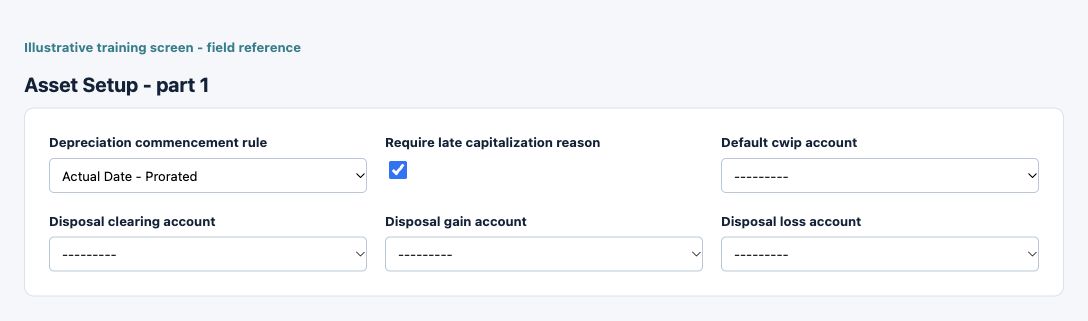
Asset Setup field reference
Figure 1 Asset Setup
| Field and screenshot | Entry rule and example | Purpose and implication |
|---|---|---|
| Depreciation commencement rule - Figure 1 | Required entry. Choices: Actual Date - Prorated, Full In-Service Month, Next Month. Example: Actual Date - Prorated | Company rule determining when depreciation starts relative to the asset dates. Agree it with the asset accountant before processing runs. Caution: Confirm the saved value and affected workflow before relying on the result. |
| Require late capitalization reason - Figure 1 | Checkbox policy setting; review the saved on/off state. Example: The approved on/off policy | Requires an explanation for eligible late capitalisation. It is a review control, not permission to bypass accounting periods or alter historical depreciation silently. Caution: Confirm the saved value and affected workflow before relying on the result. |
| Default cwip account - Figure 1 | Required entry. Example: Approved active company posting account | Default capital-work-in-progress destination before eligible costs are capitalised to an asset. It is distinct from the production WIP account. Caution: Form acceptance is not accounting approval; inspect company, active state and purpose. |
| Disposal clearing account - Figure 1 | Optional or policy-dependent entry. Example: Approved active company posting account | Intermediate disposal destination used to separate disposal accounting from cash settlement. Reconcile residual amounts and proceeds. Caution: Form acceptance is not accounting approval; inspect company, active state and purpose. |
| Disposal gain account - Figure 1 | Required entry. Example: Approved active company posting account | Approved gain or loss destination for asset disposal differences. Keep gain and loss purposes distinct and inspect the linked disposal journal. Caution: Form acceptance is not accounting approval; inspect company, active state and purpose. |
| Disposal loss account - Figure 1 | Required entry. Example: Approved active company posting account | Approved gain or loss destination for asset disposal differences. Keep gain and loss purposes distinct and inspect the linked disposal journal. Caution: Form acceptance is not accounting approval; inspect company, active state and purpose. |
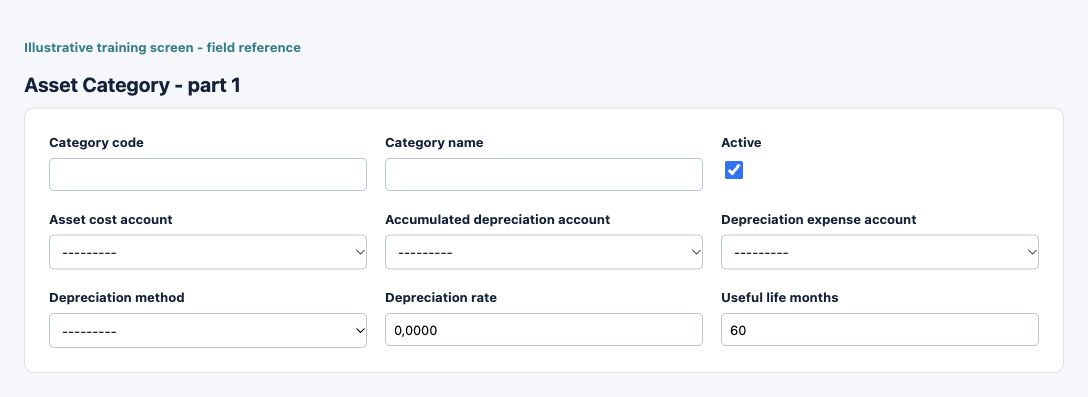
Asset Category field reference
Figure 2 Asset Category
| Field and screenshot | Entry rule and example | Purpose and implication |
|---|---|---|
| Category code - Figure 2 | Required entry. Maximum 30 characters. Example: EQUIP | Business code identifying the configuration or master record. Use a stable naming scheme and check existing records before adding another. Caution: Confirm the saved value and affected workflow before relying on the result. |
| Category name - Figure 2 | Required entry. Maximum 100 characters. Example: Equipment | Business description used to recognise this record in lists and selections; it is not a posting account or an approval. Caution: Confirm the saved value and affected workflow before relying on the result. |
| Active - Figure 2 | Checkbox policy setting; review the saved on/off state. Example: The approved on/off policy | Controls whether this configuration remains available for relevant use. Turning it off does not reverse earlier transactions or erase history. Caution: Confirm the saved value and affected workflow before relying on the result. |
| Asset cost account - Figure 2 | Required entry. Example: Approved active company posting account | Gross asset cost destination for this category. Category mapping does not itself acquire or capitalise an asset. Caution: Form acceptance is not accounting approval; inspect company, active state and purpose. |
| Accumulated depreciation account - Figure 2 | Required entry. Example: Approved active company posting account | Accumulated depreciation destination, separate from gross asset cost and current depreciation expense. Caution: Form acceptance is not accounting approval; inspect company, active state and purpose. |
| Depreciation expense account - Figure 2 | Required entry. Example: Approved active company posting account | Period expense destination for calculated depreciation. Reconcile the run and asset ledger rather than posting an unexplained manual plug. Caution: Form acceptance is not accounting approval; inspect company, active state and purpose. |
| Depreciation method - Figure 2 | Required entry. Example: The approved business value or selected record | Method selected for the asset category. Straight-line uses useful life; reducing-balance uses the applicable rate. Review eligibility before changing a used category. Caution: Confirm the saved value and affected workflow before relying on the result. |
| Depreciation rate - Figure 2 | Optional or policy-dependent entry. Form precision up to 4 decimal places; consuming company policy also applies. Example: 10.00 for an eligible reducing-balance design | Rate relevant to reducing-balance depreciation. The category form clears the rate for other methods; it is not a straight-line useful-life substitute. Caution: Confirm the saved value and affected workflow before relying on the result. |
| Useful life months - Figure 2 | Required entry. Example: 36 | Estimated useful life measured in months. Do not enter years as months or assume that a rate field overrides the selected method. Caution: Confirm the saved value and affected workflow before relying on the result. |
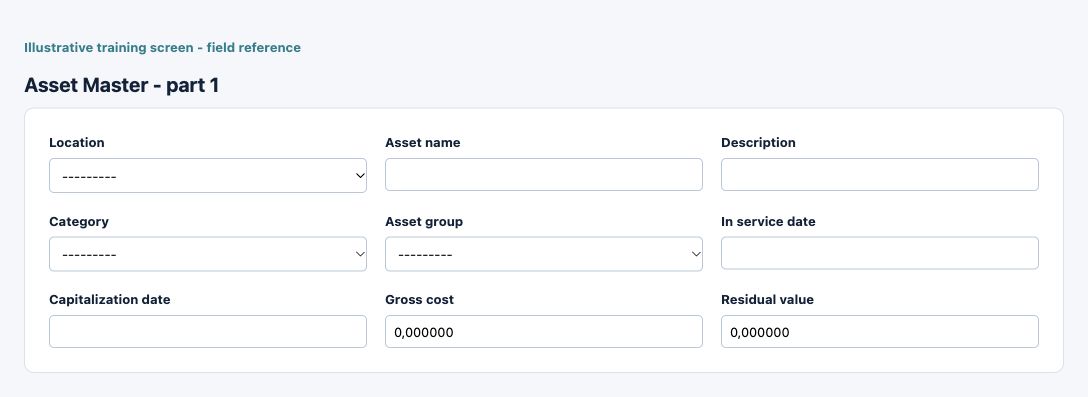
Asset Master field reference
Figure 3 Asset Master
| Field and screenshot | Entry rule and example | Purpose and implication |
|---|---|---|
| Location - Figure 3 | Required entry. Example: Main Office | Select the current-company operating location or permitted locations. This determines operational scope; a shared name does not establish access to another location. Caution: Confirm the saved value and affected workflow before relying on the result. |
| Asset name - Figure 3 | Required entry. Maximum 150 characters. Example: Training equipment | Business identity of the asset in operational and ledger review. Keep serial/tag evidence and supporting acquisition records consistent. Caution: Confirm the saved value and affected workflow before relying on the result. |
| Description - Figure 3 | Optional or policy-dependent entry. Maximum 255 characters. Example: Approved business purpose | Business explanation supporting the record and its review. Text does not replace source documents, approval or calculated accounting values. Caution: Confirm the saved value and affected workflow before relying on the result. |
| Category - Figure 3 | Required entry. Example: The approved business value or selected record | Asset category supplying the depreciation design and accounting mappings. A similarly named category may have different destinations. Caution: Confirm the saved value and affected workflow before relying on the result. |
| Asset group - Figure 3 | Optional or policy-dependent entry. Example: The approved business value or selected record | Optional grouping for asset organisation and reporting. It does not replace category mappings or asset location. Caution: Confirm the saved value and affected workflow before relying on the result. |
| In service date - Figure 3 | Required entry. Example: 16 October 2026, on the approved effective basis | Date the asset is placed into service. This is separate from purchase, invoice and capitalisation dates and affects depreciation review. Caution: Confirm the saved value and affected workflow before relying on the result. |
| Capitalization date - Figure 3 | Required entry. Example: 16 October 2026, on the approved effective basis | Date eligible cost is recognised as a capitalised asset. Check period, commencement rule and acquisition evidence before use. Caution: Confirm the saved value and affected workflow before relying on the result. |
| Gross cost - Figure 3 | Required entry. Form precision up to 6 decimal places; consuming company policy also applies. Example: 1200.00 | Gross asset value in the applicable asset accounting basis. Do not confuse it with residual value, net carrying amount or a new supplier payment. Caution: Confirm the saved value and affected workflow before relying on the result. |
| Residual value - Figure 3 | Required entry. Form precision up to 6 decimal places; consuming company policy also applies. Example: 120.00 | Estimated amount remaining at the end of useful life. It affects the depreciable basis and is not accumulated depreciation. Caution: Confirm the saved value and affected workflow before relying on the result. |
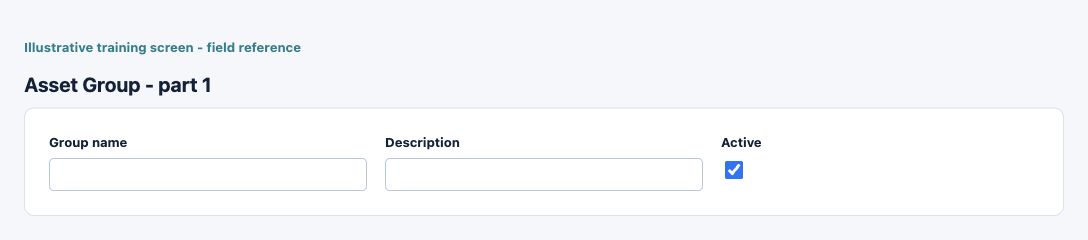
Asset Group field reference
Figure 4 Asset Group
| Field and screenshot | Entry rule and example | Purpose and implication |
|---|---|---|
| Group name - Figure 4 | Required entry. Maximum 100 characters. Example: Office equipment | Business description used to recognise this record in lists and selections; it is not a posting account or an approval. Caution: Confirm the saved value and affected workflow before relying on the result. |
| Description - Figure 4 | Optional or policy-dependent entry. Maximum 255 characters. Example: Approved business purpose | Business explanation supporting the record and its review. Text does not replace source documents, approval or calculated accounting values. Caution: Confirm the saved value and affected workflow before relying on the result. |
| Active - Figure 4 | Checkbox policy setting; review the saved on/off state. Example: The approved on/off policy | Controls whether this configuration remains available for relevant use. Turning it off does not reverse earlier transactions or erase history. Caution: Confirm the saved value and affected workflow before relying on the result. |
Review the asset master
Confirm company/location, asset name, category/group, in-service and capitalisation dates, gross cost and residual value. The in-service date is not automatically the supplier invoice date. Check supporting identity and acquisition evidence before relying on an opening or imported amount.
Trace acquisition and capitalisation
Use the supported acquisition/capitalisation process and inspect the Asset Capitalization workbench source evidence. A Fixed Asset selection on a purchase line does not by itself establish completed capitalisation. Reconcile eligible CWIP costs into the asset and preserve the source invoice/cost trail.
Review depreciation runs
Confirm run period, eligible assets, commencement rules and calculated amounts before processing. Reconcile gross cost minus accumulated depreciation to carrying value, with approved residual/life assumptions. For example, USD 1,200 cost and USD 120 residual over 36 months gives a simple USD 30-per-month depreciable basis before the configured commencement and period treatment.
Use adjustments for supported changes
Asset Adjustment is not an ordinary supplier invoice or manual alteration of accumulated depreciation. Identify the asset, date, reason and intended change and inspect the resulting ledger/journal. Do not use an adjustment to conceal missing acquisition or depreciation records.
Review disposal and proceeds separately
Disposal can remove asset cost and accumulated depreciation and recognise the relevant gain/loss and clearing. Proceeds and actual cash settlement need their own evidence. A disposal gain is not equivalent to the gross proceeds received, and a disposal record is not a bank instruction.
Reconcile the asset ledger
Use Asset Ledger and relevant reports to explain opening balance, additions, capitalisations, depreciation, adjustments and disposals. Compare category totals to the corresponding GL accounts with the same company, currency and cutoff. Investigate assets with inconsistent dates or balances instead of posting a balancing plug.
Preserve history and approvals
Before editing a used category, reversing a transaction or changing a capitalisation date, inspect posted history and subsequent runs. Keep the approved valuation and source evidence. Physical custody changes, impairment decisions and accounting-policy approval follow the organisation's controls; a form accepting a value is not policy approval.
Resolve an asset setup or balance difference
| Situation | What to do |
|---|---|
| Cost appears twice | Trace manual/opening/CWIP and supplier sources to identify duplicate recognition. Do not offset it with unexplained depreciation or a balancing journal. |
| Depreciation differs | Check cost, residual, method, life, commencement dates, opening history and run state. A master change is not a correction of posted depreciation. |
| Disposal or settlement is unclear | Review the original asset, supported disposal path, clearing and actual cash separately. Do not invent proceeds or assume a saved disposal instructs a bank. |
Continue with the related task
Asset transactions and safety cautions, vendor procurement, GL controls and account review schedules.
Bulk asset imports for Fixed assets
Use the correct bulk action for this module. The following templates are different business operations, not interchangeable create/update files.
| Action and exact template columns | Prepare the file | Check the saved result |
|---|---|---|
| Asset Master - Fixed Assets Asset Master | New asset records; prepare group, location, dates, acquisition/capitalisation values, depreciation and GL mapping context. Agree migration/opening treatment. | Match asset numbers and register values/lifecycle, then reconcile asset cost/depreciation to GL. Do not duplicate acquisition invoices or opening journals; use asset setup. |
| Asset Adjustments - Fixed Assets Adjustments | Existing asset, increase/decrease category, approved amount, dates and contra account. | Reconcile cost/carrying value and GL to approval evidence. An adjustment is not a supplier invoice; use asset transactions. |
| Asset Disposals - Fixed Assets Disposals | Verify exact asset, disposal dates/type, proceeds and accounts before loading. Review the asset guide's operational cautions first. | Reconcile register removal, depreciation, proceeds and gain/loss. Do not retry or use disposal as a shortcut for deleting an asset. Use disposal guidance. |
Follow this module bulk procedure
- Confirm the asset group, location, depreciation and GL mappings, open dates and the approved migration/acquisition approach. Choose Asset Master, Asset Adjustments or Asset Disposals in its own list.
- Download the current template for that action. New asset records and adjustments/disposals against existing assets are different events; verify the exact asset identity before loading a transaction.
- Check dates, amount/basis, increase/decrease or disposal category, proceeds and contra account with the asset owner. Do not duplicate acquisition invoices, opening journals or an existing disposal.
- Validate the complete intended file, review identities/totals and commit once. Inspect the saved register and transaction state, not only the job's created count.
- Reconcile cost, accumulated depreciation, carrying value and GL; for disposals also reconcile proceeds and gain/loss. Read the asset transaction cautions and use the supported correction path rather than using disposal to delete an asset.
Validate, commit and recover safely
For a supported workbook import, use the shared import steps and job recovery. A validated preview is not a saved transaction. Use Show status before retrying; cancelling a job does not reverse committed records. Keep the approved file, job reference and reconciled results securely.